
awesome-visual-novels
🍙 A curated list of my favorite visual novels for Android and Steam Deck
- 86
- CC0-1.0
- 3 d ago

This is the source code for the Harmony project REST API
Repo harmonydata/harmonyapi, read from GitHub 18 h ago. harmonydata has not joined Take My Repo.
harmonydata/harmonyapi is a public repo on GitHub by harmonydata. This is the source code for the Harmony project REST API. It declares no license on GitHub. Public does not mean open source: without a license, nobody is granted the right to reuse it. It is written mainly in Python, has 3 stars and last changed on 2026-11-23. Nobody has reviewed it on Take My Repo yet, which says nothing about its quality. Read from GitHub on 2026-11-24.
🍙 A curated list of my favorite visual novels for Android and Steam Deck
You can also join our Discord server!
You can contact Harmony team at https://harmonydata.ac.uk/, or Thomas Wood at http://fastdatascience.com/.
Read our guide to contributing to Harmony here.
You can raise an issue in the issue tracker, and you can open a pull request.
Please contact us at https://harmonydata.ac.uk/contact or write to thomas@fastdatascience.com if you would like to be involved in the project.
Please visit https://github.com/harmonydata/harmony
Please visit https://github.com/harmonydata/harmony_original
Harmony is a data harmonisation project that uses Natural Language Processing to help researchers make better use of existing data from different studies by supporting them with the harmonisation of various measures and items used in different studies. Harmony is a collaboration project between the University of Ulster, University College London, the Universidade Federal de Santa Maria in Brazil, and Fast Data Science Ltd in London.
You can read more at https://harmonydata.ac.uk.
There is a live demo at: https://harmonydata.ac.uk/app
Harmony compares questions from different instruments by converting them to a vector representation and calculating their similarity. You can read more at https://harmonydata.ac.uk/how-does-harmony-work/
Download and install Docker:
Open a Terminal and run
docker run -p 8000:8000 -p 3000:3000 harmonydata/harmonylocal
Then go to http://localhost:3000 in your browser.
If you are a Docker user, you can run Harmony from a pre-built Docker image.
A prerequisite is Tika, which is a PDF parsing library. This must run as a server in Java. We use the Tika Python bindings.
First, clone the API and make sure to clone with --recurse-submodules.
git clone --recurse-submodules git@github.com:harmonydata/harmonyapi.git
The Harmony API includes the harmony repo as a submodule.
After you have cloned the repository, if the folder inside called harmony is empty, or at any point you get an error like the below, please check you have cloned with --recurse-submodules as below:
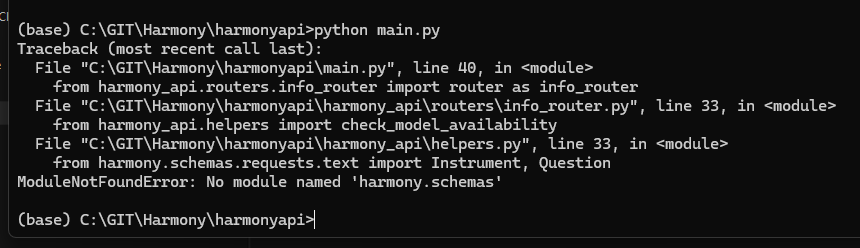
git clone --recurse-submodules https://github.com/harmonydata/harmonyapi.git
Download and install Java if you don't have it already. Download and install Apache Tika and run it on your computer https://tika.apache.org/download.html
java -jar tika-server-standard-2.3.0.jar
docker build -t harmonyapi .
Don't forget to expose port 8080:
docker run -p 8080:80 harmonyapi
You should now be able to visit http://0.0.0.0:8080/docs and view the data.
If you want to run the Harmony API container and execute Bash commands inside it, you can run:
docker run -it harmonyapi bash
Harmony team only: see details of how Harmony is deployed on-premises here:
https://github.com/harmonydata/harmony_deployment_ulster_private
You can deploy Harmony with Docker Compose - see docker_compose.yml.
When the app is run, there is an environment variable HARMONY_DATA_PATH which is set to /data on the production
server, and that's where you need to put any data files. But you could set it to anything you like on your local machine
e.g. /home/xxx/data/ and put the files there and it will find them.
These 3 files are the files it looks for in the /data folder, although the app will run without them. It's a cached version of the Mental Health Catalogue:
mhc_all_metadatas.json
mhc_embeddings.npy
mhc_questions.json
When Harmony is deployed to Azure, there is an Azure blob storage which is mounted under /data.
The data files can be found here: https://github.com/harmonydata/harmony_deployment_ulster_private
There are also other environment variables which tell the API where to look to load the sentence transformer or contact Tika:
 environment:
   HARMONY_DATA_PATH: /data
   HARMONY_SENTENCE_TRANSFORMER_PATH: /data/paraphrase-multilingual-MiniLM-L12-v2
   OPENAI_API_KEY:
   GOOGLE_APPLICATION_CREDENTIALS:
   AZURE_OPENAI_API_KEY:
   AZURE_OPENAI_ENDPOINT:
   TIKA_SERVER_ENDPOINT: http://tika:9998
HARMONY_DATA_PATH - This path will be used to store for example the cache files. Defaults to the HOME DIRECTORY.
OPENAI_API_KEY - The OpenAI API key.
GOOGLE_APPLICATION_CREDENTIALS - To make use of Google's Vertex AI, fill in this environment variable.
This should be the content of your service account file, so a JSON object is expected as the value for the
environment. Make sure to give the service account the required Vertex AI role.
AZURE_OPENAI_API_KEY - The Azure OpenAI API key.
AZURE_OPENAI_ENDPOINT - The Azure OpenAI endpoint.
TIKA_SERVER_ENDPOINT - This is the endpoint where Tika is served from.
AZURE_STORAGE_URL - The Azure Blob storage URL. This is required for downloading the
catalogue data.
You can ideally set these environment variables to show Harmony where to look for dependencies and data, but it will work without it (it will download the sentence transformer from HuggingFace Hub, etc).
The deployed Harmony uses an Azure Function to run spaCy, available in the repository here: https://github.com/harmonydata/spacyfunctionapp
So to run locally with Docker Compose you can do:
docker compose up
.env fileIf you are working with external third-party services in the API, you may find it convenient to make an .env file in the base folder of the project. You can connect an IDE such as Pycharm to use this .env file. It will be ignored by .gitignore so you don't need to worry about accidentally committing your credentials to the repo.
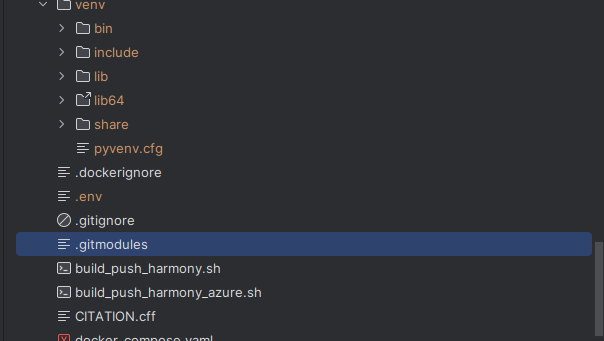
Example content of the .env file:
GOOGLE_APPLICATION_CREDENTIALS='{   "type": "service_account",  ... }'
AZURE_OPENAI_API_KEY=f46axxxxxxxxxxxxxxxxxxxxxxxxxxxd
AZURE_OPENAI_ENDPOINT=https://xxxxxxxxx.openai.azure.com/
OPENAI_API_TYPE=azure
OPENAI_API_VERSION=2023-12-01-preview
OPENAI_API_KEY=sk-xxxxxxxxxxxxxxxxxxxxxxxxxxxxxxxxxxxxxxxxxxxxxxxX
When deploying, you can use these environment variables in your Docker run command, e.g.
docker run -d -p 80:80 -p 3000:3000 -e GOOGLE_APPLICATION_CREDENTIALS=xxx -e AZURE_OPENAI_API_KEY=xxxx -e "HARMONY_DATA_PATH=/data" -v /home/thomaswood/data:/data harmonydata/harmonyapi:[DOCKER_TAG_HERE]
If you are not running with Docker, you can run the individual components of the Harmony API separately.
Architecture of the Harmony implementation as it runs with FastAPI on an on-premises server (the current setup) or on an alternative e.g. a cloud server such as Azure or EC2:
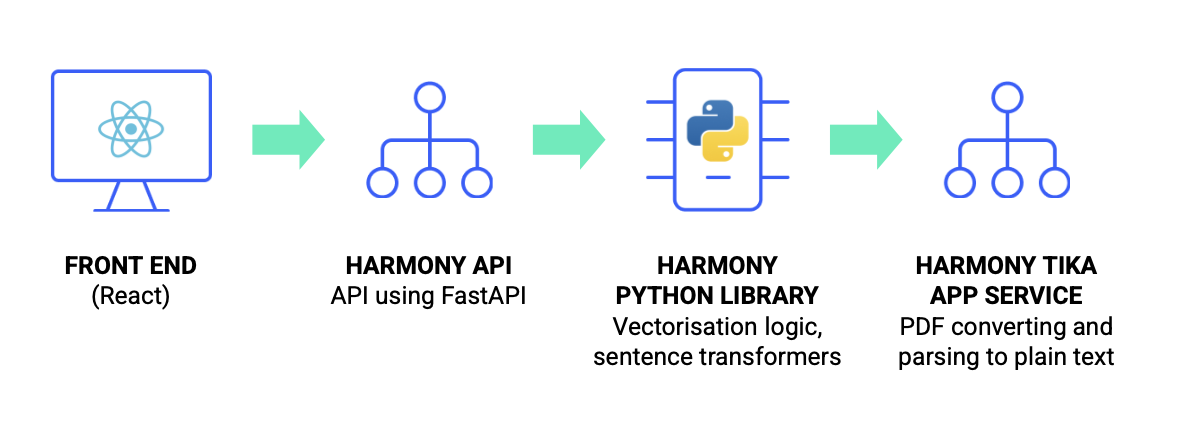
You can install from PyPI.
pip install harmonydata
You can read the user guide at ./harmony_pypi_package/README.md.
By default, Harmony API runs on port 8000 (see screenshot below)
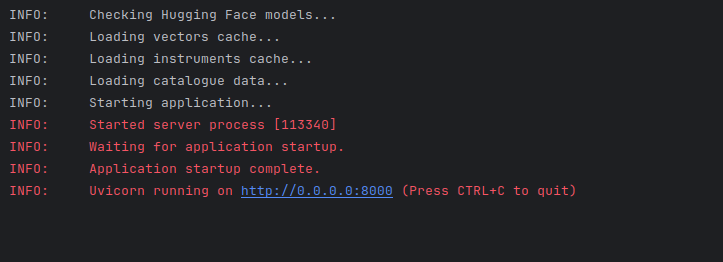
If you are having errors running the API on the port it could be
In particular on Windows, you may need to give some kind of permission to a Python program to use any port.
If you want to read in a raw (unstructured) PDF or Excel file, you can do this via a POST request to the REST API. This will convert the file into an Instrument object in JSON.
harmonydata/harmonyapi is a public repo on GitHub by harmonydata. This is the source code for the Harmony project REST API.
It declares no license on GitHub. Public does not mean open source: without a license, nobody is granted the right to reuse it.
Its maker has not tagged a system, so it is unknown here. Its README says what it needs.
Open "Take it" on its page: Take My Repo writes an install plan for your machine and hands it to your AI agent (Claude Code, Codex or Cursor), which asks you before each step. Take My Repo has not tested it on any machine.
🕷️ The BEST Web Scraping framework that handles everything from a single request to a full-scale crawl! Don't be shy, join here: https://discord.gg/EMgGbDceNQ and follow here for daily tips and tricks: https://x.com/Scrapling_dev
(Spatial) data harmonisation with hale»studio (formerly HUMBOLDT Alignment Editor)
12 weeks, 26 lessons, 52 quizzes, classic Machine Learning for all
Bring data to life with SVG, Canvas and HTML. :bar_chart::chart_with_upwards_trend::tada:
Its last change on GitHub was on 2026-11-23. Take My Repo does not judge from that whether it is maintained.
Nobody has reviewed it on Take My Repo yet, which says nothing about its quality.
Take My Repo cannot say: it does not audit code and has not run harmonyapi. What is known comes from GitHub. It declares no license on GitHub. Public does not mean open source: without a license, nobody is granted the right to reuse it. Its last change was on 2026-11-23. It has 3 stars, which measure popularity, not safety. Nobody has reviewed it on Take My Repo yet, which says nothing about its quality. Read the source before you run it. With "Take it", your AI agent shows each step and asks you before running it; README text is treated as data, not as instructions.


