cc-switch
A cross-platform desktop All-in-One assistant for Claude Code, Codex, OpenCode,DeepSeek Harness and more. Only official website: ccswitch.io
- 156k
- Rust
- MIT
- 6 h ago
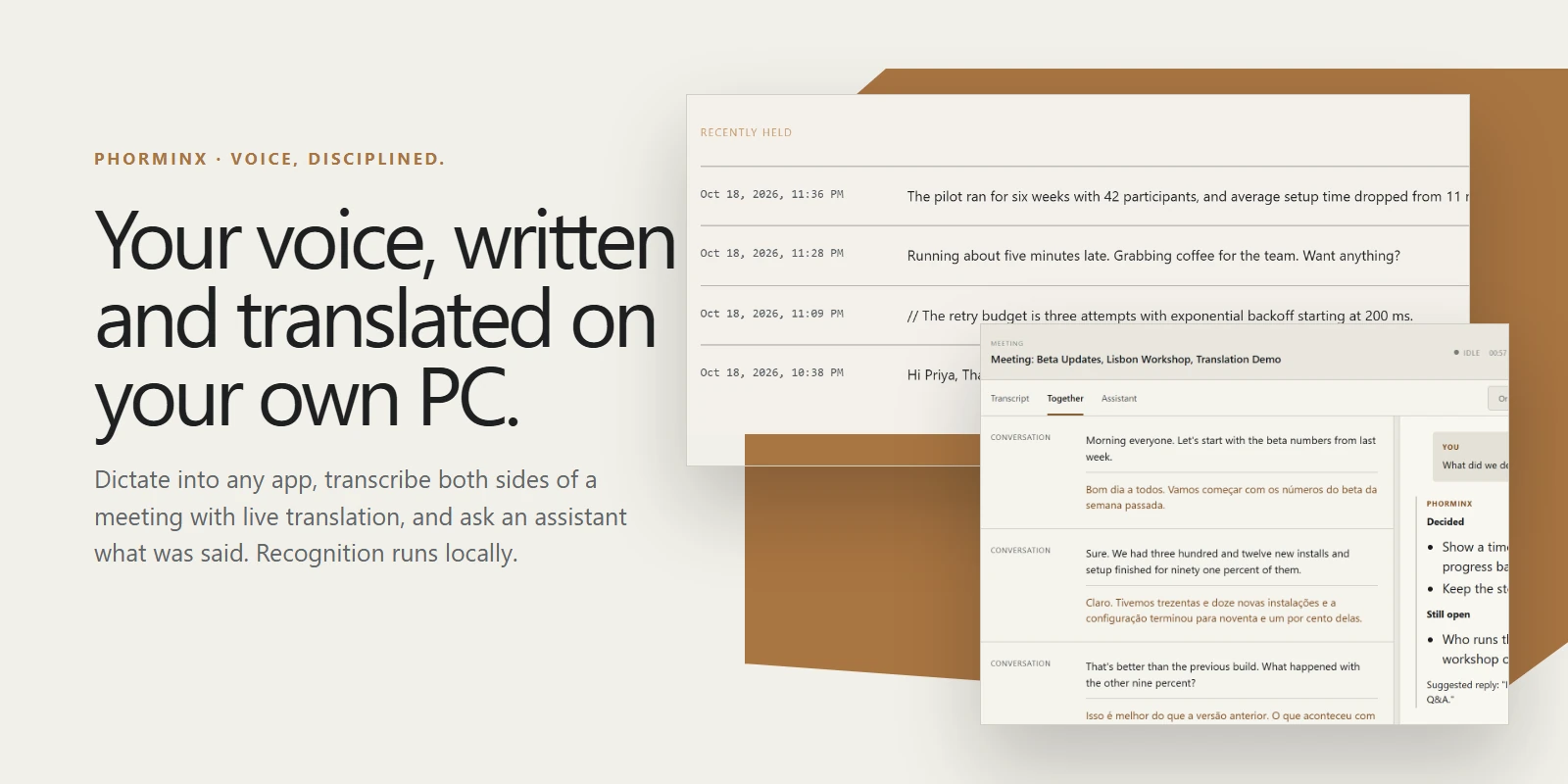
A local-first Windows application for dictation and meeting transcription, with searchable notes, optional local AI formatting and private model management.
Repo impossibleG/phorminx, read from GitHub 1 min ago. impossibleG has not joined Take My Repo.
impossibleG/phorminx is a public repo on GitHub by impossibleG. A local-first Windows application for dictation and meeting transcription, with searchable notes, optional local AI formatting and private model management. It declares the MIT license on GitHub. It is written mainly in Rust, has 116 stars and last changed on 2026-10-29. Nobody has reviewed it on Take My Repo yet, which says nothing about its quality. Read from GitHub on 2026-11-21.

Voice, disciplined.
Local-first dictation, meetings and research notes for Windows.
Speak, keep searchable text, and use AI formatting without a paid AI service.
phorminx.net ·
Getting started ·
Build from source
Dictation ·
Formatting ·
Prompts ·
Meetings ·
Assistant ·
Investigations ·
Messages ·
Privacy
Product images are crops of the real app running on a demo profile with made-up content
(how they are made).

Open the last dictation from the status pill's Expand button to edit it, Reformat it with another strength or a one-off instruction, copy it, or Replace the inserted text. Replace only touches text that is still there and unchanged; otherwise the result goes to the clipboard.


Named, tagged, versioned instructions. Type @ in any instruction field
(formatting, app profiles, the review panel, the meeting assistant or Actions)
to insert one; it always uses the latest version.


A resizable companion keeps the transcript and assistant beside the call, in Transcript, Together or Assistant view. Optional automatic commentary runs only on a verified local Ollama model, and a failed answer never ends capture.

A dedicated shortcut sends the clipboard to the active investigation from any app. The assistant can suggest connections for you to accept or dismiss, and any investigation can be exported as Markdown.

Add people with a one-time invite. A message only moves while both of you have Phorminx running. See ADR-018.

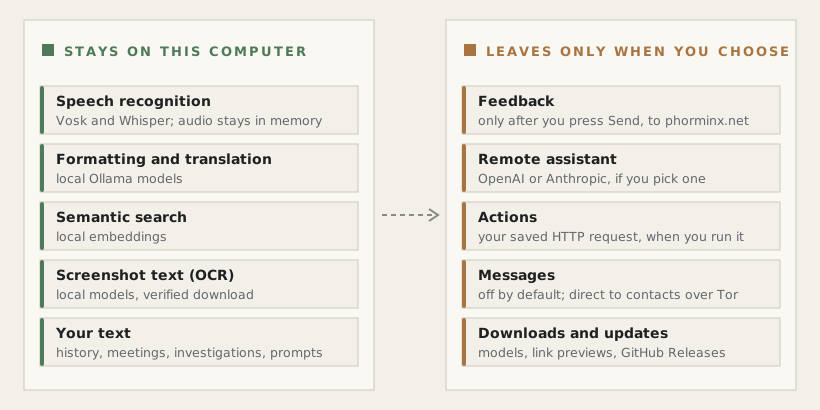
Speech recognition runs locally. The production capture path keeps audio in
memory rather than saving recordings to disk. Retained text and settings live
under %LOCALAPPDATA%\Phorminx; use the application's history, session, and
deletion controls to manage stored text. Disabling dictation history does not
mean that separately saved meeting sessions have been deleted.
Local Ollama formatting and embeddings use local compute. Model downloads use the network. Optional remote assistant providers and HTTP actions send the configured text/context to the selected provider or destination. These options are not a local-only privacy guarantee: remote providers may charge for usage and apply their own data policies. Review the destination before enabling them.
Meeting translation uses a separately selected local Ollama model. Originals
remain available even if translation is unavailable or cannot keep up. Fresh
settings recommend nomic-embed-text:latest; existing embedding selections and
indexes are not silently replaced.
Investigations are kept until you delete them; dictation history retention does not apply to them. Screenshots are stored as re-encoded PNG files beside the database. Screenshot text recognition runs locally after an optional, verified model download (12.6 MB). A pasted link is fetched once, without cookies, for its title and preview; local and private-network addresses are never fetched.
Messages (off by default) sends text directly to people you add with a one-time invite. Turning it on connects Phorminx to the Tor network through the embedded Arti client; there is no Phorminx server, and neither side learns the other's IP address. Contacts can see when you are online, and a message only moves while both of you have Phorminx running. History stays on this computer and can be deleted per contact. See ADR-018.
Launcher 0 · Give feedback records a draft locally. Only clicking Send
submits its reviewed text to phorminx.net; optional diagnostics are shown
separately. Audio and logs are not attached automatically. Release-enabled
builds check stable GitHub Releases daily by default; automatic download and
install after exit are on by default, with an onboarding opt-out and a Settings
control. The app verifies signed metadata and installer hashes and
waits for exit before installing, never stopping an active recording. Builds
without a configured release-verification key cannot enable updates. Neither
feature makes an unconfigured feedback server ready.
Do not include real transcripts, recordings, credentials, or personal settings in bug reports or contributions. Use synthetic examples instead.
Ctrl+Alt+Space to open the P launcher, choose Dictate,
speak, and press the shortcut again to finish.Phorminx is alpha software; accuracy, latency and compatibility depend on the device, audio source and model. The getting started guide covers the PowerShell starter bundle, model choices and meeting audio tips.
Phorminx's original source is licensed under the MIT License. Third-party libraries, runtimes, and downloaded models retain their respective licenses and notices; the project license does not replace those terms.
impossibleG/phorminx is a public repo on GitHub by impossibleG. A local-first Windows application for dictation and meeting transcription, with searchable notes, optional local AI formatting and private model management.
It declares the MIT license on GitHub.
Its maker tagged it for Windows. That is declared by the maker; Take My Repo has not tested it.
Open "Take it" on its page: Take My Repo writes an install plan for your machine and hands it to your AI agent (Claude Code, Codex or Cursor), which asks you before each step. Take My Repo has not tested it on any machine.
Its last change on GitHub was on 2026-10-29. Take My Repo does not judge from that whether it is maintained.
Nobody has reviewed it on Take My Repo yet, which says nothing about its quality.
A cross-platform desktop All-in-One assistant for Claude Code, Codex, OpenCode,DeepSeek Harness and more. Only official website: ccswitch.io
Fastest and only macOS Dictation app with on-device STT and custom trained AI enhancement model. Windows, iOS testflight! Android, Linux waitlist open! A local Wispr Flow alternative. Follow https://x.com/fluidvoiceapp for more
Stop renting your intelligence. Own it with AnythingLLM. Everything you need for a powerful local-first agent experience
Local voice dictation and meeting recorder for Windows + Linux. Hold a hotkey to dictate, or record long-form meetings with system audio. Whisper transcription, bring-your-own-LLM summaries. Open source.
VoiceStudio is the open-source, fully-local ElevenLabs alternative — voice cloning, voice design, video dubbing, dictation, transcription & audiobook creation in 646 languages.
利用 AI 大模型和自动化工作流,根据主题或关键词一键生成高清短视频。Generate HD short videos from a topic or keyword with an automated AI workflow.
A self-hosted embedding server with HTTP, gRPC and MCP APIs, verified model installation, batching, health checks, metrics and Windows and Linux releases.
A self-hosted token-completion server for local open models, with chat and completion APIs, SSE streaming, WebSockets, gRPC, MCP and verified setup.
A self-hosted OCR server that turns PNG and JPEG images into structured text using local PP-OCRv5 models through HTTP, gRPC and MCP.
A self-hosted speech server with streaming transcription, speech synthesis, verified local model setup, WebSockets, HTTP, gRPC and MCP APIs.
A TypeScript template for ReAct agents that use local or OpenAI-compatible models, call local and MCP tools, preserve conversation state, and stream responses over HTTP.
A production-ready TypeScript template for MCP servers with tools, resources, prompts, stdio and Streamable HTTP transports, testing, Docker, and operational safeguards.