
GeoNetMon
Open Source GUI Network monitor and interactive per-app firewall for Linux — live connections, GeoIP, allow/deny prompts, blocklists.
- 1
- 3 wk ago
Repo jegly/GeoNetMon, read from GitHub 6 h ago. jegly has not joined Take My Repo.
In short
jegly/GeoNetMon is a public repo on GitHub by jegly. Open Source GUI Network monitor and interactive per-app firewall for Linux — live connections, GeoIP, allow/deny prompts, blocklists. It declares no license on GitHub. Public does not mean open source: without a license, nobody is granted the right to reuse it. It is written mainly in Python, has 1 stars and last changed on 2026-10-31. Nobody has reviewed it on Take My Repo yet, which says nothing about its quality. Read from GitHub on 2026-11-24.

Download
sudo dpkg -i geonetmon_1.0.4_all.deb
Checksums
| File | SHA-256 |
|---|---|
geonetmon_1.0.4_all.deb |
sha256:03b237f99d1b1d059761de2b17a439d8ef51df296fe12454ed828259ae09f69c |
Verify a download:
sha256sum geonetmon_1.0.4_all.deb
The build attestation shows it was built by this repository's release workflow (with the GitHub CLI: gh attestation verify geonetmon_1.0.4_all.deb --repo jegly/GeoNetMon).
The package installs dependencies, creates the geonetmon system group, adds your user to it, and starts the background daemon. Log out and back in after install, then launch from your application menu or run geonetmon.
New in 1.0.3: passive DNS capture (real hostnames for CDN IPs with the shield off), optional app-lock password with idle auto-lock, 14 new themes ported from Tesseract, a native system-tray menu that works on GTK4, grouped past connections, and a stack of smaller fixes (toggle-button theming, Escape closes dialogs, window size persistence, owner-only permissions on config/history files).
What is GeoNetMon?
GeoNetMon is a GTK4 network monitor and interactive firewall for Linux. It has two modes:
Monitor mode (shield off) — a passive live view of every TCP and UDP connection on the machine. No packets are intercepted. Process name, destination country, organisation, reverse hostname, bandwidth, and risk score are shown per connection. This mode works without the daemon and without root.
Enforcement mode (shield on) — outbound connections are held in the kernel queue before they go through. A prompt window asks you to allow or deny, exactly like Little Snitch or OpenSnitch. Rules you create persist and auto-apply to future connections so you only see a prompt once per app (or per host/port, depending on how you configure it).
The GUI runs as your normal user in both modes. A small privileged daemon (geonetmond) handles packet interception via nftables and NFQUEUE and publishes process names to a world-readable file — the GUI never needs root.
[!TIP] GeoNetMon works well alongside a traditional firewall. Use GeoNetMon for real-time interactive decisions — allow or deny a specific app's connection the moment it happens — and your firewall for persistent blanket rules (block a port, restrict a range). GeoNetMon supports UFW, nftables, and iptables as backends for its manual IP block feature. UFW is recommended for most users as blocks are written as proper UFW rules and survive reboots; nftables and iptables blocks are re-applied from GeoNetMon's own record on each change.
Screenshots
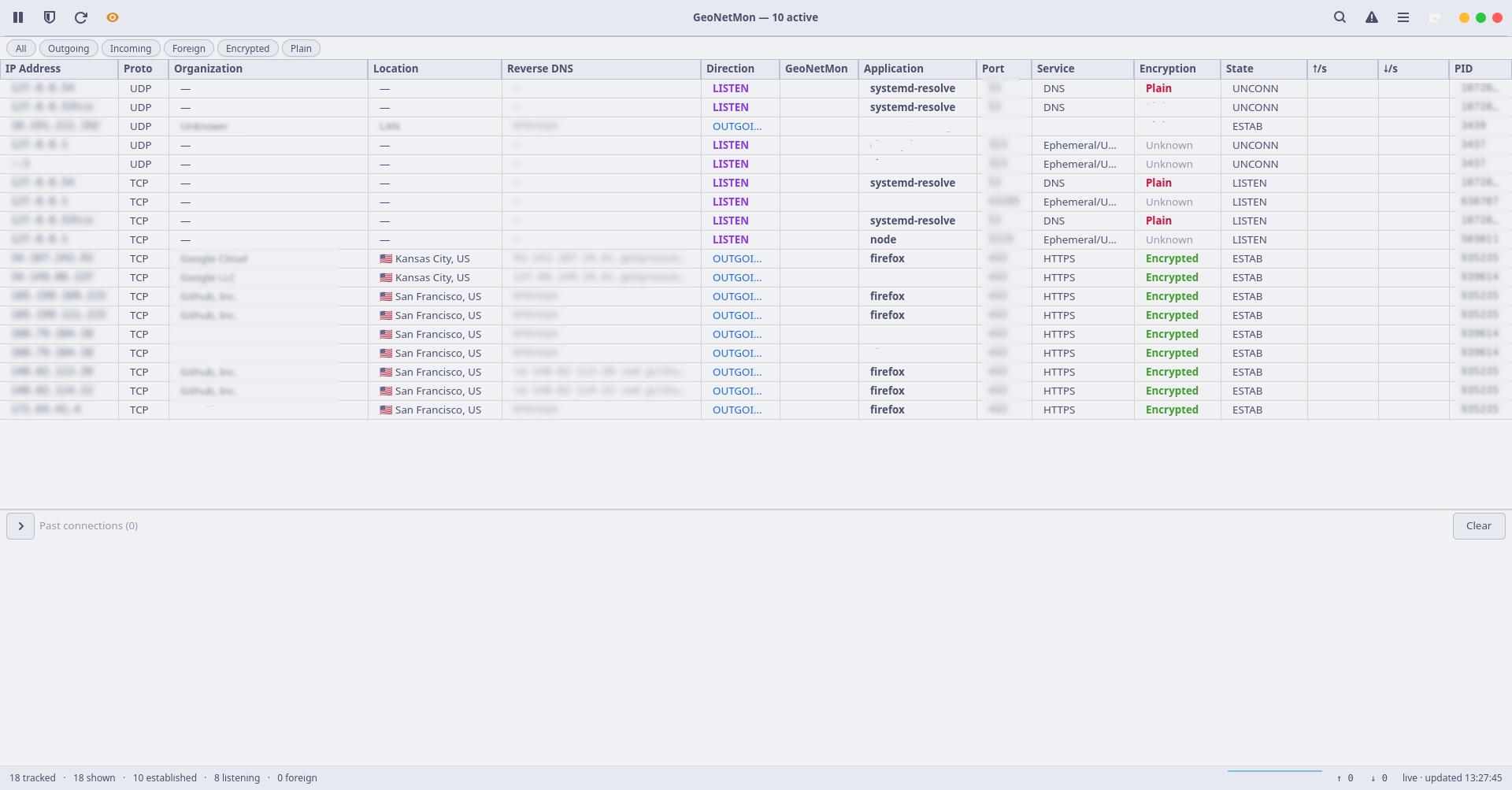 Overview — light mode |
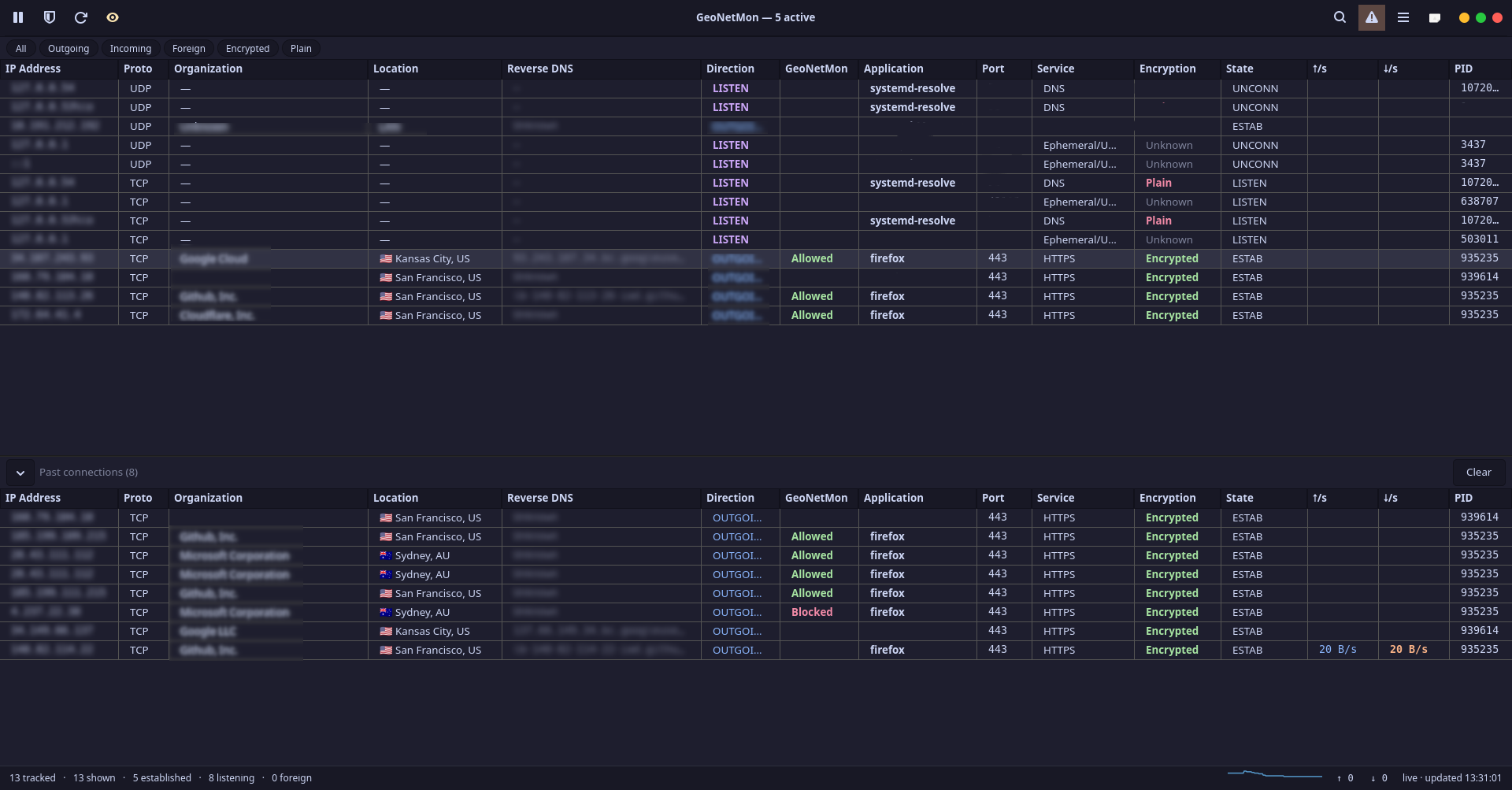 Overview — dark mode with past connections |
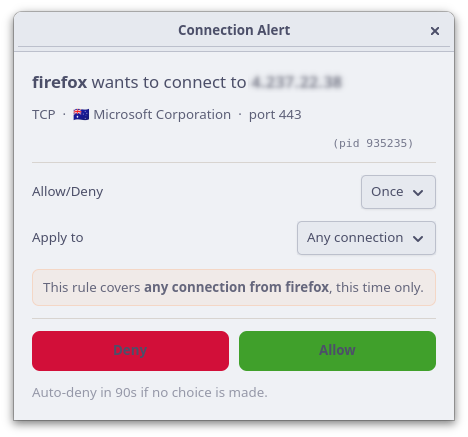 Allow / deny prompt |
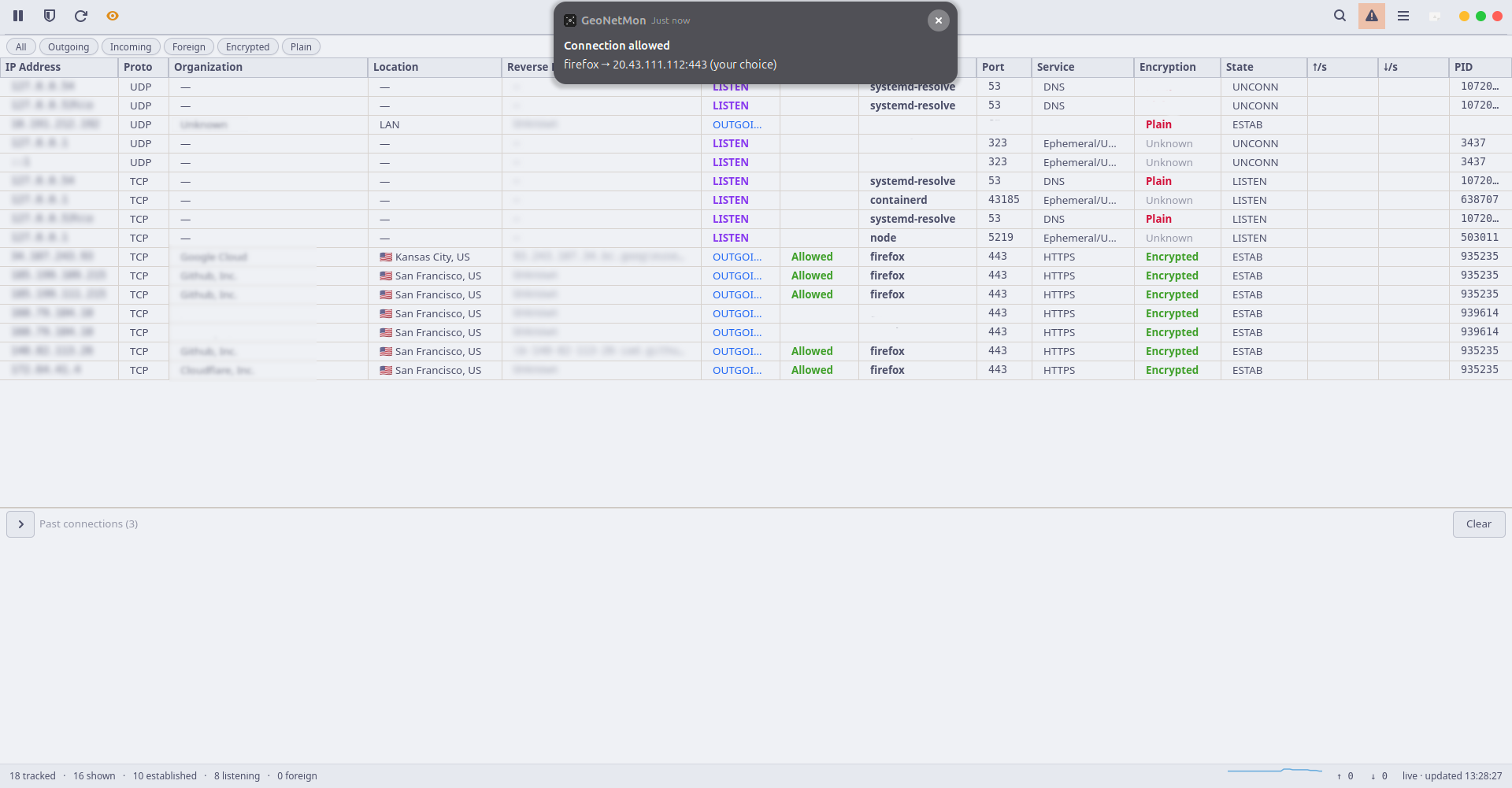 Connection allowed — GNOME notification |
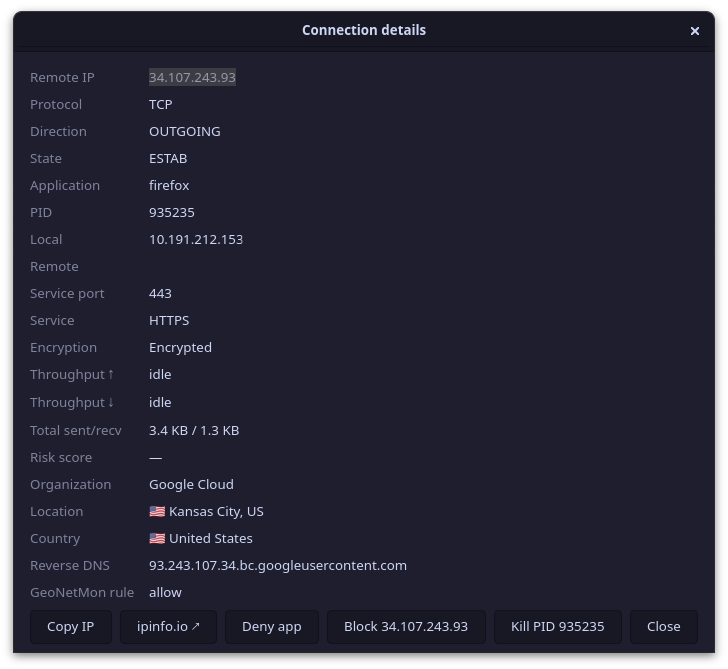 Connection details |
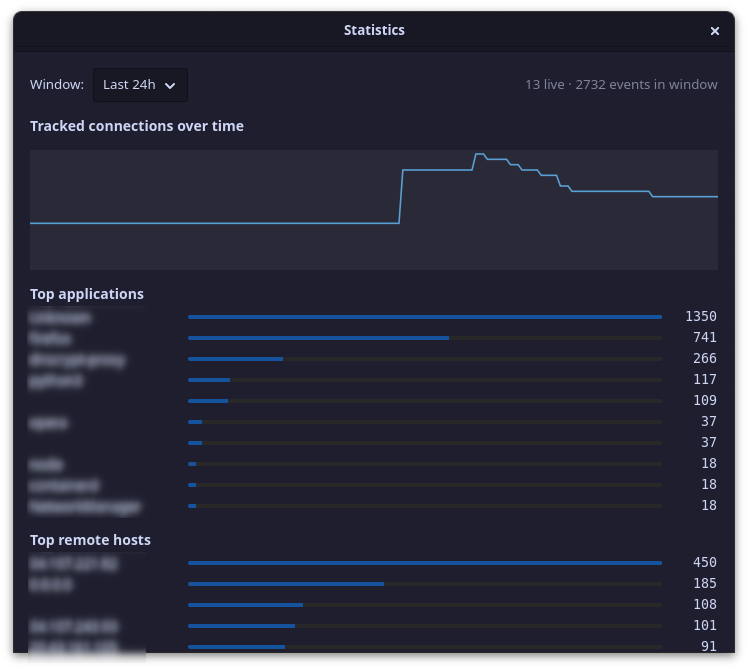 Statistics |
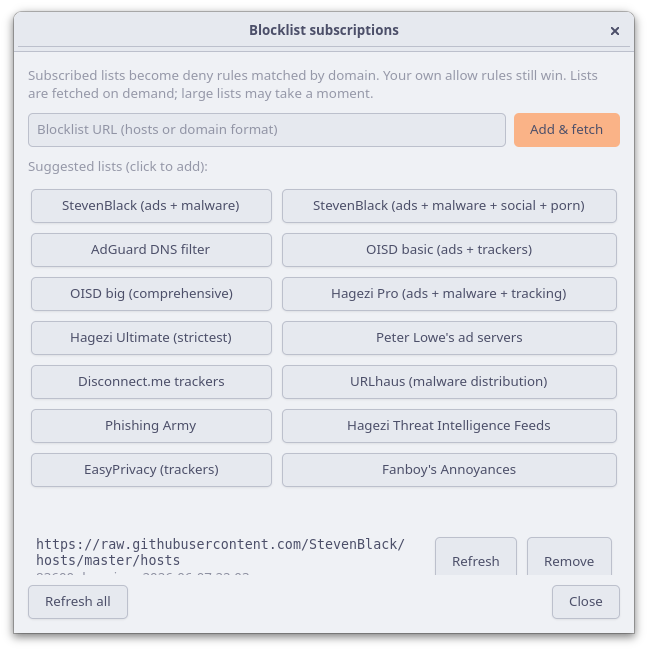 Blocklist subscriptions |
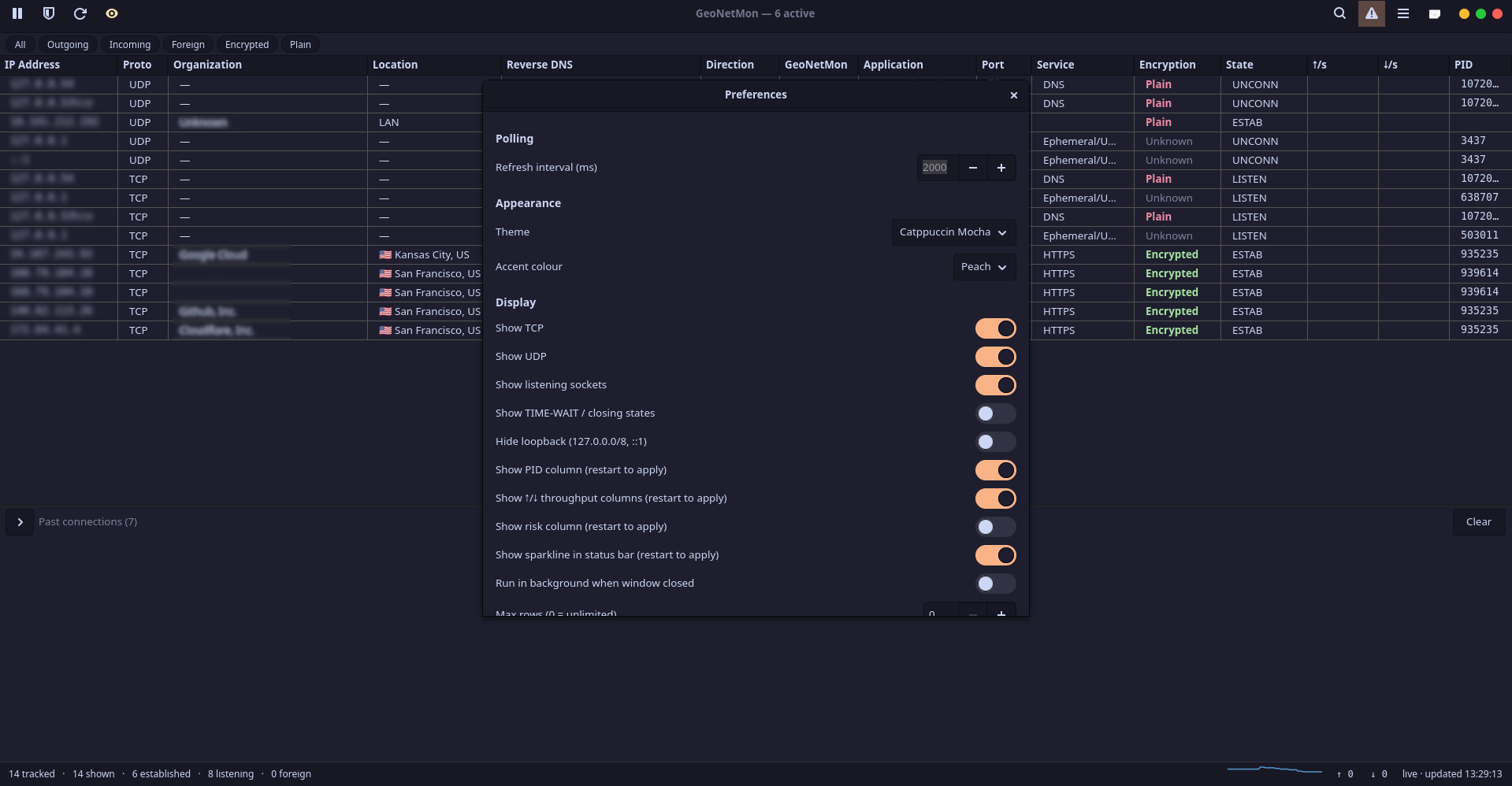 Preferences — appearance |
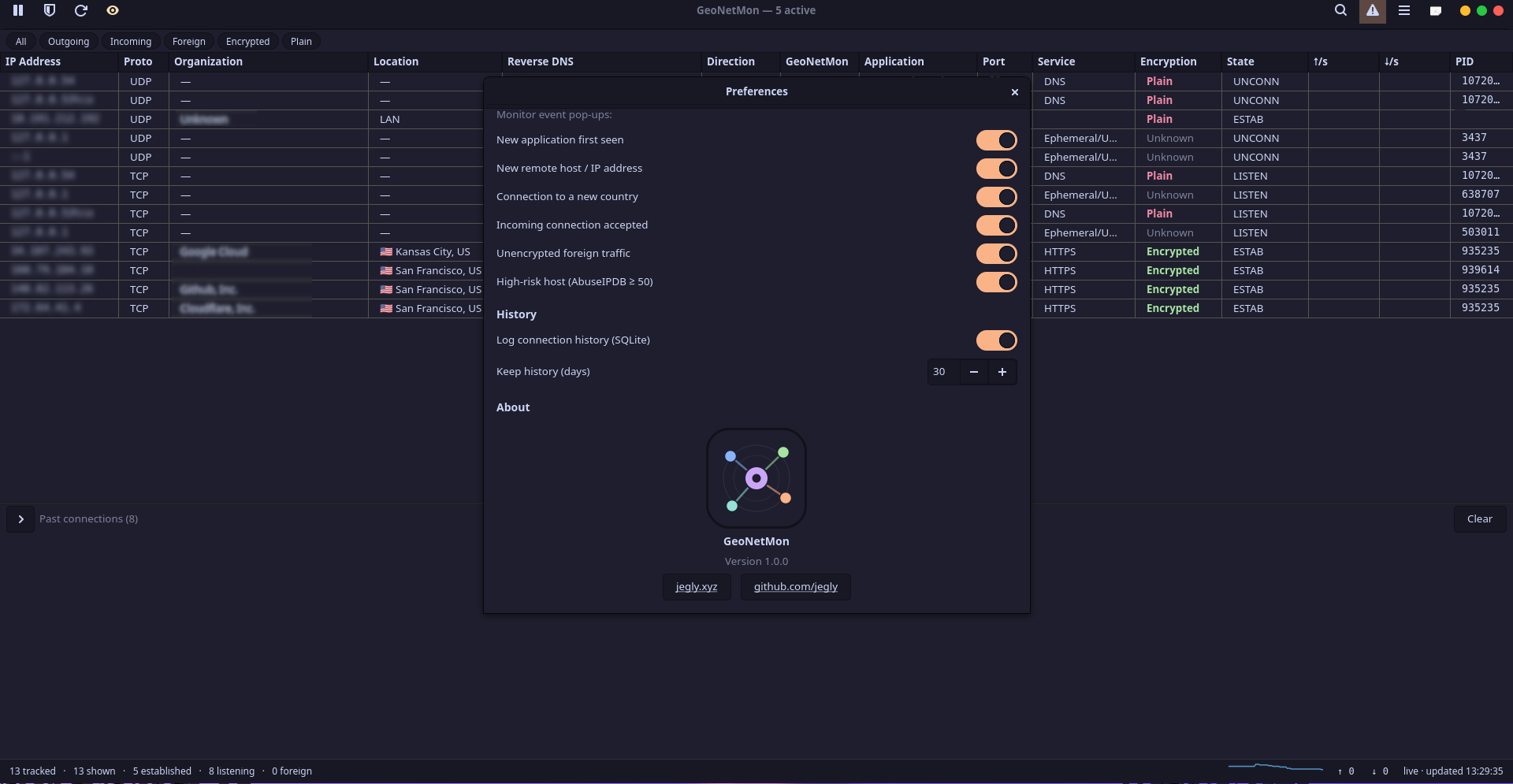 Preferences — alerts and history |
Core Features
Live connection table
All active TCP and UDP sockets, refreshed on a configurable interval. Each row shows:
- Process name and PID
- Local and remote address
- Destination hostname (reverse DNS)
- Country and organisation (GeoIP)
- Country flag
- Protocol and port service name
- Direction (outbound / incoming / listening)
- Encryption status
- Live upload and download rate
- Risk score (AbuseIPDB — requires API key)
- Enforcement verdict (allowed / blocked / pending)
- Connection state
Columns are individually toggleable. New connections flash briefly on arrival. A search bar and quick-filter pills (TCP, UDP, outgoing, incoming, listening) let you narrow the table in real time. The status bar shows live aggregate throughput and a sparkline of connection count over time.
Monitor mode vs enforcement mode
| Monitor (shield off) | Enforcement (shield on) | |
|---|---|---|
| Daemon required | No — degrades gracefully | Yes |
| Packets intercepted | No | Yes — held until you decide |
| Rules applied | No | Yes |
| Process names visible | Yes (via /run/geonetmon-procs.json) |
Yes |
| Works without root | Yes | Yes (daemon runs as root, GUI does not) |
Switching the shield on without the daemon running shows a status message and leaves the app in monitor mode.
Interactive firewall (enforcement mode)
Outbound connections are held in the kernel queue until you respond. A prompt window appears with the process name, destination, country, and port. If the window is minimised or behind another window, a GNOME desktop notification fires — clicking it raises the prompt directly, with no lag.
How long the rule lasts:
| Scope | Meaning |
|---|---|
| Once | This connection only — not saved |
| Until the app quits | Active while the process is running |
| Until restart | Survives app restarts, cleared on reboot |
| Forever | Written to disk, applied automatically from then on |
What the rule covers:
| Apply to | Meaning |
|---|---|
| Any connection | Any outbound connection from this app |
| Connections to this host | This app to this destination only |
| Connections on this port | This app on this port, any host |
| Only this connection | Exact — this app, this host, this port |
A plain-English summary under the dropdowns describes the exact rule before you confirm. An auto-timeout acts if you don't answer — the action (allow or deny) and duration are configurable.
Passive DNS capture
The daemon watches DNS responses on every interface (a receive-only socket with a kernel BPF filter — only port-53 packets ever reach userspace) and remembers which hostname resolved to which IP. This works with the shield off, so CDN and cloud IPs that publish no reverse-DNS record still show the name your machine actually looked up — firefox → github.com instead of a bare Fastly IP. Local resolvers like dnscrypt-proxy and systemd-resolved are covered too: the app↔127.0.0.1:53 leg is plaintext even when the upstream is encrypted.
The hostname map lives in daemon memory only (capped, 15-minute TTL, never written to disk) and is served to the GUI over the existing group-gated socket. Toggle under Preferences → Enrichment.
DNS-aware prompts
The same capture feeds enforcement prompts, so they say firefox → github.com on the very first packet, not a bare IP. Blind spot: an app doing its own DNS-over-HTTPS internally (bypassing the system resolver) is invisible — same limitation as Little Snitch.
Binary integrity
When you allow an application, its executable is SHA-256-pinned. If that binary changes later, the prompt flags it — a replaced binary cannot inherit an existing allow rule.
Manual IP blocking
Separate from enforcement. Right-click any row in the connection table and choose Block IP to immediately drop all traffic to and from that remote address. The block goes through whichever firewall backend is configured in Settings (ufw, nftables, or iptables — auto-detected by default). UFW blocks survive reboots; nftables blocks are re-applied declaratively from GeoNetMon's own record. Blocked IPs are listed and removable from the Firewall manager.
Right-click context menu
Right-clicking any connection row opens a context menu with:
- Allow / Deny — create a quick permanent rule for this connection without going through the full prompt
- Details / lsof — open the full detail window with process info
- Copy IP — copy the remote address to the clipboard
- Filter to this app — narrow the table to show only connections from this process
- Block / Unblock IP — immediate firewall block on the remote IP
- Whois — open an in-app whois lookup for the remote IP
- Kill process — send SIGTERM to the owning process
GNOME notifications
Notifications for allow/deny prompts appear at the desktop level — visible even when the app is minimised or behind other windows. Clicking the notification raises only the small prompt window directly. Notification behaviour for manual decisions, auto-allowed connections, and auto-denied connections are each independently toggled in Settings.
Alerts
GNOME desktop notifications and an in-app alert log for:
- A new application making its first outbound connection
- A connection to a new country
- A connection flagged high-risk by AbuseIPDB
- Incoming connections
- Unencrypted connections to foreign hosts
Each alert type is individually toggled in Settings.
Blocklist subscriptions
Subscribe to domain blocklists in hosts or plain-domain format. Subscribed domains become deny rules matched before any outbound connection is allowed. Your own allow rules always take priority.
Fourteen presets included:
| Category | Lists |
|---|---|
| Ads and tracking | StevenBlack, AdGuard DNS, OISD basic, OISD big, Hagezi Pro, Hagezi Ultimate, Peter Lowe, Disconnect.me, EasyPrivacy, Fanboy Annoyances |
| Malware and phishing | URLhaus, Phishing Army, Hagezi Threat Intelligence Feeds |
| Combined | StevenBlack (ads + malware + social + explicit) |
Any hosts-format or plain-domain URL can be added.
Firewall rules
A rules table for viewing, adding, editing, and deleting named allow/deny rules. Rules can target a process binary, destination host, destination port, or any combination. Specificity ordering is automatic — more specific rules win over broader ones. Rules persist to ~/.config/geonetmon/rules.json and can be exported and imported as JSON.
Past connections panel
A collapsible in-session panel below the live table shows connections that appeared and then closed during the current session. Repeats of the same connection (same IP, port, protocol, app — think dnscrypt-proxy probing its resolvers every few seconds) coalesce into a single row with a ×N count and an expander arrow that reveals every individual instance. Double-click any entry for full detail. The list can be cleared manually and does not persist across restarts (connection history is in the History tab instead).
World connection map
An equirectangular map with great-circle arcs from your location to each geolocated remote, coloured by direction, foreign, or high-risk status. A CC0 coastline is bundled — no network calls or extra assets required. Set your home country in Settings to place the origin marker.
Statistics
Top applications, remote hosts, and countries over a selectable window (hour / day / week / month), plus an activity graph, all from the local history database.
Connection history
Past connections logged to a local SQLite database. Retention defaults to 30 days.
GeoIP
Two backends:
- GeoLite2 (offline) — point the app at a local
GeoLite2-City.mmdband optionallyGeoLite2-ASN.mmdb. No internet required after download. Preferred when configured. - ipinfo.io (online) — optional API token for higher rate limits.
Both backends cache results locally for 7 days. Private, loopback, and link-local IPs are resolved locally and never sent to any external service.
CSV export
The Export option in the menu saves all currently visible rows to a CSV file, including every column.
Pause and resume
A pause button in the header stops the table from refreshing without closing the app. Useful when inspecting a specific connection without the list moving under you.
Themes
Twenty themes, switchable live in Settings with no restart: System (follows your GTK dark/light setting), Dracula, all four Catppuccin flavours (Latte, Frappé, Macchiato, Mocha), plus fourteen ported from Tesseract — Adventure Time, Borland, Commodore 64, Fairy Floss Dark, Flat, Gogh — Starry Night, Grass, Gruvbox Material, Homebrew, Kokuban, Mono Cyan, Neon Tessera, Ocean, and Vintage Light. All support configurable accent colours.
App lock
Questions
What is GeoNetMon?
jegly/GeoNetMon is a public repo on GitHub by jegly. Open Source GUI Network monitor and interactive per-app firewall for Linux — live connections, GeoIP, allow/deny prompts, blocklists.
Is GeoNetMon open source?
It declares no license on GitHub. Public does not mean open source: without a license, nobody is granted the right to reuse it.
Does GeoNetMon run on macOS, Windows or Linux?
Its maker has not tagged a system, so it is unknown here. Its README says what it needs.



