
viewer3d
Simple Viewer for GLTF Models
- 6
- MIT
- 4 wk ago
Repo joembedded/viewer3d, read from GitHub 1 d ago. joembedded has not joined Take My Repo.
In short
joembedded/viewer3d is a public repo on GitHub by joembedded. Simple Viewer for GLTF Models. It declares the MIT license on GitHub. It is written mainly in JavaScript, has 6 stars and last changed on 2026-10-28. Nobody has reviewed it on Take My Repo yet, which says nothing about its quality. Read from GitHub on 2026-11-22.
JoEmbedded 3D Viewer
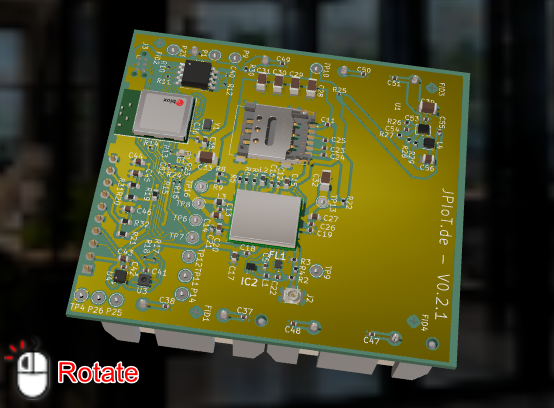
A browser-based GLTF/GLB viewer for circuit boards, sensors and product models. The demos use Three.js, mouse/touch orbit controls and optional image or Video-MP4 skyboxes. No build step is required. "Just works":
Demos
Every HTML entry point is listed below. Open demo links target GitHub Pages; Source links open the HTML in this repository. Updated Pages URLs become available after the reorganized files are published to GitHub Pages.
| Page | Purpose | Open demo | Source |
|---|---|---|---|
index.html |
Entry page with links to all demos, a RAK3172 module and a compact material sample | Open demo | Source |
skybox-explorer.html |
Scientific logger with all six image panoramas and the MP4 skybox | Open demo | Source |
jpiot-pcb.html |
JPIoT circuit board with studio lighting and soft contact shadows | Open demo | Source |
scientific-logger.html |
Scientific logger in its laboratory panorama | Open demo | Source |
material-preview.html |
Polished aluminium, polymer and satin-metal sample | Open demo | Source |
ble-sensor.html |
OSX sensor orientation controlled by a Bluetooth device | Open demo | Source |
The former index2.html, jpiot.html, boilerplate_gp.html,
boilerplate_sg.html and boilerplate_gp_video.html have been renamed to the
corresponding descriptive pages above. Update existing bookmarks and embeds.
Every page uses a centered 90% content width, leaving 5% on the left and right
of the available viewport (excluding the scrollbar). The shared rules live in
driver_js/page-layout.css. Each page includes a "Zurück" link to index.html.
The introductory and Bluetooth pages also retain 5vh top and bottom padding;
compact viewers shrink to fit narrow screens.
Repository layout
*.html                    Demo entry points
models/                   GLB models and optional same-name JSONL presentations
  source/                 Editable Three.js project and its source artwork
skyboxes/                 Panorama images and MP4 videos
driver_js/               Viewer, Bluetooth drivers and shared styles
  three/                  Minimal local Three.js runtime and required add-ons
tools/                   Asset generation and verification utilities
favicon.ico               Site icon
LICENSE                   Project license
readme.md                 Documentation and demo links
Temporary browser reports, screenshots, caches and local backups are excluded from version control. Unused Three.js add-ons and historical output files have been removed from the active project. Required runtime libraries retain their copyright/license headers.
Run locally
Serve the repository root over HTTP. For XAMPP, open
http://localhost/viewer3d/index.html. Alternatively:
python -m http.server 8765
Then open http://localhost:8765/index.html. Loading ES modules and models via
file:// is not supported. Asset paths are relative to the HTML document, so
the same layout works under a GitHub Pages project subdirectory.
Embed a viewer
Add a container with an explicit height, the stylesheet and this import map:
<link rel="stylesheet" href="./driver_js/jo3dview.css">
<script type="importmap">
{
  "imports": {
    "three": "./driver_js/three/build/three.module.min.js",
    "three/addons/": "./driver_js/three/examples/jsm/"
  }
}
</script>
<div id="viewer-controls"></div>
<div id="mviewer" class="jo3dviewer" style="height: 60vh">
  <div id="mloader" class="jo3dloader" role="status">Loading...</div>
</div>
Initialize it from a module script:
import { view3dDocumentation } from './driver_js/jo3dview.js';

const viewer = view3dDocumentation('mviewer', {
    model: './models/testball-optimized.glb',
    background: './skyboxes/southern-germany.webp',
    loaderId: 'mloader',
    toolbarId: 'viewer-controls', // optional
    autoRotatePause: 10
});
await viewer.ready; // model loaded; rejects on model-loading errors
await viewer.backgroundReady; // true on background load, false on failure

// viewer.setAutoRotate(false);
// viewer.setNeutralBackground(true); // preserves environment lighting
// viewer.resetView();
// viewer.invalidate(); // after manual scene/material changes
// viewer.dispose(); // releases resources when removing the viewer
For a minimal integration, view3d(containerId, model, size, loaderId, background, centerModel, options) remains available. Its seventh argument
accepts the rendering options used by the documentation preset.
The preset uses ACES tone mapping, exposure 1.05, environment intensity 1.25,
background intensity 0.85 and normalized model size 1.1. Override exposure,
environmentIntensity, backgroundIntensity, fov, size and
cameraPosition: [x, y, z] as needed. The camera adapts to portrait screens.
Rotation defaults to off when reduced motion is requested. Interaction pauses
auto-rotation for 10 seconds after release. Hidden/offscreen views skip rendering;
stationary documentation viewers render only when necessary. Pixel ratio is
capped at 1.75 and the drawing buffer at 3 million pixels by default.
Optional modelAutoRotateSpeed: [x, y, z] adds model rotation around each Euler
axis while camera auto-rotation is active. It defaults to [0, 0, 0] (disabled) and uses the same
units as autoRotateSpeed: 1 is one full turn per 60 seconds; negative values
reverse direction. The extra rotation follows the same interaction pauses,
rotation toggle and visibility handling. The Scientific logger uses
autoRotateSpeed: -0.35 and modelAutoRotateSpeed: [-0.175, 0, 0] (half speed
around X). The Skybox Explorer uses [0, -1.5, 0] for rotation around Y.
Each zero component disables its axis. Older scalar values remain
supported as an X-only speed.
Flight Recorder and presentations
Every viewer has a compact Record developer button that opens the non-modal Flight Recorder editor. Each viewer owns its own point list. Opening the editor switches off auto-rotation; the canvas remains available for setting up the next shot.
Presentation files live in the same directory as their model, with the same
base filename and the extension .jsonl. For example:
| Model | Presentation data |
|---|---|
models/view3d_opt.glb |
models/view3d_opt.jsonl |
models/rak3172sip.glb |
models/rak3172sip.jsonl |
On initialization, each viewer checks its companion file with an HTTP HEAD
request. The Presentation button is initially hidden and appears only if
that request succeeds. A missing or unreachable file leaves it hidden; there is
no fallback to another model's presentation. Serve the JSONL files alongside the
models, including when publishing to GitHub Pages, then reload the page after
adding a file. Viewers using the same model use the same companion file.
Presentation loads the file without a prompt, waits for the model and flies
to the first point. It closes the editor on success; the Info box and navigation
appear after arrival. The button remains available when the Record launcher
is hidden. Override the derived file with data-presentation-file="my-tour.jsonl"
on the viewer container or the presentationFile viewer option (which takes
precedence). Paths are relative to the HTML page. An invalid, empty or failed load
shows an error in the editor and retains the existing points. Reset, Auto or
disposal cancel a pending load.
- View loggen asks for a short name, records the current view and adds a
destination button. Each point has an editable Info field initially set
to
Name-YourCommentsHere. Canceling or entering a blank name adds nothing. V on the focused canvas records a point too. Each recording is also logged as JSON in the browser console. - Edit beside each point opens a prompt with its existing Info text. Use
\nfor a line break. Cancel keeps the old text; an empty value clears it. Each row also displays the recorded zoom factor and camera-to-target distance. - Click a point's button to fly smoothly to it. Camera position, look target,
orientation, FOV, zoom and the recorded model transform transition together.
Camera-relative interpolation produces an orbit around the target. The final
view stays still for presenting. Mouse/touch interaction cancels a flight;
choosing another point starts from the current position. Normal rotation can
be enabled again using Auto, the existing rotation control or
viewer.setAutoRotate(true). - After arrival, the Info text fades into a readable box at the top left of the
viewer. Both literal
\nescapes and real line breaks are displayed as new lines. Its four navigation buttons are ⏮ START (first list point), ‹ (previous), › (next) and ⏹ END (close the box, fly back to the app's initial view, then restart auto-rotation). Previous/next are disabled at the list boundaries. The box hides during a flight or manual interaction, and reappears after the next arrival. - On browser viewports up to 1024 px wide or up to 600 px high, the Info box starts expanded at each arrival and collapses after 2 seconds into a small navigation bar. All four navigation controls remain accessible. The ▲/▼ toggle is always available, including on larger screens, to collapse or expand the text manually. Manually reopened text stays open until the next point or a change across the responsive breakpoint. Larger viewports stay expanded by default. Box resizing and the toggle use a soft 320 ms animation, disabled when the browser requests reduced motion.
- Auto ends the current flight or stationary presentation view, flies back to
the app's initial camera position, target, zoom and model pose, and only then
restarts auto-rotation. This is the app's starting view, not the first point in
the loaded file or the view before pressing Presentation. Scripts can call
viewer.flightRecorder.startAutoRotation(). Manual interaction, Reset or a new flight cancels the return without starting auto-rotation later. Long point lists scroll vertically inside their frame; the toolbar stays visible. - Reset clears the list immediately and cancels an active flight or import.
- Export downloads UTF-8 JSONL: one named point per line, including Info.
Before a file has been loaded, the suggested download name is the model's
companion filename, e.g.
view3d_opt.jsonl. After loading, it uses that file's basename. Save/copy the download next to the corresponding model with the same basename and.jsonlextension to make it available through Presentation. Export does not write to the web server automatically. - Laden prompts for a project filename (including
.jsonl, or a relative path), initially suggesting the same file as Presentation, then the last successfully loaded filename. It loads usingfetch(), relative to the HTML page. A valid file replaces the list. Errors are shown in the editor and retain the existing list. An empty file loads an empty list. Lists are held in memory; export before reloading or leaving the page.
The Record button is visible by default. Every demo marks its viewer container with
data-flight-recorder="visible"; change it to hidden in the HTML to hide it:
<div id="mviewer" class="jo3dviewer" data-flight-recorder="hidden"></div>
Alternatively pass flightRecorder: false in the viewer options, or set
viewer.flightRecorder.button.hidden = true. Hiding the button only hides the
launcher; programmatic access and the canvas shortcut remain available.
TRANSTIME in driver_js/flight-recorder.js defaults to 2.0 seconds per scene
unit (twice the original flight speed). Override it per viewer with transTime: 2.0 in the options. Duration is
d = max(cameraDistance, targetDistance, 0.25) and
duration = transTime * (d <= 1 ? d : sqrt(d)), with smooth acceleration
and deceleration. Short flights keep their original timing; at the default setting,
a distance of 4 takes 4 seconds instead of 8. The minimum gives zoom/orientation-only changes a half-second
transition at the default setting. Flights pause while the viewer/tab is hidden.
Each JSONL record has version: 1, name, info and the snapshot fields:
viewerId, camera, viewport, model. Camera data includes position, target,
up vector, quaternion ([x, y, z, w]
Questions
What is viewer3d?
joembedded/viewer3d is a public repo on GitHub by joembedded. Simple Viewer for GLTF Models.
Is viewer3d open source?
It declares the MIT license on GitHub.
Does viewer3d run on macOS, Windows or Linux?
Its maker has not tagged a system, so it is unknown here. Its README says what it needs.
How do I install viewer3d?
Open "Take it" on its page: Take My Repo writes an install plan for your machine and hands it to your AI agent (Claude Code, Codex or Cursor), which asks you before each step. Take My Repo has not tested it on any machine.
Is viewer3d still maintained?
Its last change on GitHub was on 2026-10-28. Take My Repo does not judge from that whether it is maintained.