coding-interview-university
A complete computer science study plan to become a software engineer.
- 365k
- CC-BY-SA-4.0
- 2 wk ago
List of 1000 JavaScript Interview Questions
Repo kansiris/javascript-interview-questions, read from GitHub 1 min ago. kansiris has not joined Take My Repo.
kansiris/javascript-interview-questions is a public repo on GitHub by kansiris. List of 1000 JavaScript Interview Questions. It declares no license on GitHub. Public does not mean open source: without a license, nobody is granted the right to reuse it. It has 6 stars and last changed on 2022-02-04. Nobody has reviewed it on Take My Repo yet, which says nothing about its quality. Read from GitHub on 2026-11-22.
Click ⭐if you like the project. Pull Requests are highly appreciated. Follow me @Kansiris87 for technical updates.
Go to Coding Exercise for coding specific questions
You can download the PDF and Epub version of this repository from the latest run on the actions tab.
There are many ways to create objects in javascript as below
Object constructor:
The simplest way to create an empty object is using the Object constructor. Currently this approach is not recommended.
var object = new Object();
Object's create method:
The create method of Object creates a new object by passing the prototype object as a parameter
var object = Object.create(null);
Object literal syntax:
The object literal syntax is equivalent to create method when it passes null as parameter
var object = {};
Function constructor:
Create any function and apply the new operator to create object instances,
function Person(name){
   this.name=name;
   this.age=21;
}
var object = new Person("Sudheer");
Function constructor with prototype:
This is similar to function constructor but it uses prototype for their properties and methods,
function Person(){}
Person.prototype.name = "Sudheer";
var object = new Person();
This is equivalent to an instance created with an object create method with a function prototype and then call that function with an instance and parameters as arguments.
function func {};

new func(x, y, z);
(OR)
// Create a new instance using function prototype.
var newInstance = Object.create(func.prototype)

// Call the function
var result = func.call(newInstance, x, y, z),

// If the result is a non-null object then use it otherwise just use the new instance.
console.log(result && typeof result === 'object' ? result : newInstance);
ES6 Class syntax:
ES6 introduces class feature to create the objects
class Person {
   constructor(name) {
      this.name = name;
   }
}

var object = new Person("Sudheer");
Singleton pattern:
A Singleton is an object which can only be instantiated one time. Repeated calls to its constructor return the same instance and this way one can ensure that they don't accidentally create multiple instances.
var object = new function(){
   this.name = "Sudheer";
}
Prototype chaining is used to build new types of objects based on existing ones. It is similar to inheritance in a class based language.
The prototype on object instance is available through Object.getPrototypeOf(object) or proto property whereas prototype on constructors function is available through Object.prototype.

The difference between Call, Apply and Bind can be explained with below examples,
Call: The call() method invokes a function with a given this value and arguments provided one by one
var employee1 = {firstName: 'John', lastName: 'Rodson'};
var employee2 = {firstName: 'Jimmy', lastName: 'Baily'};

function invite(greeting1, greeting2) {
    console.log(greeting1 + ' ' + this.firstName + ' ' + this.lastName+ ', '+ greeting2);
}

invite.call(employee1, 'Hello', 'How are you?'); // Hello John Rodson, How are you?
invite.call(employee2, 'Hello', 'How are you?'); // Hello Jimmy Baily, How are you?
Apply: Invokes the function with a given this value and allows you to pass in arguments as an array
var employee1 = {firstName: 'John', lastName: 'Rodson'};
var employee2 = {firstName: 'Jimmy', lastName: 'Baily'};

function invite(greeting1, greeting2) {
    console.log(greeting1 + ' ' + this.firstName + ' ' + this.lastName+ ', '+ greeting2);
}

invite.apply(employee1, ['Hello', 'How are you?']); // Hello John Rodson, How are you?
invite.apply(employee2, ['Hello', 'How are you?']); // Hello Jimmy Baily, How are you?
bind: returns a new function, allowing you to pass any number of arguments
var employee1 = {firstName: 'John', lastName: 'Rodson'};
var employee2 = {firstName: 'Jimmy', lastName: 'Baily'};

function invite(greeting1, greeting2) {
    console.log(greeting1 + ' ' + this.firstName + ' ' + this.lastName+ ', '+ greeting2);
}

var inviteEmployee1 = invite.bind(employee1);
var inviteEmployee2 = invite.bind(employee2);
inviteEmployee1('Hello', 'How are you?'); // Hello John Rodson, How are you?
inviteEmployee2('Hello', 'How are you?'); // Hello Jimmy Baily, How are you?
Call and apply are pretty interchangeable. Both execute the current function immediately. You need to decide whether it’s easier to send in an array or a comma separated list of arguments. You can remember by treating Call is for comma (separated list) and Apply is for Array.
Whereas Bind creates a new function that will have this set to the first parameter passed to bind().
JSON is a text-based data format following JavaScript object syntax, which was popularized by Douglas Crockford. It is useful when you want to transmit data across a network and it is basically just a text file with an extension of .json, and a MIME type of application/json
Parsing: Converting a string to a native object
JSON.parse(text)
Stringification: converting a native object to a string so it can be transmitted across the network
JSON.stringify(object)
The slice() method returns the selected elements in an array as a new array object. It selects the elements starting at the given start argument, and ends at the given optional end argument without including the last element. If you omit the second argument then it selects till the end.
Some of the examples of this method are,
let arrayIntegers = [1, 2, 3, 4, 5];
let arrayIntegers1 = arrayIntegers.slice(0,2); // returns [1,2]
let arrayIntegers2 = arrayIntegers.slice(2,3); // returns [3]
let arrayIntegers3 = arrayIntegers.slice(4); //returns [5]
Note: Slice method won't mutate the original array but it returns the subset as a new array.
The splice() method is used either adds/removes items to/from an array, and then returns the removed item. The first argument specifies the array position for insertion or deletion whereas the optional second argument indicates the number of elements to be deleted. Each additional argument is added to the array.
Some of the examples of this method are,
let arrayIntegersOriginal1 = [1, 2, 3, 4, 5];
let arrayIntegersOriginal2 = [1, 2, 3, 4, 5];
let arrayIntegersOriginal3 = [1, 2, 3, 4, 5];

let arrayIntegers1 = arrayIntegersOriginal1.splice(0,2); // returns [1, 2]; original array: [3, 4, 5]
let arrayIntegers2 = arrayIntegersOriginal2.splice(3); // returns [4, 5]; original array: [1, 2, 3]
let arrayIntegers3 = arrayIntegersOriginal3.splice(3, 1, "a", "b", "c"); //returns [4]; original array: [1, 2, 3, "a", "b", "c", 5]
Note: Splice method modifies the original array and returns the deleted array.
Some of the major difference in a tabular form
| Slice | Splice |
|---|---|
| Doesn't modify the original array(immutable) | Modifies the original array(mutable) |
| Returns the subset of original array | Returns the deleted elements as array |
| Used to pick the elements from array | Used to insert or delete elements to/from array |
Objects are similar to Maps in that both let you set keys to values, retrieve those values, delete keys, and detect whether something is stored at a key. Due to this reason, Objects have been used as Maps historically. But there are important differences that make using a Map preferable in certain cases.
JavaScript provides both strict(===, !==) and type-converting(==, !=) equality comparison. The strict operators take type of variable in consideration, while non-strict operators make type correction/conversion based upon values of variables. The strict operators follow the below conditions for different types,
Some of the example which covers the above cases,
0 == false   // true
0 === false  // false
1 == "1"     // true
1 === "1"    // false
null == undefined // true
null === undefined // false
'0' == false // true
'0' === false // false
[]==[] or []===[] //false, refer different objects in memory
{}=={} or {}==={} //false, refer different objects in memory
An arrow function is a shorter syntax for a function expression and does not have its own this, arguments, super, or new.target. These functions are best suited for non-method functions, and they cannot be used as constructors.
In Javascript, functions are first class objects. First-class functions means when functions in that language are treated like any other variable.
For example, in such a language, a function can be passed as an argument to other functions, can be returned by another function and can be assigned as a value to a variable. For example, in the below example, handler functions assigned to a listener
const handler = () => console.log ('This is a click handler function');
document.addEventListener ('click', handler);
First-order function is a function that doesn’t accept another function as an argument and doesn’t return a function as its return value.
const firstOrder = () => console.log ('I am a first order function!');
Higher-order function is a function that accepts another function as an argument or returns a function as a return value or both.
const firstOrderFunc = () => console.log ('Hello, I am a First order function');
const higherOrder = ReturnFirstOrderFunc => ReturnFirstOrderFunc();
higherOrder(firstOrderFunc);
Unary function (i.e. monadic) is a function that accepts exactly one argument. It stands for a single argument accepted by a function.
Let us take an example of unary function,
const unaryFunction = a => console.log (a + 10); // Add 10 to the given argument and display the value
Currying is the process of taking a function with multiple arguments and turning it into a sequence of functions each with only a single argument. Currying is named after a mathematician Haskell Curry. By applying currying, a n-ary function turns it into a unary function.
Let's take an example of n-ary function and how it turns into a currying function,
const multiArgFunction = (a, b, c) => a + b + c;
console.log(multiArgFunction(1,2,3));// 6

const curryUnaryFunction = a => b => c => a + b + c;
curryUnaryFunction (1); // returns a function: b => c =>  1 + b + c
curryUnaryFunction (1) (2); // returns a function: c => 3 + c
curryUnaryFunction (1) (2) (3); // returns the number 6
Curried functions are great to improve code reusability and functional composition.
A Pure function is a function where the return value is only determined by its arguments without any side effects. i.e, If you call a function with the same arguments 'n' number of times and 'n' number of places in the application then it will always return the same value.
Let's take an example to see the difference between pure and impure functions,
//Impure
let numberArray = [];
const impureAddNumber = number => numberArray.push(number);
//Pure
const pureAddNumber = number => argNumberArray =>
  argNumberArray.concat([number]);

//Display the results
console.log (impureAddNumber(6)); // returns 1
console.log (numberArray); // returns [6]
console.log (pureAddNumber(7) (numberArray)); // returns [6, 7]
console.log (numberArray); // returns [6]
As per above code snippets, Push function is impure itself by altering the array and returning an push number index which is independent of parameter value. Whereas Concat on the other hand takes the array and concatenates it with the other array producing a whole new array without side effects. Also, the return value is a concatenation of the previous array.
Remember that Pure functions are important as they simplify unit testing without any side effects and no need for dependency injection. They also avoid tight coupling and make it harder to break your application by not having any side effects. These principles are coming together with Immutability concept of ES6 by giving preference to const over let usage.
The let statement declares a block scope local variable. Hence the variables defined with let keyword are limited in scope to the block, statement, or expression on which it is used. Whereas variables declared with the var keyword used to define a variable globally, or locally to an entire function regardless of block scope.
Let's take an example to demonstrate the usage,
let counter = 30;
if (counter === 30) {
  let counter = 31;
  console.log(counter); // 31
}
console.log(counter); // 30 (because the variable in if block won't exist here)
You can list out the differences in a tabular format
| var | let |
|---|---|
| It is been available from the beginning of JavaScript | Introduced as part of ES6 |
| It has function scope | It has block scope |
| Variables will be hoisted | Hoisted but not initialized |
Let's take an example to see the difference,
function userDetails(username) {
   if(username) {
     console.log(salary); // undefined due to hoisting
     console.log(age); // ReferenceError: Cannot access 'age' before initialization
     let age = 30;
     var salary = 10000;
   }
   console.log(salary); //10000 (accessible to due function scope)
   console.log(age); //error: age is not defined(due to block scope)
}
userDetails('John');
let is a mathematical statement that was adopted by early programming languages like Scheme and Basic. It has been borrowed from dozens of other languages that use let already as a traditional keyword as close to var as possible.
If you try to redeclare variables in a switch block then it will cause errors because there is only one block. For example, the below code block throws a syntax error as below,
let counter = 1;
switch(x) {
  case 0:
    let name;
    break;

  case 1:
    let name; // SyntaxError for redeclaration.
    break;
}
To avoid this error, you can create a nested block inside a case clause and create a new block scoped lexical environment.
let counter = 1;
    switch(x) {
      case 0: {
        let name;
        break;
      }
      case 1: {
        let name; // No SyntaxError for redeclaration.
        break;
      }
    }
The Temporal Dead Zone is a behavior in JavaScript that occurs when declaring a variable with the let and const keywords, but not with var. In ECMAScript 6, accessing a let or const variable before its declaration (within its scope) causes a ReferenceError. The time span when that happens, between the creation of a variable’s binding and its declaration, is called the temporal dead zone.
Let's see this behavior with an example,
function somemethod() {
  console.log(counter1); // undefined
  console.log(counter2); // ReferenceError
  var counter1 = 1;
  let counter2 = 2;
}
IIFE (Immediately Invoked Function Expression) is a JavaScript function that runs as soon as it is defined. The signature of it would be as below,
(function ()
    {
      // logic here
    }
 )
();
The primary reason to use an IIFE is to obtain data privacy because any variables declared within the IIFE cannot be accessed by the outside world. i.e, If you try to access variables with IIFE then it throws an error as below,
(function ()
        {
          var message = "IIFE";
          console.log(message);
        }
 )
();
console.log(message); //Error: message is not defined
encodeURI() function is used to encode an URL. This function requires a URL string as a parameter and return that encoded string.
decodeURI() function is used to deocde an URL. This function requires an encoded URL string as parameter and return that decoded string.
Note: If you want to encode characters such as / ? : @ & = + $ # then you need to use encodeURIComponent().
let uri = "employeeDetails?name=john&occupation=manager";
let encoded_uri = encodeURI(uri);
let decoded_uri = decodeURI(encoded_uri);
Memoization is a programming technique which attempts to increase a function’s performance by caching its previously computed results. Each time a memoized function is called, its parameters are used to index the cache. If the data is present, then it can be returned, without executing the entire function. Otherwise the function is executed and then the result is added to the cache. Let's take an example of adding function with memoization,
const memoizAddition = () => {
  let cache = {};
 return (value) => {
  if (value in cache) {
   console.log('Fetching from cache');
   return cache[value]; // Here, cache.value cannot be used as property name starts with the number which is not a valid JavaScript  identifier. Hence, can only be accessed using the square bracket notation.
  }
  else {
   console.log('Calculating result');
   let result = value + 20;
   cache[value] = result;
   return result;
  }
 }
}
// returned function from memoizAddition
const addition = memoizAddition();
console.log(addition(20)); //output: 40 calculated
console.log(addition(20)); //output: 40 cached
Hoisting is a JavaScript mechanism where variables and function declarations are moved to the top of their scope before code execution. Remember that JavaScript only hoists declarations, not initialisation. Let's take a simple example of variable hoisting,
console.log(message); //output : undefined
var message = 'The variable Has been hoisted';
The above code looks like as below to the interpreter,
var message;
console.log(message);
message = 'The variable Has been hoisted';
In ES6, Javascript classes are primarily syntactic sugar over JavaScript’s existing prototype-based inheritance. For example, the prototype based inheritance written in function expression as below,
function Bike(model,color) {
    this.model = model;
    this.color = color;
}

Bike.prototype.getDetails = function() {
    return this.model + ' bike has' + this.color + ' color';
};
Whereas ES6 classes can be defined as an alternative
class Bike{
  constructor(color, model) {
    this.color= color;
    this.model= model;
  }

  getDetails() {
    return this.model + ' bike has' + this.color + ' color';
  }
}
A closure is the combination of a function and the lexical environment within which that function was declared. i.e, It is an inner function that has access to the outer or enclosing function’s variables. The closure has three scope chains
Let's take an example of closure concept,
function Welcome(name){
  var greetingInfo = function(message){
   console.log(message+' '+name);
  }
return greetingInfo;
}
var myFunction = Welcome('John');
myFunction('Welcome '); //Output: Welcome John
myFunction('Hello Mr.'); //output: Hello Mr.John
As per the above code, the inner function(i.e, greetingInfo) has access to the variables in the outer function scope(i.e, Welcome) even after the outer function has returned.
Modules refer to small units of independent, reusable code and also act as the foundation of many JavaScript design patterns. Most of the JavaScript modules export an object literal, a function, or a constructor
Below are the list of benefits using modules in javascript ecosystem
Scope is the accessibility of variables, functions, and objects in some particular part of your code during runtime. In other words, scope determines the visibility of variables and other resources in areas of your code.
A Service worker is basically a script (JavaScript file) that runs in the background, separate from a web page and provides features that don't need a web page or user interaction. Some of the major features of service workers are Rich offline experiences(offline first web application development), periodic background syncs, push notifications, intercept and handle network requests and programmatically managing a cache of responses.
Service worker can't access the DOM directly. But it can communicate with the pages it controls by responding to messages sent via the postMessage interface, and those pages can manipulate the DOM.
The problem with service worker is that it gets terminated when not in use, and restarted when it's next needed, so you cannot rely on global state within a service worker's onfetch and onmessage handlers. In this case, service workers will have access to IndexedDB API in order to persist and reuse across restarts.
IndexedDB is a low-level API for client-side storage of larger amounts of structured data, including files/blobs. This API uses indexes to enable high-performance searches of this data.
Web storage is an API that provides a mechanism by which browsers can store key/value pairs locally within the user's browser, in a much more intuitive fashion than using cookies. The web storage provides two mechanisms for storing data on the client.
Post message is a method that enables cross-origin communication between Window objects.(i.e, between a page and a pop-up that it spawned, or between a page and an iframe embedded within it). Generally, scripts on different pages are allowed to access each other if and only if the pages follow same-origin policy(i.e, pages share the same protocol, port number, and host).
A cookie is a piece of data that is stored on your computer to be accessed by your browser. Cookies are saved as key/value pairs. For example, you can create a cookie named username as below,
document.cookie = "username=John";

Cookies are used to remember information about the user profile(such as username). It basically involves two steps,
There are few below options available for a cookie,
document.cookie = "username=John; expires=Sat, 8 Jun 2019 12:00:00 UTC";
document.cookie = "username=John; path=/services";
You can delete a cookie by setting the expiry date as a passed date. You don't need to specify a cookie value in this case. For example, you can delete a username cookie in the current page as below.
document.cookie = "username=; expires=Fri, 07 Jun 2019 00:00:00 UTC; path=/;";
Note: You should define the cookie path option to ensure that you delete the right cookie. Some browsers doesn't allow to delete a cookie unless you specify a path parameter.
Below are some of the differences between cookie, local storage and session storage,
| Feature | Cookie | Local storage | Session storage |
|---|---|---|---|
| Accessed on client or server side | Both server-side & client-side | client-side only | client-side only |
| Lifetime | As configured using Expires option | until deleted | until tab is closed |
| SSL support | Supported | Not supported | Not supported |
| Maximum data size | 4KB | 5 MB | 5MB |
LocalStorage is the same as SessionStorage but it persists the data even when the browser is closed and reopened(i.e it has no expiration time) whereas in sessionStorage data gets cleared when the page session ends.
The Window object implements the WindowLocalStorage and WindowSessionStorage objects which has localStorage(window.localStorage) and sessionStorage(window.sessionStorage) properties respectively. These properties create an instance of the Storage object, through which data items can be set, retrieved and removed for a specific domain and storage type (session or local).
For example, you can read and write on local storage objects as below
localStorage.setItem('logo', document.getElementById('logo').value);
localStorage.getItem('logo');
The session storage provided methods for reading, writing and clearing the session data
// Save data to sessionStorage
sessionStorage.setItem('key', 'value');

// Get saved data from sessionStorage
let data = sessionStorage.getItem('key');

// Remove saved data from sessionStorage
sessionStorage.removeItem('key');

// Remove all saved data from sessionStorage
sessionStorage.clear();
The StorageEvent is an event that fires when a storage area has been changed in the context of another document. Whereas onstorage property is an EventHandler for processing storage events. The syntax would be as below
window.onstorage = functionRef;
Let's take the example usage of onstorage event handler which logs the storage key and it's values
window.onstorage = function(e) {
  console.log('The ' + e.key +
    ' key has been changed from ' + e.oldValue +
    ' to ' + e.newValue + '.');
};
Web storage is more secure, and large amounts of data can be stored locally, without affecting website performance. Also, the information is never transferred to the server. Hence this is a more recommended approach than Cookies.
You need to check browser support for localStorage and sessionStorage before using web storage,
if (typeof(Storage) !== "undefined") {
  // Code for localStorage/sessionStorage.
} else {
  // Sorry! No Web Storage support..
}
You need to check browser support for web workers before using it
if (typeof(Worker) !== "undefined") {
  // code for Web worker support.
} else {
  // Sorry! No Web Worker support..
}
You need to follow below steps to start using web workers for counting example
let i = 0;

function timedCount() {
  i = i + 1;
  postMessage(i);
  setTimeout("timedCount()",500);
}

timedCount();
Here postMessage() method is used to post a message back to the HTML page
if (typeof(w) == "undefined") {
  w = new Worker("counter.js");
}
and we can receive messages from web worker
w.onmessage = function(event){
  document.getElementById("message").innerHTML = event.data;
};
w.terminate();
w = undefined;
WebWorkers don't have access to below javascript objects since they are defined in an external files
A promise is an object that may produce a single value some time in the future with either a resolved value or a reason that it’s not resolved(for example, network error). It will be in one of the 3 possible states: fulfilled, rejected, or pending.
The syntax of Promise creation looks like below,
    const promise = new Promise(function(resolve, reject) {
      // promise description
    })
The usage of a promise would be as below,
const promise = new Promise(resolve => {
  setTimeout(() => {
    resolve("I'm a Promise!");
  }, 5000);
}, reject => {

});

promise.then(value => console.log(value));
The action flow of a promise will be as below,

Promises are used to handle asynchronous operations. They provide an alternative approach for callbacks by reducing the callback hell and writing the cleaner code.
Promises have three states:
A callback function is a function passed into another function as an argument. This function is invoked inside the outer function to complete an action. Let's take a simple example of how to use callback function
function callbackFunction(name) {
  console.log('Hello ' + name);
}

function outerFunction(callback) {
  let name = prompt('Please enter your name.');
  callback(name);
}

outerFunction(callbackFunction);
The callbacks are needed because javascript is an event driven language. That means instead of waiting for a response javascript will keep executing while listening for other events. Let's take an example with the first function invoking an API call(simulated by setTimeout) and the next function which logs the message.
function firstFunction(){
  // Simulate a code delay
  setTimeout( function(){
    console.log('First function called');
  }, 1000 );
}
function secondFunction(){
  console.log('Second function called');
}
firstFunction();
secondFunction();

Output
// Second function called
// First function called
As observed from the output, javascript didn't wait for the response of the first function and the remaining code block got executed. So callbacks are used in a way to make sure that certain code doesn’t execute until the other code finishes execution.
kansiris/javascript-interview-questions is a public repo on GitHub by kansiris. List of 1000 JavaScript Interview Questions.
It declares no license on GitHub. Public does not mean open source: without a license, nobody is granted the right to reuse it.
Its maker has not tagged a system, so it is unknown here. Its README says what it needs.
Open "Take it" on its page: Take My Repo writes an install plan for your machine and hands it to your AI agent (Claude Code, Codex or Cursor), which asks you before each step. Take My Repo has not tested it on any machine.
Its last change on GitHub was on 2022-02-04. GitHub counts 0 open issues and pull requests. Take My Repo does not judge from that whether it is maintained.
A complete computer science study plan to become a software engineer.
Nobody has reviewed it on Take My Repo yet, which says nothing about its quality.
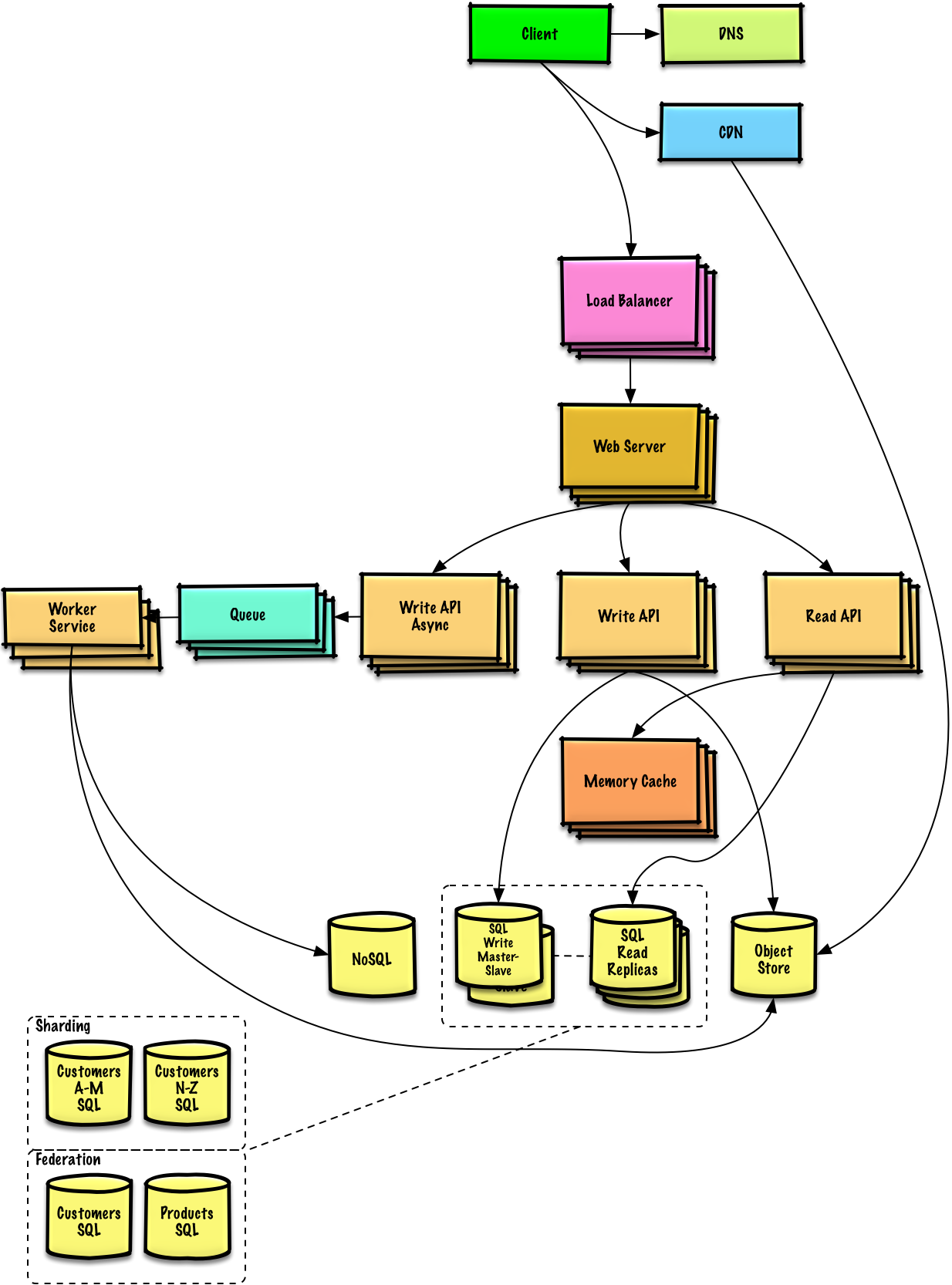
Learn how to design large-scale systems. Prep for the system design interview. Includes Anki flashcards.
Huashu Design 3.4 · 在 agent 里打一句话,拿回能交付的设计:网页 / App 原型 / App Store 宣传图 / 小红书图文 / 可编辑 PPTX / 动画 / 信息图 · 六个候选挑三个方向 · 92 种带样张的风格库 · 该是图的地方放真图 · HTML-native design skill for Claude Code, Codex, Cursor & any agent
📝 Algorithms and data structures implemented in JavaScript with explanations and links to further readings
Curated coding interview preparation materials for busy software engineers
List of Top 500 SQL Interview Questions & Answers with queries and more
List of top 500 C# csharp Interview Questions & Answers....Coding exercise questions are coming soon!!
List of top 500 ReactJS Interview Questions & Answers....Coding exercise questions are coming soon!!