
SpectArk
Native macOS incremental backup app — versioned snapshots (Time Machine style), in-app restore, realtime/scheduled, retention + quota, NAS support. SwiftUI, macOS 14+.
- 11
- MIT
- 2 mo ago
Repo kennss/SpectArk, read from GitHub 1 h ago. kennss has not joined Take My Repo.
In short
kennss/SpectArk is a public repo on GitHub by kennss. Native macOS incremental backup app — versioned snapshots (Time Machine style), in-app restore, realtime/scheduled, retention + quota, NAS support. SwiftUI, macOS 14+. It declares the MIT license on GitHub. It is written mainly in Swift, has 11 stars and last changed on 2026-09-19. Nobody has reviewed it on Take My Repo yet, which says nothing about its quality. Read from GitHub on 2026-11-25.
SpectArk
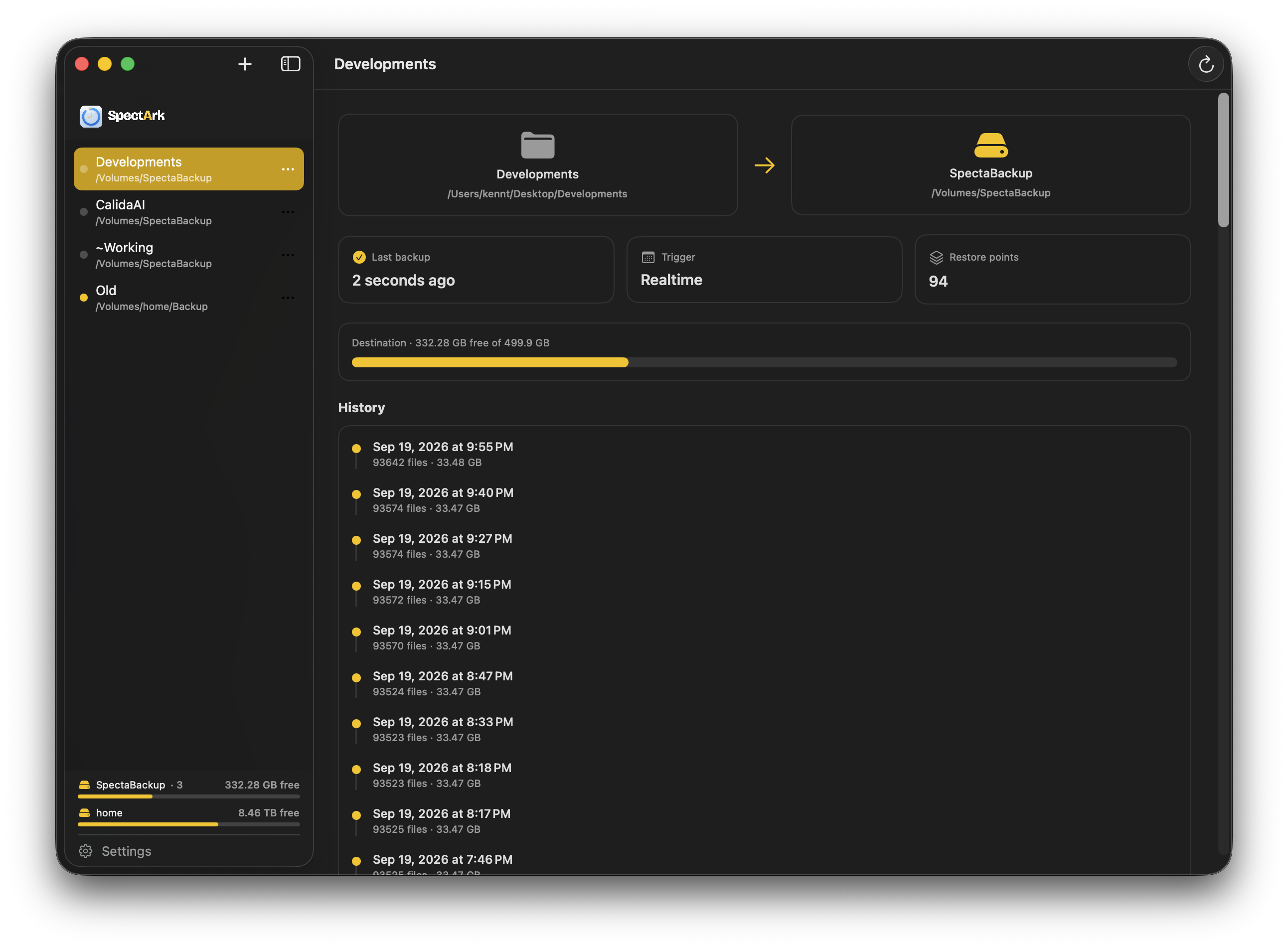
Realtime, versioned backup for the folders you actually care about — a native macOS app (Calida Lab / Specta product family).
Download
⬇ Download the latest DMG — open it and drag SpectArk to Applications. Signed with a Developer ID and notarized by Apple; universal (Apple Silicon + Intel), macOS 14+. Once installed, SpectArk updates itself (Check for Updates…).
See the Releases page for release notes and previous versions.
Why SpectArk?
I love Time Machine's versioned, point-in-time approach — but as a developer, the way it works wasn't what I needed:
- I don't need a whole-system backup. Time Machine copies the OS, apps, and Libraries. If my machine dies I'll just reinstall those. What I can't reinstall is the thing that actually matters: my source code and the projects I'm working on. It's the same in any line of work — the video being edited, the photos being retouched, the spreadsheet or document in progress: what can't be reinstalled is the work in hand.
- Scheduled backups always leave a gap. A long interval risks losing my latest code; a short one still loses whatever changed in the last few minutes when Murphy's law strikes. Even Git only protects what I've committed — never the work between commits.
- So I wanted a backup that follows my code as it changes. Point SpectArk at the folder I'm actively developing in and every change is backed up within seconds — no schedule, no gap — with a restore point at most every 15 minutes to go back to. That realtime behavior is the whole reason this app exists.
- And I didn't want to sacrifice a whole drive to it. Dedicating an entire disk to backups felt wasteful. I wanted to choose exactly where backups live and pair any source folder with any destination, freely.
- The backup shouldn't become the leak. A backup drive or NAS can be lost or stolen — and a plaintext copy hands over every file on it. So any backup can be encrypted end-to-end, unlocked only by your password (with a one-time recovery key as a fallback). It's optional and off by default: when I don't need it, backups stay plain files I can open in Finder.
SpectArk is the result: realtime, folder-scoped, versioned backup — optionally encrypted — that protects the files you actually care about, and lets you decide where they go.
Features
- Continuous protection with Time Machine–style restore points: every change is backed up within seconds, and a restore point is kept at most every 15 minutes — all of the last 24 hours, one per day for a month, one per week after that. Only changed files are copied; which folders changed comes from the macOS file-system journal, including changes made while SpectArk was not running.
- Realtime or scheduled per backup — watch a folder live, or run on an interval.
- Multiple source folders, each paired with any destination you choose.
- Local disk or NAS destinations. A NAS backup lives in a disk image on the share, with its full timeline and restore in the app; destinations are found wherever macOS mounts them.
- Keeps room on the backup disk: 5% of every backup disk stays free (or what you set); when it runs short, the disk's oldest restore points go first, across all the backups on it.
- Optional encryption: content-defined chunking + dedup, AES-256-GCM with argon2id-derived keys, and a one-time recovery key. Off by default (backups stay browsable plaintext).
- Skips rebuildable files (dependency folders, build outputs, caches) — only when the tool that owns them is recognized.
- Dashboard window + menu-bar dropdown (live throughput, free space, last backup); opens quietly at login.
- Non-sandboxed, Developer ID distribution. macOS 14+.
Getting started
- Add a backup with the + button: choose the folders to protect and a destination — a folder on any disk, or a NAS share mounted in Finder. Pick Realtime (back up as files change) or Scheduled (every so often), and turn on encryption if you want it: set a password, and save the recovery key shown once.
- Grant access when asked. macOS asks the first time SpectArk reads your Desktop, Documents or Downloads. To back up other protected places (another user's folders, a Photos library…), turn SpectArk on in System Settings ▸ Privacy & Security ▸ Full Disk Access, then quit and reopen SpectArk.
- Open at login (Settings ▸ General, or the prompt on a realtime backup): realtime backup runs only while SpectArk is open. At login it starts quietly in the menu bar — no window, no Dock icon.
- Choose how long to keep history in each backup's ⋯ ▸ Settings: Automatic (Time Machine style), keep the newest N, keep N days, or keep all — plus an optional maximum size, and how much free space to keep on the backup disk (0 = automatic, 5% of the disk).
Restoring
- ⋯ ▸ Restore… (or right-click the backup): pick a restore point, tick the files and folders you want back, and restore them to their original location or to another folder — choosing what happens when a file already exists there. An encrypted backup restores a whole restore point into a folder you choose.
- The latest backed-up state is a normal folder. For a backup on a local disk, click the destination card to open it in Finder and copy files straight out of it.
Build
The Xcode project is generated with XcodeGen:
brew install xcodegen      # one-time
xcodegen generate          # produces SpectaBackup.xcodeproj
open SpectaBackup.xcodeproj
Or from the command line:
xcodegen generate
xcodebuild -project SpectaBackup.xcodeproj -scheme SpectaBackup -configuration Release build
SpectaBackup.xcodeproj is generated and git-ignored; project.yml is the source of
truth. The project and scheme keep the legacy SpectaBackup name (and the bundle id
ai.calidalab.spectabackup) so existing backups, Keychain entries, and Full Disk
Access carry over across the rename; the built app is SpectArk.app. A release (sign,
notarize, DMG, Sparkle appcast) is built with scripts/release.sh.
Data integrity
The backup engine is built on macOS primitives chosen for correctness: every change is logged
as an intent in a SQLite catalog before it touches the disk, so an interrupted pass is repaired
on the next one; copies are fsynced and put in place with an atomic rename, and the catalog
commits with F_FULLFSYNC; every copy is checked against its source and dropped if the file
changed while it was read, so a file is never recorded half-written. Files that must agree with
each other (a database and its -wal) are copied one after another, not at one instant — a
source snapshot would need root and an Apple-granted entitlement (see TODO.md).
See docs/INCREMENTAL_ENGINE_DESIGN.md for the backup
engine and docs/ENCRYPTION_DESIGN.md for the encrypted repo.
Roadmap
Planned enhancements are tracked in TODO.md (priority-ordered), and past releases in CHANGELOG.md. Contributions welcome.
License
MIT © 2026 Kennt Kim (Calida Lab) — see LICENSE.
Questions
What is SpectArk?
kennss/SpectArk is a public repo on GitHub by kennss. Native macOS incremental backup app — versioned snapshots (Time Machine style), in-app restore, realtime/scheduled, retention + quota, NAS support. SwiftUI, macOS 14+.
Is SpectArk open source?
It declares the MIT license on GitHub.
Does SpectArk run on macOS, Windows or Linux?
Its maker has not tagged a system, so it is unknown here. Its README says what it needs.
How do I install SpectArk?
Open "Take it" on its page: Take My Repo writes an install plan for your machine and hands it to your AI agent (Claude Code, Codex or Cursor), which asks you before each step. Take My Repo has not tested it on any machine.