AutoGPT
AutoGPT is the vision of accessible AI for everyone, to use and to build on. Our mission is to provide the tools, so that you can focus on what matters.
- 188k
- Python
- 2 h ago
Experience-Driven Black-Box Cost Control for Coding Agents
Repo microsoft/TokenEconomizer, read from GitHub 2 h ago. microsoft has not joined Take My Repo.
microsoft/TokenEconomizer is a public repo on GitHub by microsoft. Experience-Driven Black-Box Cost Control for Coding Agents. It declares the MIT license on GitHub. It is written mainly in Python, has 8,037 stars and last changed on 2026-11-24. Nobody has reviewed it on Take My Repo yet, which says nothing about its quality. Read from GitHub on 2026-11-24.
AutoGPT is the vision of accessible AI for everyone, to use and to build on. Our mission is to provide the tools, so that you can focus on what matters.
Aaron J. Li1,
Weijia Xu2,
Chandan Singh2,
Zixiao Chen3,
Jeevana Priya Inala2,
Charlotte Siska3,
Acar Tamersoy3,
Bin Yu1,
Ion Stoica1,
Michel Galley2,
Jianfeng Gao2
1UC Berkeley 2Microsoft Research 3Microsoft Security
Our measurement on SWE-Bench tasks: 18.4–30.9% lower mean cost across five agent–model combinations, cheaper in all 30 repository × combination cells, and Pass@1 up in 4 of 5. Results

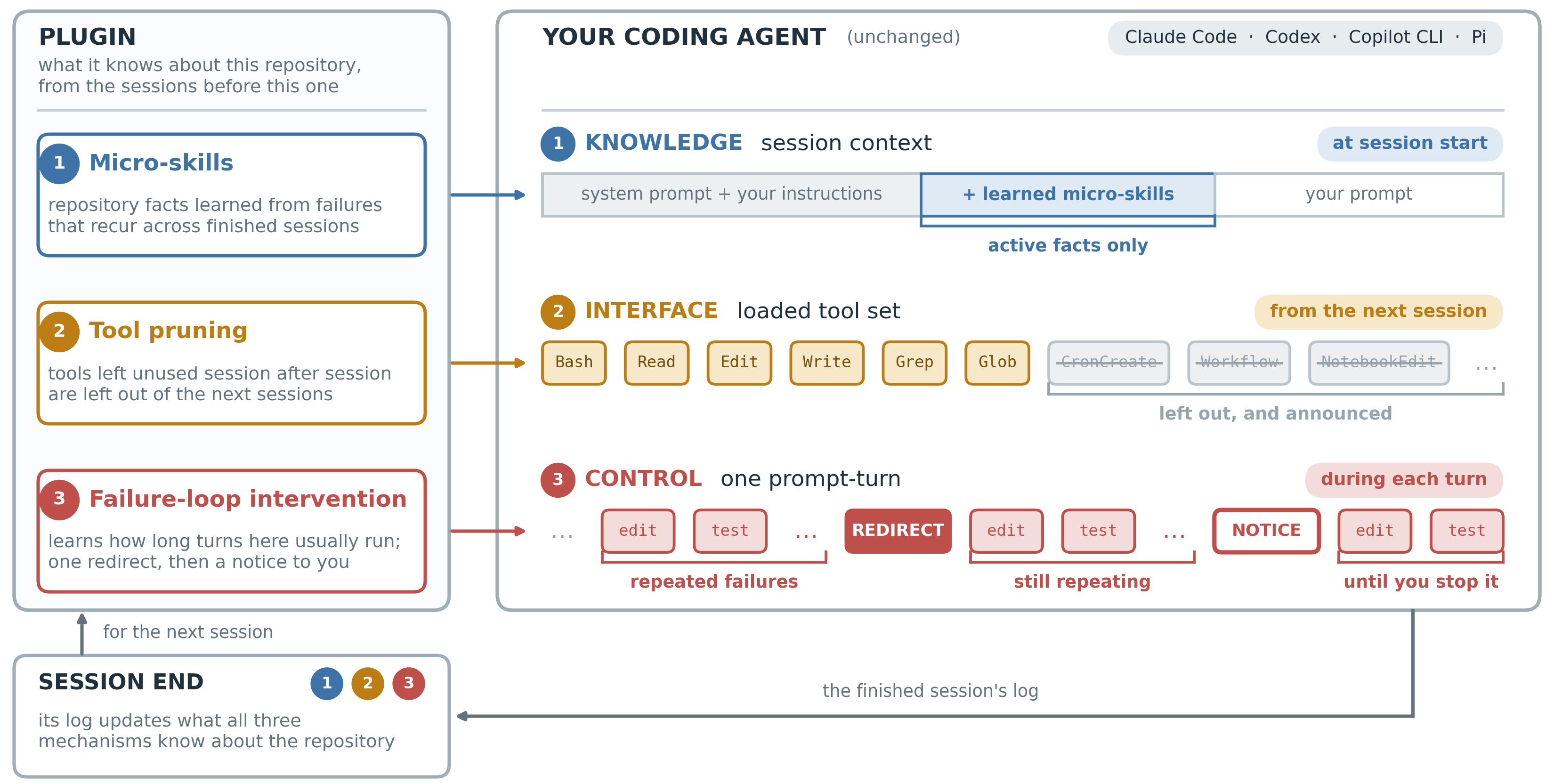
TokenEconomizer makes coding agents cheaper to run in the repositories you work in often, without changing the agent itself. It learns from the sessions an agent has already run in a repository, and uses that experience to cut waste in the sessions that follow. It has three mechanisms:
python -m pytest where pytest is missing, npx tsc where tsc is), an environment
variable a command needs, where generated files live. Micro-skills learns such facts, in any
language, from two sources: failures that repeat across sessions, and a model that reviews the
recent sessions every k sessions (k = 3) and proposes facts. A fact is stated at the start
of each session once three sessions have confirmed it, and dropped when later sessions
contradict it.TokenEconomizer is a plugin for Claude Code, Codex, the GitHub Copilot CLI and Pi,
with experimental support for opencode, Cursor Agent, Grok Build, Hermes Agent,
the Antigravity CLI and Factory Droid. Each italic
letter above is a setting, shown with its default (Settings), and each mechanism can be turned on or
off. The plugin announces each action in one line, and if any part of it fails, your session
carries on as if it were not installed. Its model calls (the fact proposer, and the judge with the
redirect it writes) run through your own agent, on the same plan or login, and their cost is
included in its reports. What it learns stays on your machine, in ~/.tokeneconomizer.
The paper ran five agent–model combinations on the same 277 SWE-Bench tasks from six repositories.
Each task ran as its own session, and each repository's tasks ran in order, starting with nothing
learned. Costs include every model call TokenEconomizer made. Within each repository and
combination, cost fell by 5–40%. The savings held on Web-Bench (16–21% lower) and on two
security-auditing benchmarks where every task is in a new repository (6–20% lower). The
project page has interactive charts, per-repository numbers
and nine annotated runs, and experiments/ reruns the SWE-Bench and
Web-Bench experiments.
Coding agents are built to finish tasks, not to keep them cheap. Every turn pays again for the agent's instructions, every loaded tool, and the conversation so far. Developers use the same agent on the same repository again and again, so much of that cost repeats: the same facts rediscovered, the same unused tools sent, the same kinds of failing loops. TokenEconomizer leaves the agent's model, weights and code alone and learns across a repository's sessions instead of treating each one on its own, so whatever the plugin spends is paid back over the sessions that follow. Four principles guide the mechanisms:
You need one of these agents, signed in any way it supports, and Python 3.10 or newer on
PATH. The plugin needs no API key of its own and never handles credentials, so any plan or
login works.
Run these commands in the folder where you want to keep the clone. Claude Code, Codex, the Copilot CLI and opencode run the plugin from the clone, so leave it in place. Then start the agent in one of your repositories.
Claude Code
git clone https://github.com/microsoft/TokenEconomizer.git
claude plugin marketplace add "$PWD/TokenEconomizer"
claude plugin install tokeneconomizer@tokeneconomizer
Start claude, trust the folder (Yes, I trust this folder), and run
/tokeneconomizer:status, allowing its script if asked. Once per machine, and again after Claude
Code updates, run /tokeneconomizer:toolprune refresh-catalog.
Codex
git clone https://github.com/microsoft/TokenEconomizer.git
codex plugin marketplace add "$PWD/TokenEconomizer"
codex plugin add tokeneconomizer@tokeneconomizer
Start codex, choose Trust and continue for the folder, then at Hooks need review
choose Trust all and continue. The hooks take effect from your next Codex session, so quit
(/exit), start codex again, and check with $tokeneconomizer:status.
GitHub Copilot in VS Code
See VS Code setup to install from the editor with the Copilot session target, without GitHub CLI or standalone Copilot CLI.
Copilot CLI
git clone https://github.com/microsoft/TokenEconomizer.git
copilot plugin marketplace add "$PWD/TokenEconomizer"
copilot plugin install tokeneconomizer@tokeneconomizer
Start copilot, choose Yes, and remember this folder for future sessions, and run
/tokeneconomizer:status, choosing Yes to run its script. Once per machine, and again after
Copilot updates, run /tokeneconomizer:toolprune refresh-catalog.
Pi
pi install git:github.com/microsoft/TokenEconomizer
Start pi and run /te status.
Factory Droid (experimental; micro-skills, the loop guard and session cost, not tool pruning)
git clone https://github.com/microsoft/TokenEconomizer.git
cd TokenEconomizer
python scripts/build_plugin.py --droid
droid plugin marketplace add "$PWD/dist/tokeneconomizer-droid"
droid plugin install tokeneconomizer@tokeneconomizer-droid --scope user
Start a new Droid session (its hooks are snapshotted at startup) and run
/tokeneconomizer-status. Droid keeps each session's token usage in a settings file beside its
log, so folded sessions are priced like any other host's. Its TUI has no persistent per-tool
setting, so tool pruning stays off; and because droid exec writes a session log of its own,
micro-skills' paid proposer and the loop guard's judge stay off until droid_sidecall is on
(when on, they may use only Droid's read-only Read tool).
See docs/DROID.md for what works and how to import earlier sessions.
Cursor Agent (experimental)
python scripts/build_plugin.py --out ~/.cursor/plugins/local/
Reload Cursor, confirm tokeneconomizer appears in Customize, then send a prompt in a repository.
Check its state from a terminal with ~/.tokeneconomizer/bin/te --host cursor status. Cursor's
published hooks provide session, prompt, tool-result and completion events. Its transcript format
and per-session token usage are not a supported public interface, so the adapter records needed
hook events locally and reports session cost as unavailable. Cursor support is macOS and Linux
only: on Windows, Cursor runs hook commands through PowerShell, and this plugin's launcher is a
POSIX shell script.
Grok Build (experimental)
git clone https://github.com/microsoft/TokenEconomizer.git
grok plugin marketplace add "$PWD/TokenEconomizer"
grok plugin install tokeneconomizer --trust
Grok runs Claude Code plugins, so this is the Claude Code plugin: grok loads plugin/hooks/hooks.json
and TokenEconomizer recognises the grok session in the hook payload. (If you already installed it
for Claude Code, grok reads ~/.claude/plugins and runs it in your sessions; this version reads
those as grok sessions.) Micro-skills and the loop guard only; tool pruning is not available.
Confirm tokeneconomizer is enabled in grok plugin list, start grok, and check with
~/.tokeneconomizer/bin/te --host grok status.
The learned facts arrive with the session's first tool call, not at its start
(its limits).
Antigravity CLI (agy; experimental; micro-skills' LLM-free facts only)
python scripts/build_plugin.py --out dist/marketplace
agy plugin install dist/marketplace/tokeneconomizer
Start agy and send a prompt in a repository, then check with
~/.tokeneconomizer/bin/te --host antigravity status (on Windows, <plugin>\scripts\te.cmd --host antigravity status, run in the repository; <plugin> is the folder above scripts\te_bootstrap.py in %USERPROFILE%\.tokeneconomizer\bin\te.json, which the first session writes). agy has no plugin commands, so the
plugin's commands run from a terminal. The plugin makes no model call through agy, which has no
option that runs a prompt with every tool off, so the paid proposer and the loop guard are off
and tool pruning is not available. Works across Windows, macOS, and Linux with native Windows batch launchers (scripts\te-hook.cmd, scripts\te.cmd). Tested on agy 1.5.1 and 1.5.2 on Windows 11, macOS, and Linux.
See its limits.
opencode (experimental)
git clone https://github.com/microsoft/TokenEconomizer.git
mkdir -p ~/.config/opencode/plugins
ln -s "$PWD/TokenEconomizer/plugin/opencode/tokeneconomizer.ts" ~/.config/opencode/plugins/
The one file serves both generations: opencode 1.x reads its server entry, 2.x its setup.
Start opencode and send a prompt, then check in the repository with
~/.tokeneconomizer/bin/te --host opencode status. opencode has no plugin commands, so the
plugin's commands run from a terminal.
Hermes Agent (experimental; micro-skills and the loop guard, on the classic CLI and one-shot runs)
microsoft/TokenEconomizer is a public repo on GitHub by microsoft. Experience-Driven Black-Box Cost Control for Coding Agents.
It declares the MIT license on GitHub.
Its maker tagged it for macOS, Windows and Linux, or as Docker or cross-platform. That is declared by the maker; Take My Repo has not tested it.
Open "Take it" on its page: Take My Repo writes an install plan for your machine and hands it to your AI agent (Claude Code, Codex or Cursor), which asks you before each step. Take My Repo has not tested it on any machine.
CLI proxy that reduces LLM token consumption by 60-90% on common dev commands. Single Rust binary, zero dependencies
Source control for agents. Use multiple coding agents, track their changes and query them in one place
The agent harness performance optimization system. Skills, instincts, memory, security, and research-first development for Claude Code, Codex, Opencode, Cursor and beyond.
Reverse engineer anything with agents, from app behavior down to native binaries.
Build Agentic workflows, RAG pipelines, with rich AI model and tool support on one collaborative workspace. Deploy on cloud, VPC, or self-hosted, so teams move from prototype to production without rebuilding the stack.
Its last change on GitHub was on 2026-11-24. GitHub counts 38 open issues and pull requests. Take My Repo does not judge from that whether it is maintained.
Nobody has reviewed it on Take My Repo yet, which says nothing about its quality.
Take My Repo cannot say: it does not audit code and has not run TokenEconomizer. What is known comes from GitHub. It declares the MIT license on GitHub. Its last change was on 2026-11-24. It has 8,037 stars, which measure popularity, not safety. Nobody has reviewed it on Take My Repo yet, which says nothing about its quality. Read the source before you run it. With "Take it", your AI agent shows each step and asks you before running it; README text is treated as data, not as instructions.