Transcoder
🎞 Hardware-accelerated video transcoding using Android MediaCodec APIs. Supports cropping, concatenation, clipping, audio processing, video speed and much more.
- 867
- Java
- Apache-2.0
- 2 y ago
MLVC: Multi-platform Learned Video Codec for Real-World Deployment
Repo microsoft/mlvc, read from GitHub 1 d ago. microsoft has not joined Take My Repo.
microsoft/mlvc is a public repo on GitHub by microsoft. MLVC: Multi-platform Learned Video Codec for Real-World Deployment. It declares the MIT license on GitHub. It is written mainly in Python, has 421 stars and last changed on 2026-11-20. Nobody has reviewed it on Take My Repo yet, which says nothing about its quality. Read from GitHub on 2026-11-25.
🎞 Hardware-accelerated video transcoding using Android MediaCodec APIs. Supports cropping, concatenation, clipping, audio processing, video speed and much more.
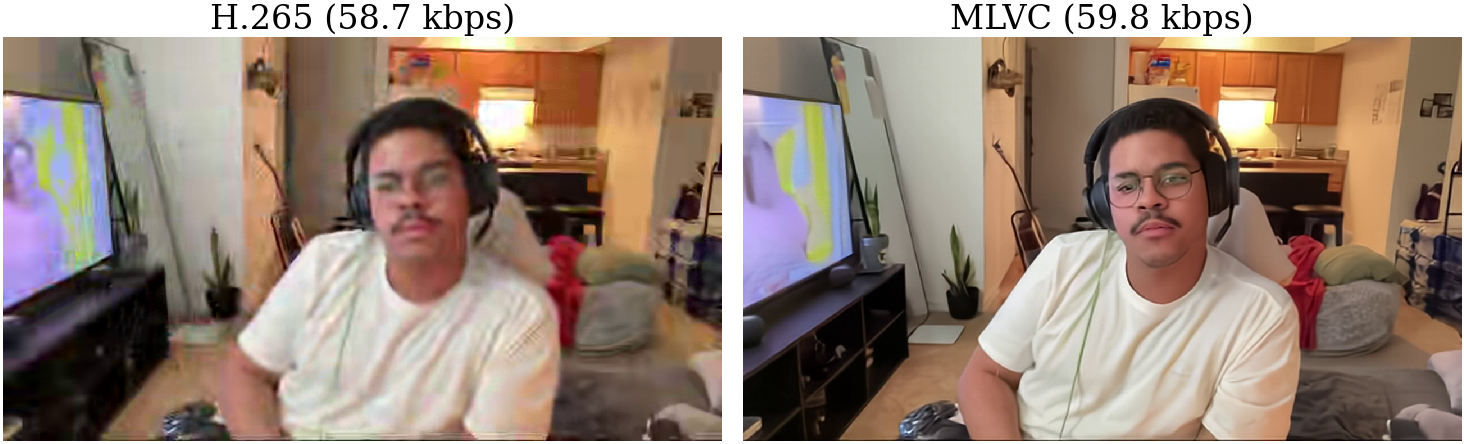
Neural video codec with real-time performance and hardware robustness across diverse consumer devices.
MLVC achieves >70% MOS-based BD-rate improvement over hardware HEVC while averaging around 100 FPS for both encoding and decoding on commodity NPUs from Apple, Intel, and Qualcomm (540p).
This repository provides:
For deployment, see libmlvc, our open-source C++ codec library for MLVC encoding and decoding on NPUs.
git clone https://github.com/microsoft/mlvc.git
cd mlvc
uv sync
uv pip install packages/msrtc_rans
uv run pre-commit install
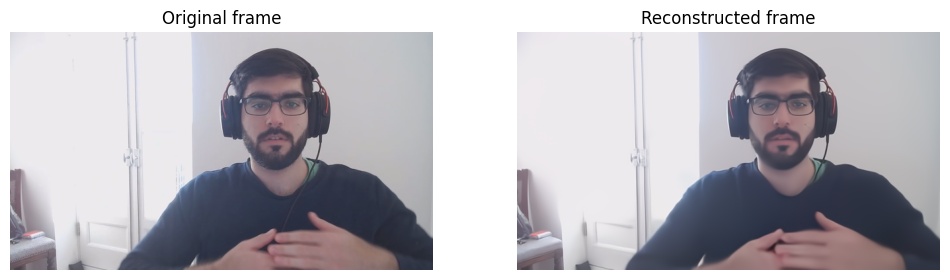
See demo.ipynb for a walkthrough.
| Model | Objective | Parameters | Weights | SHA-256 |
|---|---|---|---|---|
| MLVC | psnr | 18.3M | mlvc-psnr-v1.ckpt | 834adaab680837c4106a9bb62e5778b3f13729b4fe6f751797e0747214f5cca1 |
| MLVC | perceptual | 18.3M | mlvc-perceptual-v1.ckpt | 0ba781769a12ae40548d3f6f92e56594510b926bf72ddb92717c7ebccde4723e |
| MLVC-S | psnr | 5.4M | mlvc-s-psnr-v1.ckpt | 1b86b757ddb115342293efb57719d6216c6ee2e459ae796ec41723b5c05ca896 |
| MLVC-S | perceptual | 5.4M | mlvc-s-perceptual-v1.ckpt | cfe12eed07b00cdb98c0cd07136797f3b49e8d52f7b6bd3b81cf0a5312a4aa7c |
Note: The checkpoints listed above were trained on OpenVid. The technical report used models trained on Vimeo.
Run commands from the video/ directory.
Training dataset paths are resolved relative to --data_mount.
Model checkpoints, auxiliary model files, anchors, and relative --save_dir paths are resolved relative to --checkpoints_mount.
Relative benchmark config paths such as ./test_cfg/... are resolved from the working directory, so run the commands below from video/.
~/mlvc/
├── data/                         # --data_mount ~/mlvc
│   ├── OpenVidHD/
│   └── VCD/
└── job-outputs/                  # --checkpoints_mount ~/mlvc/job-outputs
    ├── pretrained/
    ├── benchmark_test/
    │   └── anchor/
    └── checkpoints/
You should move all downloaded datasets to ~/mlvc/data.
Download OpenVidHD data from here - see details and further steps in BUILD_TRAIN_DATASET.md.
Follow instructions here.
The original VCD dataset is available from the VCD repository. Prepared versions used by this project are available at: 360p, 540p and 720p.
Extract the required resolutions under:
~/mlvc/data/VCD/yuv/
├── 640x360_30fps/
├── 960x540_30fps/
└── 1280x720_30fps/
Anchor files contain results from a reference codec and are used to calculate BD-rate.
We provide intel_hw_hevc anchors for VCD 360p, 540p, and 720p, and DCVC-RT anchors for 96-frame HEVC sequences and 48-frame VCD-s1 360p sequences.
Keep the downloaded filenames and place the anchors under:
~/mlvc/job-outputs/benchmark_test/anchor/
├── hevc/
└── vcd/
  ├── 640x360_30fps/
  ├── 960x540_30fps/
  └── 1280x720_30fps/
Auxiliary models are workflow-specific. You do not need to download all of them.
Download the cvpr2025_image.pth.tar checkpoint provided by the DCVC project, rename it to DMCI-6.0.pth.tar, and place it in ~/mlvc/job-outputs/pretrained/.
LPIPS is required only for perceptual training or LPIPS evaluation.
Download the LPIPS VGG16 weights file vgg.pth from the PerceptualSimilarity project, rename it to lpips_vgg16.pth, and place it in ~/mlvc/job-outputs/pretrained/.
We provide experimental support for the DeQA-Score no-reference metric which uses LLaMa2-7B.
Download the weights from their HuggingFace page and place them in ~/mlvc/job-outputs/pretrained/DeQA-Score-Mix3.
SimpleVQA is an optional no-reference video-quality metric for benchmark and training-validation
videos. Place the official UGC_BVQA_model.pth
and SLOWFAST_8x8_R50.pyth
in ~/mlvc/job-outputs/pretrained/SimpleVQA. See SimpleVQA for usage.
FarL and RetinaFace are needed only to generate face segmentation masks or to calculate face-region metrics without precomputed masks.
Download the face detector mobilenet0.25_Final.pth and face parser face_parsing.farl.lapa.main_ema_136500_jit191.pt and move them to ~/mlvc/job-outputs/pretrained/checkpoints.
uv run train_image.py \
  --config configs/train_image-dcvcrt.yaml \
  --data_mount ~/mlvc \
  --checkpoints_mount ~/mlvc/job-outputs \
  --save_dir checkpoints/dmci
uv run train_video.py \
  --config configs/train_video-mlvc.yaml \
  --data_mount ~/mlvc \
  --checkpoints_mount ~/mlvc/job-outputs \
  --save_dir checkpoints/mlvc
Perceptual fine-tuning configuration is shown in train_video-mlvc-perceptual.yaml, MLVC-S model configuration is shown in train_video-mlvc_s.yaml.
To evaluate the pre-trained MLVC PSNR model, download mlvc-psnr-v1.ckpt to ~/mlvc/job-outputs/pretrained/, then run:
uv run train_video.py \
  --config configs/test_video-mlvc.yaml \
  --validate \
  --data_mount ~/mlvc \
  --checkpoints_mount ~/mlvc/job-outputs
uv run compute_benchmark_metrics.py --config configs/compute_benchmark_metrics.yaml
uv run calculate_frame_sequence_metrics.py --config configs/dataset/calculate_frame_sequence_metrics.yaml
Run commands from the video/ directory.
Download and extract the 540p VCD data, which is used during export validation and testing.
To convert a pre-trained model, download its checkpoint from the Models table to ~/mlvc/job-outputs/pretrained/, keeping its filename.
Copy model_configs_example.yaml to video/conversion/_full_model/model_configs.yaml. The template defines standard MLVC and MLVC-S entries with PSNR checkpoints selected by default. Update an entry's weights_path and weights_version to use its perceptual checkpoint.
Model conversion uses the directory layout above by default. If needed, override the job outputs and VCD data directories with VIDEO_JOB_OUTPUTS_DIR and VIDEO_TEST_DATA_DIR, or with --job-outputs-dir and --test-data-dir.
As an example, export the standard MLVC PSNR model (mlvc-psnr-v1.ckpt) at the default 960x544 input size, using the default model format and target device for your platform:
uv run convert.py export --model-version dmc61sbr_reglu
More examples:
# Example 1: Export for different model formats and target devices
uv run convert.py export --model-version dmc61sbr_reglu --model-type coreml --target-device apple
uv run convert.py export --model-version dmc61sbr_reglu --model-type onnx --target-device intel
uv run convert.py export --model-version dmc61sbr_reglu --model-type onnx --target-device qualcomm
uv run convert.py export --model-version dmc61sbr_reglu --model-type onnx --target-device generic

# Example 2: Export at fixed input sizes (both dimensions must be multiples of 16)
uv run convert.py export --model-version dmc61sbr_reglu --model-width 640 --model-height 368
uv run convert.py export --model-version dmc61sbr_reglu --model-width 320 --model-height 192

# Example 3: Override the configured checkpoint and its version label
uv run convert.py export --model-version dmc61sbr_reglu \
  --weights-path /absolute/path/to/mlvc-perceptual-v1.ckpt \
  --weights-version perceptual_v1

# Example 4: Enable model benchmark after conversion
uv run convert.py export --model-version dmc61sbr_reglu --benchmark

# Other options
uv run convert.py export --help
The following examples validate, profile, benchmark, and evaluate the default 960x544 CoreML export. Adjust --model-path
microsoft/mlvc is a public repo on GitHub by microsoft. MLVC: Multi-platform Learned Video Codec for Real-World Deployment.
It declares the MIT license on GitHub.
Its maker has not tagged a system, so it is unknown here. Its README says what it needs.
Open "Take it" on its page: Take My Repo writes an install plan for your machine and hands it to your AI agent (Claude Code, Codex or Cursor), which asks you before each step. Take My Repo has not tested it on any machine.
Its last change on GitHub was on 2026-11-20. Take My Repo does not judge from that whether it is maintained.
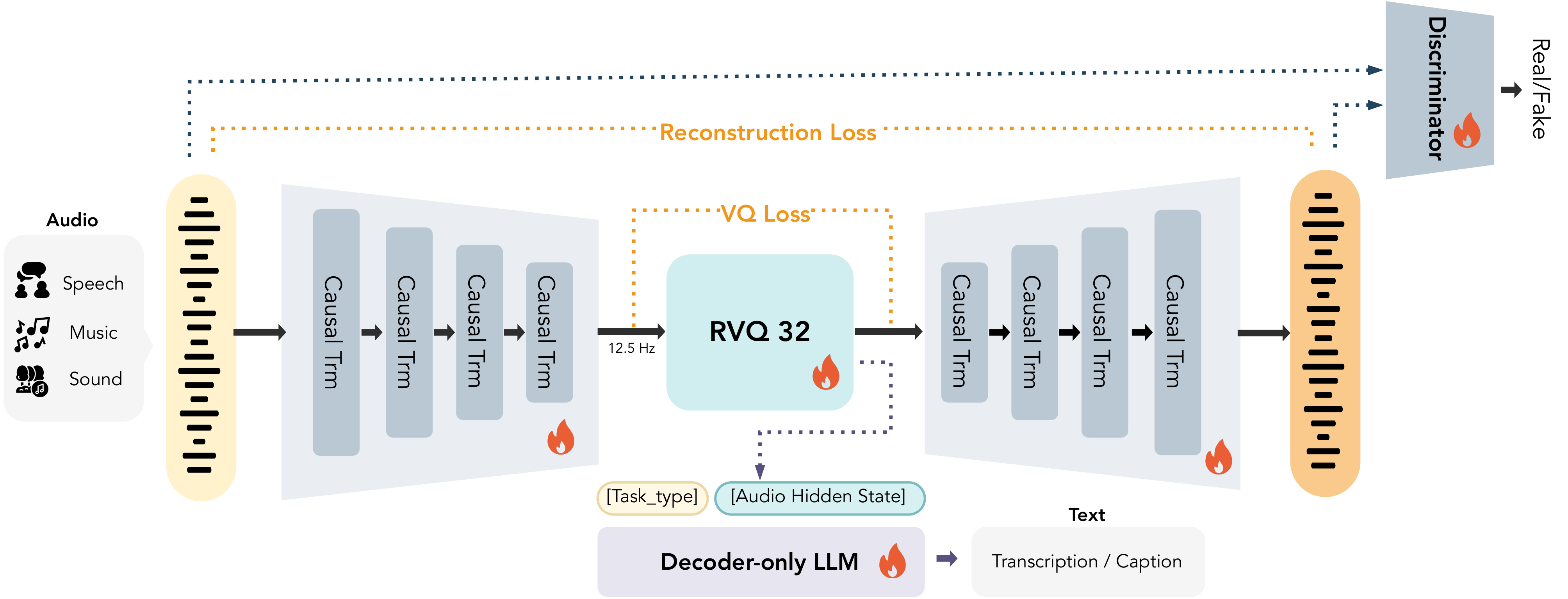
A 1.6B causal Transformer audio tokenizer with streaming, variable bitrates, and semantic alignment across speech, sound, and music
A curated list of the best Text-to-Speech, speech synthesis, and voice-cloning research — models, papers, benchmarks, and toolkits, focused on 2025–2026.
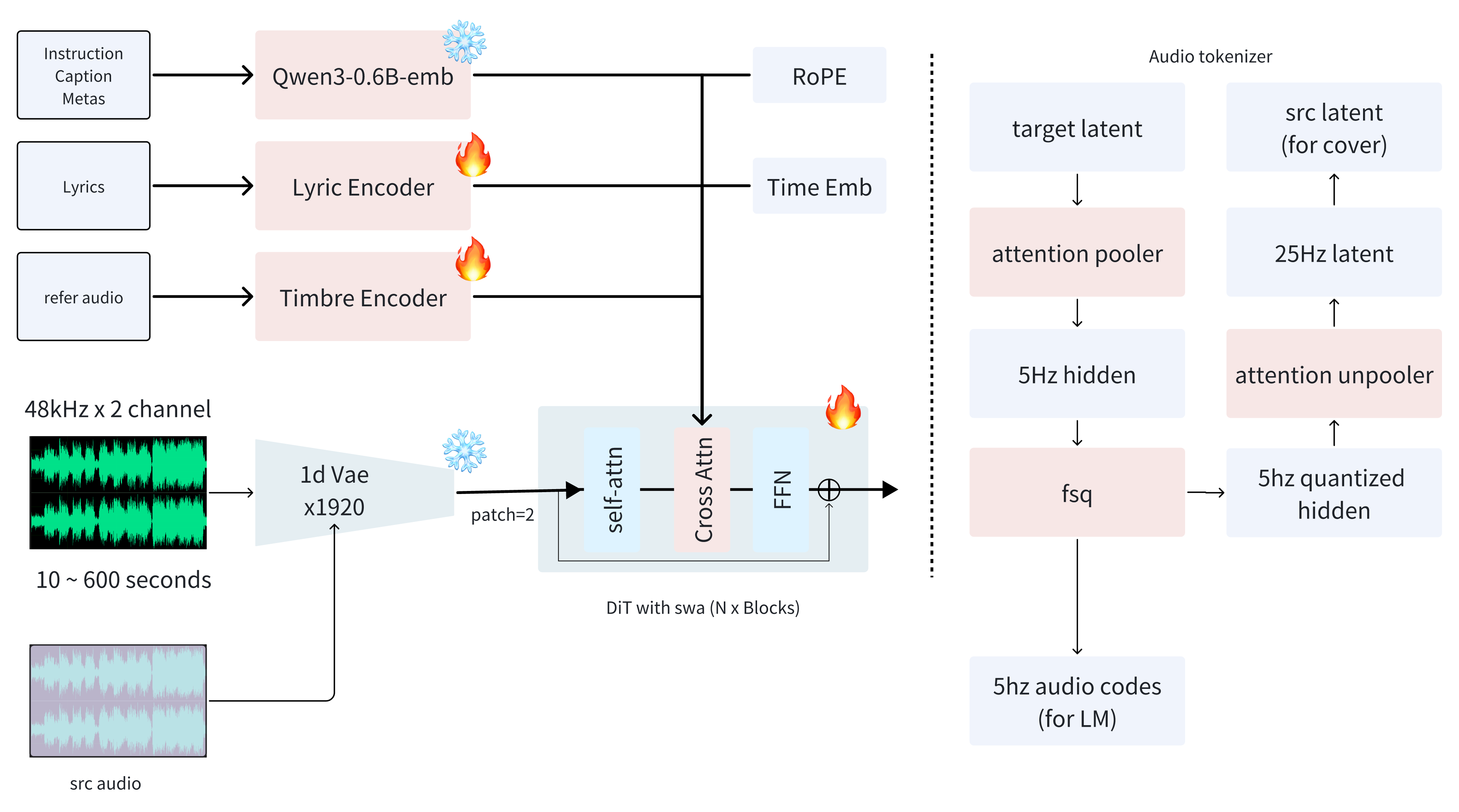
Visual catalog of neural audio and speech codec architectures, audio VAEs and continuous autoencoders, with code, checkpoints, figures and license evidence.
[CVPR 2026 Highlight] A Frame is Worth One Token: Efficient Generative World Modeling with Delta Tokens
Nobody has reviewed it on Take My Repo yet, which says nothing about its quality.
Take My Repo cannot say: it does not audit code and has not run mlvc. What is known comes from GitHub. It declares the MIT license on GitHub. Its last change was on 2026-11-20. It has 421 stars, which measure popularity, not safety. Nobody has reviewed it on Take My Repo yet, which says nothing about its quality. Read the source before you run it. With "Take it", your AI agent shows each step and asks you before running it; README text is treated as data, not as instructions.