

ECC
The agent harness performance optimization system. Skills, instincts, memory, security, and research-first development for Claude Code, Codex, Opencode, Cursor and beyond.
- 310k
- JavaScript
- MIT
- 2 d ago
A local-first AI knowledge base & NotebookLM alternative built with Electron.
Repo mrsibe/KnowNote, read from GitHub 2 d ago. mrsibe has not joined Take My Repo.
mrsibe/KnowNote is a public repo on GitHub by mrsibe. A local-first AI knowledge base & NotebookLM alternative built with Electron. It declares the GPL-3.0 license on GitHub. It is written mainly in TypeScript, has 1,174 stars and last changed on 2026-10-02. Nobody has reviewed it on Take My Repo yet, which says nothing about its quality. Read from GitHub on 2026-11-23.
The agent harness performance optimization system. Skills, instincts, memory, security, and research-first development for Claude Code, Codex, Opencode, Cursor and beyond.
Official electron build of draw.io
A local-first research workspace.
Desktop · Local RAG · Bring your own model · Open source
KnowNote turns your own documents into a knowledge base you can question, and answers from those documents with a reference back to the passage the answer came from.
It is a desktop application rather than a self-hosted stack: no Docker, no server, no account. Parsing, splitting, embedding and vector search all run inside the app, and the only thing that leaves your machine is the request you send to the model endpoint you configured. If that endpoint is a local server, nothing leaves at all.
The website is the full story: knownote.pages.dev — the mechanism, the limits, and an honest comparison with NotebookLM and AnythingLLM.
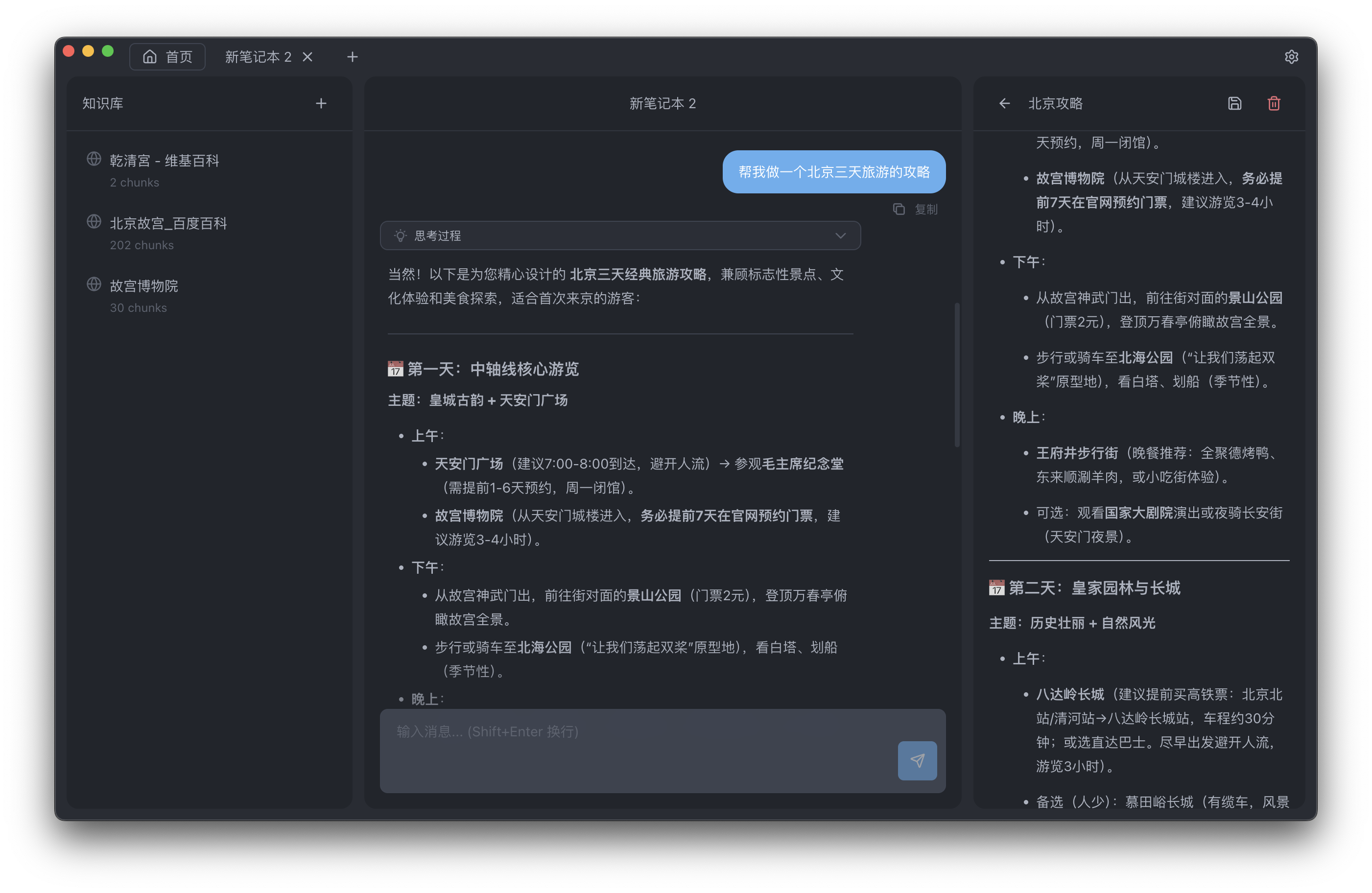
Three-column layout: Knowledge Library · AI Q&A · Note Output
KnowNote can serve your library over MCP on stdio, read-only, so an agent — Claude Code, Codex, Cursor, Claude Desktop — can search the documents you already have instead of asking you to paste them in.
// your MCP client's config
{
  "mcpServers": {
    "knownote": {
      "command": "/path/to/knownote",
      "args": ["--mcp"]
    }
  }
}
The tools are list_notebooks, search_notebook, get_source, read_document
and search_notes. search_notebook returns passages with provenance
(document id, page, character offsets) rather than bare text, so a claim an agent
makes can be checked against the source. There is no write tool, no tool that
calls a model, and no result that reports a filesystem path — that is what makes
this surface safe to grant to an agent reading untrusted documents.
By default the server uses the same library as the desktop app. Point it at a
different profile with KNOWNOTE_DATA_DIR=/path/to/profile.
Written down because the alternative is that you find out after installing.
Download the build for your platform from GitHub Releases:
knownote-{version}-setup.exeknownote-{version}-arm64.dmgThe builds are unsigned. There is no Apple Developer ID certificate in the release pipeline, so macOS refuses to launch the app on first run and Windows SmartScreen flags the installer. Neither means the download is broken — both are one-time prompts, and the steps below clear them.
Open the .dmg and drag KnowNote into Applications.
Clear the quarantine flag once:
sudo xattr -rd com.apple.quarantine /Applications/KnowNote.app
Launch it as usual.
Intel Macs are not built at the moment — the release ships an arm64 build only.
Without step 2, macOS reports "KnowNote is damaged and can't be opened" or "Apple cannot check it for malicious software". Only run this command on an app taken from this repository's Releases page.
If SmartScreen shows "Windows protected your PC", choose More info → Run anyway.
Nothing is configured out of the box: open Settings, add at least one model connection under Models (any OpenAI-, Anthropic- or Google-compatible endpoint, or a local server such as Ollama), then start asking questions. Notebooks, notes and embeddings all stay on your machine.
git clone https://github.com/MrSibe/KnowNote.git
cd KnowNote
npm install
npm run dev
CONTRIBUTING.md has the full command list, the Node version CI uses, and the checks that are gates before a pull request.
A short version. The website goes further on local RAG and citations, and DESIGN.md covers the interface.
pdfjs-dist, mammoth, officeparser and turndown. Each
format keeps the structure it has: page boundaries, headings, slides.Xenova/multilingual-e5-small through ONNX, running in the
Electron main process. 384 dimensions, q8, the revision pinned, and remote
model loading disabled. Downloaded on demand and cached on disk.sqlite-vec, through Drizzle ORM. Each notebook gets
its own vector table carrying its own width, so vectors produced by different
embedding spaces are never compared.KnowNote/
├── src/
│ ├── main/ # Electron main process
│ │ ├── db/ # Database configuration and schema
│ │ ├── services/ # Core logic (document parsing, RAG, etc.)
│ │ └── models/ # Model connection resolution and API protocol adapters
│ ├── renderer/ # React renderer process
│ ├── preload/ # Electron preload scripts
│ └── shared/ # Shared types and utilities
├── resources/ # App resources (icons, etc.)
├── build/ # Build configuration
└── out/ # Build output
Issues, discussions and pull requests are all welcome. If you have ideas about learning workflows, knowledge visualization, or the model-connection layer, they are especially useful. See CONTRIBUTING.md before you start.
GPL-3.0. See LICENSE.
If this project resonates with you, feel free to try it, star it, or leave feedback. Thanks for checking it out 🙏
Built with ❤️ by @MrSibe
mrsibe/KnowNote is a public repo on GitHub by mrsibe. A local-first AI knowledge base & NotebookLM alternative built with Electron.
It declares the GPL-3.0 license on GitHub.
Its maker tagged it for macOS, Windows and Linux, or as Docker or cross-platform. That is declared by the maker; Take My Repo has not tested it.
Open "Take it" on its page: Take My Repo writes an install plan for your machine and hands it to your AI agent (Claude Code, Codex or Cursor), which asks you before each step. Take My Repo has not tested it on any machine.
Leaked system prompts of ChatGPT, Claude, Gemini and more. The hidden system prompt of every popular chatbot, in full, every version since May 2025. Also Anthropic Claude Code, OpenAI Codex, Google Antigravity, xAI Grok, Meta Muse, Moonshot Kimi, Alibaba Qwen, Z.ai GLM ZCode, MiniMax, Cursor, Perplexity, DeepSeek and 30+ others. Updated daily.
VoiceStudio is the open-source, fully-local ElevenLabs alternative — voice cloning, voice design, video dubbing, dictation, transcription & audiobook creation in 646 languages.
The open-source, cross-platform API client for GraphQL, REST, WebSockets, SSE and gRPC. With Cloud, Local and Git storage.
Its last change on GitHub was on 2026-10-02. GitHub counts 6 open issues and pull requests. Take My Repo does not judge from that whether it is maintained.
Nobody has reviewed it on Take My Repo yet, which says nothing about its quality.
Take My Repo cannot say: it does not audit code and has not run KnowNote. What is known comes from GitHub. It declares the GPL-3.0 license on GitHub. Its last change was on 2026-10-02. It has 1,174 stars, which measure popularity, not safety. Nobody has reviewed it on Take My Repo yet, which says nothing about its quality. Read the source before you run it. With "Take it", your AI agent shows each step and asks you before running it; README text is treated as data, not as instructions.




