
docker
Docker containers for OpenCog - Robot Operating System (ROS)
- 78
- 2 wk ago
Repo opencog/docker, read from GitHub 1 min ago. opencog has not joined Take My Repo.
In short
opencog/docker is a public repo on GitHub by opencog. Docker containers for OpenCog - Robot Operating System (ROS). It declares no license on GitHub. Public does not mean open source: without a license, nobody is granted the right to reuse it. It is written mainly in Dockerfile, has 78 stars and last changed on 2026-11-05. Nobody has reviewed it on Take My Repo yet, which says nothing about its quality. Read from GitHub on 2026-11-22.
OpenCog Docker library
This repository contains various docker images for demoing and using various parts of the OpenCog project. Using the docker images here is the easiest way to get interesting parts of OpenCog running.
By using Docker, most of the difficulty of installing and configuring
the large variety of required packages and dependencies is eliminated.
The individual docker files specify exactly what is needed to run a
system or demo. Using these is as simple as saying ./build.sh and
then ./run.sh.
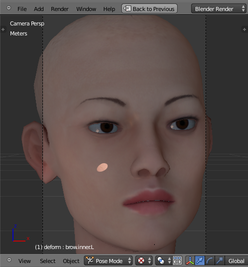
The most sophisticated demo is Eva, an animated female head, capable of seeing you (via a webcam), talking to you (via a chatbot), and engaging you (and your guests) in social interaction. She will make eye contact, and express her pleasure with smiles and looks of surprise and happiness.


Another particularly interesting container is that for the OpenCog to MineCraft bridge, which allows OpenCog to operate an avatar running around in the MineCraft world.
Dockerfiles for Robot Operating System (ROS)
Dockerfiles for demoing and working with various different robot heads and bodies, mostly those from Hanson Robotics. Several of the heads are modeled with blender, and so can be usefully worked with and controlled even without a physical robot.
Sadly, the Eva demo has bitrotted. There have been some valiant efforts to bring Eva back to life, to be found in the noetic folder, but they stand incomplete. The primary roadblock is that Eva requires an older version of blender, version 2.79, which dates back to 2016. Perhaps a blender expert could port Eva to a newer version.
The ROS dockerfiles are contained in the hydro, indigo, noetic directories. Eva came in two forms: a basic animation and social interaction demo, in the indigo/eva-owyl folder, and a full-featured system in the indigo/eva-opencig folder. These no longer work, due to bitrot; the "good stuff", the last attempt to get everything working, is in the noetic folder.
Dockerfiles for OpenCog
Opencog system dockerfiles can be found in the opencog
directory. Up-to-date, current pre-built versions of these Docker
containers can be downloaded from dockerhub. Simply go to the
opencog directory, and run the docker-build.sh shell
script. docker-build.sh -h for help, and docker-build.sh -a
to download everything.
Obsolete demos
If you have been sent here, and cannot find what you were told about, look in the archive directory. It contains copies of all of the unsupported, abandond and obsolete projects that were once a part of OpenCog.
OpenCog demo
The lang-pairs container hosts a stand-alone word-pair visualization demo. If you have some files containing text, ideally more than a few thousand words and less than a few million, then this demo can process the files and extract the word-pair mutual information. This can then be viewed by aiming a web browser at the docker container. Just follow the directions in the README.
Docker image dependency structure:
├─opencog/opencog-deps
  ├─opencog/atomspace
    ├─opencog/learn
      ├─opencog/lang-pairs
      ├─opencog/lang-mst
Organizational Notes:
Dockerhub's copies of opencog dockerfiles are here: https://hub.docker.com/search?q=opencog
-
opencog/opencog-deps:latest: Ubuntu 22.04 based image with all OpenCog's dependencies installed. This does not need to be rebuilt, except to pick up the latest version of the base OS and OS security patches. This is the base image foropencog/atomspace. -
opencog/atomspace: This depends on theopencog/opencog-deps:latestimage. It provides the AtomSpace, RocksDB, the Cogserver, and the network CogStorageNode, allowing complex AtomSpace networks to be built. -
opencog/learn: This depends on theopencog/atomspace:latestimage. It provides the basic development environment for the language learning project.
Usage
-
To run the demos and other containers, docker must be installed. Instructions can be found here. The "Giving non-root access" section of the docker docs explains how to avoid having to use
sudoall the time. -
The
docker-build.shfile in opencog directory can be used to build the containers mentioned above. Run./docker-build.sh -hfor usage instructions.
Questions
What is docker?
opencog/docker is a public repo on GitHub by opencog. Docker containers for OpenCog - Robot Operating System (ROS).
Is docker open source?
It declares no license on GitHub. Public does not mean open source: without a license, nobody is granted the right to reuse it.
Does docker run on macOS, Windows or Linux?
Its maker tagged it for macOS, Windows and Linux, or as Docker or cross-platform. That is declared by the maker; Take My Repo has not tested it.
How do I install docker?
Open "Take it" on its page: Take My Repo writes an install plan for your machine and hands it to your AI agent (Claude Code, Codex or Cursor), which asks you before each step. Take My Repo has not tested it on any machine.
Is docker still maintained?
Its last change on GitHub was on 2026-11-05. GitHub counts 1 open issue and pull requests. Take My Repo does not judge from that whether it is maintained.
What do people who ran docker say?
Nobody has reviewed it on Take My Repo yet, which says nothing about its quality.


