ComfyUI
The most powerful and modular diffusion model GUI, api and backend with a graph/nodes interface. The fastest local inference engine in the world.
- 148k
- Python
- GPL-3.0
- 1 h ago
AI rotoscoping and video matting in ComfyUI: click one person, get a native 4K alpha with hair-level edges. SAM3 picks the subject, LTX-2.5 alpha-gen draws the edge. 12 GB VRAM, EXR in/out, open weights.
Repo rik-python/ComfyUI-Comfy-Pro-Alpha-Generator, read from GitHub 18 h ago. rik-python has not joined Take My Repo.
rik-python/ComfyUI-Comfy-Pro-Alpha-Generator is a public repo on GitHub by rik-python. AI rotoscoping and video matting in ComfyUI: click one person, get a native 4K alpha with hair-level edges. SAM3 picks the subject, LTX-2.5 alpha-gen draws the edge. 12 GB VRAM, EXR in/out, open weights. It declares the GPL-3.0 license on GitHub. It is written mainly in Python, has 57 stars and last changed on 2026-11-03. Nobody has reviewed it on Take My Repo yet, which says nothing about its quality. Read from GitHub on 2026-11-23.
The most powerful and modular diffusion model GUI, api and backend with a graph/nodes interface. The fastest local inference engine in the world.
by Rikin Patel · Comfy Compositing
SAM3 decides what to matte. LTX-2.5 alpha-gen decides how the edge looks.
Entry for Comfy Org's Open Source Higgsfield · VFX Workflow Built with LTX · open source, open weights only
Quick start · Results · How it works · Settings · Install · Hardware
One ComfyUI node that mattes one chosen person with generative-quality edges. Click the subject on the plate: SAM3 tracks it, LTX-2.5 alpha-gen draws the hair, and you get a 16-bit alpha plus a clean premultiplied comp. Native 4K, EXR in and out, plate frame numbers kept, 12 GB VRAM.
https://github.com/rik-python/ComfyUI-Comfy-Pro-Alpha-Generator.git,
plus ComfyUI-SAM3 and ComfyUI-LTXVideo. Restart ComfyUI.example_workflow.json, click Load plate, click your subject, then Preview 49 frames.Already installed? Update to v0.6.0 from the ComfyUI Manager.
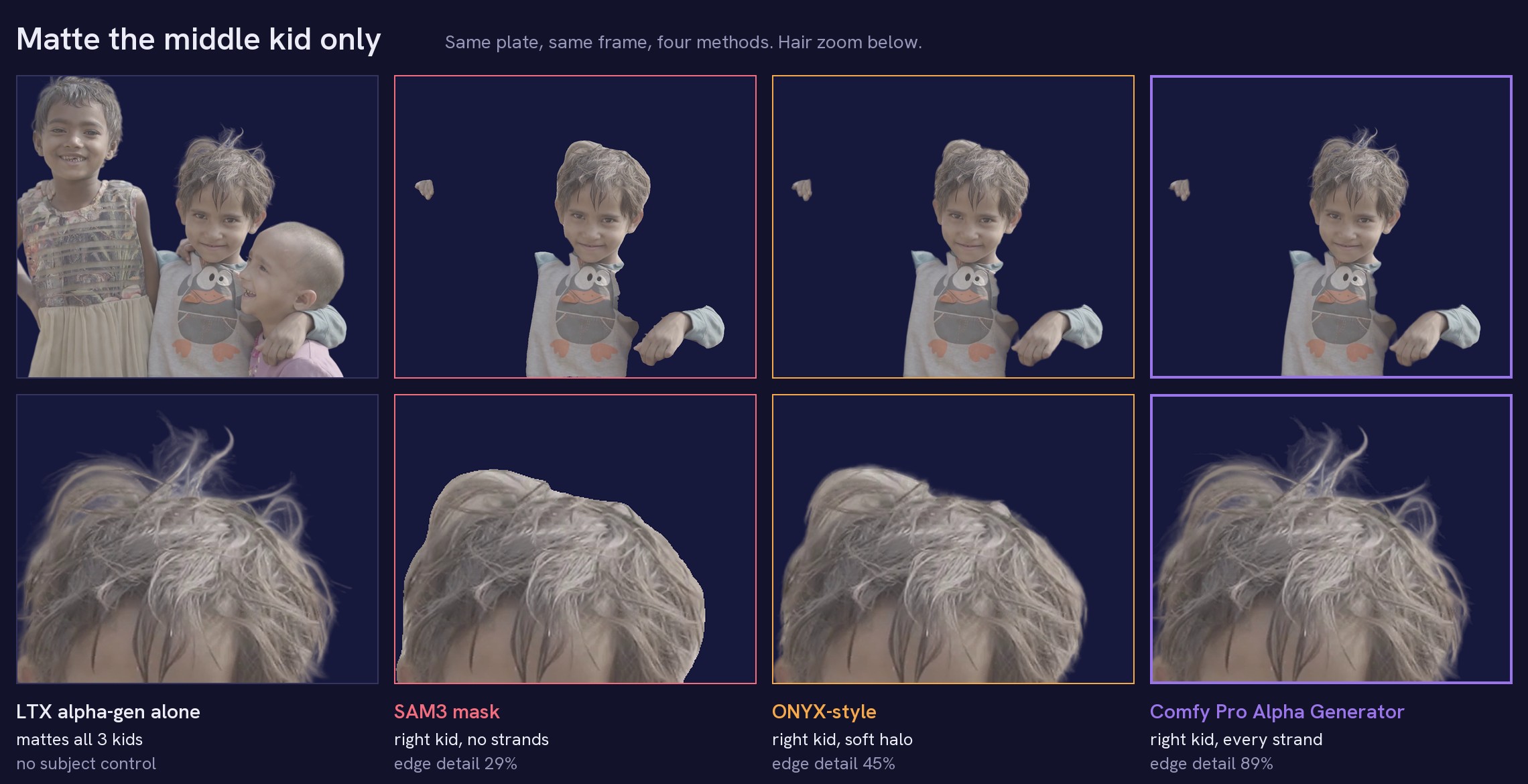
Task: matte the middle kid only. LTX alpha-gen alone has perfect hair but mattes all three kids, and there is no way to tell it which one. SAM3 and ONYX-style pick the right kid but lose the strands. Comfy Pro Alpha Generator does both. Every matte comped over navy with the same edge colour, so only the matte differs.
// 01 · problem
Pulling one person out of a busy plate is still one of the most manual jobs in compositing. The AI tools I tried fall into two groups, and each gets half of it right:
| Picks which subject | Edge quality | Why | |
|---|---|---|---|
| LTX-2.5 alpha-gen (generative) | no | hair-level | Renders the matte jointly over the whole clip, but mattes every main subject and can't be told which one. |
| SAM3 / ONYX-style (discriminative) | yes | soft, per-frame | Tracks any object you point at, then measures the edge frame by frame with ViTMatte. Strands get lost; edges chatter. |
| Comfy Pro Alpha Generator | yes | hair-level | SAM3 picks the subject, LTX draws the edge. |
// 02 · results
Measured on a 247-frame plate (three kids, arms around each other), matting only the middle kid. Every method gets the same SAM3 selection.
What the numbers are measured against: LTX alpha-gen run on the whole plate. It draws the best hair but mattes every kid, so it can't be used as is; the scores show how much of that hair each method keeps for one subject. It is not a hand-pulled ground truth, and it favours LTX-based methods (see Methodology).
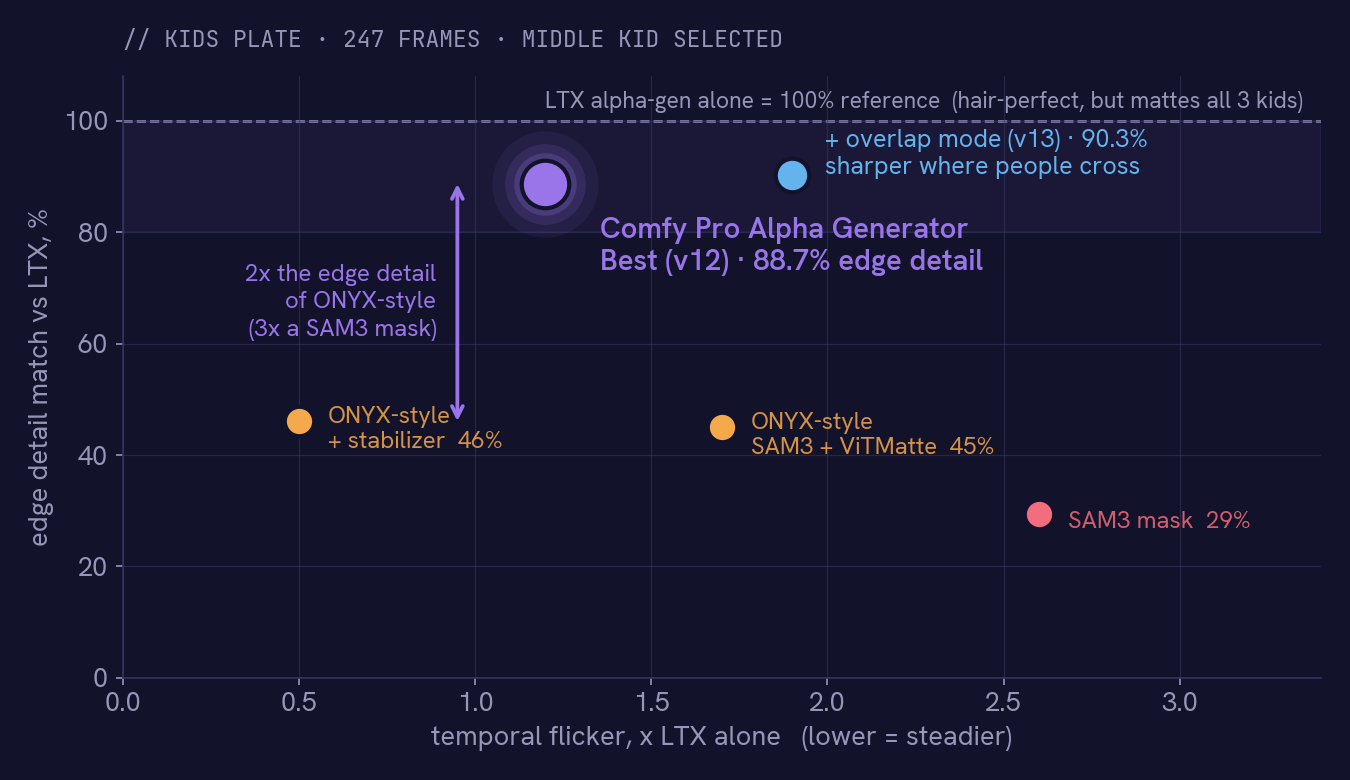
| Method | Selects one subject | Edge detail match | Hair outside the SAM3 outline | Flicker vs LTX alone |
|---|---|---|---|---|
| LTX alpha-gen alone | no (mattes everyone) | 100% (reference) | 100% | 1.0x |
| SAM3 mask | yes | 29.4% | 0% | 2.6x |
| ONYX-style: SAM3 + ViTMatte | yes | 45.0% | 31.3% | 1.7x |
| ONYX-style + temporal stabilizer | yes | 46.1% | 31.8% | 0.5x |
| Comfy Pro Alpha Generator | yes | 88.7% | 88.7% | 1.2x |
| Comfy Pro Alpha Generator, overlap mode (v13) | yes | 90.3% | 88.7% | 1.9x |
The edge matches LTX's generative hair at 88.7%, and only the middle kid is matted. The ViTMatte route gets to 45%: you get a soft halo around the head, but the strands are gone (compare the zoom at the top). A plain SAM3 mask gets 29%.
Against the background, the node flickers about as much as LTX alone (0.0112 vs 0.0109 mean error per pixel). The extra 0.2x comes from the few pixels where the kid touches someone else.
Overlap mode (v13) is for people crossing the subject; see Settings guide for what it fixes and why it moves more.
The one row this node doesn't win: a stabilized ViTMatte matte is steadier than LTX itself (0.5x), because it is smooth and has no strands left to move. That's the trade. I'll take a little more movement for real hair.
1 - sum|matte - LTX| / sum(LTX). Filling in the gaps between strands and missing strands
both count as error. Hair outside the SAM3 outline is the share of LTX's soft alpha beyond the SAM3 mask that
a method recovers (a hard mask scores 0% by definition). Both use LTX as the reference, so they favour LTX-based
methods; the hair zoom shows the same difference visually.measure_matte.py logic, also built into the node as the QC badges.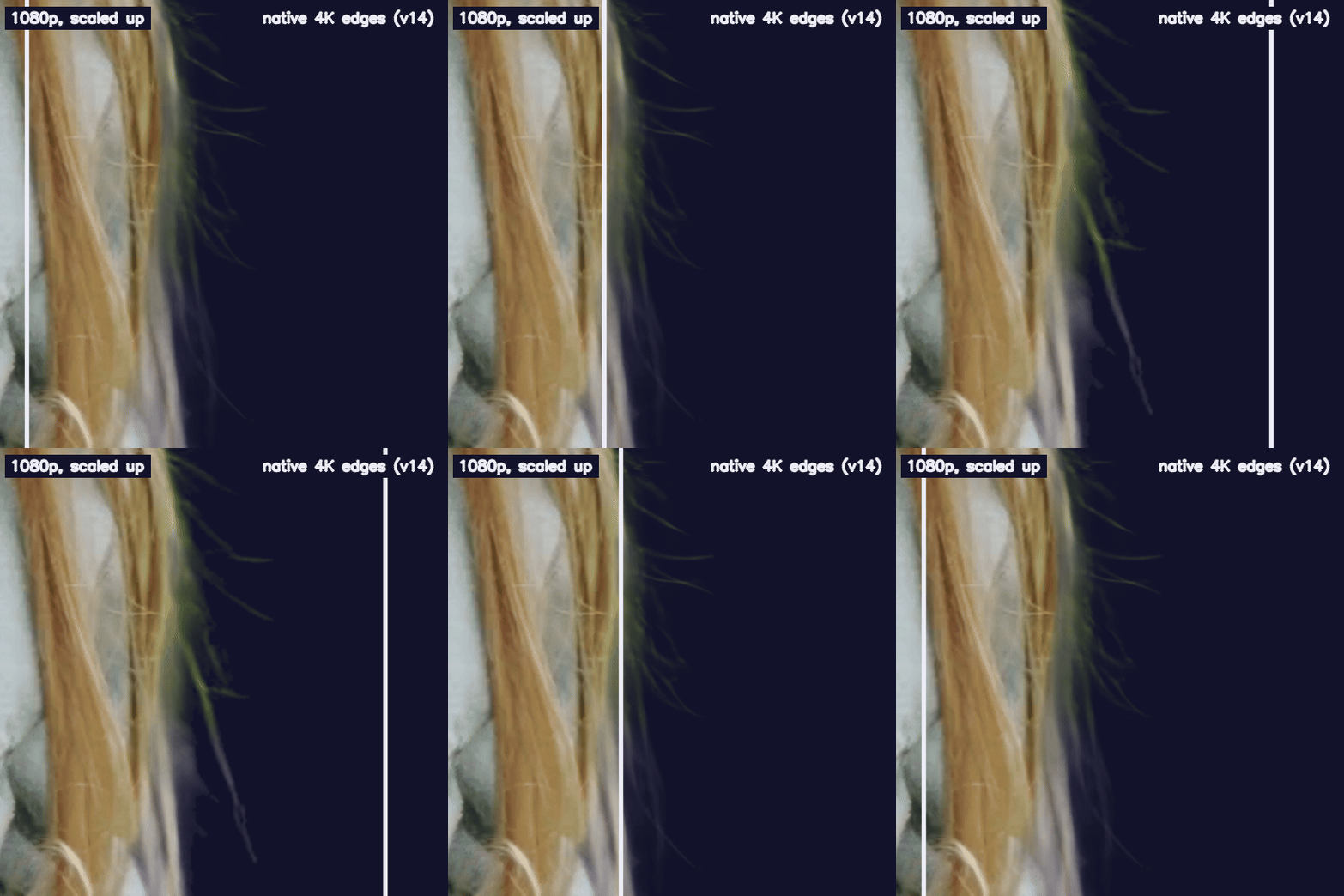
UHD 4K plate, matte over navy. Left of the line: the 1080p matte scaled up to 4K. Right: native 4K edges. More single strands, each thinner, and no grass baked into them.
Plates bigger than 1920x1088 are now matted at their own resolution. The node mattes a 1080p proxy exactly as before (that pass decides what the subject is), then runs LTX alpha-gen again on native-resolution 1920x1088 tiles along the subject's edge and merges them in. Fine hair, flyaways and fur keep single 4K strands instead of a soft 1080p band scaled up. The tiles overlap by at least half and are feather-blended where they meet, so a strand that crosses a tile border is blended, not cut. Tested on UHD 4K (3840x2160), DCI 4K (4096x2160) and 2K (2048x1080) plates.
| UHD 4K plate, long fine hair, RTX 5090 | 1080p scaled up (switch off) | Native 4K edges (on, default) |
|---|---|---|
| Edge flicker, frame to frame (lower = steadier) | 183 | 177 |
| Holes inside the subject | 0% | 0% |
| 49-frame preview | about 4 min, 20 GB RAM | about 9 min, 24 GB RAM |
| 242-frame shot | 19 min, 73 GB RAM | 58 min, 97 GB RAM |
It helps most on single strands, flyaways and fur against the background. Thick hair (braids) gains little. Where the subject touches another person, the 1080p result is kept on purpose: a tile only sees part of the frame and decides worse there. RAM grows with shot length (see Hardware).
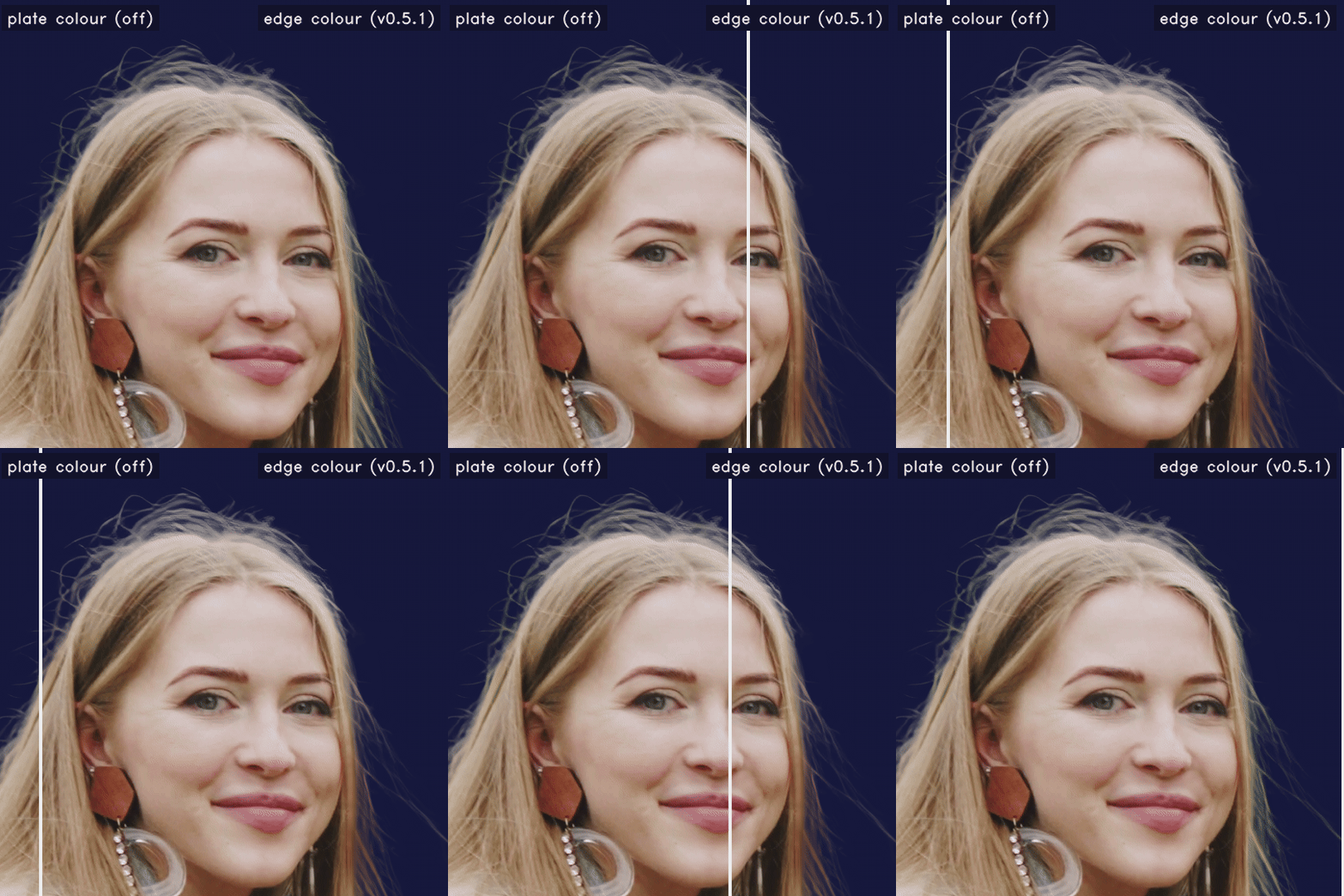
UHD 4K plate, matte over navy, the same shot as above. Left of the line: the plate's own colour in her flyaways (the grass behind her shows through each strand). Right: v0.5.1 quick edge colour, the alpha unchanged.
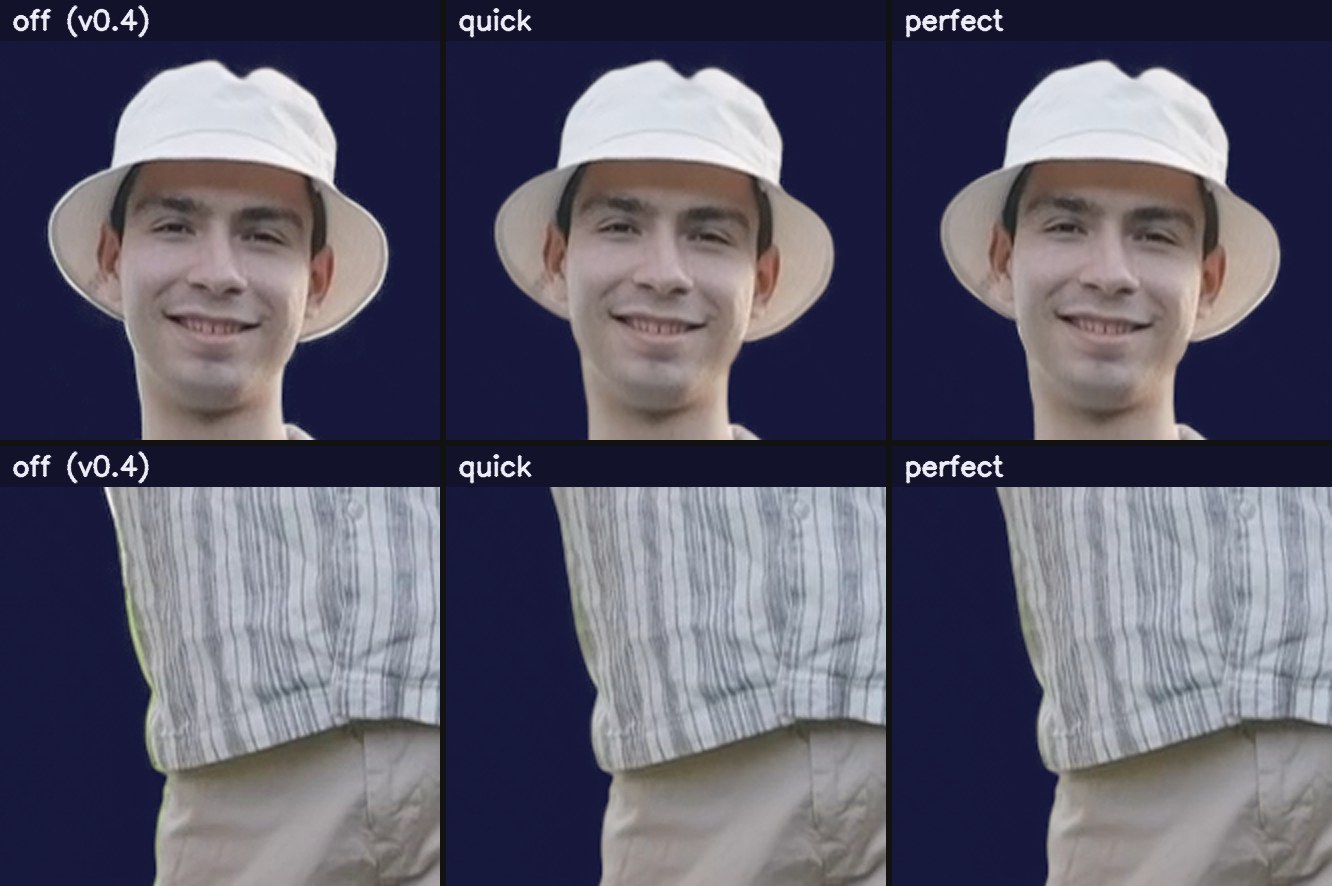
Subject comped over navy, 2x zoom. Off: the plate's own colour stays in the soft edge, so the sky behind the hat shows as a bright white rim around the brim, and the grass as a lime line down the shirt. Quick and perfect rebuild the subject's colour there.
The alpha was right, but every soft edge still carried the background it was shot against: sky in the strands, grass
along the shirt. Over a new background that shows as a halo. v15 rebuilds the subject's own colour in the edge and
outputs a clean premultiplied comp, saved next to the alpha as rgba_ files. The alpha itself does not change.
| Curls shot, 49 frames | Off (v0.4) | Quick (default) | Perfect |
|---|---|---|---|
| Background left in the edge (lower = cleaner) | 0.159 | 0.056 | 0.062 |
| Edge colour flicker (lower = steadier) | 0.064 | 0.021 | 0.028 |
On the 4K shot above (v0.5.1 quick, 25 frames across the shot), the background left in the edge drops from 0.113 to 0.067 (41% less).
F = (I - (1 - a) B) / a). It is checked against the real plate
and falls back to quick wherever the clean plate can't be trusted: next to other people, and on shots where the
subjects fill the frame (Clean Plate then re-renders them instead of removing them). On a wide shot it gives a
slightly tighter, more physical soft edge; on a close-up it gives the same result as quick, at the cost of one
more LTX pass.rik-python/ComfyUI-Comfy-Pro-Alpha-Generator is a public repo on GitHub by rik-python. AI rotoscoping and video matting in ComfyUI: click one person, get a native 4K alpha with hair-level edges. SAM3 picks the subject, LTX-2.5 alpha-gen draws the edge. 12 GB VRAM, EXR in/out, open weights.
It declares the GPL-3.0 license on GitHub.
A comprehensive ComfyUI integration for Microsoft's VibeVoice text-to-speech model, enabling high-quality single and multi-speaker voice synthesis directly within your ComfyUI workflows.
High quality training free inpaint for every stable diffusion model. Supports ComfyUI
ComfyUI node for highly expressive speech and realistic zero-shot voice cloning
Its maker tagged it for Windows. That is declared by the maker; Take My Repo has not tested it.
Open "Take it" on its page: Take My Repo writes an install plan for your machine and hands it to your AI agent (Claude Code, Codex or Cursor), which asks you before each step. Take My Repo has not tested it on any machine.
Its last change on GitHub was on 2026-11-03. GitHub counts 0 open issues and pull requests. Take My Repo does not judge from that whether it is maintained.
Nobody has reviewed it on Take My Repo yet, which says nothing about its quality.
Take My Repo cannot say: it does not audit code and has not run ComfyUI-Comfy-Pro-Alpha-Generator. What is known comes from GitHub. It declares the GPL-3.0 license on GitHub. Its last change was on 2026-11-03. It has 57 stars, which measure popularity, not safety. Nobody has reviewed it on Take My Repo yet, which says nothing about its quality. Read the source before you run it. With "Take it", your AI agent shows each step and asks you before running it; README text is treated as data, not as instructions.