
academic-research-skills-codex
Codex-native Academic Research Skills suite for human-in-the-loop academic research workflows
- 15k
- Python
- 3 wk ago
LitRank: Literature Review for Google Scholar. Free browser extension: journal quartiles (Q1–Q4) and SJR scores on Google Scholar, Scopus and Web of Science, a PRISMA-S search log for systematic reviews, and Google Scholar profile analysis. Chrome, Firefox, Edge.
Repo riponcm/LitRank, read from GitHub 1 min ago. riponcm has not joined Take My Repo.
riponcm/LitRank is a public repo on GitHub by riponcm. LitRank: Literature Review for Google Scholar. Free browser extension: journal quartiles (Q1–Q4) and SJR scores on Google Scholar, Scopus and Web of Science, a PRISMA-S search log for systematic reviews, and Google Scholar profile analysis. Chrome, Firefox, Edge. It declares no license on GitHub. Public does not mean open source: without a license, nobody is granted the right to reuse it. It has 18 stars and last changed on 2026-10-28. Nobody has reviewed it on Take My Repo yet, which says nothing about its quality. Read from GitHub on 2026-11-24.
Codex-native Academic Research Skills suite for human-in-the-loop academic research workflows

Journal quartiles and SJR scores on Google Scholar, Scopus and Web of Science, a search log for systematic reviews, and a one-click analysis of any Google Scholar profile.
A free browser extension for Chrome, Firefox and Edge. No account. No tracking. Everything stays on your device.
LitRank is a free browser extension for researchers, PhD students and librarians. It does three things:
The ranking data is Scimago Journal Rank (SJR) 2025, covering over 31,000 ranked journals, with OpenAlex's 2-year citedness alongside. It ships inside the extension, so no lookup ever leaves your computer.
This repository is LitRank's documentation, support and issue tracker.
| Search log for literature reviews | Records the database, exact query, filters, result count and date of each search on 38 databases and publisher websites. Exports a Methods paragraph, a table, a search appendix or CSV, with a PRISMA-S checklist. |
| Journal ranks beyond Google Scholar | Quartile, SJR, country and open-access badges on Scopus, Web of Science, ScienceDirect and OpenAlex results. |
| Google Scholar profile analysis | Press Analyse this author for a page-wide summary: citations, h-index, first-author papers, median SJR, journal quartiles of papers and of their citations, citation trend, top papers, keywords and subject areas. |
| Save from any publisher | Right-click any article page, or press Alt+Shift+L, to save it into a folder; save the PDF you have open the same way. Alt+Shift+K logs the search on any results page. |
| New name | LitRank: Literature Review for Google Scholar — it now does more than quartiles. |
| Changed | PDFs are saved one at a time. Bulk PDF download is gone: publishers block whole universities for automated downloading. |

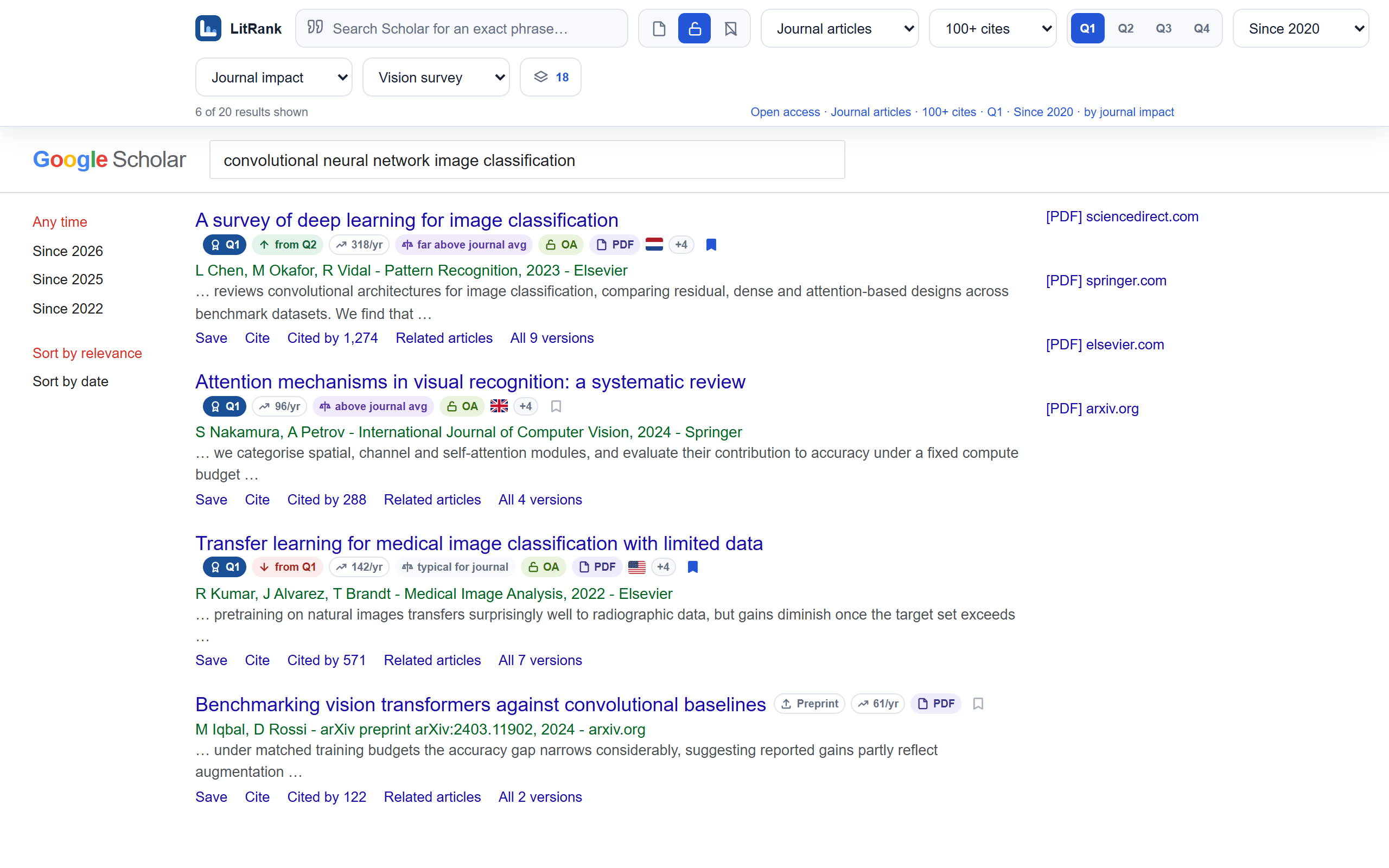
Every result carries its journal's quartile, its citation rate and whether the journal has moved quartile. The bar above the page filters by quartile, document type, citation count and open access; the bookmark beside each title saves it to a folder.

Turn a database on in the library and its results get the same badges: here Scopus, with each journal's quartile, SJR score, country and open-access status under the source title. Web of Science, ScienceDirect and OpenAlex work the same way.

Each search is recorded as you run it: the database, the query exactly as the database ran it, the limits, the number of records and the date. Refined searches stay linked to the search they narrowed, database and website searches are counted separately as PRISMA 2020 asks, and the checklist shows which PRISMA-S items are still missing.

Analyse this author reads the whole profile, one page at a time as you would, and draws the summary above the publication list. It describes where the work appeared; it ranks no one against anyone. The profile shown is a public Google Scholar profile.

Four figures and three charts, worked out from the papers you have saved. The Q1 share is measured against ranked papers only: an unranked venue means the journal could not be identified, not that the paper is poor.

Each folder has its quartile mix, median SJR, publication years and venues. Export it as BibTeX, CSV or JSON for Zotero, Mendeley or EndNote, or fill in missing details from Crossref.
The interface in every shot is the real extension. In the library, folder and search-log shots the papers and searches are invented, because a reading list is personal; the journals are real, so the quartiles and SJR figures are the genuine values LitRank looks up.
| Filter | Why it matters |
|---|---|
| Quartile | Show only Q1 and Q2 journals |
| Minimum citations | Scholar sorts by citations but cannot filter by them |
| Document type | Exclude preprints, or show only journal articles |
| Open access only | Skip what you cannot read |
| PDF available | Only results with a direct PDF link |
| Hide already saved | On a second pass, see only what you have not triaged |
| Sort by journal impact or citations | Reorder without losing Scholar's own order |
The search log works on these 38 sites. Each is off until you turn it on.
| Databases | Publisher websites |
|---|---|
| Google Scholar · PubMed · Web of Science · Scopus · Embase · ProQuest · EBSCOhost · Cochrane Library · Engineering Village · CABI Digital Library · JSTOR · CNKI · DOAJ · TRID · Lens · OpenAlex · Semantic Scholar · Crossref · Europe PMC · arXiv · bioRxiv · medRxiv | ScienceDirect · SpringerLink · Nature.com · Wiley Online Library · Taylor & Francis Online · SAGE Journals · IEEE Xplore · MDPI · Frontiers · ACS Publications · ASCE Library · Science · Emerald Insight · Cambridge Core · Oxford Academic · Canadian Science Publishing |
Journal-rank badges appear on Google Scholar, Scopus, Web of Science, ScienceDirect and OpenAlex.
Google Scholar and the databases print a journal name beside every result. LitRank matches that name — abbreviated, truncated or acronymised as the site leaves it — against the ranking data carried inside the extension, and draws the badge. No lookup leaves your machine.
The matching is deliberately conservative:
If more than one journal could fit, LitRank shows nothing rather than guessing.
The search log follows the same rule. A search it cannot read exactly is marked as such, a count it cannot read is left blank rather than recorded as zero, and nothing is ever passed off as exact. A tool that quietly guesses is worse than one that admits the gap, because from the outside you cannot tell the two apart.
LitRank has no server, no account and no analytics.
riponcm/LitRank is a public repo on GitHub by riponcm. LitRank: Literature Review for Google Scholar. Free browser extension: journal quartiles (Q1–Q4) and SJR scores on Google Scholar, Scopus and Web of Science, a PRISMA-S search log for systematic reviews, and Google Scholar profile analysis. Chrome, Firefox, Edge.
It declares no license on GitHub. Public does not mean open source: without a license, nobody is granted the right to reuse it.
LitStudy: Using the power of Python to automate scientific literature analysis from the comfort of a Jupyter notebook
uBlock Origin - An efficient blocker for Chromium and Firefox. Fast and lean.
Semi-automated research assistant for academic research and software development. Supports Claude Code, Codex CLI, Kimi Code CLI, and OpenCode across ideation, coding, experiments, writing, and publication.
Its maker has not tagged a system, so it is unknown here. Its README says what it needs.
Open "Take it" on its page: Take My Repo writes an install plan for your machine and hands it to your AI agent (Claude Code, Codex or Cursor), which asks you before each step. Take My Repo has not tested it on any machine.
Its last change on GitHub was on 2026-10-28. GitHub counts 0 open issues and pull requests. Take My Repo does not judge from that whether it is maintained.
Nobody has reviewed it on Take My Repo yet, which says nothing about its quality.
Take My Repo cannot say: it does not audit code and has not run LitRank. What is known comes from GitHub. It declares no license on GitHub. Public does not mean open source: without a license, nobody is granted the right to reuse it. Its last change was on 2026-10-28. It has 18 stars, which measure popularity, not safety. Nobody has reviewed it on Take My Repo yet, which says nothing about its quality. Read the source before you run it. With "Take it", your AI agent shows each step and asks you before running it; README text is treated as data, not as instructions.