
webmbridge
One-click WebM importer for Adobe Premiere Pro. Free, open-source CEP panel that converts WebM (VP9/VP8) to MP4/ProRes with FFmpeg and imports it into your project.
- 1
- MIT
- 5 mo ago
Repo riponcm/webmbridge, read from GitHub 1 d ago. riponcm has not joined Take My Repo.
In short
riponcm/webmbridge is a public repo on GitHub by riponcm. One-click WebM importer for Adobe Premiere Pro. Free, open-source CEP panel that converts WebM (VP9/VP8) to MP4/ProRes with FFmpeg and imports it into your project. It declares the MIT license on GitHub. It is written mainly in HTML, has 1 stars and last changed on 2026-06-30. Nobody has reviewed it on Take My Repo yet, which says nothing about its quality. Read from GitHub on 2026-11-24.



WebMBridge — WebM Importer for Adobe Premiere Pro
Import WebM into Premiere Pro in one click. WebMBridge is a free, open-source
Premiere Pro panel that converts .webm (VP9 / VP8 + Opus / Vorbis) to a
Premiere-ready MP4 or ProRes and imports it straight into your project — no
native plugin, no manual FFmpeg commands, no paid converter.
⭐ If this saves you a download-convert-import dance, please star the repo — it helps others find it.
📸 Screenshots
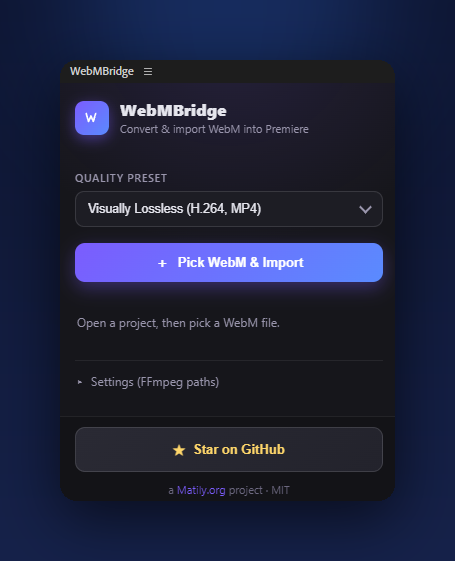 ① Pick & import choose a preset, one click |
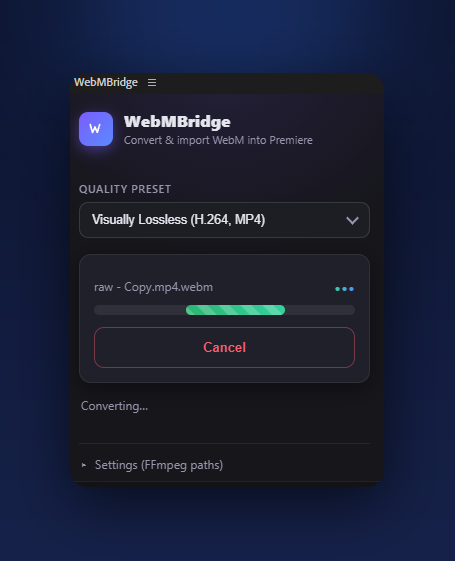 ② Live progress animated bar, % readout & Cancel |
▶️ Demo
Why WebMBridge?
Adobe Premiere Pro cannot natively open WebM files — and the long-standing free WebM plugin for Premiere is no longer maintained, so it breaks on modern Premiere versions. WebMBridge is the maintained, open-source way to use WebM in Premiere Pro without fighting dead C++ plugins.
Instead of a fragile native importer (which must be re-compiled against Adobe's SDK every release), WebMBridge uses Adobe's far more stable CEP panel API: it converts your WebM with FFmpeg and imports the result automatically. One button, done.
✨ Features
- One-click WebM → Premiere import — pick a
.webm, get it on your timeline. - Quality presets — visually lossless H.264 (MP4), smaller H.264, or ProRes 422 HQ (MOV) for the smoothest editing.
- Live progress bar while converting.
- Configurable FFmpeg path (auto-detects
ffmpeg/ffprobeon PATH). - Privacy-first & local — runs entirely on your machine. No cloud, no uploads, no trackers.
- MIT licensed — fork it, ship it, sell it.
❓ FAQ
Why won't Premiere Pro open my WebM file?
Premiere doesn't include a VP8/VP9 decoder, so .webm imports fail or show
"unsupported format." You either need a native importer plugin or you convert
the file first. WebMBridge automates the convert-and-import path.
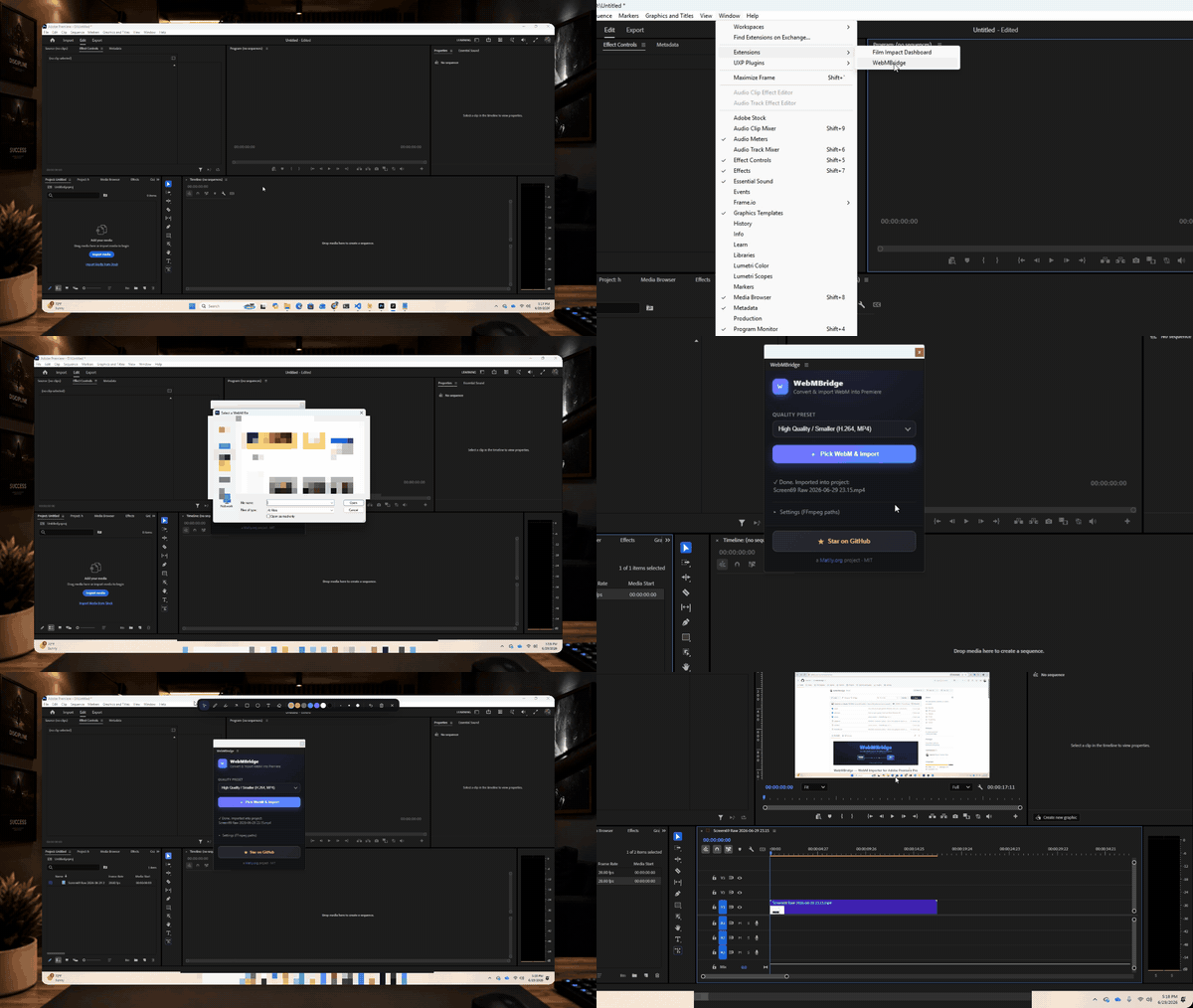
How do I import a WebM into Premiere Pro? Install WebMBridge, open the panel (Window → Extensions → WebMBridge), click Pick WebM & Import. It converts to MP4/ProRes and adds the clip to your open project automatically.
Is there a free, open-source WebM plugin for Premiere Pro in 2026? Yes — WebMBridge. It's MIT-licensed and free. (The older fnordware WebM plugin is effectively unmaintained.)
Does it support VP9 and VP8? Yes. FFmpeg decodes both VP9 and VP8 WebM, plus Opus and Vorbis audio.
Is the conversion lossless? WebM and MP4/ProRes use different codecs, so it's a re-encode, not a bit-for-bit copy — but the default preset (H.264 CRF 16) is visually lossless. ProRes 422 HQ is the best choice for further editing.
Does it work on Premiere 2024 / 2025? Yes — the CEP panel API is stable across Premiere 2019 through current releases.
🧩 Requirements
- Adobe Premiere Pro 2019 or newer (Windows; macOS should work, untested).
- FFmpeg installed. WebMBridge calls the
ffmpeg/ffprobeexecutables — it doesn't bundle or link them. If they aren't on your PATH, set full paths in the panel's Settings.
⬇️ Install (users)
- Download the latest
WebMBridge_x.y.z.zxpfrom Releases. - Install it with any ZXP installer, e.g. aescripts ZXP Installer or Anastasiy's Extension Manager.
- Fully quit and reopen Premiere Pro.
- Window → Extensions → WebMBridge.
▶️ Usage
- Open (or create) a project.
- Open the WebMBridge panel.
- Choose a quality preset → Pick WebM & Import.
- The converted clip appears in your Project panel, ready to edit.
🛠️ Build from source (developers)
# Install from source for local testing (enables PlayerDebugMode for unsigned panels)
powershell -ExecutionPolicy Bypass -File scripts/install-dev.ps1

# Package a signed .zxp for distribution
# (first drop ZXPSignCmd.exe into ./tools/ from Adobe CEP-Resources)
powershell -ExecutionPolicy Bypass -File scripts/build-zxp.ps1 -Version 1.0.0
build-zxp.ps1 generates a self-signed certificate (git-ignored) and writes
dist/WebMBridge_<version>.zxp.
Project layout
extension/            The CEP panel (this is what gets signed into the .zxp)
  CSXS/manifest.xml   Registers the panel; enables Node.js
  index.html          Panel UI
  js/main.js          Convert + import logic (Chromium + Node.js context)
  js/CSInterface.js   Minimal host bridge
  jsx/host.jsx        ExtendScript run inside Premiere (does the import)
scripts/
  install-dev.ps1     Install from source (dev mode)
  build-zxp.ps1       Sign + package a .zxp
assets/               Hero + screenshot
🤝 Contributing
Contributions are very welcome! Whether it's a bug fix, a macOS test, a new preset, drag-and-drop support, or just better docs — open an issue or a PR.
- Fork the repo and create a feature branch.
- Test with
scripts/install-dev.ps1in your Premiere. - Open a pull request describing the change.
Good first issues: macOS verification, batch import, drag-and-drop onto the panel, remembering the last output folder.
If you find WebMBridge useful, starring the repo is the easiest way to support it and help other editors discover it. ⭐
📄 License
MIT © 2026 Matily.org. FFmpeg is a separate dependency under its own (LGPL/GPL) license — WebMBridge only invokes the FFmpeg executable and does not redistribute it.
💜 Made by Matily
WebMBridge is a project by Matily.org — a non-profit software studio building free, open-source, privacy-first tools for everyone. 100% open source, local-first, zero trackers, permanently free.
Keywords: import webm premiere pro, webm to mp4 premiere, premiere pro webm plugin, free webm importer, open source webm premiere, convert webm vp9 premiere, webm not supported premiere fix, premiere webm cep panel.
Questions
What is webmbridge?
riponcm/webmbridge is a public repo on GitHub by riponcm. One-click WebM importer for Adobe Premiere Pro. Free, open-source CEP panel that converts WebM (VP9/VP8) to MP4/ProRes with FFmpeg and imports it into your project.
Is webmbridge open source?
It declares the MIT license on GitHub.
Does webmbridge run on macOS, Windows or Linux?
Its maker has not tagged a system, so it is unknown here. Its README says what it needs.
How do I install webmbridge?
Open "Take it" on its page: Take My Repo writes an install plan for your machine and hands it to your AI agent (Claude Code, Codex or Cursor), which asks you before each step. Take My Repo has not tested it on any machine.


