Codewhale
An open-source coding agent for your terminal, written in Rust. It works with any model, can split one task across several agents, and every line of it is yours to read.
- 41k
- Rust
- MIT
- 1 h ago
The Windows 11 Notepad you know, with Claude Code and Codex inside. C#, WinUI 3, Agent Client Protocol.
Repo rizonesoft/ScratchPad, read from GitHub 7 min ago. rizonesoft has not joined Take My Repo.
rizonesoft/ScratchPad is a public repo on GitHub by rizonesoft. The Windows 11 Notepad you know, with Claude Code and Codex inside. C#, WinUI 3, Agent Client Protocol. It declares the GPL-3.0 license on GitHub. It is written mainly in C#, has 1 stars and last changed on 2026-11-17. Nobody has reviewed it on Take My Repo yet, which says nothing about its quality. Read from GitHub on 2026-11-22.
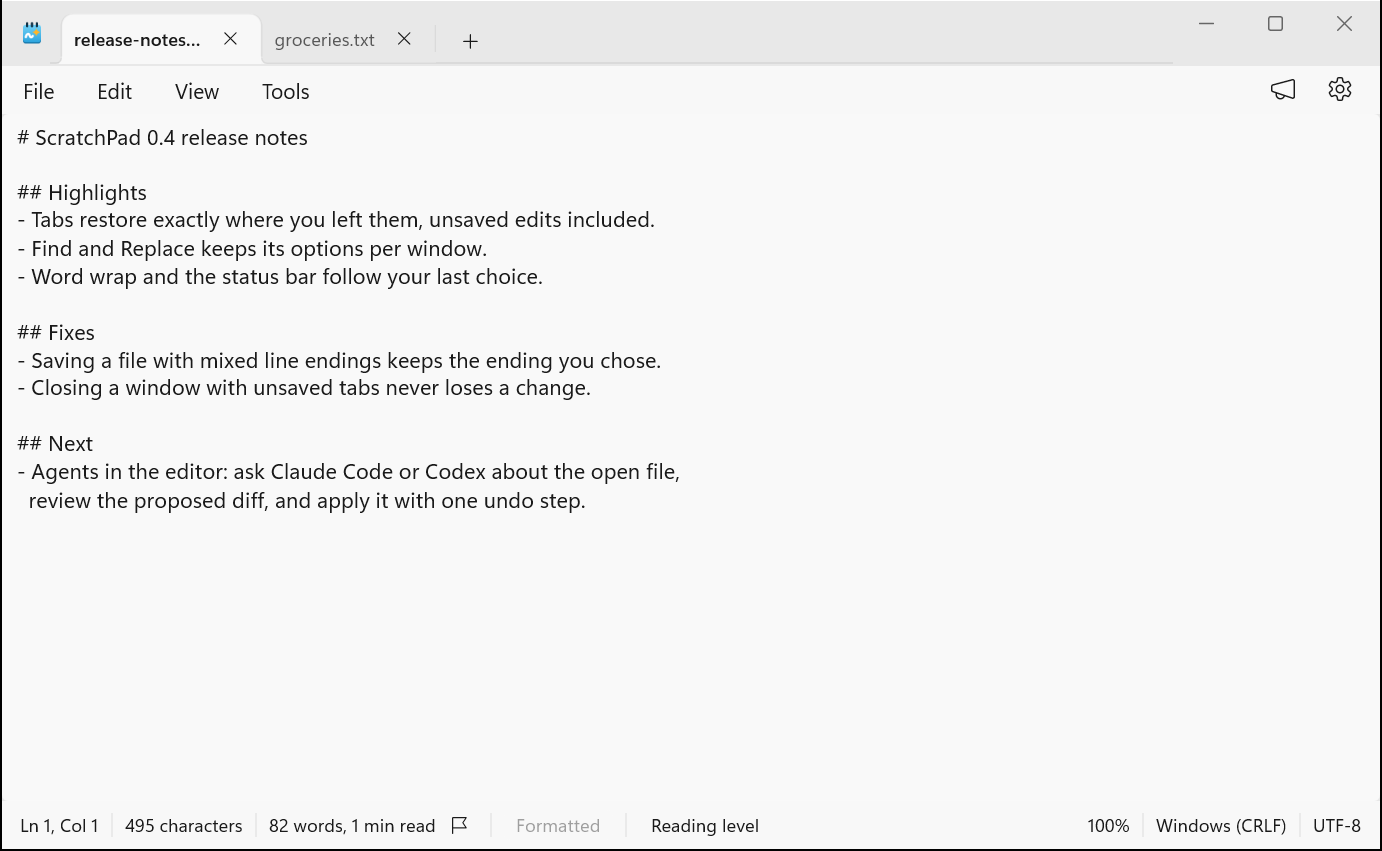
The Windows 11 Notepad you know, down to the status bar, plus your own AI agents (Claude Code and Codex) beside the editor, with no subscription nag.
People who live in Notepad and already pay for an AI agent: you want the editor you know, tab for tab and menu for menu, and you want the agent you already have to work inside it, on your machine, with your keys.
What it does today, and what is on the way:
todo/03-acp-client/, todo/04-agents/, and todo/05-ai-surface/.Windows 11 with git, Windows PowerShell 5.1 (inbox), and Python 3 on PATH. Run every command from the repository root (the folder the clone creates).
git clone https://github.com/rizonesoft/ScratchPad.git
cd ScratchPad
powershell -ExecutionPolicy Bypass -File tools\provision.ps1
$env:DOTNET_ROOT = "$PWD\.tools\dotnet-win-x64"; $env:PATH = "$PWD\.tools\dotnet-win-x64;" + $env:PATH; $env:DOTNET_MULTILEVEL_LOOKUP = "0"
dotnet build src/ScratchPad.slnx
# Once per machine: the app needs the Windows App Runtime 2.x. If this prints nothing, install it:
Get-AppxPackage -Name 'Microsoft.WindowsAppRuntime.2*' | Select-Object -First 1 Name, Version
Invoke-WebRequest https://aka.ms/windowsappsdk/2.4/2.4.0/windowsappruntimeinstall-x64.exe -OutFile "$env:TEMP\windowsappruntimeinstall-x64.exe"; & "$env:TEMP\windowsappruntimeinstall-x64.exe"
py tools/launch.py
The provisioner installs the pinned .NET SDK into .tools/ inside the checkout (never machine-wide) and wires the git hooks. The build puts the app at Bin\ScratchPad\Debug\win-x64\ScratchPad.exe, and tools/launch.py starts it. The runtime check runs once per machine; skip the install line when the check prints a package. For a fast test pass without the UI suites, run dotnet test src/Notepad.Neutral.slnf; dotnet test src/ScratchPad.slnx runs everything, including UI automation that drives real windows. docs/bootstrap.md walks through each step.
ScratchPad is a desktop app: there are no environment variables to set and no .env file, because it reads no secrets and talks to no service of its own. Settings live in the app (the gear at the top right, or Settings in the menu) and persist to %LocalAppData%\ScratchPad\settings.json; the schema is in docs/settings-schema.md. Agent sign-in, when the panel lands, goes through each agent's own login and the Windows credential store, never a file in this repository.
dotnet build (or C# Dev Kit in VS Code) says a compatible .NET SDK was not found. global.json accepts only 10.0.400 and points the dotnet host at .tools\dotnet-win-x64 through sdk.paths, so a machine-wide .NET 10 or later host finds the repo SDK on its own once the provisioner has run. A machine host older than .NET 10 ignores sdk.paths: run the $env:DOTNET_ROOT = ... line from the quick start in the same shell, then check dotnet --info lists the SDK under your checkout's .tools\ folder. Never install an SDK by hand to fix this.WSL UtilBindVsockAnyPort: socket failed 1. You ran it through WSL interop. Run powershell -ExecutionPolicy Bypass -File tools\provision.ps1 from Windows PowerShell directly.Get-AppxPackage -Name '*WindowsAppRuntime*' and install it from https://aka.ms/windowsappsdk/2.4/2.4.0/windowsappruntimeinstall-x64.exe.py scripts/todo-graph.py validate on the staged tree. Run that command, fix what it names, and commit again; if the hook never ran at all, wire it once with git config core.hooksPath tools/githooks.Directory.Build.props). Run dotnet build src/ScratchPad.slnx locally to see the same analyzer message CI saw, and fix the code it names.Somewhere along the way, the humble text editor learned a new trick: asking for money. You highlight a paragraph, click Rewrite, and instead of better prose you get a message explaining that intelligence costs $10 a month, billed annually, terms and conditions apply, have you tried turning your wallet off and on again.
ScratchPad (first called Intelligent Notepad) is built on a contrarian belief: that the AI subscription you already have should work in the text editor you already use. No Microsoft account sign-in to summarize a grocery list. No AI credits deducted because you dared to rephrase a sentence. No Copilot+ PC required to fix a typo with anything smarter than hope.
Just Notepad. Every tab, every menu, every pixel of the status bar, reproduced 1:1 in C# and WinUI 3 on .NET. And sitting beside it, a panel where Claude Code and Codex do the thinking, reached through the open Agent Client Protocol. Your agents, your keys, your machine. The paywall is not included, because there isn't one.
Design authority is split exactly two ways: Windows 11 Notepad dictates the editor, and the Agent Client Protocol specification dictates the agent layer. Microsoft's Intelligent Terminal proved that ACP fits inside a native desktop app, and it is cited in the plan as prior art for that lesson only. Nothing here is designed to match it: the context is your document, never a shell, and nobody suggests running rm -rf anything.
It is not a terminal, and it is not designed like one. Nothing here runs shell commands, detects failed builds, or knows what a TTY is. The agent chrome (status bar, pane, sessions, slash commands) solves editor problems for documents; any resemblance to terminal agent UX ends at "both talk ACP". If you came looking for a command line with opinions, that project is excellent and it lives next door.
It is not Word. There will be no paperclip, no mail merge, and no Clippy resurrection arc, no matter how politely you ask.
It is not a subscription. Saying it twice because it bears repeating.
| Path | What it is |
|---|---|
src/ |
The app (WinUI 3 shell plus editor, ACP, agents) |
tests/ |
Unit, smoke, UI, and protocol suites (backbone: D00 T02) |
resources/baseline/ |
Stock Notepad captures (behavior reference) and the three goldens of our own look |
resources/brand/ |
The ScratchPad identity: icon masters, wordmark, README banner, social preview (design contract) |
todo/ |
The live execution plan. Start here. |
scripts/ |
The TODO graph (todo-graph.py, stdlib-only) and the subagent routing check (agent_routing.py) |
tools/ |
Provisioning, launch, build evidence and the test-population check, and the README capture |
docs/ |
Guides, procedures, ledgers, review records, and phase runs |
.claude/ |
Claude Code skills and hooks that run the plan |
.github/ |
CI workflows, issue and pull request templates |
Build output lands under Bin/, build/, and TestResults/, all gitignored.
Exact versions, verified 2026-09-13 against the .NET release metadata and NuGet. Nothing here floats.
| Component | Version | Pinned in |
|---|---|---|
| .NET SDK | 10.0.400 (runtime 10.0.11; SDK row re-verified 2026-09-19) | global.json (rollForward: disable) |
| Windows App SDK | 2.4.0 | src/ScratchPad/packages.lock.json |
| xunit | 2.9.3 | tests/Smoke/packages.lock.json |
| xunit.runner.visualstudio | 2.8.2 | tests/Smoke/packages.lock.json |
| Microsoft.NET.Test.Sdk | 17.14.1 | tests/Smoke/packages.lock.json |
tools/provision.ps1 reads the SDK version from global.json, downloads that exact build from builds.dotnet.microsoft.com, verifies its published SHA512 (win-x64 9b8b8859…8c366; full hashes in the release metadata), and extracts into repo-local .tools/dotnet-win-x64/. No machine-wide install, no build step reads outside the repo.
The xunit v2 line is pinned, reversing the §1 v3 default: v3 on MTP (xunit.v3.mtp-v2 4.0.1 + MTP 2.4.0 + SDK 10.0.401) discovers zero tests under dotnet test, proven on our project and on xunit's own official template alike, while the v2 VSTest stack passes first try. T02 §1 re-evaluates v3/MTP when the ecosystem heals.
todo/TODO-00-INDEX.md -- domain order and active work.todo/implementation-plan.md -- every section in dependency order, grouped in phases.todo/README.md -- the format spec: sections, stamps, XREFs, gates.AGENTS.md -- working rules.py scripts/todo-graph.py validate # structural and graph integrity of todo/
py scripts/todo-graph.py query ready # sections whose dependencies are met
py scripts/todo-graph.py resolve 'D00 T01 §1' # any section reference -> file, section, deps, status
Only the ACP client talks to agents, over JSON-RPC 2.0 on stdio: the client launches the agent subprocess (Codex via codex-acp, Claude via claude-agent-acp), negotiates versions, and drives sessions. Every agent action is consent-gated (D03 T02, D05 T02); every agent edit is reviewed as a diff and applied through undo (D05 T02 §3-§4). The agent can suggest; only you can commit.
The TODO system (graph script, format, skills, plan mechanics) is a day-1 port of the JMR Online TODO system, seeded 2026-09-14 and groomed against real Windows 11 Notepad behavior the same week. History comments in the scripts name JMR sections (D00 T01 §21 and the like): those are provenance for why a rule exists, not live references here.
Ported deliberately later, when the repo earns them:
plan-gate.py (routing authority with host probes and clock parks): query ready plus the phase tables route until then.section_commit_gate.py (stamp provenance at commit time): validate plus review carry the contract until then.coming-soon-inspect.py: the pending-control-contract severity class stays reserved until it lands.| Document | What it covers |
|---|---|
| docs/bootstrap.md | From a fresh clone to a green build and test run, with troubleshooting |
| docs/build.md | Build, clean, test, analysis, and launch commands |
| docs/testing.md | The test suites, the section gates, and the close-out runs |
| docs/settings-schema.md | The settings store and every setting |
| docs/encrypted-notes.md | The encrypted note file format |
| docs/soak-and-quarantine.md | How flaky tests are soaked and quarantined instead of deleted |
| docs/ui-automation-spike.md | The UI automation driver decision |
| docs/ui-input-audit.md | The audit of focus-dependent UI test input |
| docs/test-exclusions.md | Test population exclusions |
| docs/assets/captures.md | Provenance for every screenshot in this README |
Read CONTRIBUTING.md: where the work lives, the one-command build, and the gates every change passes. Bugs and ideas go through the issue templates.
Active development, pre-release: the Notepad surface is being built section by section against captured Windows behavior, and the agent panel is not in the app yet. Expect breaking changes and no installer until the release domain (todo/07-release/) ships.
Licensed under the GNU General Public License v3.0: see LICENSE.
rizonesoft/ScratchPad is a public repo on GitHub by rizonesoft. The Windows 11 Notepad you know, with Claude Code and Codex inside. C#, WinUI 3, Agent Client Protocol.
It declares the GPL-3.0 license on GitHub.
Its maker has not tagged a system, so it is unknown here. Its README says what it needs.
Open "Take it" on its page: Take My Repo writes an install plan for your machine and hands it to your AI agent (Claude Code, Codex or Cursor), which asks you before each step. Take My Repo has not tested it on any machine.
Its last change on GitHub was on 2026-11-17. Take My Repo does not judge from that whether it is maintained.
Nobody has reviewed it on Take My Repo yet, which says nothing about its quality.
An open-source coding agent for your terminal, written in Rust. It works with any model, can split one task across several agents, and every line of it is yours to read.
Reverse engineer anything with agents, from app behavior down to native binaries.
The agent harness performance optimization system. Skills, instincts, memory, security, and research-first development for Claude Code, Codex, Opencode, Cursor and beyond.
Notepad like text editor based on the Scintilla source code. Notepad3 based on code from Notepad2 and MiniPath on code from metapath. Download Notepad3:
A 64-bit operating system built from scratch for modern x86-64 hardware: UEFI boot, a compositing desktop, and a native Win32 API.
Make backup copies of your music or data CDs. Copy (Clone) most CDs in just a few mouse clicks. Create perfect 1:1 copies or save your CDs to your computer. If you are familiar with Clone CD, you should feel right at home using Carbon CD.
Your desktop, where you left it. Berth saves the positions of your Windows desktop icons and puts them back.