gkd
基于无障碍,高级选择器,订阅规则的自定义屏幕点击安卓应用 | An Android APP with custom screen tapping based on Accessibility, Advanced Selectors, and Subscription Rules
- 45k
- Kotlin
- GPL-3.0
- 12 d ago
Evidence-based instructional design skills for Claude Code. 11 AI skills that check alignment, accessibility, cognitive load, and evidence strength. Import from any LMS or authoring tool.
Repo savvides/idstack, read from GitHub 10 h ago. savvides has not joined Take My Repo.
savvides/idstack is a public repo on GitHub by savvides. Evidence-based instructional design skills for Claude Code. 11 AI skills that check alignment, accessibility, cognitive load, and evidence strength. Import from any LMS or authoring tool. It declares the MIT license on GitHub. It is written mainly in Shell, has 29 stars and last changed on 2026-11-24. Nobody has reviewed it on Take My Repo yet, which says nothing about its quality. Read from GitHub on 2026-11-24.
基于无障碍,高级选择器,订阅规则的自定义屏幕点击安卓应用 | An Android APP with custom screen tapping based on Accessibility, Advanced Selectors, and Subscription Rules
Status: beta (v3.11.1.0). Skills work end-to-end and ship behind a versioned plugin, but expect rough edges and breaking changes between minor versions while we shake out the rest of the workflow with real instructional designers. See CHANGELOG.md for what's new in the current release. Tell us what's broken or missing.
Decades of research say elaborated feedback improves learning. Cognitive load theory has been replicated for 30 years. Constructive alignment measurably raises grades. The evidence is strong, but most course design tools don't make it easy to apply.
idstack is an open source copilot for instructional designers. It helps you do your job in two ways: it helps you apply the framework that you already use (ADDIE, backward design or SAM), and it supports each recommendation with peer-reviewed research. Runs in Claude Code. Rather than summarizing papers, idstack audits alignment matrices, flags cognitive load issues, classifies objectives against Bloom's taxonomy, and references the empirical evidence behind every recommendation.
Skills covering the full lifecycle: analyze, design, build, export. One shared project manifest that remembers your course across sessions. Every recommendation tagged with its evidence tier, from T1 (meta-analyses) to T5 (expert opinion), so you always know how strong the backing is.
Free, MIT licensed, open source. Available as a plugin for Claude Code, and as a Chrome Extension. Have feedback or a feature request?
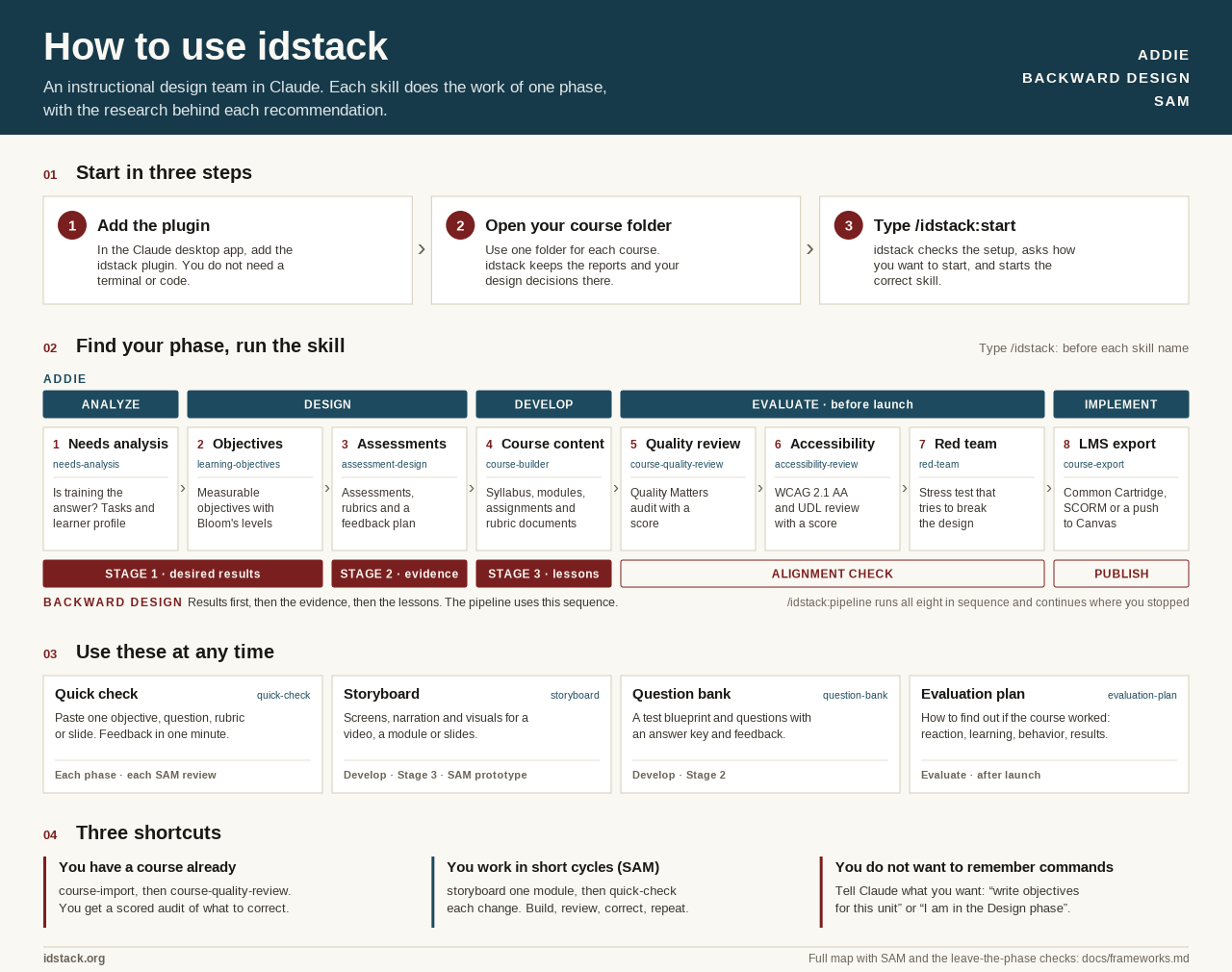
Do you use ADDIE, backward design or SAM? See where each skill is in your framework.
/idstack:start in a folder for your course. It checks your setup and starts the correct skill.
Or paste one item, for example a learning objective or a quiz question, and type /idstack:quick-check. You get feedback with citations in one minute, with no setup./idstack:course-quality-review to see what the evidence says.You can type the command, or tell Claude what you want in your own words.
| I want to… | Type | Time | What you get |
|---|---|---|---|
| Get feedback on one objective, quiz question, rubric, slide or page | /idstack:quick-check |
1 minute | A verdict, a maximum of five findings with citations, and a corrected version in the chat |
| Audit a course that I have | /idstack:course-import, then /idstack:course-quality-review |
20–40 minutes | A quality score and a report of findings, each with its evidence tier |
| Design a new course from the start | /idstack:pipeline |
A few sessions | Needs analysis, objectives, assessments, course content, three reviews and an LMS package |
| Write or repair learning objectives | /idstack:learning-objectives |
15 minutes | Measurable objectives with Bloom's levels and an alignment matrix |
| Write quiz or test questions | /idstack:question-bank |
15 minutes | A test blueprint and questions with an answer key and feedback |
| Storyboard a video, a module or slides | /idstack:storyboard |
20 minutes | Each screen with its narration, visual and learner action |
| Find out if a course worked | /idstack:evaluation-plan |
20 minutes | Evaluation questions, measures, survey items and a schedule |
| Check accessibility | /idstack:accessibility-review |
15 minutes | WCAG 2.1 AA violations and UDL recommendations |
| Put a course in my LMS | /idstack:course-export |
10 minutes | A Common Cartridge or SCORM file, or a push to Canvas |
| Not sure | /idstack:start |
1 minute | idstack asks two questions and starts the correct skill |
The times are estimates. They change with the size of the course. Each skill asks one question at a time, and you can stop and continue later.
Each skill that writes a report adds one section at a time to a Markdown file and gives you a link. You read the section, then approve it, change a row or remove a row. Nothing goes in the final report without your approval.
You:    /idstack:course-import

idstack: How do you want to import your course?
         - LMS or SCORM package file
         - PDF or Word file
         - Paste course documents
         - LMS API (Canvas or Moodle)

You:    LMS API, Canvas. The course is https://canvas.university.edu/courses/12345.

idstack: Open .idstack/canvas.env in a text editor. Paste your Canvas access
         token between the two quotes after CANVAS_TOKEN=. Save the file,
         then tell me when it is done.

You:    Done.

idstack: Connected. Found 12 modules, 8 assignments, 4 discussions, 6 outcomes.

         ... a note and a question for the Imported structure section ...

         Import quality triage: 4 rows (4 warning).
         All 8 assessments are auto-graded quizzes with no rubrics.
         Read the draft in .idstack/exports/bio-101/course-import.md.

         Do you approve the Import quality triage section?
         - Approve  - Change a row  - Remove a row

You:    Approve

         ... one draft section and one question for each step ...

You:    /idstack:course-quality-review

idstack: QM structural review: 8 rows (3 pass, 5 flag).
         Standard 3 (Assessment): no rubrics, no alignment to objectives.
         Read the draft in .idstack/exports/bio-101/course-quality-review.md.

         Do you approve the QM structural review section?
The chat shows a short note and one question for each section. The tables, scores and citations go into the Markdown report. For example, the report for this course has the finding "All 8 assessments are auto-graded quizzes with no rubrics", the citation [Assessment-8] [T1] and the recommendation to run /idstack:assessment-design.
You had a course in Canvas. Now you have an evidence-based audit with specific recommendations, evidence tiers, and cross-references to the skills that fix each issue. Two commands. Or just run /idstack:pipeline and it chains the 8-skill linear pipeline automatically (course-import branches in for existing courses, learn is a separate cross-project memory utility, and start is the first-run guide. These three, pipeline itself, and the four companion skills sit outside the linear chain, which is why pipeline runs 8 of the 16 skills).
Requirements: Claude Code — desktop app, web app, or CLI — and python3 3.9 or later.
Not using Claude Code? The idstack skills run in Claude Code. Without it, use the Chrome extension. The skills are plain Markdown, so you can fork this repo and adapt it for a different agent, for example Codex or Antigravity. idstack does not support or test those forks.
Paste this into your terminal:
git clone https://github.com/savvides/idstack.git
cd idstack
./setup
./setup registers the repo as a Claude Code plugin marketplace and installs it. Restart Claude Code if it was already running — plugins load at session start. You should see /idstack:<skill> commands in the slash picker.
If you'd rather not touch the terminal, paste this into Claude Code:
Install idstack: run
git clone https://github.com/savvides/idstack.git && cd idstack && ./setup, then tell me it's installed and show me the available skills.
Claude clones the repo, runs setup, and confirms the skills are registered.
./setup is a bash script, so PowerShell and cmd cannot run it.cd path/to/idstack./setupClaude Code writes a project-scoped install to .claude/settings.json in the folder where you run the command. Go to the course folder first. Then run setup with the path of your idstack clone:
cd path/to/your-course
path/to/idstack/setup --local
If you run ./setup --local in the idstack clone, idstack is installed only for sessions that start in the clone.
./setup                # Register the plugin with Claude Code at user scope
./setup --local        # Install at project scope (.claude/ in the current folder) instead of user scope
./setup --help         # Show the usage and exit (also -h)
Setup is idempotent — re-run it any time.
You should see output like this:
  regenerated skill files
Setup installs idstack (scope: user)...
  source: /path/to/idstack

<messages from claude plugin marketplace add and claude plugin install>

Setup installed idstack in Claude Code (scope: user).

  If Claude Code is open, close it and open it again.
  Claude Code reads plugins only when a session starts.

  To use a skill, run /idstack:<skill>

  If you do not know where to start:
    /idstack:start

  If you have a course, import it and examine it:
    /idstack:course-import -> /idstack:course-quality-review

  To start a new course:
    /idstack:needs-analysis

  Run the full pipeline:
    /idstack:pipeline

  All skills: start, needs-analysis, learning-objectives, assessment-design,
    course-builder, course-quality-review, accessibility-review,
    red-team, course-export, course-import, pipeline, learn,
    quick-check, storyboard, question-bank, evaluation-plan

  More information: https://idstack.org
You can use idstack in the Code tab of the Claude desktop app on a Mac. You do not need a terminal.
Documents/BIO-101. Start a new session and select that folder with the folder button below the message box./plugin marketplace add savvides/idstack
/plugin marketplace update idstack
/idstack:start and press Return. idstack checks your setup, then asks how you want to start.Each skill that writes a report gives you a link to it. Click the link to open the report in the app.
macOS asks you to install developer tools? idstack needs python3. Click Install in the macOS window. When the installation is complete, type /idstack:start again.
If you or your instructional designers don't use the terminal, idstack is available as a native Chrome Side Panel extension in the Chrome Web Store:
If you switch tabs while the panel is open, click the idstack icon again so it can read the new tab. This isn't needed on Canvas pages at instructure.com or on a Canvas site you've already allowed.
If developing or modifying the extension locally:
chrome://extensions/.extension/ directory from this repo.When viewing any Canvas course homepage or modules list (/courses/:id), idstack automatically detects the course environment and presents an "Audit Full Course" button:
savvides/idstack is a public repo on GitHub by savvides. Evidence-based instructional design skills for Claude Code. 11 AI skills that check alignment, accessibility, cognitive load, and evidence strength. Import from any LMS or authoring tool.
It declares the MIT license on GitHub.
Its maker tagged it for macOS, Windows and Linux, or as Docker or cross-platform. That is declared by the maker; Take My Repo has not tested it.
An AI skill that provides design intelligence for building professional UI/UX across multiple platforms.
Reverse engineer anything with agents, from app behavior down to native binaries.
A free, open source, and extensible speech-to-text application that works completely offline.
把书、长视频、播客等高价值内容蒸馏成可执行的 Agent Skills(Distill high-value content from books, long-form videos, podcasts, and more into executable Agent Skills)
This paper introduces BloomBench, a new bilingual (English-Arabic), cognitively-informed benchmark based on Bloom's Taxonomy to systematically evaluate the reasoning abilities of Vision-Language Models across different hierarchical cognitive levels.
Open "Take it" on its page: Take My Repo writes an install plan for your machine and hands it to your AI agent (Claude Code, Codex or Cursor), which asks you before each step. Take My Repo has not tested it on any machine.
Its last change on GitHub was on 2026-11-24. GitHub counts 13 open issues and pull requests. Take My Repo does not judge from that whether it is maintained.
Nobody has reviewed it on Take My Repo yet, which says nothing about its quality.
Take My Repo cannot say: it does not audit code and has not run idstack. What is known comes from GitHub. It declares the MIT license on GitHub. Its last change was on 2026-11-24. It has 29 stars, which measure popularity, not safety. Nobody has reviewed it on Take My Repo yet, which says nothing about its quality. Read the source before you run it. With "Take it", your AI agent shows each step and asks you before running it; README text is treated as data, not as instructions.