the-book-of-secret-knowledge
A collection of inspiring lists, manuals, cheatsheets, blogs, hacks, one-liners, cli/web tools and more.
- 261k
- MIT
- 2 y ago
Universal Bash watchdog for monitoring websites, HTTP endpoints, TCP ports, and command-based services. Configure checks, retries, timeouts, state tracking, cooldowns, remediation commands, and failure/recovery hooks in YAML. Runs safely as a one-shot Linux check from cron or systemd without eval-based command execution.
Repo shellharbor/watchdog, read from GitHub 7 h ago. shellharbor has not joined Take My Repo.
shellharbor/watchdog is a public repo on GitHub by shellharbor. Universal Bash watchdog for monitoring websites, HTTP endpoints, TCP ports, and command-based services. Configure checks, retries, timeouts, state tracking, cooldowns, remediation commands, and failure/recovery hooks in YAML. Runs safely as a one-shot Linux check from cron or systemd without eval-based command execution. It declares the MIT license on GitHub. It is written mainly in Shell, has 15 stars and last changed on 2026-11-20. Nobody has reviewed it on Take My Repo yet, which says nothing about its quality. Read from GitHub on 2026-11-24.
A collection of inspiring lists, manuals, cheatsheets, blogs, hacks, one-liners, cli/web tools and more.
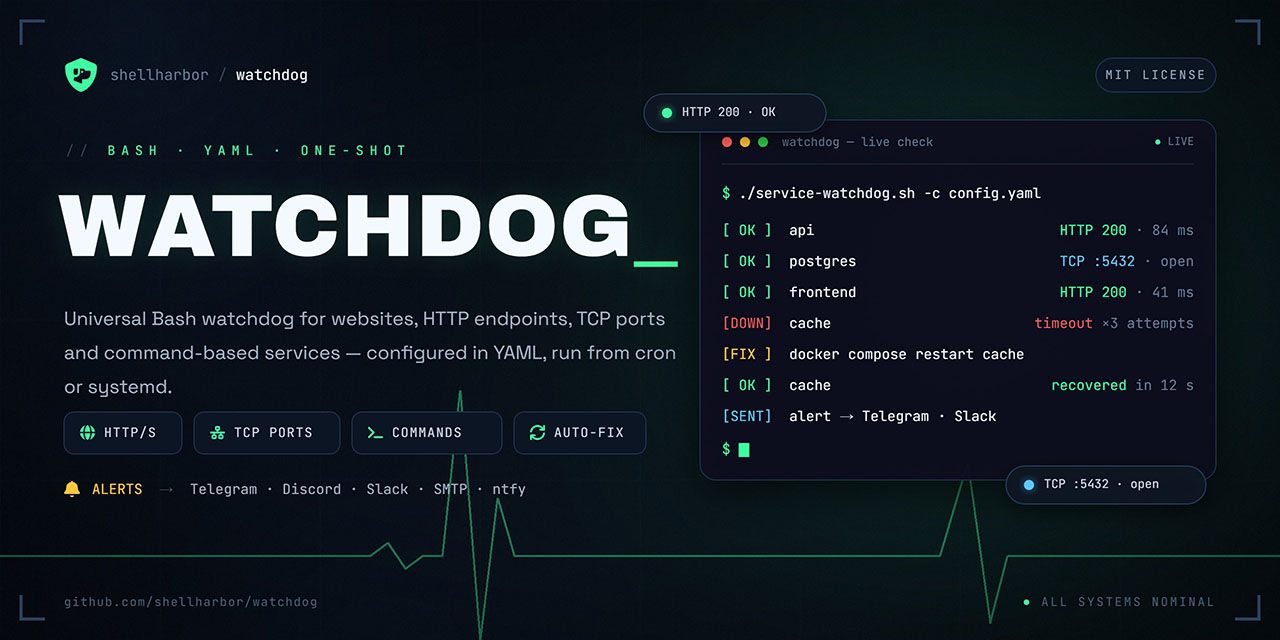
A small, dependency-light Bash watchdog for websites and services. It runs configured health checks and executes an explicit command sequence when a target stays unavailable after all retry attempts.
The watchdog is intentionally a one-shot program. Run it from a systemd timer, cron, or another scheduler.
For task-oriented guides and additional runnable examples, see the project Wiki.
/dev/tcpevalyq v4curl, flock, GNU timeout/coreutils (including base64), and unzip
for ZIP installationopenssl only when one or more services use check.type: tls_certOn Debian or Ubuntu, install the system packages with:
sudo apt-get install bash curl util-linux coreutils unzip
Install yq v4 using its official package or release instructions. The Python
package with the same name is not compatible.
For example, on Ubuntu with Snap:
sudo snap install yq
yq --version  # Must report Mike Farah yq version v4.x.x
Download the stable v1.7.9 source archive from GitHub:
curl -fL \
  https://github.com/shellharbor/watchdog/archive/refs/tags/v1.7.9.zip \
  -o watchdog.zip
unzip watchdog.zip
cd watchdog-1.7.9
Alternatively, clone the repository with Git:
git clone https://github.com/shellharbor/watchdog.git
cd watchdog
Install and configure the watchdog:
sudo install -d -m 0755 /opt/service-watchdog
sudo install -m 0755 service-watchdog.sh /opt/service-watchdog/
sudo install -m 0644 VERSION /opt/service-watchdog/
sudo install -m 0640 config.example.yaml /opt/service-watchdog/config.yaml
sudoedit /opt/service-watchdog/config.yaml
sudo /opt/service-watchdog/service-watchdog.sh -n
sudo /opt/service-watchdog/service-watchdog.sh
Or run sudo ./install.sh to verify dependencies, install the script and
example configuration, create runtime directories, install the systemd units,
and reload systemd. The installer preserves an existing configuration.
The optional shellharbor-watchdog Python distribution runs the same Bash
engine, not a rewritten monitor. It requires Python 3.11+ on Linux (including
WSL), Bash 4.3+, Mike Farah yq v4, curl, flock, and GNU coreutils. Native
installation, systemd, Docker, and Kubernetes do not gain a Python dependency.
Install the published v1.7.9 package from PyPI:
python3 -m venv .venv
.venv/bin/python -m pip install shellharbor-watchdog==1.7.9
.venv/bin/python -m shellharbor_watchdog --version
.venv/bin/python -m shellharbor_watchdog validate -c /etc/watchdog/config.yaml
.venv/bin/shellharbor-watchdog status -c /etc/watchdog/config.yaml --json
.venv/bin/shellharbor-watchdog-discover --help
For local development, use pip install . from this checkout instead. Do
not install the unrelated watchdog filesystem-event package. Publication
uses a separate manually approved GitHub Actions workflow with Trusted
Publishing; local builds and GitHub releases do not upload to PyPI.
The Python launchers forward the existing CLI arguments literally and replace
themselves with Bash, retaining signals, standard streams, and exit codes
0 / 1 / 2. Set WATCHDOG_CONFIG or pass -c; otherwise they look for
config.yaml in the caller's current directory. They never write configuration
or state into the installed package, install OS dependencies, or create a timer.
Use an explicit config and absolute launcher path in a scheduler.
See the Python package guide for installation,
examples, tests, and manual TestPyPI/PyPI Trusted Publishing. A safe first
configuration is available in examples/python-package.yaml.
The verified production publication includes wheel/sdist hash checks, publisher-attestation identity checks, and clean Linux installation/runtime tests. The earlier TestPyPI trial remains separate; do not use the test index for production deployment.
Docker is an additional deployment option, not a replacement for the native
single-file, cron, or systemd installation. The production image is built from
packaging/docker/Dockerfile; the root
Dockerfile belongs only to the GitHub Marketplace validation
Action described below.
Release images are published to GitHub Container Registry as
ghcr.io/shellharbor/watchdog. The official Docker Hub mirror is
shellharbor/watchdog.
Pin a complete release tag in production:
docker pull ghcr.io/shellharbor/watchdog:<version>
# Or pull the same image from Docker Hub.
docker pull shellharbor/watchdog:<version>
docker build --file packaging/docker/Dockerfile --target runtime \
  --tag watchdog:local .
The container is a one-shot job. Its exit code is the monitoring result: 0
means the selected targets were healthy, 1 represents an unavailable target
or attempted remediation, and 2 is a Watchdog configuration or runtime
error. It does not run a scheduler or background daemon. Schedule
docker compose run --rm watchdog with the host scheduler if a container-only
deployment is desired.
Start with the supplied configuration and Compose files:
cp packaging/docker/config.example.yaml config.yaml
mkdir -p state
# On a Linux host, give the non-root image user write access to persisted data.
sudo chown -R 10001:10001 state

# Replace the illustrative URL in config.yaml, then validate without checks.
docker compose -f docker-compose.example.yml run --rm watchdog validate

# Run one monitoring cycle.
docker compose -f docker-compose.example.yml run --rm watchdog
The Compose example mounts only a read-only configuration file and a writable
./state volume. Its example configuration keeps state and the operational log
under /var/lib/watchdog; enable history, metrics, or a generated status page
only on paths mounted deliberately for those outputs. The container root
filesystem is read-only, it runs as UID/GID 10001, drops all Linux
capabilities, uses no-new-privileges, and has a small writable /tmp tmpfs.
It does not use privileged mode, host networking, host filesystem mounts, or a
Docker socket by default.
Container checks observe the container network and only the filesystems that
you mount. In particular, a disk check does not report host disk capacity
unless the relevant host filesystem is explicitly mounted read-only, and a
127.0.0.1 target means the Watchdog container itself—not the host. Host
systemctl commands are unavailable; Docker CLI remediation requires the
separate socket profile below. A ClamAV check also needs a deliberate readable
scan path and current virus definitions; they are not baked into the image.
Keep notification credentials outside YAML and the image. For an ad-hoc run,
use a protected environment file containing only the variables named by the
configuration's *_env fields:
docker run --rm \
  --env-file /etc/watchdog/notification.env \
  --volume "$PWD/config.yaml:/etc/watchdog/config.yaml:ro" \
  --volume "$PWD/state:/var/lib/watchdog" \
  ghcr.io/shellharbor/watchdog:<version> notify-test --channel all
For Compose scheduling, add the same protected file through a local,
uncommitted Compose override (env_file:), or inject those variables through
the host scheduler's secret mechanism. Never pass a token or password as an
image build argument, label, command argument, or committed YAML value.
A host cron entry can trigger the job every minute without keeping a monitor daemon alive:
* * * * * cd /srv/watchdog && /usr/bin/docker compose -f docker-compose.example.yml run --rm --no-deps watchdog
The image health check runs validate against the mounted configuration. It
confirms that the Watchdog binary, configuration, and required dependencies are
usable, but deliberately does not indicate whether the monitored services
are healthy. Use the exit code from each scheduled run and Watchdog's alerts,
metrics, and status command for target health.
ENTRYPOINT forwards stop signals through Watchdog and its check subprocesses, then
waits for the normal cleanup trap so docker stop retains Watchdog's exit-code
contract.
The container contract for a future external scheduler or agent is intentionally
small: mount a readable config at /etc/watchdog/config.yaml (or set
WATCHDOG_CONFIG), mount the required output paths, supply secrets as
environment variables, invoke a single command, and consume its exit code.
The default image intentionally does not include the Docker CLI and the default
Compose service never mounts /var/run/docker.sock. If—and only if—configured
remediation commands need to control the host Docker daemon, use the separate
-docker image and explicit profile:
export WATCHDOG_DOCKER_GID="$(stat -c '%g' /var/run/docker.sock)"
docker compose -f docker-compose.example.yml \
  --profile docker-actions run --rm watchdog-docker-actions
Give that profile a dedicated, reviewed config such as config-docker.yaml.
Docker socket access effectively grants control of the host Docker daemon and
can lead to host-level compromise; it is not made safe by running the container
as a non-root UID. Prefer remote HTTP remediation or narrowly scoped host
automation when possible.
The Publish Watchdog container images
shellharbor/watchdog is a public repo on GitHub by shellharbor. Universal Bash watchdog for monitoring websites, HTTP endpoints, TCP ports, and command-based services. Configure checks, retries, timeouts, state tracking, cooldowns, remediation commands, and failure/recovery hooks in YAML. Runs safely as a one-shot Linux check from cron or systemd without eval-based command execution.
It declares the MIT license on GitHub.
Its maker has not tagged a system, so it is unknown here. Its README says what it needs.
A high-performance web server and reverse proxy, 100% compatible with nginx.
Lightweight probe monitoring — Go + VictoriaMetrics + PostgreSQL/SQLite | Real-time metrics, service checks, tamper protection & security audit
π RuView turns commodity WiFi signals into real-time spatial intelligence, vital sign monitoring, and presence detection — all without a single pixel of video.
Linux, Jenkins, AWS, SRE, Prometheus, Docker, Python, Ansible, Git, Kubernetes, Terraform, OpenStack, SQL, NoSQL, Azure, GCP, DNS, Elastic, Network, Virtualization. DevOps Interview Questions
Open "Take it" on its page: Take My Repo writes an install plan for your machine and hands it to your AI agent (Claude Code, Codex or Cursor), which asks you before each step. Take My Repo has not tested it on any machine.
Its last change on GitHub was on 2026-11-20. Take My Repo does not judge from that whether it is maintained.
Nobody has reviewed it on Take My Repo yet, which says nothing about its quality.
Take My Repo cannot say: it does not audit code and has not run watchdog. What is known comes from GitHub. It declares the MIT license on GitHub. Its last change was on 2026-11-20. It has 15 stars, which measure popularity, not safety. Nobody has reviewed it on Take My Repo yet, which says nothing about its quality. Read the source before you run it. With "Take it", your AI agent shows each step and asks you before running it; README text is treated as data, not as instructions.