dispatch
Caido plugin to send HTTP requests to external CLI security tools with preview, batch execution, and live output
- 26
- MIT
- 3 mo ago
Repo six2dez/dispatch, read from GitHub 2 d ago. six2dez has not joined Take My Repo.
In short
six2dez/dispatch is a public repo on GitHub by six2dez. Caido plugin to send HTTP requests to external CLI security tools with preview, batch execution, and live output. It declares the MIT license on GitHub. It is written mainly in TypeScript, has 26 stars and last changed on 2026-08-20. Nobody has reviewed it on Take My Repo yet, which says nothing about its quality. Read from GitHub on 2026-11-21.
Dispatch
A Caido plugin to send intercepted HTTP requests to external CLI security tools (sqlmap, ffuf, nuclei, dalfox, etc.) with one click, streaming output in a built-in terminal.
Inspired by Custom Send To for Burp Suite.
Features
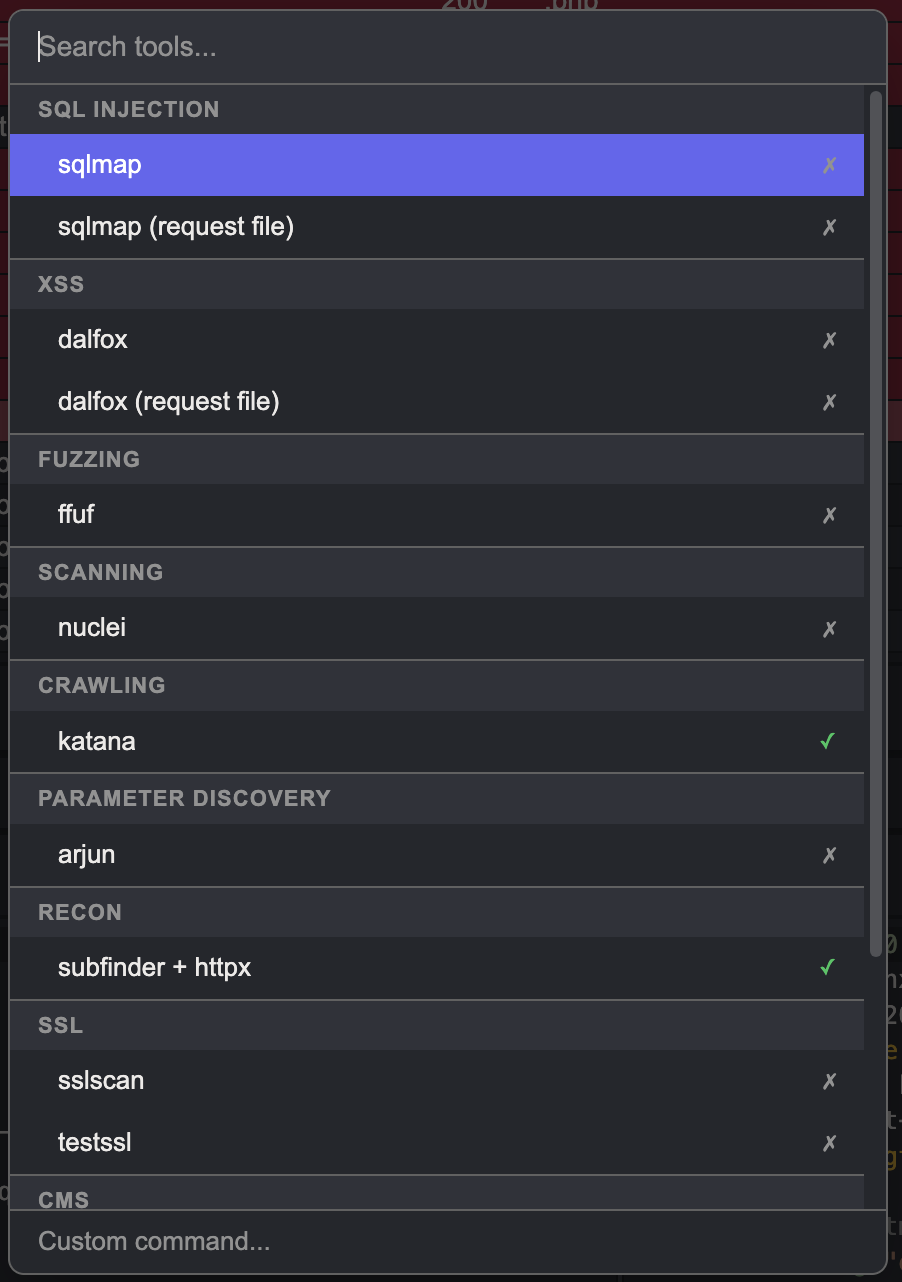
- Per-tool context menu — Right-click any request → "Dispatch: sqlmap", "Dispatch: ffuf", etc. for one-click dispatch, plus "Dispatch..." for the full picker; quick entries stay in sync with Settings changes
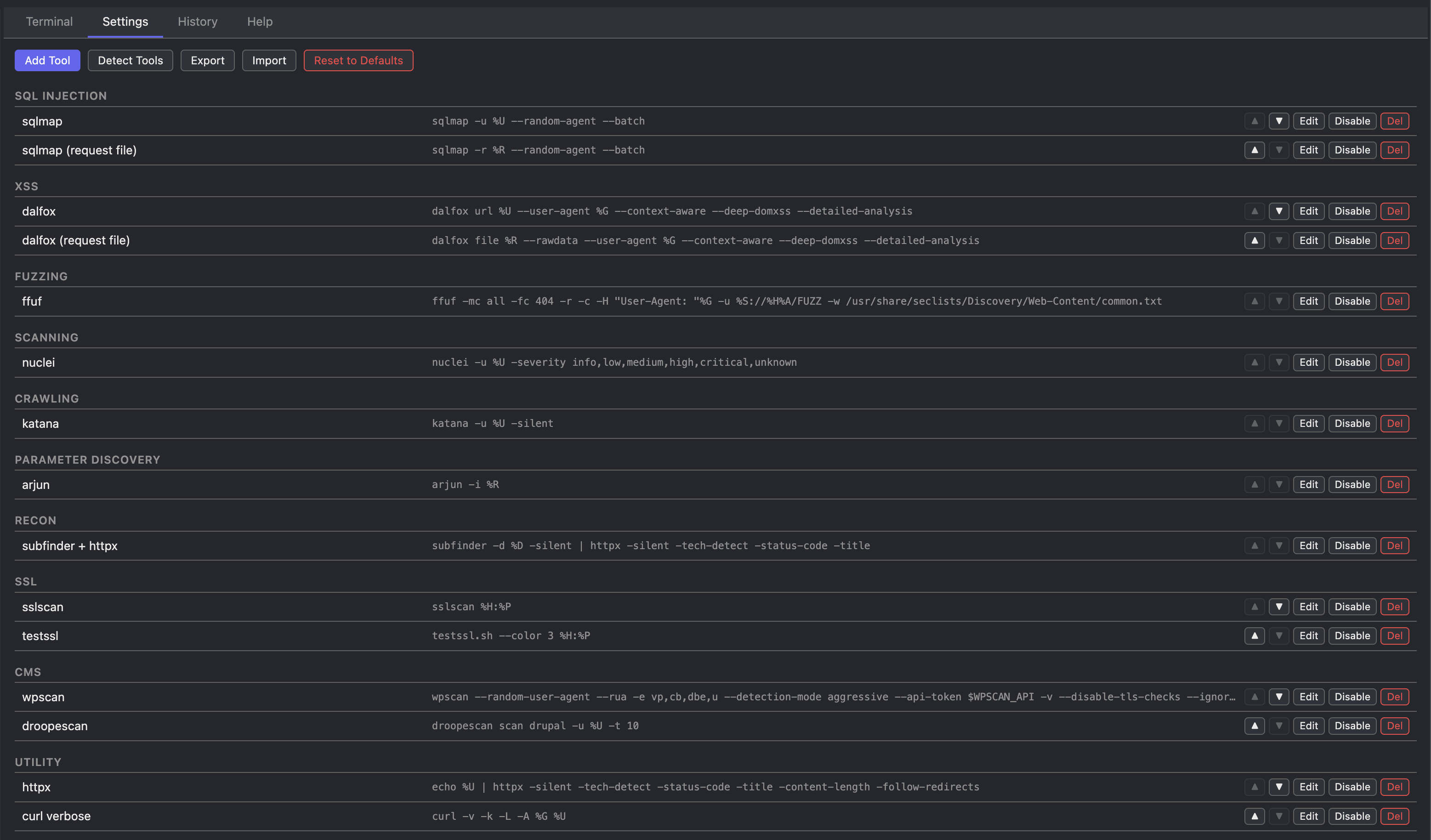
- 19 built-in presets — sqlmap, dalfox, ffuf, nuclei, katana, arjun, x8, gospider, subfinder+httpx, sslscan, testssl, wpscan, droopescan, httpx, curl, LinkFinder and more
- Placeholder system —
%U,%H,%R, etc. auto-resolve from the selected request - Preview & edit — See the resolved command before running, edit flags on the fly
- Streaming terminal — Real-time stdout/stderr output with kill support
- Multi-select — Select multiple requests and run a tool against all of them sequentially, with live batch progress in the Terminal tab
- Tool detection — Shows installed/missing status for each tool, with multi-binary support for pipelines
- Custom tools — Add your own tools with any command template
- Import/Export — Backup and share tool configurations as JSON
- History — Browse past executions with filters by tool name and exit code, with automatic refresh as runs finish
- Caido Findings — Create Caido Findings from completed runs
- Shell env vars — Use
$VARor${VAR}in templates (resolved by login shell) - Binary-safe —
%Rand%Bpreserve exact bytes for non-UTF-8 / binary request bodies - Caido theme integration — Uses native CSS variables, adapts to any Caido theme
Installation
- Download
plugin_package.zip(and optionallyplugin_package.zip.sig+public.pemto verify) from Releases - (Optional but recommended) Verify the signature
- In Caido, go to Plugins → Install from file → Select the zip
- The "Dispatch" sidebar entry and context menu will appear immediately
Usage
- Intercept or browse HTTP requests in Caido
- Right-click a request row → Dispatch...
- Search or pick a tool from the list
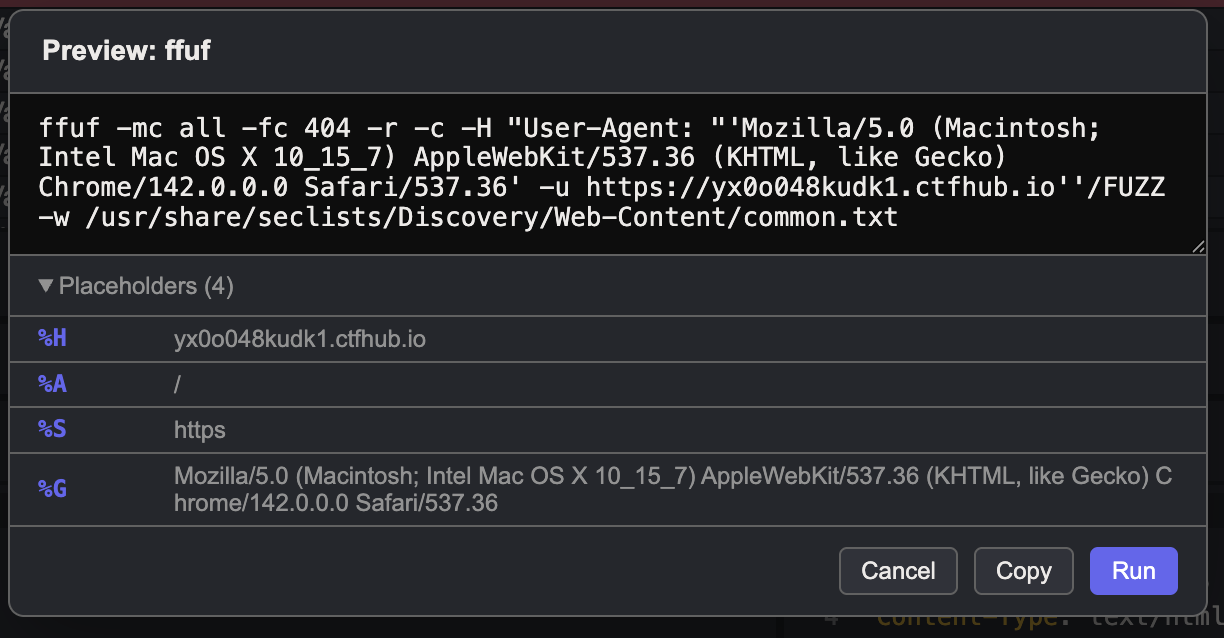
- Review the resolved command in the preview dialog
- Click Run — output streams live in the Terminal tab
Multi-select
Select multiple request rows before clicking "Dispatch...". The tool runs once per request sequentially. The preview shows the first request; edits to flags apply to all, and the Terminal tab shows live batch progress while the batch is running.
Environment Variables
Use $VAR or ${VAR} in command templates to reference shell environment variables. Since commands run via login shell, all your system environment variables are available.
Example: wpscan --url=%U --api-token $WPSCAN_API
Placeholders
Use these in command templates. They resolve per-request before execution.
| Placeholder | Description | Example |
|---|---|---|
%U |
Full URL (scheme://host:port/path?query) | https://target.com/api/users?id=1 |
%H |
Host | target.com |
%P |
Port | 443 |
%A |
Path (without query, preserves trailing slash) | /api/users/ |
%Q |
Query string (without ?) | id=1&name=test |
%M |
HTTP method | POST |
%S |
Scheme | https |
%C |
Cookies (Cookie header value) | session=abc123; token=xyz |
%G |
User-Agent header value | Mozilla/5.0 (Windows NT 10.0; ...) |
%D |
Root/registrable domain | example.co.uk |
%R |
Temp file with full raw request (binary-safe) | /tmp/dispatch-xxx/request.raw |
%E |
Temp file with request headers | /tmp/dispatch-xxx/headers.txt |
%B |
Temp file with request body (binary-safe) | /tmp/dispatch-xxx/body.txt |
File placeholders (%R, %E, %B) only create temp files when used. Files are cleaned up after execution. %R and %B use raw bytes to preserve binary content without UTF-8 corruption.
Built-in Presets
| Group | Tool | Command |
|---|---|---|
| SQL Injection | sqlmap | sqlmap -u %U --random-agent --batch |
| SQL Injection | sqlmap (request file) | sqlmap -r %R --random-agent --batch |
| XSS | dalfox | dalfox url %U --user-agent %G --context-aware --deep-domxss --detailed-analysis |
| XSS | dalfox (request file) | dalfox file %R --rawdata --user-agent %G --context-aware --deep-domxss --detailed-analysis |
| Fuzzing | ffuf | ffuf -mc all -fc 404 -r -c -H "User-Agent: "%G -u %S://%H%A/FUZZ -w WORDLIST |
| Fuzzing | x8 (param discovery) | x8 -u %U -w WORDLIST |
| Scanning | nuclei | nuclei -u %U -severity info,low,medium,high,critical,unknown |
| Scanning | nuclei (request file) | nuclei -l %R -severity info,low,medium,high,critical,unknown |
| Crawling | katana | katana -u %U -silent |
| Crawling | gospider | gospider -s %U -d 2 --sitemap --robots |
| Param Discovery | arjun | arjun -i %R |
| Recon | subfinder + httpx | subfinder -d %D -silent | httpx -silent -tech-detect -status-code -title |
| SSL | sslscan | sslscan %H:%P |
| SSL | testssl | testssl.sh --color 3 %H:%P |
| CMS | wpscan | wpscan --random-user-agent --rua -e vp,cb,dbe,u --detection-mode aggressive --api-token $WPSCAN_API -v --disable-tls-checks --ignore-main-redirect --url=%U |
| CMS | droopescan | droopescan scan drupal -u %U -t 10 |
| JS Analysis | LinkFinder | linkfinder -i %U -o cli |
| Utility | httpx | echo %U | httpx -silent -tech-detect -status-code -title -content-length -follow-redirects |
| Utility | curl verbose | curl -v -k -L -A %G %U |
Replace WORDLIST in the preview dialog with your actual wordlist path before running.
Custom Tools & Categories
- Go to Settings → Add Tool to create your own commands with any placeholder
- The Group field accepts any text — if the category doesn't exist, it's created automatically
- A category disappears when all its tools are removed or moved to another group
- Use Import/Export to backup and share your tool configurations as JSON
- Quick-dispatch entries update automatically after you add, edit, disable, or remove a tool in Settings
History & Findings
Every run lands in the History tab with exit code, duration, and full output. Filter by tool name or exit code, reopen any run's stdout/stderr, or click Create Finding to file a Caido Finding linked to the original request and the tool output.

Keyboard Shortcuts
| Context | Key | Action |
|---|---|---|
| Picker | ↑ / ↓ |
Navigate tools |
| Picker | Enter |
Select tool |
| Picker | Esc |
Close picker |
| Picker | Type | Filter by name or group |
| Preview | Cmd+Enter |
Run command |
| Preview | Esc |
Cancel |
| Terminal | Click command | Copy to clipboard |
Building from Source
Requires Node.js ≥ 20 and pnpm ≥ 9 (pin your version with the provided .nvmrc).
git clone https://github.com/six2dez/dispatch.git
cd dispatch
pnpm install
pnpm run lint
pnpm run typecheck
pnpm run build
The output dist/plugin_package.zip is ready to install in Caido.
Verifying a Release
Every release publishes plugin_package.zip alongside plugin_package.zip.sig (ED25519
signature) and public.pem (verification key). To confirm a download has not
been tampered with:
openssl pkeyutl -verify \
  -pubin -inkey public.pem \
  -rawin -in plugin_package.zip \
  -sigfile plugin_package.zip.sig
A successful verification prints Signature Verified Successfully. Any other
output means the file was modified or the wrong key was used — do not install.
Platform Support
- macOS and Linux are first-class: commands run through your login
shell (
/bin/zsh -lcon macOS,/bin/bash -lcelsewhere). - Windows is not directly supported — use WSL and install Caido + the CLI tools inside the WSL distro, or run Caido in a Linux VM.
Troubleshooting
- Tool detected as missing but it's installed: Dispatch resolves tools
through a login shell, so it sees the same
PATHyou get in a fresh terminal tab. Make sure your tool is exported from~/.zshrc,~/.zprofile,~/.bash_profile, or~/.bashrc(depending on your shell), not only from a project-local env. - Command edited in preview doesn't use my env var: env vars like
$WPSCAN_APIare expanded by the login shell at run-time. If the variable isn't set in your shell profile, it silently expands to an empty string. Check withenv | grep WPSCAN_APIin a terminal tab. - Process stays running after hitting Kill: Dispatch terminates the entire
process group. If a tool double-forks into a daemon it may survive; kill it
manually with
pkill -f toolname. - History shows truncated output: buffered output is capped at 512 KB per
stream (stdout and stderr). Redirect the tool's output to a file in the
command template if you need the full log (e.g.
nuclei ... -o /tmp/out.txt). - Signature verification fails: make sure you downloaded
public.pemfrom the same release, not from the repo. The key is attached to every release from 0.3 onward.
Security
This plugin executes arbitrary shell commands by design — it is built for security professionals who need to pipe HTTP requests to CLI tools. Key points:
- All placeholder values (%U, %H, etc.) are shell-escaped automatically using single-quote wrapping
- The preview dialog allows editing the resolved command before execution; edited commands are executed as-is
- Commands run via login shell (
/bin/zsh -lcon macOS,/bin/bash -lcon Linux) with the user's full PATH - The plugin does NOT execute commands without user interaction (always requires context menu click + tool selection + optional preview confirmation)
%Rand%Bfile placeholders write binary-safe data usingtoBytes()/toRaw()to preserve exact request content- Kill terminates the entire process group (pipes, subprocesses), not just the parent shell
- Tool configurations imported from JSON get new IDs and cannot overwrite existing tools
- Maximum 10 concurrent processes to prevent accidental resource exhaustion
- The plugin itself makes no network requests, contacts no external service, collects no telemetry, and loads no remote assets — the only outbound traffic is whatever the CLI tool you launch produces. Everything it stores (tool configs, run history) stays in Caido's local plugin storage
Notes
- Commands execute via login shell (
/bin/zsh -lcon macOS,/bin/bash -lcon Linux) to inherit your full system PATH - All placeholder values are shell-escaped (single-quote wrapped) automatically
- Pipes, redirects, and chaining work in command templates
- Terminal output stored in SQLite is truncated to 512KB per stream; the in-app terminal also caps buffered stdout/stderr to 512KB each
- Batch execution continues even if individual requests fail
License
MIT
Questions
What is dispatch?
six2dez/dispatch is a public repo on GitHub by six2dez. Caido plugin to send HTTP requests to external CLI security tools with preview, batch execution, and live output.
Is dispatch open source?
It declares the MIT license on GitHub.
Does dispatch run on macOS, Windows or Linux?
Its maker has not tagged a system, so it is unknown here. Its README says what it needs.
How do I install dispatch?
Open "Take it" on its page: Take My Repo writes an install plan for your machine and hands it to your AI agent (Claude Code, Codex or Cursor), which asks you before each step. Take My Repo has not tested it on any machine.
Is dispatch still maintained?
Its last change on GitHub was on 2026-08-20. Take My Repo does not judge from that whether it is maintained.
What do people who ran dispatch say?
Nobody has reviewed it on Take My Repo yet, which says nothing about its quality.