
syft
CLI tool and library for generating a Software Bill of Materials from container images and filesystems
- 10k
- Go
- Apache-2.0
- 1 d ago
Java library which implements the Java object model for SPDX and provides useful helper functions
Repo spdx/Spdx-Java-Library, read from GitHub 8 h ago. spdx has not joined Take My Repo.
spdx/Spdx-Java-Library is a public repo on GitHub by spdx. Java library which implements the Java object model for SPDX and provides useful helper functions. It declares the Apache-2.0 license on GitHub. It is written mainly in Java, has 72 stars and last changed on 2026-11-23. Nobody has reviewed it on Take My Repo yet, which says nothing about its quality. Read from GitHub on 2026-11-23.

Spdx-Java-Library is a Java library which implements the Java object model for SPDX and provides useful helper functions.
The library is available in Maven Central as
org.spdx:java-spdx-library
(note the order of the word "java-spdx").
If you are using Maven, you can add the following dependency in your POM file:
<dependency>
  <groupId>org.spdx</groupId>
  <artifactId>java-spdx-library</artifactId>
  <version>[2.0,3.0)</version>
</dependency>
See the GETTING-STARTED.md file for installation instructions and how to get started in different scenarios.
Library version 2.0.0 and higher is not compatible with previous versions of the library due to breaking changes introduced in SPDX 3.0.
However, the library supports both SPDX specification versions 2.X and 3.X.
See README-V3-UPGRADE.md for library upgrade instructions.

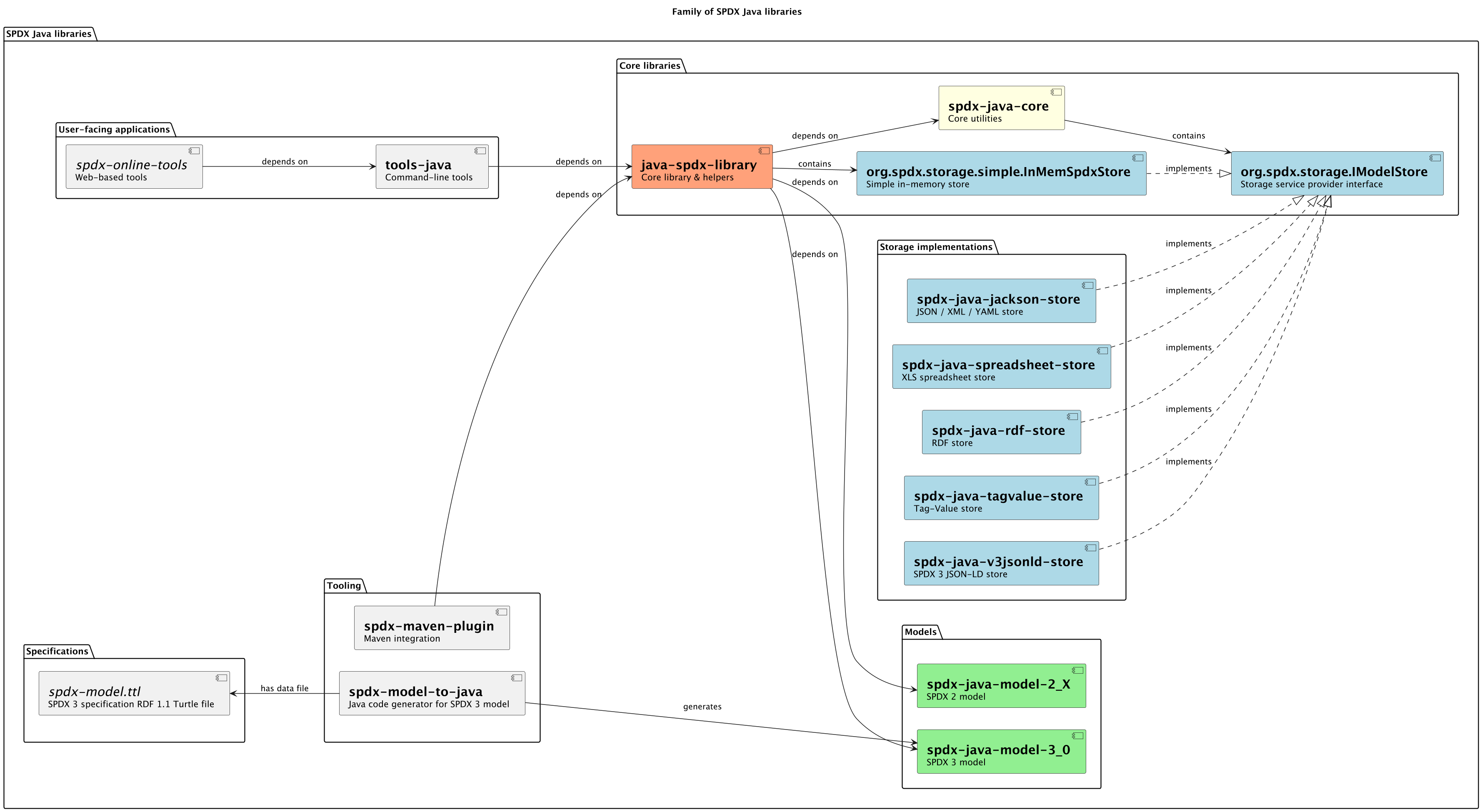
Here are links to the API documentation for the family of SPDX Java libraries.
"release" points to the API documentation of the latest stable version of the library, while "dev" points to the API documentation generated every time there is an update in the library's GitHub repository.
| Library | Description | Supported SPDX version | Supported SPDX version | Doc (release) | Doc (dev) |
|---|---|---|---|---|---|
| java-spdx-library | Core library implementing the SPDX Java object model and helper functions. | 2.X | 3.X | release | dev |
| spdx-java-core | Core utilities and shared functionality for SPDX Java libraries. | 2.X | 3.X | release | dev |
| Model | |||||
| spdx-java-model-2_X | Model implementation for SPDX 2.X specification. | 2.X | release | dev | |
| spdx-java-model-3_0 | Model implementation for SPDX 3.0 specification. | 3.X | release | ||
| Model store | |||||
| spdx-jackson-store | Jackson Databind-based storage implementation for SPDX objects. Supports JSON, YAML and XML formats. | 2.X | release | dev | |
| spdx-rdf-store | RDF-based storage implementation for SPDX objects. | 2.X | release | dev | |
| spdx-spreadsheet-store | Spreadsheet-based storage implementation for SPDX objects. Supports XLS and XLSX formats. | 2.X | release | dev | |
| spdx-tagvalue-store | Tag-value-file-based storage implementation for SPDX objects. | 2.X | release | dev | |
| spdx-v3jsonld-store | JSON-LD-based storage implementation for SPDX 3 objects. | 3.X | release | dev | |
| Tools | |||||
| spdx-model-to-java | Generates Java source files from SPDX 3 model files. Used for spdx-java-model-3_0. | 3.X | dev | ||
| spdx-maven-plugin | Maven plugin producing SPDX documents for artifacts described in the Maven POM file. | 2.X | 3.X | release | dev |
| tools-java | Command-line tools for working with SPDX documents. | 2.X | 3.X | release |
org.spdx.storage.IModelStore interface.
This is a low level Service Provider Interface (SPI).ISerializableModelStore extends the IModelStore and supports
serializing and de-serializing the store to an I/O Stream.
This interface is currently used to implement JSON, XML, YAML, and RDF/XML
formats.org.spdx.library.model package.The methods enterCriticalSection and leaveCriticalSection are available to
support multi-threaded applications.
These methods serialize access to the model store for the specific SPDX document used for the SPDX model object.
Spdx-Java-Library can be configured using either Java system properties or a Java properties file located in the runtime CLASSPATH at /resources/spdx-java-library.properties.
The library has these configuration options:
org.spdx.useJARLicenseInfoOnly - a boolean that controls whether the (potentially out of date) listed license information bundled inside the JAR is used (true), vs the library downloading the latest files from the SPDX website (false). Default is false (always download the latest files from the SPDX website).org.spdx.downloadCacheEnabled - a boolean that enables or disables the download cache. Defaults to false (the cache is disabled). The cache location is determined as per the XDG Base Directory Specification (i.e. ${XDG_CACHE_HOME}/Spdx-Java-Library or ${HOME}/.cache/Spdx-Java-Library).org.spdx.downloadCacheCheckIntervalSecs - a long that controls how often each cache entry is rechecked for staleness, in units of seconds. Defaults to 86,400 seconds (24 hours). Set to 0 (zero) to have each cache entry checked every time (note: this will result in a lot more network I/O and negatively impact performance, albeit there is still a substantial performance saving vs not using the cache at all).Note that these configuration options can only be modified prior to first use of Spdx-Java-Library. Once the library is initialized, subsequent changes will have no effect.
Before executing any of the model class methods, the model versions need to be initialized. This is done by calling:
SpdxModelFactory.init();
SPDX data is stored in a "model store" and copying between model stores requires a copy manager.
A simple store is provided in the java library. To create the simple in-memory model store and a copy manager, execute the following:
InMemSpdxStore modelStore = new InMemSpdxStore();
IModelCopyManager copyManager = new ModelCopyManager();
Many factory and helper methods in the library make use of a DefaultModelStore
if no model store or copy manager is specified.
The SpdxModelFactory.init() will create defaults for this purpose.
If you would like to use a different default model store and/or copy manager, you can call:
DefaultModelStore.initialize(IModelStore newModelStore, String newDefaultDocumentUri,
                            IModelCopyManager newDefaultCopyManager);
The newDefaultDocumentUri is a default document URI used for SPDX Spec version 2 model objects.
IMPORTANT NOTE: The call to DefaultModelStore.initialize must be made prior to or immediately after the call
to SpdxModelFactory.init(). Otherwise, any data stored in the previous default model object will be lost.
The SpdxModelFactory.init() will not overwrite an already initialized default model store.
To update Spdx-Java-Library, the following is a very brief checklist:
ISpdxModelInfo - typically named SpdxModelInfoVXXXspdx/Spdx-Java-Library is a public repo on GitHub by spdx. Java library which implements the Java object model for SPDX and provides useful helper functions.
It declares the Apache-2.0 license on GitHub.
Its maker has not tagged a system, so it is unknown here. Its README says what it needs.
Open "Take it" on its page: Take My Repo writes an install plan for your machine and hands it to your AI agent (Claude Code, Codex or Cursor), which asks you before each step. Take My Repo has not tested it on any machine.
:mag: ScanCode detects licenses, copyrights, dependencies by "scanning code" ... to discover and inventory open source and third-party packages used in your code. Sponsored by NLnet, the Google Summer of Code, Azure credits, nexB and other generous sponsors!
GLPI is a Free Asset and IT Management Software package, Data center management, ITIL Service Desk, licenses tracking and software auditing.
Dependency-Track is an intelligent Component Analysis platform that allows organizations to identify and reduce risk in the software supply chain.
Its last change on GitHub was on 2026-11-23. Take My Repo does not judge from that whether it is maintained.
Nobody has reviewed it on Take My Repo yet, which says nothing about its quality.
Take My Repo cannot say: it does not audit code and has not run Spdx-Java-Library. What is known comes from GitHub. It declares the Apache-2.0 license on GitHub. Its last change was on 2026-11-23. It has 72 stars, which measure popularity, not safety. Nobody has reviewed it on Take My Repo yet, which says nothing about its quality. Read the source before you run it. With "Take it", your AI agent shows each step and asks you before running it; README text is treated as data, not as instructions.


