BibGuard
Automated bibliography verification and LaTeX quality auditing for papers.
- 140
- 7 mo ago
Repo thinkwee/BibGuard, read from GitHub 2 h ago. thinkwee has not joined Take My Repo.
In short
thinkwee/BibGuard is a public repo on GitHub by thinkwee. Automated bibliography verification and LaTeX quality auditing for papers. It declares no license on GitHub. Public does not mean open source: without a license, nobody is granted the right to reuse it. It is written mainly in Python, has 140 stars and last changed on 2026-05-06. Nobody has reviewed it on Take My Repo yet, which says nothing about its quality. Read from GitHub on 2026-11-22.

BibGuard: Bibliography & LaTeX Quality Auditor
- Try now at https://huggingface.co/spaces/thinkwee/BibGuard !
- BibGuard is a comprehensive quality-assurance tool for academic papers. It validates every bibliography entry against real-world databases, checks LaTeX submission quality, flags retracted DOIs and broken URLs, and uses an LLM (optional) to verify that cited papers actually support your claims.
- AI coding assistants and writing tools often hallucinate plausible-sounding but non-existent references. BibGuard verifies the existence of every entry against multiple databases (arXiv, CrossRef, DBLP, Semantic Scholar, OpenAlex, Google Scholar) and produces a single, beautiful, self-contained HTML report you can open offline.
🛡 Why BibGuard?
- 🚫 Stop Hallucinations: Instantly flag citations that don't exist or have mismatched metadata
- 🚫 Catch Retractions: Detect references to papers that have been retracted or are under "expression of concern"
- 🔗 Detect Broken URLs: HEAD-check
entry.urlto find dead links before reviewers do - 📋 LaTeX Quality Checks: Detect formatting issues, weak writing patterns, double-blind compliance, AI-text artifacts
- 🔒 Safe & Non-Destructive: Your original files are never modified — only reports are generated
- 🧠 Contextual Relevance (optional, with LLM): Score each citation 1-5 and tag its role (baseline/method/dataset/counterexample/survey/motivation/other)
- ⚡ Re-runs are fast: SQLite-backed HTTP cache + auto-retry mean the second run on the same paper completes in seconds
🚀 Features
Bibliography Validation
- 🔍 Multi-Source Verification: Validates metadata against arXiv, CrossRef, DBLP, Semantic Scholar, OpenAlex, and Google Scholar
- 🚫 Retraction Detection: Flags retracted/withdrawn DOIs via CrossRef's
update-torelation - 🔗 URL Liveness Check: Optional HEAD-then-GET check on every
entry.url - 📊 Preprint Detection: Warns if >50% of references are preprints, and suggests published versions when arXiv records them
- 👀 Usage Analysis: Highlights missing citations and unused bib entries
- 👯 Duplicate Detection: Identifies duplicate entries with fuzzy matching
- 🤖 AI Relevance + Role Tagging (optional): 1-5 relevance score plus citation role classification
LaTeX Quality Checks
- 📐 Format Validation: Caption placement, cross-references, citation spacing, equation punctuation
- ✍️ Writing Quality: Weak sentence starters, hedging language, redundant phrases
- 🔤 Consistency: Spelling variants (US/UK English), hyphenation, terminology — augmentable via project glossary
- 🤖 AI Artifact Detection: Conversational AI responses, placeholder text, Markdown remnants
- 🔠 Acronym Validation: Ensures acronyms are defined before use, with a project-glossary skip list
- 🎭 Anonymization: Checks for identity leaks in double-blind submissions
- 📅 Citation Age: Flags references older than 30 years
- 🎓 Conference Templates: Mandatory-section and style-package checks for ACL, EMNLP, NAACL, CVPR, ICCV, ECCV, NeurIPS, ICML, ICLR
Outputs
- 📄 Markdown reports — bibliography validation + LaTeX quality issues
- 🌐 Self-contained HTML — dark mode, full-text search, per-section severity filters, inline highlighting of the offending span on each LaTeX issue. Opens offline, no server required
- 🤖 JSON for CI / scripts / custom dashboards
- 🧹 Cleaned
.bibcontaining only entries actually cited in the paper
📦 Installation
git clone git@github.com:thinkwee/BibGuard.git
cd BibGuard
pip install -r requirements.txt
⚡ Quick Start
1. Initialize Configuration
python main.py --init
This creates config.yaml. Edit it to point at your .bib and .tex files.
Single File Mode
files:
  bib: "paper.bib"
  tex: "paper.tex"
  output_dir: "bibguard_output"
Directory Scan Mode
For projects with multiple .tex and .bib files:
files:
  input_dir: "./my_project_dir"
  output_dir: "bibguard_output"
2. Run a Check
python main.py                          # full check using config.yaml / bibguard.yaml
python main.py --quick                  # local-only checks (no network, instant)
python main.py --format json,html       # pick output formats
python main.py --verbose                # DEBUG logs to stderr
python main.py --config my.yaml         # custom config path
python main.py --list-templates         # list conference templates
Default outputs (in bibguard_output/):
report.html— single self-contained HTML, opens offline, dark-mode awarereport.json— full machine-readable dump (only whenjsonis inoutput.formats)bibliography_report.md— bibliography validation, with corroboration noteslatex_quality_report.md— LaTeX quality issues, errors / warnings / suggestions, full line content with the offending span bolded<bibname>_only_used.bib— clean bibliography of cited entries only
🛠 Configuration
bibguard.yaml (or config.yaml) contains the following sections:
files:
  bib: "paper.bib"
  tex: "paper.tex"
  output_dir: "bibguard_output"

network:
  contact_email: ""           # used in polite-pool User-Agent for arXiv/CrossRef/OpenAlex
  cache_enabled: true         # local SQLite cache for HTTP responses (~/.cache/bibguard)
  cache_ttl_hours: 24
  retry_total: 5              # auto-retry on 429/5xx with exponential backoff
  retry_backoff_factor: 1.5

template: ""                  # acl | emnlp | naacl | cvpr | iccv | eccv | neurips | icml | iclr

bibliography:
  check_metadata: true        # verify against online databases (slow on first run, fast on repeats)
  check_usage: true           # find unused entries / missing citations
  check_duplicates: true
  check_preprint_ratio: true  # warn if >50% of references are preprints
  check_relevance: false      # LLM-based relevance check (requires API key)

submission_extra:
  url_liveness: false         # HEAD-check every entry.url field (slow)
  retraction: true            # flag retracted DOIs via CrossRef

submission:                   # 11 LaTeX checkers — toggle each independently
  caption: true
  reference: true
  formatting: true
  equation: true
  ai_artifacts: true
  sentence: true
  consistency: true
  acronym: true
  number: true
  citation_quality: true
  anonymization: true

# Project glossary feeds the consistency / acronym checkers.
glossary:
  preferred:
    - "Transformer"
    - "fine-tuning"
  acronyms:
    NLP: "Natural Language Processing"
    LLM: "Large Language Model"

llm:
  backend: "gemini"           # gemini | openai | anthropic | deepseek | ollama | vllm
  model: ""                   # leave empty for sensible default per backend
  api_key: ""                 # PREFER env var: $GEMINI_API_KEY / $OPENAI_API_KEY / etc.

output:
  quiet: false
  minimal_verified: false
  formats: [markdown, html]   # any of: markdown, html, json
🤖 LLM-Based Relevance + Role Tagging
When bibliography.check_relevance is true, BibGuard sends each citation's surrounding context plus the cited paper's abstract to your chosen LLM. The model returns a 1-5 relevance score, an is_relevant boolean, a one-sentence explanation, and a citation role:
baseline— cited as a comparison/baselinemethod— cited paper introduces a method this one builds ondataset— provides a dataset/benchmark used herecounterexample— cited to argue againstsurvey— cited as a survey/overviewmotivation— cited to motivate the problemother
Supported backends: Gemini, OpenAI, Anthropic, DeepSeek, Ollama (local), vLLM (custom endpoint).
API keys: read from environment variables by convention — GEMINI_API_KEY, OPENAI_API_KEY, ANTHROPIC_API_KEY, DEEPSEEK_API_KEY. Set them in your shell rather than committing api_key: to bibguard.yaml.
🌐 Web UI
python app.py
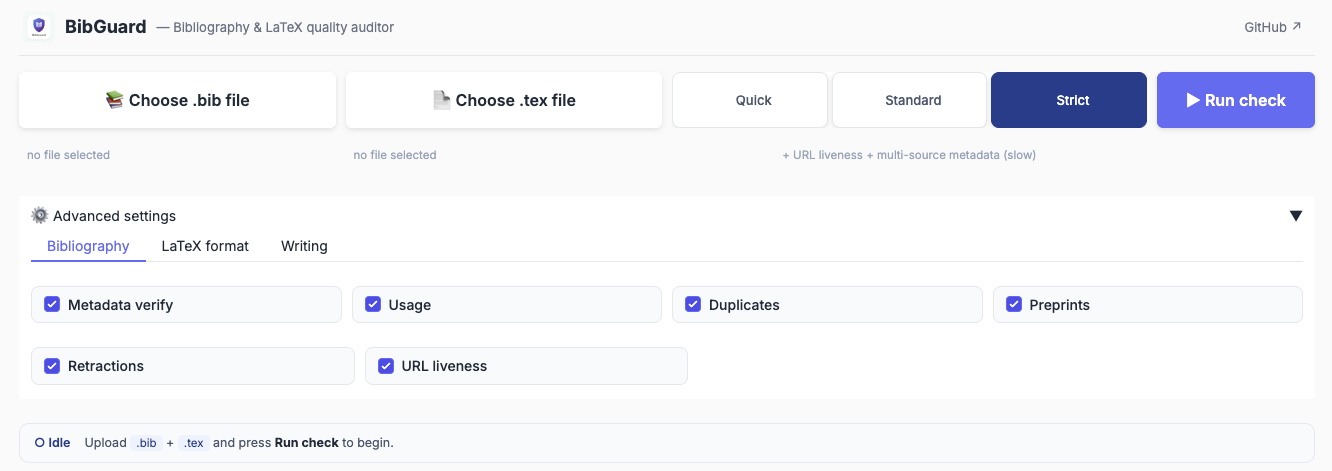
Opens at http://localhost:7860. The web UI mirrors the CLI but with a streaming status panel and three presets:
- Quick — local checks only, no network, instant
- Standard — local + retraction lookup (CrossRef)
- Strict — adds multi-source metadata fetch + URL liveness (slow on first run; subsequent runs are cached)
The toolbar fits in one row: file uploads, preset chips, and Run / Stop. Per-check overrides live in the Advanced accordion. The report renders inline as a self-contained iframe so the page stays stable while entries stream in. Downloads (HTML, Markdown bib, JSON, cleaned .bib, bibguard.log) appear in the Downloads accordion below.
Set BIBGUARD_CONTACT_EMAIL=you@example.com in your shell to use a real contact in the polite-pool User-Agent.
🪝 Pre-commit Hook
To run BibGuard automatically before each commit that touches .tex or .bib:
cd /path/to/your-paper-repo
bash /path/to/BibGuard/scripts/install-hook.sh
Skip the hook for one commit with git commit --no-verify.
📝 Understanding Reports
Self-Contained HTML (report.html)
The recommended output. Single file, no external assets, dark-mode aware. Includes:
- Three tabs: Bibliography · LaTeX Quality · Retractions / URLs
- Per-section filter chips — bibliography filters by Verified / Unverified / Unused; LaTeX quality filters by Errors / Warnings / Info
- Full-text search across titles, authors, keys, and messages — works inside the active tab
- Inline span highlighting — for LaTeX issues that come from a regex (e.g.,
\cite{}without~), the offending substring is wrapped in<mark>so you can see exactly where in the line to look - Honest empty states — Retractions / URL liveness panels report how many entries actually carried a
doi=/url=field, so an empty result no longer looks like the check failed silently - Theme toggle that overrides system preference
Markdown Reports
Two files for granular review and code review tooling:
bibliography_report.md— every entry with metadata-match status, including positive corroboration notes when a second source agreedlatex_quality_report.md— issues grouped by checker and severity, full line content with the offending span bolded
JSON Output
Machine-readable dump for CI integration. Top-level keys: meta, summary, entries, submission_results, retractions, url_findings, duplicates, missing_citations.
🧐 Understanding Mismatches
BibGuard is strict, but false positives happen:
- Year Discrepancy (±1 Year) — preprint vs. official publication. Verify which version you intend to cite.
- Author List Variations — different databases truncate large author lists differently. Check primary authors.
- Venue Name Differences — abbreviations vs. full names (e.g., "NeurIPS" vs. "Neural Information Processing Systems"). Both usually correct.
- Non-Academic Sources — blogs and documentation aren't indexed by academic databases. Verify URL and title manually.
🔧 Performance Notes
- First run with
check_metadata: trueon ~100 entries: 1-3 minutes (rate-limited by arXiv/CrossRef). - Re-runs: seconds, thanks to the SQLite HTTP cache at
~/.cache/bibguard/http_cache.sqlite(TTL 24h by default). - Quick mode (
python main.py --quick) bypasses all network calls; runs in <1 second on most papers. - Retraction lookup is concurrent; ~5-10 seconds for 100 entries with cache cold.
Hostile networks (HF Spaces, restricted egress)
BibGuard's networking is tuned for "fail fast, then circuit-break":
- urllib3 retries are restricted to genuine HTTP 5xx — connection resets and read timeouts are not retried, so a blocked source fails in 1-3 s instead of 20+ s.
- The application-level circuit breaker trips after 2 consecutive failures and skips that source for the rest of the run.
If you know in advance that a source won't work from your deploy (e.g. HF Spaces' egress IPs are routinely blocked by DBLP and export.arxiv.org), pre-disable them so the run never even tries:
export BIBGUARD_DISABLE_SOURCES="dblp,arxiv"
python app.py     # or main.py
Comma- or space-separated, case-insensitive. Other sources (CrossRef, Semantic Scholar, OpenAlex) keep working.
🤝 Contributing
Contributions welcome. Open an issue or pull request.
🙏 Acknowledgments
BibGuard uses the following data sources:
- arXiv API
- CrossRef REST API
- Semantic Scholar Graph API
- DBLP API
- OpenAlex API
- Google Scholar (via scraping; rate-limited)
Made with ❤️ for researchers who care about their submission
Questions
What is BibGuard?
thinkwee/BibGuard is a public repo on GitHub by thinkwee. Automated bibliography verification and LaTeX quality auditing for papers.
Is BibGuard open source?
It declares no license on GitHub. Public does not mean open source: without a license, nobody is granted the right to reuse it.
Does BibGuard run on macOS, Windows or Linux?
Its maker has not tagged a system, so it is unknown here. Its README says what it needs.
How do I install BibGuard?
Open "Take it" on its page: Take My Repo writes an install plan for your machine and hands it to your AI agent (Claude Code, Codex or Cursor), which asks you before each step. Take My Repo has not tested it on any machine.
Is BibGuard still maintained?
Its last change on GitHub was on 2026-05-06. Take My Repo does not judge from that whether it is maintained.
What do people who ran BibGuard say?
Nobody has reviewed it on Take My Repo yet, which says nothing about its quality.