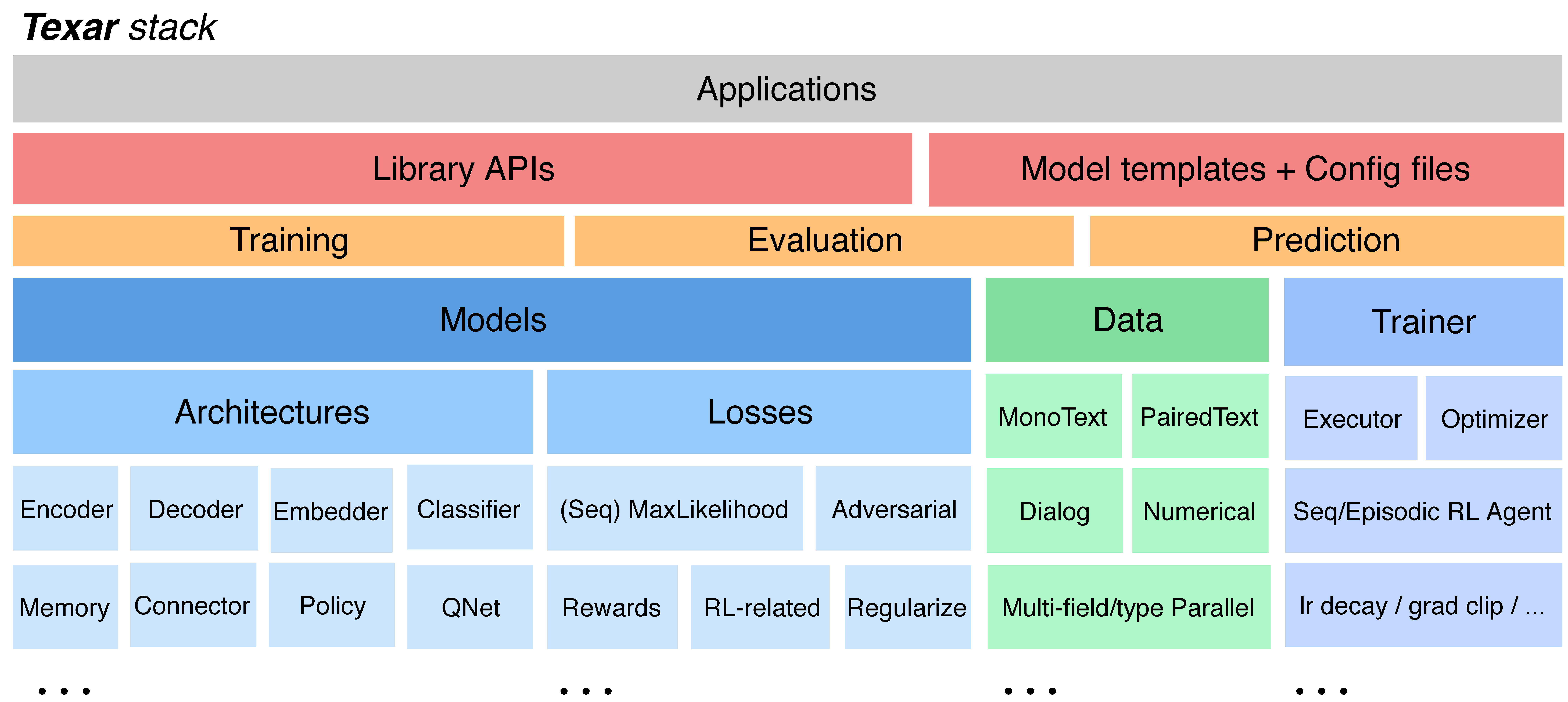
texar
Toolkit for Machine Learning, Natural Language Processing, and Text Generation, in TensorFlow. This is part of the CASL project: http://casl-project.ai/
- 2.4k
- Python
- Apache-2.0
- 4 mo ago
Tools for reshaping text data
Repo trinker/textshape, read from GitHub 9 h ago. trinker has not joined Take My Repo.
trinker/textshape is a public repo on GitHub by trinker. Tools for reshaping text data. It declares no license on GitHub. Public does not mean open source: without a license, nobody is granted the right to reuse it. It is written mainly in R, has 54 stars and last changed on 2024-04-01. Nobody has reviewed it on Take My Repo yet, which says nothing about its quality. Read from GitHub on 2026-11-25.
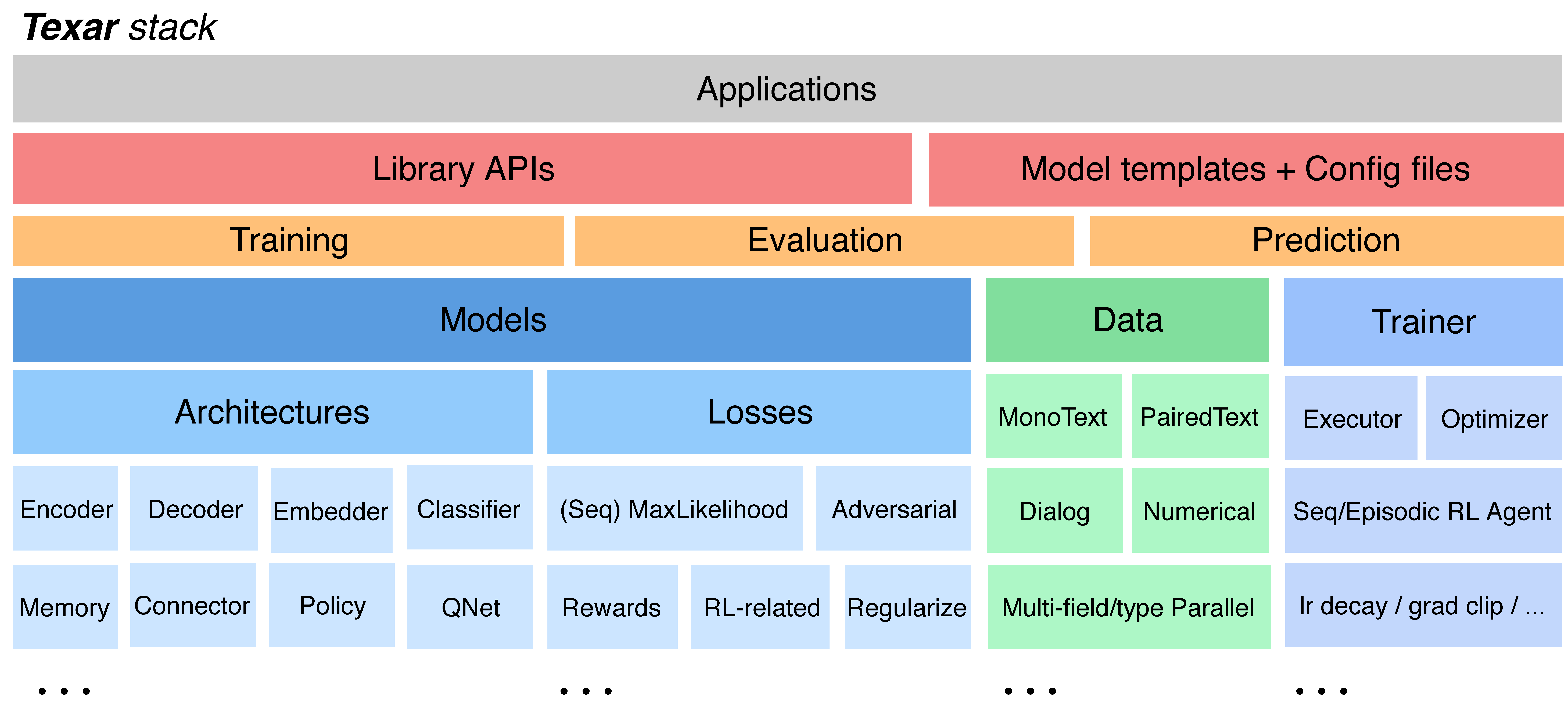
Toolkit for Machine Learning, Natural Language Processing, and Text Generation, in TensorFlow. This is part of the CASL project: http://casl-project.ai/

textshape is small suite of text reshaping and restructuring functions. Many of these functions are descended from tools in the qdapTools package. This brings reshaping tools under one roof with specific functionality of the package limited to text reshaping.
Other R packages provide some of the same functionality. textshape
differs from these packages in that it is designed to help the user take
unstructured data (or implicitly structured), extract it into a
structured format, and then restructure into common text analysis
formats for use in the next stage of the text analysis pipeline. The
implicit structure of seemingly unstructured data is often
detectable/expressible by the researcher. textshape provides tools
(e.g., split_match) to enable the researcher to convert this tacit
knowledge into a form that can be used to reformat data into more
structured formats. This package is meant to be used jointly with the
textclean package, which
provides cleaning and text normalization functionality.
Most of the functions split, expand, grab, or tidy a vector, list,
data.frame, or DocumentTermMatrix. The combine, duration,
mtabulate, & flatten functions are notable exceptions. The table
below describes the functions and their use:
| Function | Used On | Description |
|---|---|---|
combine |
vector, list, data.frame |
Combine and collapse elements |
tidy_list |
list of vectors or data.frames |
Row bind a list and repeat list names as id column |
tidy_vector |
vector |
Column bind a named atomic vector’s names and values |
tidy_table |
table |
Column bind a table’s names and values |
tidy_matrix |
matrix |
Stack values, repeat column row names accordingly |
tidy_dtm/tidy_tdm |
DocumentTermMatrix |
Tidy format DocumentTermMatrix/TermDocumentMatrix |
tidy_colo_dtm/tidy_colo_tdm |
DocumentTermMatrix |
Tidy format of collocating words from a DocumentTermMatrix/TermDocumentMatrix |
duration |
vector, data.frame |
Get duration (start-end times) for turns of talk in n words |
from_to |
vector, data.frame |
Prepare speaker data for a flow network |
mtabulate |
vector, list, data.frame |
Dataframe/list version of tabulate to produce count matrix |
flatten |
list |
Flatten nested, named list to single tier |
unnest_text |
data.frame |
Unnest a nested text column |
split_index |
vector, list, data.frame |
Split at specified indices |
split_match |
vector |
Split vector at specified character/regex match |
split_portion |
vector* |
Split data into portioned chunks |
split_run |
vector, data.frame |
Split runs (e.g., “aaabbbbcdddd”) |
split_sentence |
vector, data.frame |
Split sentences |
split_speaker |
data.frame |
Split combined speakers (e.g., “Josh, Jake, Jim”) |
split_token |
vector, data.frame |
Split words and punctuation |
split_transcript |
vector |
Split speaker and dialogue (e.g., “greg: Who me”) |
split_word |
vector, data.frame |
Split words |
grab_index |
vector, data.frame, list |
Grab from an index up to a second index |
grab_match |
vector, data.frame, list |
Grab from a regex match up to a second regex match |
column_to_rownames |
data.frame |
Add a column as rownames |
cluster_matrix |
matrix |
Reorder column/rows of a matrix via hierarchical clustering |
*Note: Text vector accompanied by aggregating grouping.var
argument, which can be in the form of a vector, list, or
data.frame
To download the development version of textshape:
Download the zip
ball or tar
ball, decompress
and run R CMD INSTALL on it, or use the pacman package to install
the development version:
if (!require("pacman")) install.packages("pacman")
pacman::p_load_gh("trinker/textshape")
You are welcome to:
Contributions are welcome from anyone subject to the following rules:
The main shaping functions can be broken into the categories of (a) binding, (b) combining, (c) tabulating, (d) spanning, (e) splitting, (f) grabbing & (e) tidying. The majority of functions in textshape fall into the category of splitting and expanding (the semantic opposite of combining). These sections will provide example uses of the functions from textshape within the three categories.
if (!require("pacman")) install.packages("pacman")
pacman::p_load(tidyverse, magrittr, ggstance, viridis, gridExtra, quanteda)
pacman::p_load_current_gh('trinker/gofastr', 'trinker/textshape')
The tidy_xxx functions convert untidy structures into tidy
format. Tidy formatted
text data structures are particularly useful for interfacing with
ggplot2, which expects this form.
The tidy_list function is used in the style of
do.call(rbind, list(x1, x2)) as a convenient way to bind together
multiple named data.frames or vectorss into a single data.frame
with the list names acting as an id column. The data.frame bind is
particularly useful for binding transcripts from different observations.
Additionally, tidy_vector and tidy_table are provided for cbinding
a table’s or named atomic vector’s values and names as separate
columns in a data.frame. Lastly, tidy_dtm/tidy_tdm provide
convenient ways to tidy a DocumentTermMatrix or TermDocumentMatrix.
x <- list(p=1:500, r=letters)
tidy_list(x)

##      id content
##   1:  p       1
##   2:  p       2
##   3:  p       3
##   4:  p       4
##   5:  p       5
##  ---
## 522:  r       v
## 523:  r       w
## 524:  r       x
## 525:  r       y
## 526:  r       z
x <- list(p=mtcars, r=mtcars, z=mtcars, d=mtcars)
tidy_list(x)

##      id  mpg cyl  disp  hp drat    wt  qsec vs am gear carb
##   1:  p 21.0   6 160.0 110 3.90 2.620 16.46  0  1    4    4
##   2:  p 21.0   6 160.0 110 3.90 2.875 17.02  0  1    4    4
##   3:  p 22.8   4 108.0  93 3.85 2.320 18.61  1  1    4    1
##   4:  p 21.4   6 258.0 110 3.08 3.215 19.44  1  0    3    1
##   5:  p 18.7   8 360.0 175 3.15 3.440 17.02  0  0    3    2
##  ---
## 124:  d 30.4   4  95.1 113 3.77 1.513 16.90  1  1    5    2
## 125:  d 15.8   8 351.0 264 4.22 3.170 14.50  0  1    5    4
## 126:  d 19.7   6 145.0 175 3.62 2.770 15.50  0  1    5    6
## 127:  d 15.0   8 301.0 335 3.54 3.570 14.60  0  1    5    8
## 128:  d 21.4   4 121.0 109 4.11 2.780 18.60  1  1    4    2
x <- setNames(
    sample(LETTERS[1:6], 1000, TRUE),
    sample(state.name[1:5], 1000, TRUE)
)
tidy_vector(x)

##               id content
##    1:   Arkansas       D
##    2:     Alaska       B
##    3:    Arizona       E
##    4:    Arizona       C
##    5: California       A
##   ---
##  996:    Arizona       F
##  997:     Alaska       E
##  998:    Alabama       F
##  999:     Alaska       C
## 1000:    Arizona       E
x <- table(sample(LETTERS[1:6], 1000, TRUE))
tidy_table(x)

##    id content
## 1:  A     156
## 2:  B     174
## 3:  C     179
## 4:  D     149
## 5:  E     170
## 6:  F     172
mat <- matrix(1:16, nrow = 4,
    dimnames = list(LETTERS[1:4], LETTERS[23:26])
)

mat

##   W X  Y  Z
## A 1 5  9 13
## B 2 6 10 14
## C 3 7 11 15
## D 4 8 12 16

tidy_matrix(mat)

##     row col value
##  1:   A   W     1
##  2:   B   W     2
##  3:   C   W     3
##  4:   D   W     4
##  5:   A   X     5
##  6:   B   X     6
##  7:   C   X     7
##  8:   D   X     8
##  9:   A   Y     9
## 10:   B   Y    10
## 11:   C   Y    11
## 12:   D   Y    12
## 13:   A   Z    13
## 14:   B   Z    14
## 15:   C   Z    15
## 16:   D   Z    16
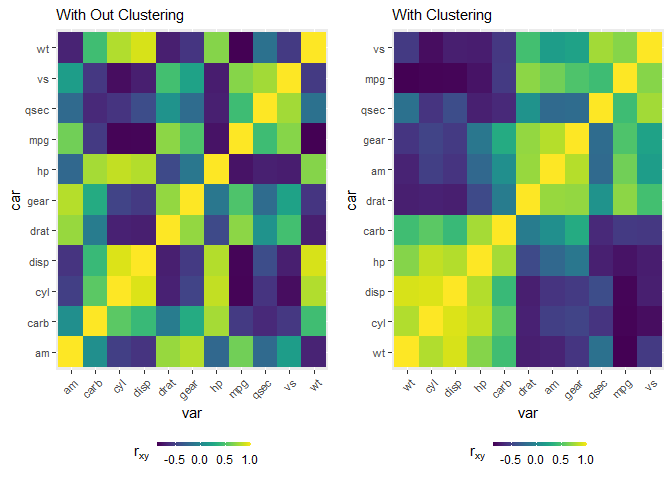
With clustering (column and row reordering) via the cluster_matrix
function.
## plot heatmap w/o clustering
wo <- mtcars %>%
    cor() %>%
    tidy_matrix('car', 'var') %>%
    ggplot(aes(var, car, fill = value)) +
         geom_tile() +
         scale_fill_viridis(name = expression(r[xy])) +
         theme(
             axis.text.y = element_text(size = 8)   ,
             axis.text.x = element_text(size = 8, hjust = 1, vjust = 1, angle = 45),
             legend.position = 'bottom',
             legend.key.height = grid::unit(.1, 'cm'),
             legend.key.width = grid::unit(.5, 'cm')
         ) +
         labs(subtitle = "With Out Clustering")

## plot heatmap w clustering
w <- mtcars %>%
    cor() %>%
    cluster_matrix() %>%
    tidy_matrix('car', 'var') %>%
    mutate(
        var = factor(var, levels = unique(var)),
        car = factor(car, levels = unique(car))
    ) %>%
    group_by(var) %>%
    ggplot(aes(var, car, fill = value)) +
         geom_tile() +
         scale_fill_viridis(name = expression(r[xy])) +
         theme(
             axis.text.y = element_text(size = 8)   ,
             axis.text.x = element_text(size = 8, hjust = 1, vjust = 1, angle = 45),
             legend.position = 'bottom',
             legend.key.height = grid::unit(.1, 'cm'),
             legend.key.width = grid::unit(.5, 'cm')
         ) +
         labs(subtitle = "With Clustering")

grid.arrange(wo, w, ncol = 2)
The tidy_dtm and tidy_tdm functions convert a DocumentTermMatrix
or TermDocumentMatrix into a tidied data set.
trinker/textshape is a public repo on GitHub by trinker. Tools for reshaping text data.
It declares no license on GitHub. Public does not mean open source: without a license, nobody is granted the right to reuse it.
Its maker has not tagged a system, so it is unknown here. Its README says what it needs.
Open "Take it" on its page: Take My Repo writes an install plan for your machine and hands it to your AI agent (Claude Code, Codex or Cursor), which asks you before each step. Take My Repo has not tested it on any machine.
Statistical Inference via Data Science: A ModernDive into R and the Tidyverse
Integrating the Best of TF into PyTorch, for Machine Learning, Natural Language Processing, and Text Generation. This is part of the CASL project: http://casl-project.ai/
Its last change on GitHub was on 2024-04-01. Take My Repo does not judge from that whether it is maintained.
Nobody has reviewed it on Take My Repo yet, which says nothing about its quality.
Take My Repo cannot say: it does not audit code and has not run textshape. What is known comes from GitHub. It declares no license on GitHub. Public does not mean open source: without a license, nobody is granted the right to reuse it. Its last change was on 2024-04-01. It has 54 stars, which measure popularity, not safety. Nobody has reviewed it on Take My Repo yet, which says nothing about its quality. Read the source before you run it. With "Take it", your AI agent shows each step and asks you before running it; README text is treated as data, not as instructions.