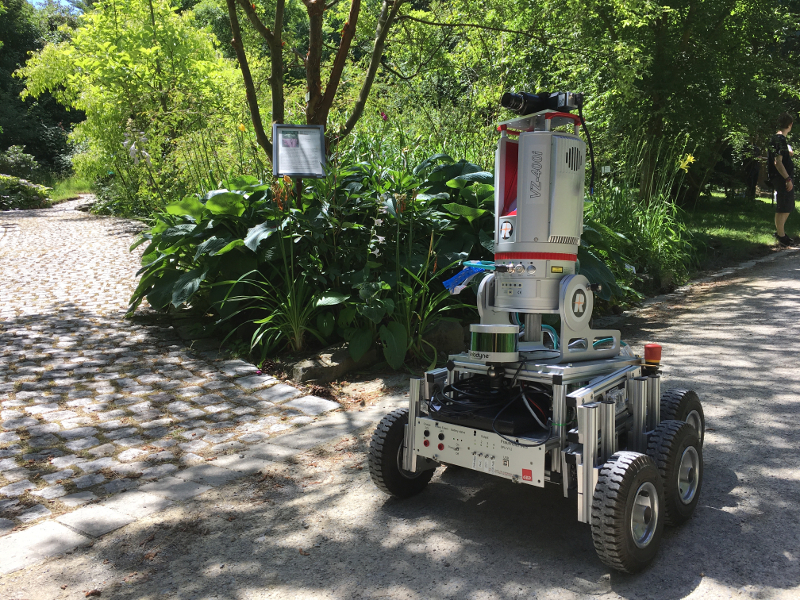

pluto_robot
ROS driver for the Pluto robot
- 51
- 5 y ago
Repo uos/pluto_robot, read from GitHub 1 h ago. uos has not joined Take My Repo.
In short
uos/pluto_robot is a public repo on GitHub by uos. ROS driver for the Pluto robot. It declares no license on GitHub. Public does not mean open source: without a license, nobody is granted the right to reuse it. It is written mainly in Python, has 51 stars and last changed on 2021-10-28. Nobody has reviewed it on Take My Repo yet, which says nothing about its quality. Read from GitHub on 2026-11-25.
Similar repos
ardupilot
ArduPlane, ArduCopter, ArduRover, ArduSub source

Pluto Robot
 |
 |
Maintainer: Sebastian Pütz
Author: Sebastian Pütz
Installation
Please use the official released ros package or install more recent versions from source.
sudo apt install ros-melodic-pluto-robot
Installation from source
All dependencies can be installed using rosdep
rosdep install pluto_robot
As explicit dependencies for navigation we refer to the following ROS packages, which are also developed by us:
Software Stack
This pluto_robot software stack provides software to use the outdoor robot in simulation and in the real world. Furthermore, example HDF5 map datasets are provided to use Pluto with the mesh_navigation software stack. This package has been used to evaluate the mesh navigation stack. Thus, a couple of experiments are provided. Additionally mesh navigation path planning and motion control with Pluto can be run in the provided Gazebo simulation.
This https://github.com/uos/pluto_robot software stack contains the following packages:
pluto_bringupcontains a couple of launch and config files to start up the robot with its sensors and drivers.pluto_descriptioncontains the Unified Robot Description Format (URDF) model to model the robot and its internal transformationspluto_gazebocontains the Gezebo simulation worlds, configurations and launch files to start up the respective environments with Pluto, see Simulationpluto_navigationcontains dataset, map and navigation configurations to run the mesh navigation stack with Pluto Additionally, it contains mesh navigation experiments using developed planners from the mesh navigation stack. See Mesh Navigation for more details.pluto_robotsis the corresponding meta package.
Simulation
You can use Pluto in an outdoor simulation environment. We provides several datasets and the corresponding environments for the Gazebo simulation. For navigation purposes the corresponding navigation launch file should be started, too. The following simulation environments are currently available:
- Botanical Garden at Osnabrück University:
roslaunch pluto_gazebo pluto_botanical_garden.launch - Stone Quarry in the Forest in Brockum:
roslaunch pluto_gazebo pluto_stone_quarry.launch - Physics building at Osnabrück University:
roslaunch pluto_gazebo pluto_physics.launch
Mesh Navigation
The mesh_navigation stack provides a navigation server for Move Base Flex. It provides a couple of configuration files and launch files to start the navigation server with the configured layer plugins for the layered mesh map, and the configured planners and controller to perform path planning and motion control in 3D (or more specifically on 2D-manifold).
See the Demo Video:
Experiments
We provide experiments consisting of starting positions and goals to test the navigation. To run an experiment you first need to launch the navigation stack with the chosen Environment Dataset and then publish the experiments poses:
roslaunch pluto_navigation experiment.launch experiment:={experiment_name}Replace {experiment_name} with the name of the experiment you choose.
Available experiments for each dataset can be found in the Environment Dataset Section in the description of the correspoiding dataset.
How to get our datasets
To manage our datasets we use a git extension called "Git Large File Storage" or for short git LFS. This allows us to keep this repository small while also embedding our datasets inside this repository.
To download our datasets you first need to install git LFS on your system. After installing the git extension you will be able to clone this repository like any other git repository and the datasets will be downloaded.
If you already cloned this repository without having git LFS installed, the dataset files will just be placeholders on your local copy. To download the datasets you again need to install git LFS on your system. After installing the Extension you need to install the git LFS configuration locally. This needs to be ran just once per system and repository inside the directory of your local copy of this repository.
git lfs install
Now simply fetch all available git LFS resources for your local copy of this repository. This will download all datasets and make them available locally.
git lfs fetch --all
Environment Datasets
The following environment dataset are available:
- Botanical Garden at Osnabrück University:
roslaunch pluto_navigation botanical_garden_osnabrueck.launch - Stone Quarry in the forest in Brockum:
roslaunch pluto_navigation stone_quarry_brockum.launch - Physics building at Campus Westerberg, Osnabrück University:
roslaunch pluto_navigation physics_campus_westerberg.launch - Farmer's Pit in Stemwede:
roslaunch pluto_navigation farmers_pit_stemwede.launch - Market Garden (complete) in Ibbenbüren:
roslaunch pluto_navigation market_garden_ibbenbueren_all.launch - Market Garden (beds) in Ibbenbüren:
roslaunch pluto_navigation market_garden_ibbenbueren_inner.launch
| Dataset | # Vertices | # Triangles | BB x[m] | BB y[m] | BB z[m] | Overview |
|---|---|---|---|---|---|---|
| Botanical Garden Osnabrück | 714 760 | 1 430 188 | 39.05 | 49.25 | 6.67 |  |
| Stone Quarry Brockum | 992 879 | 1 904 178 | 100.58 | 100.58 | 23.94 |  |
| Physics Campus Westerberg | 719 080 | 1 617 772 | 166.02 | 83.61 | 26.33 |  |
| Farmer's Pit Stemwede | 401 036 | 794 509 | 122.23 | 104.57 | 14.84 |  |
| Market Garden Ibbenbüren All | 1 361 308 | 2 656 283 | 174.33 | 149.61 | 24.58 |  |
Botanical Garden Osnabrück
in progress, description coming soon.
Experiments
The following experiments are available for the physics campus dataset. For every experiment there is one option to use the dijkstra planner and one option to use the vector field planner (vfp). To run the experiment, follow the instructions from Experiments.
| Name | Description | Overview |
|---|---|---|
| botanical_garden_1_vfp or botanical_garden_1_dijkstra |
 |
|
| botanical_garden_2_vfp or botanical_garden_2_dijkstra |
 |
|
| botanical_garden_3_vfp or botanical_garden_3_dijkstra |
 |
|
| botanical_garden_4_vfp or botanical_garden_4_dijkstra |
 |
Stone Quarry Brockum
Questions
What is pluto_robot?
uos/pluto_robot is a public repo on GitHub by uos. ROS driver for the Pluto robot.
Is pluto_robot open source?
It declares no license on GitHub. Public does not mean open source: without a license, nobody is granted the right to reuse it.
Does pluto_robot run on macOS, Windows or Linux?
Its maker tagged it for Linux. That is declared by the maker; Take My Repo has not tested it.
How do I install pluto_robot?
Open "Take it" on its page: Take My Repo writes an install plan for your machine and hands it to your AI agent (Claude Code, Codex or Cursor), which asks you before each step. Take My Repo has not tested it on any machine.