wondshare-recoverit
Wondshare Recoverit 1.3.5 pre-configured production build for enterprise desktop recovery utility deployment in 2026.
- 289
- HTML
- 6 d ago
Native Windows file recovery for NTFS, FAT12/16/32, exFAT and ext2/ext3/ext4. Metadata and journal recovery, free-space carving and whole-disk/image RAW scans. One engine for Win32 GUI/CLI, with Mica, dark mode and Per-Monitor V2.
Repo wesmar/FileRecoveryTool, read from GitHub 1 h ago. wesmar has not joined Take My Repo.
wesmar/FileRecoveryTool is a public repo on GitHub by wesmar. Native Windows file recovery for NTFS, FAT12/16/32, exFAT and ext2/ext3/ext4. Metadata and journal recovery, free-space carving and whole-disk/image RAW scans. One engine for Win32 GUI/CLI, with Mica, dark mode and Per-Monitor V2. It declares the MIT license on GitHub. It is written mainly in C++, has 45 stars and last changed on 2026-11-23. Nobody has reviewed it on Take My Repo yet, which says nothing about its quality. Read from GitHub on 2026-11-25.
Wondshare Recoverit 1.3.5 pre-configured production build for enterprise desktop recovery utility deployment in 2026.
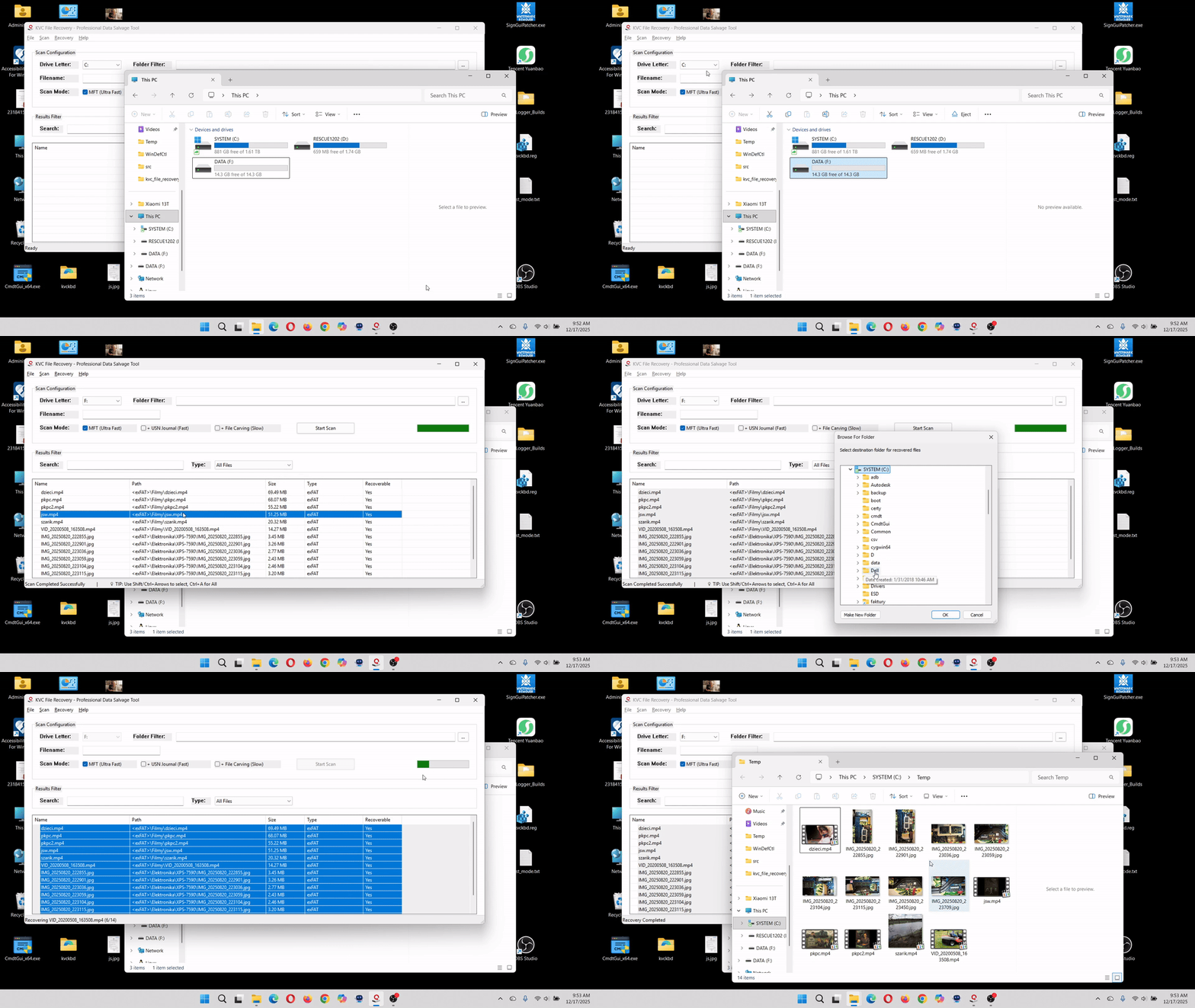
Native Windows recovery from file-system records, journals and raw bytes.
Download FileRecoveryTool.7z · Release notes · kvc.pl
Archive password: github.com
Recover deleted files from NTFS, FAT12/16/32, exFAT and ext2/3/4, or scan a whole disk or flat image without a usable file system. The native Win32 GUI and CLI use the same scanning and recovery engine. No installer, service or application framework is required; the static-runtime builds do not need a separate Visual C++ runtime.
The engine reads the source and writes recovered files to another disk. It uses surviving names, sizes and allocation maps where available, and checks file structure when carving. Results distinguish Full, Partial, MetadataOnly and unavailable data. A surviving file record is not a promise that its original bytes still exist.
[13.10.2026]
[18.07.2026] — First public release
NTFS, FAT32 and exFAT recovery, USN history, signature scanning, GUI/CLI operation and four x64/x86 binary variants.
| Method | What it uses | What it can recover |
|---|---|---|
| File-system records | NTFS MFT, FAT/exFAT directory entries, ext directories and inodes | Original names, paths and file contents when the required metadata and bytes survive |
| Deletion history | NTFS USN journal; ext3/4 journal copies | Deletion events and names; ext journal copies may also preserve lost inode and block maps |
| Free-space carving | Supported signatures and file structure in unallocated space | Recognizable files whose directory records are lost |
| RAW scanning | All source bytes, without an allocation map | Recognizable files from whole disks, volumes and flat images, including live files |
USN records alone do not reconstruct file contents. If the matching MFT record is gone, its history is metadata only. Carving normally assumes contiguous data; complete surviving ext block maps can let it follow fragments and skip metadata blocks. RAW does not discover missing fragment maps.
Ext volumes are read directly by the engine; an installed ext driver is not required. Metadata parsing covers ext2/3/4; the recorded ext recovery scenarios exercise ext3 and ext4.
Metadata recovery is not limited to the extensions below. These are the formats exercised by the current signature-recovery tests:
| Family | Tested formats |
|---|---|
| Images | JPEG, PNG, GIF, BMP |
| Video and audio | MP4, AVI, WAV |
| Archives | ZIP, 7z |
| Documents | DOCX, PDF, including encrypted and incrementally updated PDF fixtures |
ZIP-based Office extensions are inferred from package member names. This does not validate their XML contents. The presence of a format's signature in the source code does not by itself establish complete recovery support.
Download the password-protected archive, extract it with github.com, and choose a binary:
| Binary | Architecture | Runtime |
|---|---|---|
FRT_x64.exe |
x64 | Static runtime; recommended for Windows 10/11 x64 |
FRT_x86.exe |
x86 | Static runtime; 32-bit build |
FRT_x64_minSize.exe |
x64 | Dynamic runtime; matching Visual C++ Redistributable required |
FRT_x86_minSize.exe |
x86 | Dynamic runtime; matching Visual C++ Redistributable required |
All four release binaries (FRT_x64.exe, FRT_x86.exe, FRT_x64_minSize.exe, FRT_x86_minSize.exe) are digitally signed and timestamped:
CN=Open Source Developer Marek Wesołowski, O=Open Source Developer, L=Warszawa, S=mazowieckie, C=PLCertum Code Signing 2021 CA (Asseco Data Systems S.A.)Certum Timestamp (RFC 3161)Verify locally in PowerShell:
Get-AuthenticodeSignature .\FRT_x64.exe | Format-List Status, SignerCertificate, TimeStamperCertificate
Administrator rights are required for direct disk and volume access. Development validation is performed on Windows 11 x64. The application uses native Windows APIs; Mica depends on OS support and falls back to an opaque surface.
Preserve the source. Stop writing to it after deletion, and save recovered files and reports to another physical disk. On SSD/NVMe, data already discarded through TRIM may no longer be readable.
Scanning runs in the background and results arrive in batches. The interface follows Windows light/dark and high-contrast settings. Fonts and controls scale with DPI, including 150% scaling.
Run from an elevated terminal. --mft selects the source file system's own records, including FAT/exFAT and ext; it is not restricted to NTFS. Use --usn for NTFS history, --carving for free-space signatures, or --all to combine those methods. --raw is a separate mode.
# List available volumes.
.\FRT_x64.exe --cli --list

# Recover from file-system records.
.\FRT_x64.exe --cli --drive E --mft --recover --output D:\Recovered

# Combine metadata, history and free-space signatures; save a report.
.\FRT_x64.exe --cli --drive E --all --csv D:\results.csv --recover --output D:\Recovered

# Scan a volume that has no drive letter, including an ext volume.
.\FRT_x64.exe --cli --volume \\.\HarddiskVolume7 --mft --recover --output D:\Recovered

# Scan a flat byte-for-byte image without file-system metadata.
.\FRT_x64.exe --cli --image D:\images\source.img --raw --diagnostics --recover --output E:\Recovered

# Scan a whole physical disk. Verify the device number before use.
.\FRT_x64.exe --cli --volume \\.\PhysicalDrive2 --raw --csv E:\raw.csv

.\FRT_x64.exe --help
VHD/VHDX containers must be mounted first and scanned through their disk or volume device. --image expects a flat image. The program checks the physical source disk against recovery/report destinations; another partition of the same disk is rejected. For flat images, overwriting the input, including through a hard link, is rejected.
The tests create and delete their own fixtures on isolated disks in a Windows 11 Hyper-V guest. They recover through the production CLI, compare SHA-256, and check output counts and quality. Fragmentation is measured from the actual physical extent map before deletion.
Selected results recorded on 13.10.2026:
| Coverage | Result |
|---|---|
| FAT12/16/32, exFAT, NTFS and ext3/4 metadata recovery | 563/563 byte-exact |
| Codec-generated images, MP4/AVI/WAV and ZIP carving | 56/56 byte-exact |
| NTFS/exFAT archive and document recovery, including eight-extent layouts | 42/42 byte-exact |
| RAW codec media from a flat image and a whole physical test disk | 8/8 + 8/8 byte-exact |
| Mixed RAW DOCX/PDF/ZIP/7z image | 13/13 byte-exact |
| Measured NTFS/exFAT fragmentation, 1–128 extents | 36/36 byte-exact |
| Measured exFAT fragmentation, 256/1024 extents | 4/4 byte-exact |
| File-boundary parser regressions | 50/50 passed |
| GUI font and layout scenarios across five DPI settings | 15/15 passed |
Additional cases check corrupted/truncated archives and PDFs, source immutability, RAW destination checks, menu text in three palettes, and truthful metadata-only results after NTFS loses extension-record maps.
These are controlled recovery tests, not a physical NVMe/TRIM benchmark or a success rate for arbitrary damaged disks. DPI changes are simulated; they do not replace physical multi-monitor testing. See test methods, results and limitations for the detailed matrices.
$LogFile is not implemented.Full describes the available recovery map and boundaries, not a complete content-decoder verdict. The tests independently open/decode selected recovered files, but scanning does not perform that validation for every format.
Use Visual Studio C++ tools with the platform toolset named by the project, a Windows SDK and PowerShell 7. The build script locates usable x64/x86 compilers, MSBuild and Windows SDK resource compilers from files on disk.
pwsh -File build.ps1 -Rebuild
This builds all four release variants into bin/. build_all.bat calls the same script. For only the tested x64 static-runtime build, use pwsh -File tests/build-x64.ps1 -Rebuild. The solution is kvc_recovery.slnx.
src/ separates entry points, GUI, scan orchestration, disk I/O, file-system parsers, carving, recovery and support code. Visual Studio filters mirror the directory structure. Both interfaces call DiskForensicsCore and RecoveryEngine; the CLI is also the route used by the recovery test harness.
FileRecoveryTool is free. If it got your files back and you want to help:
| Method | Details |
|---|---|
| PayPal | paypal.me/ext1 |
| Revolut | revolut.me/marekb92 |
| BLIK (Poland) | to phone number 607 440 283 |
| Bank transfer, PLN (mBank) | PL56 1140 2004 0000 3102 2774 6285, BIC BREXPLPWMBK |
| Bank transfer, PLN (Revolut) | PL14 2910 0006 0000 0000 0283 2042, BIC REVOPL22 |
| Bank transfer, EUR or USD (Revolut) | LT39 3250 0407 9321 0075, BIC REVOLT21 |
| Bitcoin | bc1qgl598mngyvjpy7wzl0umvnkknnfqdwfuz0k5ds |
The recipient is Marek Wesołowski. The Bitcoin QR code is at https://kvc.pl/wsa-next#support.
wesmar/FileRecoveryTool is a public repo on GitHub by wesmar. Native Windows file recovery for NTFS, FAT12/16/32, exFAT and ext2/ext3/ext4. Metadata and journal recovery, free-space carving and whole-disk/image RAW scans. One engine for Win32 GUI/CLI, with Mica, dark mode and Per-Monitor V2.
It declares the MIT license on GitHub.
Its maker has not tagged a system, so it is unknown here. Its README says what it needs.
Windows disk usage analyzer and cleanup tool with interactive treemaps, large-file discovery, duplicate detection, and file-system monitoring.
Easeus Partition Master 14.5 pre-configured production build for secure desktop environment workstation deployment.
Cross-platform Rust daemon that prevents disk-full incidents for AI coding workloads using predictive pressure control, safe artifact cleanup, and multi-volume ballast pools.
primo iphone data recovery windows — Primo IPhone Data Recovery for Windows 11 and 10. README covers data recovery, configuration, and daily desktop use.
Open "Take it" on its page: Take My Repo writes an install plan for your machine and hands it to your AI agent (Claude Code, Codex or Cursor), which asks you before each step. Take My Repo has not tested it on any machine.
Its last change on GitHub was on 2026-11-23. Take My Repo does not judge from that whether it is maintained.
Nobody has reviewed it on Take My Repo yet, which says nothing about its quality.
Take My Repo cannot say: it does not audit code and has not run FileRecoveryTool. What is known comes from GitHub. It declares the MIT license on GitHub. Its last change was on 2026-11-23. It has 45 stars, which measure popularity, not safety. Nobody has reviewed it on Take My Repo yet, which says nothing about its quality. Read the source before you run it. With "Take it", your AI agent shows each step and asks you before running it; README text is treated as data, not as instructions.