
KeyboardKit
Windows Kernel-Mode Keylogger - Educational rootkit driver intercepting keyboard IRPs for UDP logging. Demonstrates stealth persistence, privilege escalation & IRP hooking for offensive security research and defensive analysis.
- 16
- 12 mo ago
Repo wesmar/KeyboardKit, read from GitHub 1 h ago. wesmar has not joined Take My Repo.
In short
wesmar/KeyboardKit is a public repo on GitHub by wesmar. Windows Kernel-Mode Keylogger - Educational rootkit driver intercepting keyboard IRPs for UDP logging. Demonstrates stealth persistence, privilege escalation & IRP hooking for offensive security research and defensive analysis. It declares no license on GitHub. Public does not mean open source: without a license, nobody is granted the right to reuse it. It is written mainly in C++, has 16 stars and last changed on 2025-12-04. Nobody has reviewed it on Take My Repo yet, which says nothing about its quality. Read from GitHub on 2026-11-25.
In the maintainer's words. Shown from GitHub; Take My Repo does not keep a copy.
UDP Keyboard Logger - Educational Kernel-Mode Project
Quick Start
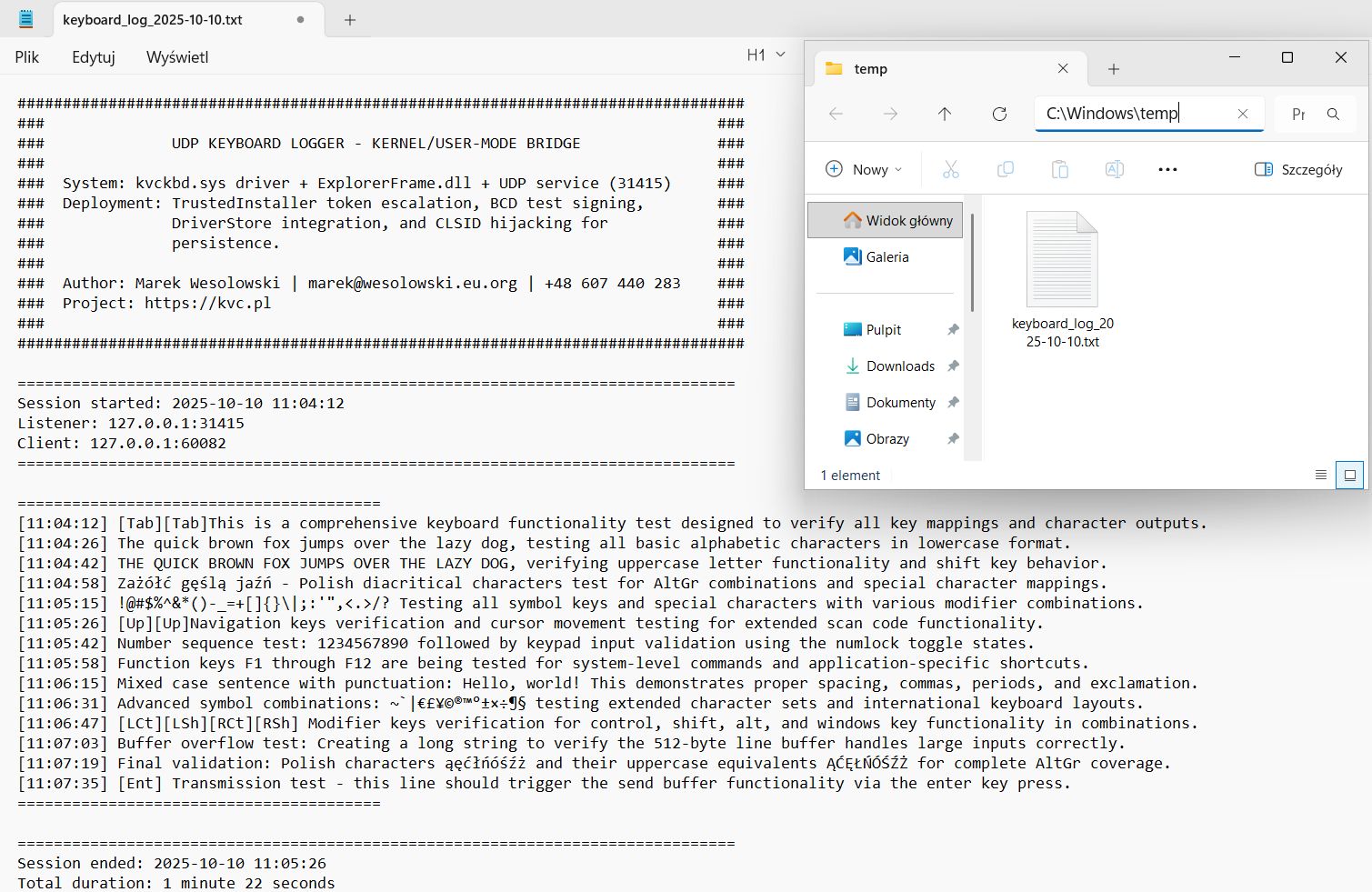
This project demonstrates the use of a custom keyboard driver operating in kernel mode with a built-in UDP protocol under 30 kB. After successful installation, verify operation with:
UdpLogger status
Expected Output (Fully Operational):
=== UDP Keyboard Logger - Full System Status ===

[+] Windows Service: RUNNING (UdpKeyboardLogger)
[+] Kernel Driver: LOADED (kvckbd.sys)
[+] CLSID Hijack: ACTIVE (ExplorerFrame.dll -> ExpIorerFrame.dll)
[+] Test Signing: ENABLED (BCD)
[+] Files: All components present

Overall Status: FULLY OPERATIONAL
Table of Contents
- Project Overview
- Architecture Overview
- Component 1: kvckbd.sys - Kernel Driver
- Component 2: ExplorerFrame.dll - Persistence Layer
- Component 3: UdpLogger.exe - Management Hub
- BCD Deep Dive
- Driver Service Registration
- Installation & Usage
- Technical Details & Internals
- Security Considerations
- Build & Development
- Troubleshooting
- Legal & Educational Notice
Project Overview
Introduction
This comprehensive educational project represents one of the few fully functional IRP-based keyboard filter drivers developed in recent years, specifically compiled and tested for Windows 11 25H2 that successfully combines kernel-mode interception, network communication, sophisticated privilege escalation, and persistent installation mechanisms. The project serves as a practical reference for understanding modern Windows protection mechanisms and kernel programming techniques.
Educational Purpose
This system is designed for:
- Security researchers studying Windows defense mechanisms and attack vectors
- Kernel developers learning IRP-based filter drivers and Windows Driver Model (WDM)
- System programmers understanding Windows internals, BCD manipulation, and privilege escalation
- Red team operators researching persistence techniques in authorized penetration testing environments
Critical Prerequisites
⚠️ MANDATORY REQUIREMENTS:
- Disable Secure Boot in BIOS/UEFI settings
- Administrator privileges required
- Windows 10/11 x64 systems only
- Authorized, controlled testing environment
Alternative approach: use the companion KVC tool – a separate project that can load an unsigned kernel driver without reboot in any protection mode (including Secure Boot). Note: the user must update the KVC source (including the offset map in OffsetFinder.cpp) before use.
Three-Component Ecosystem
| Component | Type | Privilege Level | Primary Function |
|---|---|---|---|
| kvckbd.sys | Kernel Filter Driver | Ring 0 | IRP-level keyboard interception, scan code processing, WSK networking |
| ExplorerFrame.dll | COM In-Process Server | Ring 3 (User) | CLSID hijacking for persistence, API hooking for watermark removal |
| UdpLogger.exe | Service Manager | Ring 3 (TI/Admin) | Installation orchestration, UDP logging, system status monitoring |
Architecture Overview
Data Flow Pipeline
The system implements a multi-layer interception and processing pipeline:
Keyboard Hardware
    ↓
i8042prt.sys / USB HID Driver (Port Driver)
    ↓
kbdclass.sys (Windows Keyboard Class Driver)
    ↓ [IRP_MJ_READ Interception Point]
kvckbd.sys (Filter Driver - Ring 0)
    ├→ Scan Code Translation
    ├→ State Machine Processing
    ├→ Line Buffering (512 bytes)
    └→ WSK UDP Transmission
        ↓
127.0.0.1:31415 (Localhost UDP Socket)
    ↓
UdpLogger.exe Windows Service (Ring 3)
    ├→ Non-blocking UDP Listener
    ├→ Daily Log Rotation
    └→ Timestamped File Output
        ↓
keyboard_log_YYYY-MM-DD.txt
Component Interaction Model
The three components operate independently yet cooperatively:
Kernel Space (Ring 0):
- kvckbd.sys operates as a transparent filter between applications and the keyboard hardware
- Intercepts IRP_MJ_READ requests destined for kbdclass.sys
- Processes keyboard input asynchronously using system threads
- Transmits processed keystrokes via kernel-mode UDP (WSK)
User Space (Ring 3):
- UdpLogger.exe runs as a Windows Service (UdpKeyboardLogger)
- Listens on UDP port 31415 for incoming keystroke data
- Implements daily log rotation with automatic header/footer generation
- Provides comprehensive CLI for system management and status monitoring
Persistence Layer:
- ExplorerFrame.dll (misspelled as ExpIorerFrame.dll) hijacks legitimate COM CLSID
- Loads automatically when explorer.exe initializes shell components
- Hooks API functions to remove "Test Mode" watermark
- Ensures stealth operation by patching import tables
Installation State Flow
[User Executes: UdpLogger install]
           ↓
    ┌──────────────────────────────────┐
    │ Secure Boot Detection Phase      │
    │  • Check UEFI registry key       │
    │  • Block if Secure Boot enabled  │
    │  • Display BIOS disable guide    │
    └──────────────────────────────────┘
           ↓
    ┌──────────────────────────────────┐
    │ Resource Extraction Phase        │
    │  • Skip icon data (1662 bytes)   │
    │  • XOR-decrypt CAB archive       │
    │  • FDI in-memory decompression   │
    │  • Extract kvc.bin               │
    │  • Parse PE binaries (MZ search) │
    │  • Identify by subsystem field   │
    └──────────────────────────────────┘
           ↓
    ┌──────────────────────────────────┐
    │ Privilege Escalation Phase       │
    │  • Acquire SYSTEM token          │
    │  • Start TrustedInstaller        │
    │  • Duplicate TI token            │
    │  • Enable all privileges         │
    └──────────────────────────────────┘
           ↓
    ┌──────────────────────────────────┐
    │ File Deployment Phase            │
    │  • Write to System32             │
    │  • Write to DriverStore          │
    │  • Direct API (no cmd.exe)       │
    └──────────────────────────────────┘
           ↓
    ┌──────────────────────────────────┐
    │ Registry Configuration Phase     │
    │  • CLSID hijack registration     │
    │  • BCD test signing enable       │
    │  • Driver service creation       │
    └──────────────────────────────────┘
           ↓
    ┌──────────────────────────────────┐
    │ Service Installation Phase       │
    │  • Create Windows service        │
    │  • Configure auto-start          │
    │  • Start service immediately     │
    └──────────────────────────────────┘
           ↓
    [System Reboot Required]
           ↓
    [kvckbd.sys loads at boot]
           ↓
    [System Fully Operational]
Secure Boot Detection & Blocking
Pre-Installation Check (SystemStatus.cpp:91-104)
Before any installation steps, the system checks if Secure Boot is enabled:
HKEY hKey;
DWORD secureBootEnabled = 0;

RegOpenKeyExW(HKEY_LOCAL_MACHINE,
    L"SYSTEM\\CurrentControlSet\\Control\\SecureBoot\\State",
    0, KEY_READ, &hKey);

RegQueryValueExW(hKey, L"UEFISecureBootEnabled", nullptr, nullptr,
    (LPBYTE)&secureBootEnabled, &dataSize);

return secureBootEnabled == 1;  // TRUE = Secure Boot ON → BLOCK
Installation Blocking (UdpLogger.cpp:216-234)
If Secure Boot is detected, installation terminates immediately with error message:
[ERROR] SECURE BOOT IS ENABLED - INSTALLATION BLOCKED

+============================================================+
|                   SECURE BOOT DETECTED                    |
+============================================================+
|  Secure Boot is enabled in UEFI/BIOS settings.            |
|  This prevents loading unsigned kernel drivers.           |
|                                                           |
|  REQUIRED ACTION:                                         |
|  1. Enter UEFI/BIOS settings during boot                  |
|  2. Disable Secure Boot                                   |
|  3. Save changes and reboot                               |
|  4. Run installation again                                |
+============================================================+
Why This Matters:
- kvckbd.sys is test-signed, not WHQL/Microsoft-signed
- Secure Boot enforces Microsoft's driver signature policy
- Installation would complete but driver would fail to load
- Pre-check prevents wasted time and provides clear guidance
Component 1: kvckbd.sys - Kernel Driver
Overview
The kernel driver is the cornerstone of this system, operating at Ring 0 with full kernel privileges. It implements a sophisticated IRP filter mechanism that intercepts keyboard input at the Windows Driver Model (WDM) level, specifically targeting the kbdclass.sys class driver.
Architectural Design
Filter Driver Philosophy: Rather than implementing a complete keyboard driver stack, kvckbd.sys adopts the filter driver pattern. It positions itself between user-mode applications and the legitimate Windows keyboard driver, allowing it to observe and process all keyboard input without replacing core system functionality.
Key Innovation - Modern IRP-Based Implementation – Tested on Windows 11 25H2: This driver represents a rare working implementation of IRP-based keyboard filtering. Most modern attempts fail due to:
- Incorrect offset calculations for DeviceExtension structures
- Improper synchronization leading to race conditions and BSODs
- Failure to handle IRP cancellation correctly
- Inadequate resource cleanup during driver unload
This project solves all these challenges through careful architecture-specific offset management, proper IRQL-aware synchronization, and comprehensive cancellation handling.
IRP Interception Mechanism
DeviceExtension Offset Technique: The driver directly accesses internal structures of kbdclass.sys by using architecture-specific offsets into the DeviceExtension. This technique is necessary because Microsoft doesn't expose these structures publicly:
| Structure | x86 Offset | x64 Offset | Purpose |
|---|---|---|---|
| IO_REMOVE_LOCK | 0x10 | 0x20 | Prevents device removal during operations |
| KSPIN_LOCK | 0x6C | 0xA0 | Synchronizes access to IRP queue |
| LIST_ENTRY | 0x70 | 0xA8 | Head of pending read IRP queue |
IRP Queue Manipulation: The driver dequeues pending IRPs directly from kbdclass.sys's internal queue, processes them, then forwards them to the original handler. This requires:
- Acquiring the keyboard device's spinlock (at DISPATCH_LEVEL)
- Removing IRP from linked list
- Clearing cancel routines safely
- Handling race conditions with IRP cancellation
Thread-Based Processing: Each intercepted IRP spawns a dedicated system thread. This design:
- Prevents blocking at high IRQL
- Allows synchronous waiting for lower driver completion
- Enables proper context for WSK network operations
- Simplifies error handling and resource cleanup
Scan Code Processing Engine
Multi-Table Translation System: The driver implements an efficient scan code translation engine using multiple lookup tables:
- Base Table (84 entries): Maps scan codes 0x00-0x53 to lowercase characters
- Shift Modifiers (10 entries): Translates digits under Shift (1→!, 2→@, etc.)
- Special Characters: Handles punctuation marks with Shift variations
- Extended Codes (18 entries): E0-prefixed scan codes (arrows, Right Ctrl/Alt, etc.)
- International Support: Polish diacritics via AltGr combinations (ą, ć, ę, ł, ń, ó, ś, ú, ż)
State Machine Implementation: The driver maintains keyboard state flags (Shift, CapsLock, NumLock) and implements XOR logic for proper character output. For letters:
- Shift + CapsLock OFF = Uppercase
- Shift OFF + CapsLock = Uppercase
- Shift + CapsLock = Lowercase (XOR behavior)
Performance Optimization: Instead of storing all combinations (84 × 4 = 336 entries), the driver computes variations at runtime, reducing memory footprint to ~1KB for all translation tables while maintaining O(1) lookup complexity.
Line Buffering Innovation
Design Rationale: Traditional keystroke loggers send one network packet per key press, generating excessive traffic. This driver implements line-based buffering:
- Accumulates keystrokes in a 512-byte buffer
- Filters out modifier keys ([Shift], [Ctrl], [Alt])
- Filters out function keys (F1-F12)
- Transmits complete lines only when Enter is pressed
Performance Impact:
- Before: 1000 keystrokes/minute = 1000 UDP packets
- After: 1000 keystrokes/minute ≈ 10-20 UDP packets (typical typing patterns)
- Network overhead reduction: 95-98%
Synchronization: The buffer uses KSPIN_LOCK for protection since it's accessed at DISPATCH_LEVEL. Spinlocks are mandatory here (mutexes would cause BSOD at DISPATCH_LEVEL).
WSK Network Stack
Kernel-Mode Networking: The driver uses Winsock Kernel (WSK) for UDP communication. WSK advantages:
- No context switching to user mode
- Direct access to network stack
- Operation at IRQL ≤ DISPATCH_LEVEL
- Suitable for driver-to-driver or driver-to-service communication
Initialization Process:
- Start WSK subsystem (WSKStartup)
- Resolve target address via WSKGetAddrInfo (supports both IPv4/IPv6)
- Create datagram socket (WSKSocket with SOCK_DGRAM)
- Configure default destination via SIO_WSK_SET_SENDTO_ADDRESS ioctl
UDP Transmission: Calls WSKSendTo with pre-configured socket. No need to specify destination address on each call since SIO_WSK_SET_SENDTO_ADDRESS sets a default target.
Driver Lifecycle Management
Initialization Thread: A persistent system thread (KbdThread_IrpHookInit) runs continuously:
- Enumerates keyboard device objects every 100ms
- Detects newly plugged keyboards (hot-plug support)
Questions
What is KeyboardKit?
wesmar/KeyboardKit is a public repo on GitHub by wesmar. Windows Kernel-Mode Keylogger - Educational rootkit driver intercepting keyboard IRPs for UDP logging. Demonstrates stealth persistence, privilege escalation & IRP hooking for offensive security research and defensive analysis.
Is KeyboardKit open source?
It declares no license on GitHub. Public does not mean open source: without a license, nobody is granted the right to reuse it.
More from wesmar
Everything by wesmar- kvcKVC enables unsigned driver loading via DSE bypass (g_CiOptions patch, skci.dll hijack, SeCiCallbacks redirection) and PP/PPL manipulation for LSASS memory dumping on modern Windows with HVCI/VBS. 346
- KernelResearchKitWindows 11 kernel research framework demonstrating DSE bypass on Windows 11 25H2 through boot-time execution. Loads unsigned drivers by surgically patching SeCiCallbacks via native subsystem. Includes anti-loop protection and dual-path architecture. Windows 11 25H2 driver signature enforcement bypass 289
- BootBypassAdvanced native-mode utility for bypassing DSE and HVCI. Implements smart SeCiCallbacks patching and independent management of Memory Integrity settings. Operating as a subsystem:native app, it ensures early-phase control and environment preparation for security research and driver development. 84
- WinDefCtlCommand-line utility to completely halt, disable, and neutralize Windows Defender and Tamper Protection. Bypasses forced UAC and GUI requirements in Windows 11 (supports 26H1/26H2). Features invisible execution and automatic privilege handling. Essential tool for sysadmins and security researchers. 81
- Watermark_RemoverWindows watermark remover using IAT hooking and COM CLSID proxy injection. Patches shell32.dll via TrustedInstaller to intercept ExtTextOutW, LoadStringW, DrawTextWithGlow and more (removes evaluation, test-mode and activation strings). Pure MASM x64 (no CRT), ~30 KB. Reversible.