
linux-live
Debian Linux that boots from a single file on the NTFS volume of a modern Windows 11 PC with Secure Boot ON and BitLocker ON. Signed shim/GRUB/kernel, no MOK, no BitLocker protector changes. Online at boot (Wi-Fi reused from Windows, DHCP, SSH), C: mounted read-write. No USB, no repartitioning. Uninstall: delete folder, ESP files, boot entry.
- 17
- MIT
- 2 wk ago
Repo wesmar/linux-live, read from GitHub 2 h ago. wesmar has not joined Take My Repo.
In short
wesmar/linux-live is a public repo on GitHub by wesmar. Debian Linux that boots from a single file on the NTFS volume of a modern Windows 11 PC with Secure Boot ON and BitLocker ON. Signed shim/GRUB/kernel, no MOK, no BitLocker protector changes. Online at boot (Wi-Fi reused from Windows, DHCP, SSH), C: mounted read-write. No USB, no repartitioning. Uninstall: delete folder, ESP files, boot entry. It declares the MIT license on GitHub. It is written mainly in C++, has 17 stars and last changed on 2026-11-08. Nobody has reviewed it on Take My Repo yet, which says nothing about its quality. Read from GitHub on 2026-11-25.
▶ Click above to watch the boot demonstration on YouTube (3 min, 1080p)
⬇ LinuxLive.7z (Password: github.com)
·
filesystem.squashfs
·
esp.tar
·
All Releases
The application is packaged in
LinuxLive.7z(password:github.com) to bundle all 21 language localizations and protect against false-positive browser download blocks. The program downloads the image and the ESP package itself and checks both against their.sha256files. The direct links are for offline installs.
Engineering Status
LinuxLive.exedeploys and boots a complete Linux live system residing as a single file on the Windows NTFS volume. The boot chain relies on standard Microsoft-signed shim → distribution-signed GRUB → distribution-signed kernel, maintaining full Secure Boot enforcement without MOK enrollment. BitLocker-encrypted volumes unlock seamlessly at boot. Verified end-to-end on Dell XPS (Windows 11, Secure Boot ON, BitLocker ON). Debian 13 with the signed 7.2.11 kernel serves as the reference image; any distribution providing a signed shim, GRUB, and kernel functions identically.
Repository Policy: Git tracks the native Windows C++23 source, project files, language files, test suites, and image build scripts. Binary build artifacts, releases, and local packaging tools stay outside the repository.
Linux Live — a Signed Linux System on the Windows Volume
One file on C: • Secure Boot on • BitLocker unlocked • Wi-Fi and SSH from Windows • C: writable from Linux
No repartitioning, no USB stick, no MOK enrolment: official distribution signatures, native NTFS integration
LinuxLive.exe deploys a Linux live environment to a Windows machine without repartitioning or USB media. The root filesystem is a single
filesystem.squashfsstored inC:\linux-live. The signed bootloader resides on the EFI System Partition (ESP), launched via a dedicated UEFI NVRAM boot entry. Upon boot, Linux detects its NTFS container, unlocks BitLocker using the recovery password (with user consent), imports Wi-Fi credentials and SSH keys directly from the Windows installation, and mounts the Windows partition read-write at/mnt/win. Runtime modifications can be committed to a compressed delta layer (persistence.squashfs). Reverting the installation simply requires removing the folder, the ESP directory, and the NVRAM entry.Debian is the representative case, not a special one. The program reads what it needs from the package: the ESP folder is the prefix compiled into the signed GRUB, the folder on the Windows volume is
live-media-pathingrub.cfg. A Fedora package (/EFI/fedora,rd.live.image) goes through the same code.
Quick Start
LinuxLive.exe runs both as an interactive Direct2D graphical application (GUI) and as an automated command-line tool (CLI).
1. GUI (Interactive)
- Download
LinuxLive.7z(archive password:github.com) and extract it. - Run
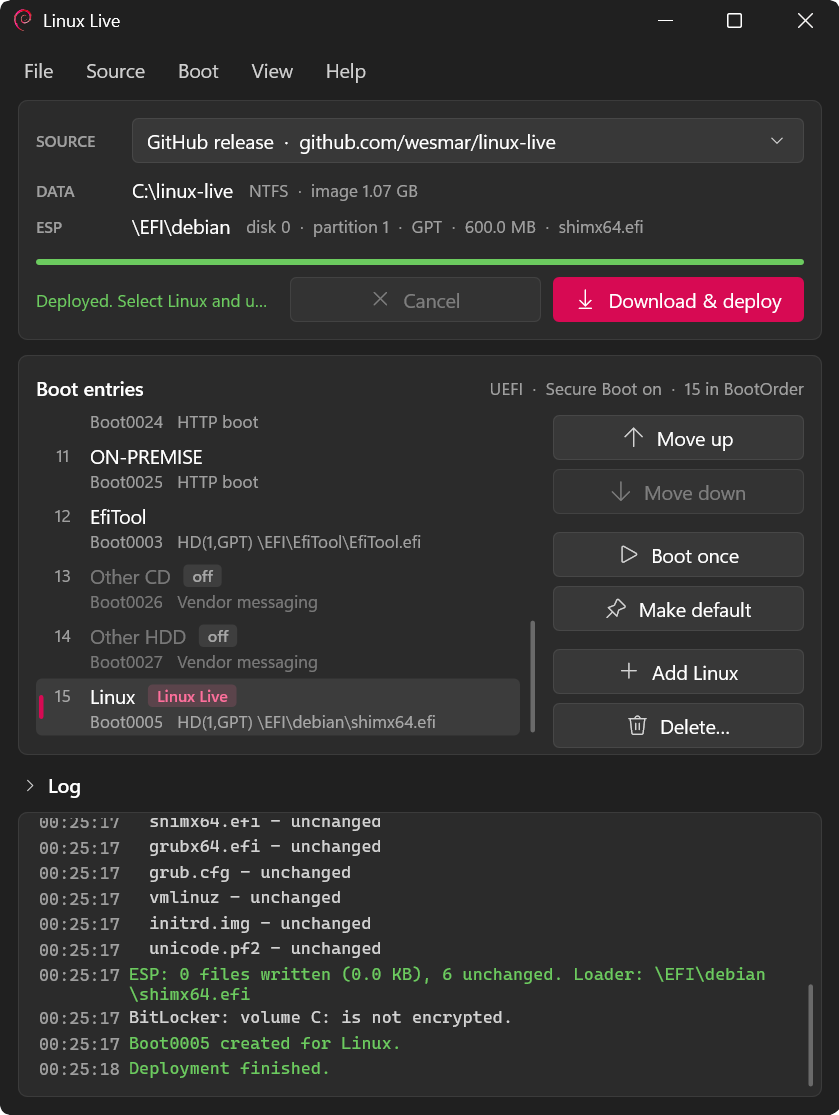
LinuxLive.exeas Administrator. - Click Download & deploy — the program downloads
filesystem.squashfsandesp.tar, verifies SHA-256 digests, populates the ESP, createsC:\linux-live\authorized_keys, and adds a UEFI NVRAM entry. - Click Boot once and restart.
2. Command Line (CLI for Automation and Scripts)
Pass arguments to LinuxLive.exe to run directly in the console:
:: 1. Deploy: download release assets, verify SHA-256 digests, configure ESP and read BitLocker key
LinuxLive.exe deploy --github --bitlocker-key

:: 2. Set one-time boot to Linux on the next reboot
LinuxLive.exe once

:: 3. Reboot directly into Linux
LinuxLive.exe reboot
Common CLI commands:
LinuxLive.exe status— view current deployment and ESP statusLinuxLive.exe list— list UEFI boot entriesLinuxLive.exe default— set Linux as the default boot entryLinuxLive.exe delete— remove UEFI entry and clean up BCD references
3. First Minutes in Linux
- Login: Automatic console login to
user(user@debian:~$) with passwordlesssudo. - Network & Wi-Fi: Ethernet uses DHCP; Wi-Fi profiles and passwords sync automatically from the Windows registry. Verify connectivity:
ping -c 4 linux.org. - Headless SSH: Connect over SSH immediately using the deterministic emergency π key (
~/.ssh/id_pi). - Windows Drive Access: The BitLocker volume is mounted read-write at
/mnt/win(ls -la /mnt/win). - Session Persistence: Save package installations and state to
C:\linux-live\persistence.squashfswithsave-session. Revert anytime viasave-session --reset. - Return to Windows: Run
rebootto start standard Windows Boot Manager normally.
Table of Contents
- Quick Start
- Overview
- Architecture
- The Boot Chain and What Is Signed
- The Package Decides the Layout
- Inside the Image
- The initrd
- Kernel and firmware
- Dynamic Hardware and Runtime Discovery at Boot
- BitLocker in the initrd
- Secure Boot is kept, end to end
- Two views of one volume: the live medium and /mnt/win
- Network: DHCP, routes, DNS and Wi-Fi from the Windows registry
- SSH with the keys of Windows
- Persistence as a delta squashfs
- Console, clock, locale and boot time
- Pre-Installed Diagnostics and Image Footprint
- Building the Image
- The Build Steps in Detail
- The Windows Program
- Security Boundaries
- Known Issues
- Testing
- Source Layout
- Building from Source
- License
Overview
Ways of running Linux on a Windows computer, and what each one costs:
| Way | What it costs | Secure Boot | Hardware access |
|---|---|---|---|
| WSL 2 | a VM without its own kernel on the hardware | stays on | virtualised GPU, no Wi-Fi card, no firmware |
| Live USB | a stick and the boot menu every time | depends on the distribution | full |
| Dual boot | repartitioning, a second installed system | needs a signed distribution | full |
| Disabling Secure Boot | a weaker platform, BitLocker recovery prompts | off | full |
| Linux Live | 1.1 GB file on C:, 57 MB on the ESP | stays on | full - real kernel, real drivers |
Typical uses: Linux with full hardware access on a BitLocker-protected laptop without touching its partitioning; a rescue and diagnostics system that is always there (efibootmgr, mokutil, nvme-cli, cryptsetup, parted, gdisk, msr-tools, tcpdump); new hardware that needs a current kernel - the reference image runs the signed 7.2.11 kernel from Debian backports.
Design principles:
- Preserving official signatures: shim, GRUB, and kernel binaries are used byte-for-byte from upstream distribution packages, ensuring full Secure Boot compatibility without custom key enrollment.
- Dynamic package layout: Paths and ESP directory structures are resolved dynamically from the distribution package rather than hardcoded in the executable.
- Clean build lifecycle: Image builds run in isolated tmpfs environments; the resulting container contains zero stale logs, temporary caches, machine identifiers, or hardcoded credentials.
- Explicit user consent: Potentially sensitive operations require explicit confirmation: saving the BitLocker recovery password to ESP (
--bitlocker-key) or shrinking the Windows partition for a dedicated boot partition (--boot-partition). - Strict compiler standards: C++23, compiled cleanly with
/W4 /WX /sdl /guard:cf /CETCompat /Breproon MSVC.
Architecture
flowchart LR
    subgraph Windows["Windows - LinuxLive.exe"]
        CLI["command line"] --> Core
        GUI["graphical interface"] --> Core
        Core["core: Deploy, BootList, Actions"]
    end
    Core -- "HTTPS + SHA-256" --> SRC[("GitHub release<br/>or own URL / file")]
    Core -- "filesystem.squashfs" --> NTFS[("C:\linux-live")]
    Core -- "shim, GRUB, grub.cfg,<br/>kernel, initrd" --> ESP[("ESP<br/>\EFI\debian")]
    Core -. "kernel, initrd<br/>(small ESP only)" .-> BOOT[("FAT32 boot partition")]
    Core -- "boot entries, BootOrder, BootNext" --> NVRAM[("UEFI NVRAM")]
    Core -- "BCD copies of entries" --> BCD[("Windows BCD store")]
Two independent halves meet in two places only: the ESP package (esp.tar) and the image (filesystem.squashfs). Everything the Windows program needs to know about the Linux side it reads from the package; everything the Linux side needs to know about the Windows side it reads from the kernel command line and from the Windows volume itself.
The Boot Chain and What Is Signed
sequenceDiagram
    participant FW as UEFI firmware
    participant SH as shimx64.efi
    participant GR as grubx64.efi
    participant K as kernel + initrd
    participant LB as live-boot
    FW->>SH: boot entry Linux, or BootNext once
    Note over FW,SH: verified against db - Microsoft UEFI CA
    SH->>GR: load from the same folder
    Note over SH,GR: verified against the distribution key in shim
    GR->>GR: read $prefix/grub.cfg (prefix /EFI/debian is part of the signed image)
    GR->>K: linux $live/vmlinuz live-media-path=linux-live
    Note over GR,K: kernel verified through shim_lock
    K->>K: initrd: unlock BitLocker read-only
    K->>LB: find /linux-live/filesystem.squashfs on NTFS
    LB->>LB: overlay: squashfs + persistence.squashfs + tmpfs
| Part | Verified by | Where it lives |
|---|---|---|
shimx64.efi |
firmware, Microsoft UEFI CA in db |
ESP |
grubx64.efi |
shim, distribution key | ESP |
vmlinuz |
shim (shim_lock), distribution key |
ESP or boot partition |
grub.cfg, initrd.img |
not verified - on every signed distribution | ESP or boot partition |
filesystem.squashfs |
not verified at boot; SHA-256 at download | Windows volume |
This is the normal trust model of signed Linux distributions, not something this project relaxes. See Security Boundaries.
The Package Decides the Layout
A signed GRUB cannot be told where to look: the folder it reads grub.cfg from is compiled into the signed image. Debian's grubx64.efi has a PE section mods; it starts with a grub_module_info64 header (magic mimg, offset, size) followed by typed modules, and the module of type 3 (OBJ_TYPE_PREFIX) holds /EFI/debian. There is no embedded configuration and no cmdpath
Questions
What is linux-live?
wesmar/linux-live is a public repo on GitHub by wesmar. Debian Linux that boots from a single file on the NTFS volume of a modern Windows 11 PC with Secure Boot ON and BitLocker ON. Signed shim/GRUB/kernel, no MOK, no BitLocker protector changes. Online at boot (Wi-Fi reused from Windows, DHCP, SSH), C: mounted read-write. No USB, no repartitioning. Uninstall: delete folder, ESP files, boot entry.
Is linux-live open source?
It declares the MIT license on GitHub.