notepad
High-performance Notepad clone written in pure Assembly (MASM) for Windows 11. Bypasses C Runtime (CRT) to interact directly with Win32 API. Features x64/arm64/x86 support, manual memory management, and low-level message loops. A perfect reference for systems programmers exploring the PE format and bare-metal Windows development.
- 26
- MIT
- 3 mo ago
Repo wesmar/notepad, read from GitHub 2 h ago. wesmar has not joined Take My Repo.
In short
wesmar/notepad is a public repo on GitHub by wesmar. High-performance Notepad clone written in pure Assembly (MASM) for Windows 11. Bypasses C Runtime (CRT) to interact directly with Win32 API. Features x64/arm64/x86 support, manual memory management, and low-level message loops. A perfect reference for systems programmers exploring the PE format and bare-metal Windows development. It declares the MIT license on GitHub. It is written mainly in Assembly, has 26 stars and last changed on 2026-08-30. Nobody has reviewed it on Take My Repo yet, which says nothing about its quality. Read from GitHub on 2026-11-25.
Similar repos
NotepadNext
A cross-platform, reimplementation of Notepad++

Notepad: Win32 API Implementation (x86/x64/ARM64)
[30.08.2026] New: native ARM64 build, and Shift+Minimise hides the window to the notification area
There is now a third binary, Notepad_arm64.exe, built for AArch64 with
armasm64. It is native code, not emulation — Windows on ARM runs the x64
build through its translation layer, and this one skips that entirely. Same
editor, same features, third calling convention.
Hold Shift and press Minimise, and the window leaves the task bar for the notification area instead of shrinking into it. Double-click the icon to bring the window back; right-click it for Restore and Exit.
Plain Minimise is untouched. The shortcut is an addition, never a replacement, so a window cannot be lost by reflex - press the button as usual and it behaves as usual.
Three details are worth stating, because each of them is a way to get this wrong:
- The low four bits of
wParaminWM_SYSCOMMANDare reserved by the system for its own use. The command has to be masked with0xFFF0before it is compared - a raw comparison againstSC_MINIMIZEmisses the message whenever Windows happens to set any of them. SetForegroundWindowis required beforeTrackPopupMenu, and aWM_NULLposted afterwards clears the foreground state it had to establish. Without the pair, the tray menu stays on screen when the user clicks somewhere else.WM_DESTROYremoves the icon explicitly. One left behind outlives the process and sits in the notification area until something makes Windows notice its owner is gone.
The icon is IDI_APPLICATION, taken from the system. The resource script
carries a version block and a manifest but no icon of its own, and inventing
one would cost bytes for nothing.
Implemented in x86/tray.asm, x64/tray.asm and arm64/tray.asm - same
behaviour in all three, differing only in the calling convention and in the size
of NOTIFYICONDATAW (152 bytes in 32-bit, 168 in 64-bit).
Abstract
Notepad is a bare-metal implementation of a text editor for the Microsoft Windows operating system, written entirely in Macro Assembler (MASM). Unlike standard software development involving high-level abstractions (C#, C++, Python), this project interacts directly with the Win32 API and the CPU registers, bypassing the C Runtime (CRT) entirely.
This repository serves as a reference implementation for systems programmers, malware analysts, and computer science students studying the PE (Portable Executable) format, Windows message loops, and low-level memory management. It demonstrates the dichotomy between legacy x86 (Flat Memory Model) and modern x64 (Microsoft x64 ABI) calling conventions within a single codebase.
Download
Pre-built binaries: notepad.zip
Contains both x86 and x64 executables ready to run on Windows.
Technical Specifications
Build Environment
| Component | Specification | Notes |
|---|---|---|
| Assembler | ml.exe (x86) / ml64.exe (x64) / armasm64.exe (ARM64) | Microsoft Macro Assembler, and the ARM64 assembler for the third target |
| Linker | link.exe | Microsoft Incremental Linker |
| Subsystem | WINDOWS | Graphical User Interface (GUI) |
| Entry Point | start | Custom entry, no main() wrapper |
| Resource Compiler | rc.exe | Compiles menus, icons, and manifests |
Core Dependencies (Kernel-Level)
The application relies strictly on standard dynamic link libraries found in all Windows versions since XP:
- kernel32.dll: Memory allocation (HeapAlloc/HeapFree), File I/O (CreateFile, ReadFile, WriteFile), Process control
- user32.dll: Window creation (CreateWindowEx), Message loop (GetMessage), Clipboard interaction
- gdi32.dll: Font rendering and graphics device interface contexts
- comdlg32.dll: Common Dialogs (Open File, Save File, Print, Find/Replace)
- shell32.dll: Shell functions and file path operations
- shlwapi.dll: Shell Lightweight API (PathFindFileName for title display)
- advapi32.dll: Registry read, and only read - the Windows theme setting
- comctl32.dll: Common controls (Status Bar)
- riched20.dll: RichEdit 2.0 control for advanced text editing
dwmapi.dll is deliberately absent from that list. The title bar colour and the
Mica backdrop are set through it, but it is resolved with LoadLibrary at run
time and released again, so it never enters the import table. On a system that
has no Desktop Window Manager every one of those calls degrades to nothing and
the editor still runs.
Architecture & Internals
The application implements a standard Windows Event-Driven Architecture. It does not poll for input; rather, it yields CPU time until the Operating System pushes a message to the thread's message queue.
1. The Message Loop (The Heartbeat)
The entry point initializes the WNDCLASSEX structure and spawns the main window. It then enters an infinite loop, consuming approximately 0% CPU when idle.
; Pseudo-assembly representation of the core loop (x64)
MessageLoop:
    mov     rcx, OFFSET msg
    xor     rdx, rdx
    xor     r8, r8
    xor     r9, r9
    call    GetMessage          ; Blocking call, waits for OS event
    test    eax, eax
    jz      ExitProgram         ; WM_QUIT received

    ; Modeless Dialog Handling (Find/Replace)
    mov     rcx, hFindReplaceDlg
    mov     rdx, OFFSET msg
    call    IsDialogMessage     ; Checks if msg belongs to Find/Replace dialog
    test    eax, eax
    jnz     MessageLoop         ; If handled, skip Dispatch

    call    TranslateMessage    ; Virtual-Key -> character
    call    DispatchMessage     ; Route to WndProc
    jmp     MessageLoop
2. Tri-Architecture Logic (x86, x64, ARM64)
The codebase highlights critical differences in assembly programming between the three targets. The first two share an assembler and differ in calling convention; the third differs in both.
x86 (32-bit Protected Mode)
- Calling Convention: STDCALL. Arguments are pushed onto the stack in reverse order. The callee cleans the stack (
ret n). - Registers: EAX, EBX, ECX, EDX, ESI, EDI, EBP, ESP.
- Memory Addressing: 32-bit absolute or relative.
- MASM Syntax: Uses
invokemacro for simplified API calls.
x64 (Long Mode)
- Calling Convention: Microsoft x64 ABI (FASTCALL variant).
- First 4 integer arguments passed in RCX, RDX, R8, R9.
- Floating point args in XMM0 - XMM3.
- Remaining arguments pushed to stack.
- Shadow Space: The caller must reserve 32 bytes (0x20) on the stack for the callee to spill registers.
- Stack Alignment: The stack pointer (RSP) must be aligned to a 16-byte boundary before calling any Windows API function.
- RIP-Relative Addressing: Data is accessed relative to the current instruction pointer to support position-independent code (PIC).
- Handles: All handles and pointers are 64-bit (QWORD).
ARM64 (AArch64)
- Assembler:
armasm64.exe, and this is the part that surprises people coming from MASM. It is a different assembler, not the same one with different mnemonics:AREAinstead of segment directives,DCB/DCD/DCQinstead ofdb/dd/dq,EXPORT/IMPORTinstead ofPUBLIC/EXTERN, and noSTRUCTat all - every structure field is a hand-writtenEQUoffset. It is also not GNUas:.section,.globaland.quadbelong to a different toolchain and will not assemble here. - Calling Convention: AAPCS64. First eight integer arguments in X0 - X7, further arguments on the stack. No shadow space - the 32 bytes an x64 caller must reserve have no counterpart here.
- Return Address: in the link register X30, not pushed by the call. A leaf
function need not touch the stack at all; anything that calls onward must save
X30 itself, which is why every non-leaf procedure opens with
STP x29, x30, [sp, #-16]!. - Stack Alignment: SP must be 16-byte aligned at every call, and the hardware enforces it rather than merely expecting it.
- Callee-saved: X19 - X28. Values that must survive a Win32 call live there.
- Addressing:
ADRPplusADDforms a 4 KB-page-relative address and its low 12 bits. The pair is one address computation - applying the second half twice is a silent memory-corruption bug rather than an assembly error.
3. Memory Management Implementation
Since malloc and free (C-Runtime) are unavailable, the application interfaces directly with the Windows Heap Manager via kernel32:
- Allocation:
HeapAlloc(GetProcessHeap(), HEAP_ZERO_MEMORY, size) - Deallocation:
HeapFree(hHeap, 0, pMemory)
This is critically used for:
- File buffers when reading/writing files
- Text buffers for status bar updates and word counting
- Temporary storage during word wrap toggle
4. Unicode Support
The application uses Unicode (UTF-16 LE) throughout:
- All Windows API calls use Wide (W) variants:
CreateWindowExW,SendMessageW, etc. - File Reading: Detects encoding via BOM (Byte Order Mark):
- UTF-16 LE (FF FE): Direct load
- UTF-8 (EF BB BF): Convert via
MultiByteToWideChar - No BOM: Try UTF-8 first, fallback to ANSI (CP_ACP)
- File Writing: Always UTF-16 LE with BOM for maximum compatibility
Feature Implementation Detail
A. The RichEdit Control
Instead of using a basic EDIT control, the application uses RichEdit 2.0 (riched20.dll) which provides:
- Advanced text selection and manipulation
- Built-in Find/Replace support via
EM_FINDTEXTEX - Character formatting capabilities
- Better undo/redo handling
Styles: WS_CHILD | WS_VISIBLE | WS_VSCROLL | ES_MULTILINE | ES_AUTOVSCROLL | ES_NOHIDESEL
For word wrap toggle, horizontal scrolling is added/removed: WS_HSCROLL | ES_AUTOHSCROLL
B. File I/O Pipeline
File operations adhere to strict transactional steps to ensure data integrity:
- CreateFile: Opens handle with
GENERIC_READorGENERIC_WRITE - GetFileSize: Determines allocation requirements
- Heap Allocation: Dynamic memory request via
HeapAlloc - ReadFile / WriteFile: Bulk transfer between disk and memory
- Encoding Conversion: BOM detection and
MultiByteToWideCharif needed - SetWindowText / GetWindowText: Transfer between memory and the GUI RichEdit control
C. Find & Replace
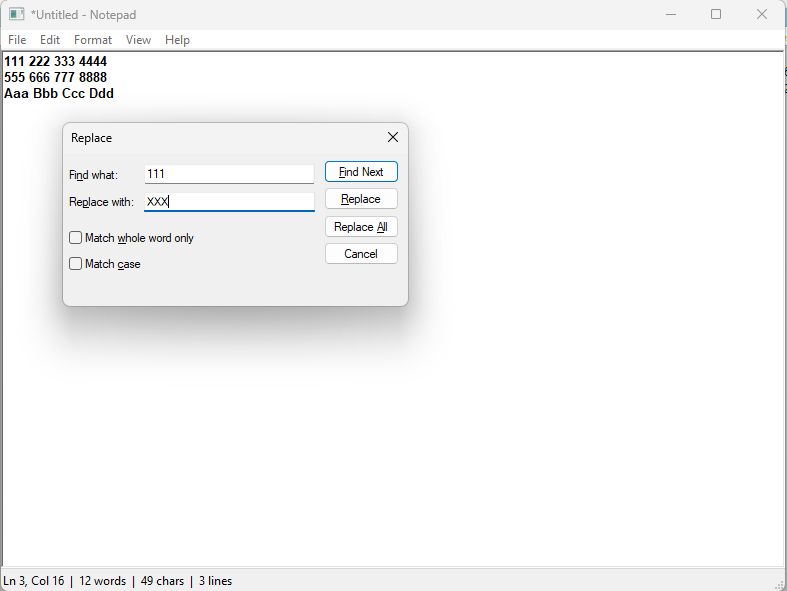
The search feature uses the Common Dialog Box Library (FindText / ReplaceText) for the UI, with search logic implemented via RichEdit messages:
- Search:
EM_FINDTEXTEXwithFINDTEXTEXstructure - Selection:
EM_EXSETSELto highlight matching text - Replace:
EM_REPLACESELfor text substitution - Wrap Around: Automatic search restart from beginning/end when not found
D. Status Bar
Real-time display of:
- Current cursor position:
Ln X, Col Y - Word count (manual counting algorithm)
- Character count (excluding CR)
- Line count
E. Appearance: Theme, DPI and Tray
A Win32 window gets none of the modern Windows appearance for free, and the
surfaces that make it up answer to mechanisms that have nothing to do with each
other. theme.asm keeps them together, because that is the only way they stay
in step.
Dark mode. View -> Theme offers Use System Setting, Light and Dark.
The system option reads AppsUseLightTheme under
HKCU\Software\Microsoft\Windows\CurrentVersion\Themes\Personalize and
follows WM_SETTINGCHANGE, so switching Windows over switches the editor with
it; an explicit Light or Dark choice deliberately ignores that. The registry is
read and never written - the program still creates no files and stores no
settings of its own, so the choice lives for the session only.
Three surfaces have to be told separately. The title bar is the Desktop Window
Manager's, set through DwmSetWindowAttribute with attribute 20, and with 19 as
well because Windows 10 builds before 19041 spelled it that way. The editor is a
RichEdit control: EM_SETBKGNDCOLOR paints its whole client area, including the
margin past the last line, and the text colour travels separately as a
CHARFORMAT2 with CFM_COLOR. That message also raises EN_CHANGE, whose
handler reads the modify flag and rewrites the title, so notifications are
silenced for the duration - otherwise the window opens claiming an untouched
document has been edited.
The status bar is painted by hand. comctl32 fills its own background from a
system colour that no message overrides and SetWindowTheme does not reach, so
in dark mode the part is marked SBT_OWNERDRAW and drawn in WM_DRAWITEM. In
light mode the control is left to draw itself, which it already does correctly.
Owner-draw keeps the pointer rather than the string, so the text is copied into
the module's own buffer first: a caller's stack buffer would be dangling by the
time the control repainted.
PerMonitorV2 DPI is implemented, not merely declared. The manifest asks for
it, which tells Windows to stop scaling the window on the application's behalf
and hand the job over as WM_DPICHANGED
Questions
What is notepad?
wesmar/notepad is a public repo on GitHub by wesmar. High-performance Notepad clone written in pure Assembly (MASM) for Windows 11. Bypasses C Runtime (CRT) to interact directly with Win32 API. Features x64/arm64/x86 support, manual memory management, and low-level message loops. A perfect reference for systems programmers exploring the PE format and bare-metal Windows development.
Is notepad open source?
It declares the MIT license on GitHub.
Does notepad run on macOS, Windows or Linux?
Its maker has not tagged a system, so it is unknown here. Its README says what it needs.