
AutoGPT
AutoGPT is the vision of accessible AI for everyone, to use and to build on. Our mission is to provide the tools, so that you can focus on what matters.
- 188k
- Python
- 1 h ago
Self-hosted AI teammates, each with its own computer — a Grok Bot alternative on your hardware. Bring any model. Unofficial.
Repo wolfqing/OpenSuperBot, read from GitHub 1 min ago. wolfqing has not joined Take My Repo.
wolfqing/OpenSuperBot is a public repo on GitHub by wolfqing. Self-hosted AI teammates, each with its own computer — a Grok Bot alternative on your hardware. Bring any model. Unofficial. It declares the MIT license on GitHub. It is written mainly in TypeScript, has 132 stars and last changed on 2026-11-21. Nobody has reviewed it on Take My Repo yet, which says nothing about its quality. Read from GitHub on 2026-11-22.
Always-on AI teammates, each with its own computer — running on your hardware, with your credentials, under your roof.
Formerly OpenGrokBot. Upgrading an existing install? Nothing breaks — see Coming from OpenGrokBot.
xAI's Grok Bot sells always-on teammates that each get a cloud computer — browser, filesystem, terminal — with persistent memory, bot-to-bot handoffs, and an iMessage-shaped app to manage them. It comes with paid Grok and Cursor plans and meters its own usage on top, and every bot runs on xAI's cloud with your logins inside it.
This is the same shape, self-hosted. One gateway process on your machine, a computer of its own for every bot (a Docker container, or without Docker a browser and a folder on your Mac, Linux or Windows machine), a desktop app or dense web client that reads like a workbench, and a model of your choice behind each teammate — Claude, OpenAI, Gemini, Grok, DeepSeek, Kimi, Qwen, GLM, MiniMax, a local Ollama, or anything OpenAI-compatible.

 |
 |
 |
| Today · Web Feed (Light theme) — prompt-driven background web topics, source links, and unified Feed / Ideas / Goals / Spaces tabs. | Today · Live Spaces (Light theme) — zero-JS metrics, charts, tables, and quick teammate actions with per-bot viewer / editor roles. |
Group room · DAG Pipeline — shared team.md charter plus parallel-wave dispatch stages with expandable upstream outputs. |
 |
 |
 |
| Computer panel — live CDP/noVNC screen, sandboxed shell, steerable background tasks, and Connector / MCP / Vault / Space grants. | Connectors & MCP — native OAuth 2.1 Polery Docs (no Composio key), Gmail / Calendar / Notion / Slack, plus stdio & Streamable HTTP MCP. |
Team Wiki — zero-vector-DB entity pages (project / client / contact / topic) with FTS5 search, history, and Review & verify taint tracking. |
A folder with a SOUL.md (who it is) and an AGENTS.md (how it works, with its hard boundaries), a thread in
the sidebar, and a computer of its own. With Docker, that computer is a container:

Without Docker, a local computer takes the container's place: a background browser with its own profile and a folder of its own, on your machine (docs/local-computers.md). Either way, the bot's credentials live in its browser profile. The gateway never sees a password, and neither does your config file.
Every line below is implemented and covered by tests — nothing here is a roadmap item.
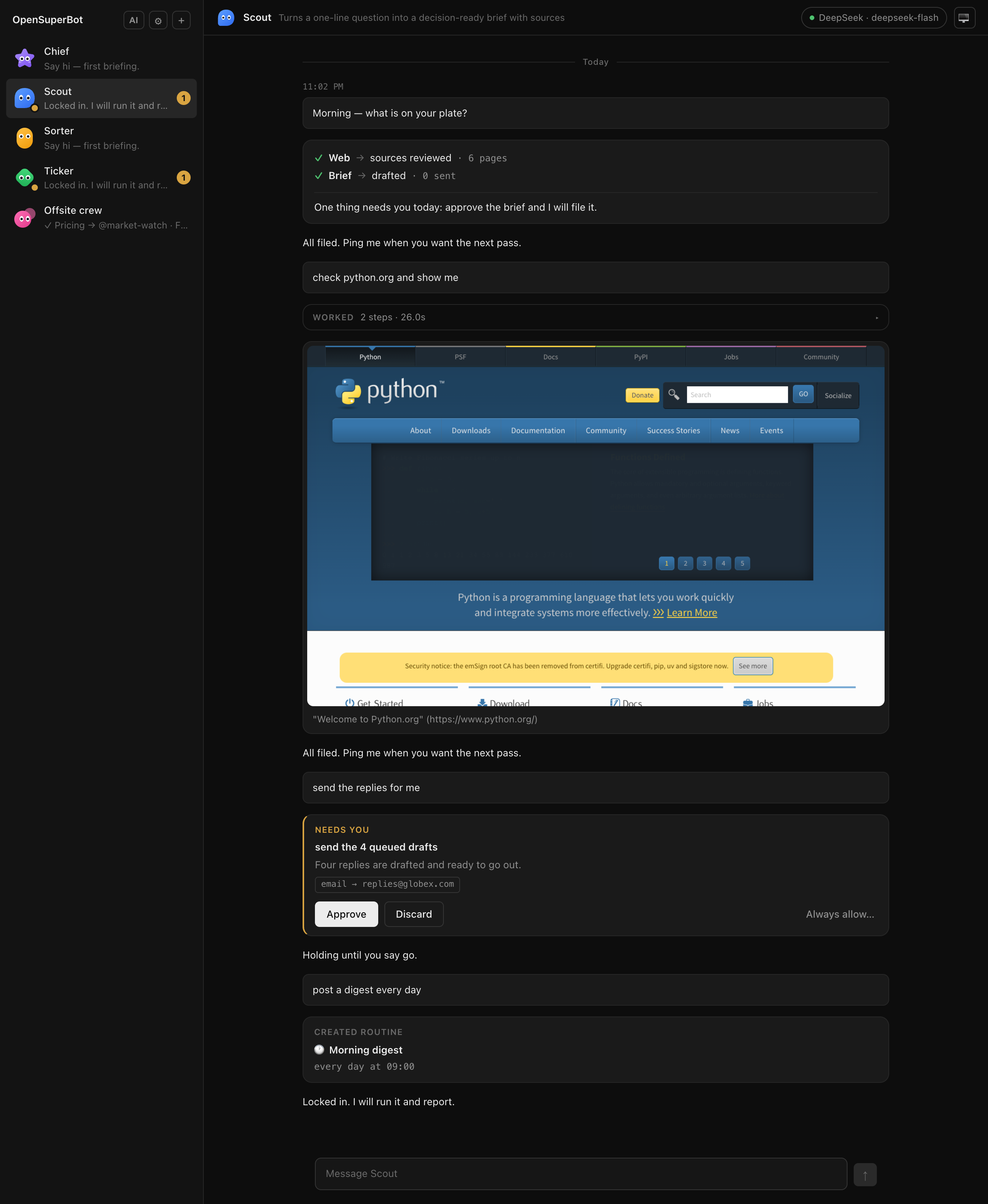
The management surface
✓ system → result · count lines with a single closing sentence
that surfaces only what needs you. Same shape from every teammate.MEMORY.md and posts the diff as a chip; "forget that rule" removes it the same way, and the computer panel
lists every rule with a remove button. The file lives outside the bot's computer, so a chip marks every change.
Repeated discards (≥ 2 in 14 days) or a teammate's propose_memory_rule call never edit MEMORY.md directly — they
post an editable Rule proposal card (Save to MEMORY.md / Dismiss) with an amber warning badge whenever
external data was in context.Feed, Ideas, Tracking & Goals, Spaces). A single daily overview next to your
teammates:
web_search / web_fetch (not cron jobs), with 7-day deduplication, a ~15 items/day cap, and
clickable source links.metric, table, kanban, timeline, chart, markdown,
actions) with per-teammate viewer / editor grants and live thread updates.<data>/vault-secrets.json
(0600, never in SQLite, containers, or model prompts) with strict HTTPS domain allowlists, zero-default per-teammate
grants, ${vault:<slug>.<field>} references in MCP configs, approval/taint-gated vault_fill, and automatic output
redaction.contact, client, project, topic) backed by
SQLite FTS5 with CJK/English tokenization, multi-query RRF × recency ranking (wiki_search, wiki_read,
wiki_upsert), atomic <data>/wiki/ Markdown mirrors, revision history, an in-app Team Wiki browser/editor,
and explicit Review & verify taint tracking.prepare mode & Quiet Hours. "Post a digest every day" registers a cron job, shows the schedule in
plain English, survives restarts, and never runs twice at once. "Whenever a new issue comes in" gives the routine a
secret webhook address instead. Choose watch (strictly read-only, silent unless needed) or prepare (read-only
plus wiki_upsert and workspace write_file to assemble briefs ahead of time). Turn on opt-in Quiet Hours in
Settings to hold non-urgent scheduled watch/prepare updates for a single Morning digest per teammate while
urgent alerts (urgent: true), approvals, questions, and manual runs always break through immediately.delegate_background_task) while its foreground chat stays immediately
responsive. Watch live steps, send mid-flight steering notes, or cancel from the thread chip or computer panel; a
per-bot browser lease prevents foreground and background turns from colliding on the same page.localhost, or LAN), a
built-in priority semaphore (P0 interactive > P1 background > P2 routines > P3 low) lets interactive chats
and approvals jump ahead between steps without cloud-API overhead (configurable in Settings → Local model
concurrency).(thread, bot) checkpoint compaction, workspace spill for oversized tool outputs, repeat-call
loop guards, SQLite FTS5 search_history with strict per-bot isolation, bounded parallel read-tool execution,
optimistic write_file stale guards, jittered LLM retry with tool JSON validation, sleep/wake latest-only scheduler
catch-up, and an instant recent-thread LRU cache in the client.<data>/skills/ and every teammate sees it and reads it
before work it covers. Memory and routines stay with each teammate; skills are shared.OPENSUPERBOT_DAILY_TOKENS caps each teammate's model use per day; the panel
shows today's count.The computer
read_file, write_file and shell in its own workspace: the container, or on a local computer a folder that
no path can leave. A local computer's commands are off until you turn them on for that teammate, and then run
in an OS sandbox (Seatbelt on macOS, bubblewrap on Linux). Long files and pages come back in slices instead of
being cut off.browser_goto / browser_extract (with the page's links) / browser_click / browser_type /
browser_press / browser_scroll / browser_back against a real Chromium — so login-walled sites and forms
work, which pure API/MCP setups cannot do. The container image ships CJK and emoji fonts.browser_screenshot posts what the bot saw into the thread as evidence — and, with OPENSUPERBOT_VISION=1,
shows it to a vision model too.ask_for_login instead of asking for a password. You sign
in once in its browser — through its screen in the thread for a container, or in a normal window that opens
on your desktop for a local computer — and the session persists in its profile, across restarts.Connectors & MCP
polery). Connect Polery Docs directly from Connectors → Apps via first-party
OAuth 2.1 (PKCE S256 + RFC 8707 resource binding) and Streamable HTTP MCP — no Composio API key required.
Exposes 4 read-only tools (polery_list_documents, polery_search_documents, polery_read_document,
polery_get_proposal) and 2 approval-gated write tools (polery_create_document, polery_propose_edits), with
tokens kept locally in <data>/polery-tokens.json (0600).no-reply / mailer-daemon noise, stripping HTML and tracking pixels, and removing
URL tracking parameters), outside-data taint on reads, and code-enforced frozen write approvals executed
once by the gateway when you click Approve (never replayed if a connection drops mid-flight).stdio & Streamable HTTP). Attach any Model Context Protocol server from
Connectors → MCP — local stdio commands (shell: false, clean-room environment) or remote Streamable HTTP
endpoints (with automatic 2024-11-05 HTTP+SSE fallback and same-origin redirect guards) — or paste a Claude
Desktop / Cursor mcpServers JSON block to import a batch at once. Supports on-demand tool loading for large servers
and ${vault:<slug>.<field>} references into the local Vault; secrets stay in <data>/mcp-secrets.json (0600)
outside SQLite and containers; access is opt-in per teammate; tools default to 'write' unless marked 'read', so
'read' tools work safely in watch routines while 'write' tools pause at a non-rememberable approval chip with
frozen arguments.The crew
team.md charter & DAG dispatch pipelines. Ask the room a question: each teammate answers for
its own patch — in parallel — following your operator-edited Team charter (team.md), then the chief of staff
closes with a dispatch table (✓ item → @bot · when) or proposes an interactive multi-step Dispatch pipeline
card (create_dispatch_plan) with explicit dependsOn edges. Click Start pipeline to run independent stages in
parallel, pass fenced upstream outputs with taint tracking to downstream teammates, and automatically pause and
resume around approvals. Type @ to ask only the teammates you name.message_bot drops a scoped task into a teammate's thread and wakes it up. By
default only the chief can reach everyone; peer-to-peer is off until you name the direction. Relays are
capped at two hops so two bots cannot echo at each other.+, a name in any language, one line of job description. No workflow editor, no
tool checklist — the complexity accumulates in use, not in a setup form.Grab the installer for your machine from GitHub Releases
— mac-arm64.dmg (Apple silicon), mac-x64.dmg (Intel), linux-amd64.deb / linux-arm64.deb (Ubuntu and Debian),
or linux-x86_64.AppImage / linux-arm64.AppImage (other Linux). You do not need Node, pnpm, Docker or a terminal:
open it and a short wizard walks through language, connecting an AI service (or looking around in demo mode with no
key), and checking your browser and command sandbox.
First-open notes:
.deb over the .AppImage — it installs bubblewrap and the AppArmor profiles
needed for unprivileged user namespaces, so the command sandbox works out of the box.Step-by-step screenshots, startup update checks (one GitHub request, no auto-update, switchable in Settings), data locations and clean uninstall instructions are in docs/desktop.md.
For Windows (which has no desktop installer yet), servers, or hacking on the repo. Needs Node 22+ and pnpm. Docker is optional. Without it, each teammate gets a local computer: a browser of its own on your machine (your Chrome, Edge or Chromium if you have one — otherwise one is downloaded once) and a folder of its own. With Docker running, each gets a sealed container instead. Local computers run on macOS, Linux and Windows; on Windows they get the browser and the folder but no commands, so a teammate that needs a shell there gets a Docker computer.
git clone https://github.com/wolfqing/OpenSuperBot.git
cd OpenSuperBot
pnpm install
Try it with no API key at all — a scripted stub model drives every path end to end:
OPENSUPERBOT_MODEL=stub pnpm dev
On Windows, in PowerShell: $env:OPENSUPERBOT_MODEL = 'stub'; pnpm dev.
The gateway prints a sign-in link — http://localhost:5173/auth?token=…. Open it once per browser; nothing
reaches the gateway without that token.
For a real model, run plain pnpm dev with no model variables: the first page opens on a setup wizard. Pick a
service, paste its key, test it and pick a model; the key is saved on this machine and nothing needs exporting.
It also checks the browser, Docker and the sandbox, and has a demo-mode button on every early step.
Or set it with environment variables, which skips the wizard (anything OpenAI-compatible — xAI, Kimi, DeepSeek, a local Ollama):
OPENSUPERBOT_API_KEY=sk-… OPENSUPERBOT_MODEL=grok-4.7 pnpm dev
(PowerShell: $env:OPENSUPERBOT_API_KEY = 'sk-…'; $env:OPENSUPERBOT_MODEL = 'grok-4.7'; pnpm dev.)
To put teammates on different models, open AI models in the sidebar, add a connection per service you have a key for, and pick one from the top of a teammate's thread. See AI models for the services, which keys work, and which subscriptions other apps may and may not use.
The gateway picks the kind of computer at startup and says so in its log: Docker when the daemon answers and
the bot image is built, local otherwise (OPENSUPERBOT_COMPUTERS=docker|local forces one). For Docker, build the
image first: docker build -t opensuperbot/bot:dev docker/bot. On a local computer, commands are off until you turn them on
for that teammate in its computer panel; then they run in an OS sandbox (Seatbelt on macOS, bubblewrap on Linux)
that can write only that teammate's folder. Windows has no sandbox that strong, so there the switch stays off.
Details in docs/local-computers.md.
To keep it running — one process, one port, started at boot, reachable through a tunnel — pnpm build && pnpm start and the launchd / systemd / Windows Task Scheduler templates in docs/always-on.md.
| Variable | Default | What it does |
|---|---|---|
OPENSUPERBOT_API_BASE |
https://api.x.ai/v1 |
Any OpenAI-compatible endpoint |
OPENSUPERBOT_API_KEY |
— | Your key. A key set here stays in memory and is never written to disk; keys saved in the wizard or AI models live in <data>/llm-key and <data>/llm-keys/ (0600, or a user-only ACL on Windows) |
OPENSUPERBOT_MODEL |
grok-4.7 |
stub runs offline with no key |
OPENSUPERBOT_DATA |
gateway/data |
SQLite, bot data, workspaces, the gateway token |
OPENSUPERBOT_COMPUTERS |
auto |
docker, local, or auto (Docker if it is running and the image is built, else local) |
OPENSUPERBOT_BROWSER |
(auto-detected) | Browser executable for local computers; else Chrome/Edge/Chromium are looked for, then one is downloaded |
OPENSUPERBOT_BROWSER_MIRROR |
(official) | Download host for that browser, for slow-network regions |
OPENSUPERBOT_A2A_ALLOW |
(empty) | Peer handoffs, e.g. researcher>market-watch |
OPENSUPERBOT_DAILY_TOKENS |
0 (off) |
Per-teammate daily token budget |
OPENSUPERBOT_VISION |
(off) | Show the model its own screenshots |
OPENSUPERBOT_UPLOADS_MAX_MB |
2048 |
Disk the files you send to teammates may use in all; 0 no limit |
OPENSUPERBOT_COMPOSIO_API_KEY |
— | Optional Composio API key for Connectors → Apps; saved keys live in <data>/composio-key (0600) |
OPENSUPERBOT_POLERY_ORIGIN |
https://docs.polery.com |
Optional custom origin for the native Polery Docs OAuth/MCP connector |
OPENSUPERBOT_LOCAL_LLM_CONCURRENCY |
1 |
Max concurrent requests to a local LLM endpoint (localhost / Ollama / LAN) under the P0–P3 priority queue |
OPENSUPERBOT_CONTEXT_WINDOW |
0 (auto) |
Optional override for context-window budgeting & checkpoint compaction (auto-inferred by model family when 0) |
Every other setting — listen address, idle stop, per-computer limits, timeouts — is in docs/always-on.md.
In a slow-network region: for Docker, build with a mirror — docker build --build-arg APT_MIRROR=mirrors.aliyun.com … (or mirrors.huaweicloud.com, mirrors.tuna.tsinghua.edu.cn); for a local computer that has to download its browser, set OPENSUPERBOT_BROWSER_MIRROR=https://cdn.npmmirror.com/binaries/playwright.
The loudest objection to hosted always-on agents: an agent that never sleeps, holding all your credentials, on someone else's infrastructure, exposed to prompt injection. The self-hosted answers:
<data>/vault-secrets.json,
<data>/mcp-secrets.json, and <data>/polery-tokens.json (0600, never in SQLite, containers, or model prompts,
with automatic output redaction and HTTPS domain allowlists on vault_fill); if you opt into Composio-backed apps in
Connectors → Apps, OAuth tokens live on Composio while the API key stays in <data>/composio-key (0600)
outside every bot container and workspace.127.0.0.1, validates the Host header against
DNS rebinding, blocks cross-site Sec-Fetch-Site requests, signs each browser in once, and only lets its own pages
change state. A website you visit cannot approve a hold — and neither can the bot.docs/security.md lists exactly what is enforced, what is a convention, and what is still on you.
| Grok Bot | OpenSuperBot | |
|---|---|---|
| Software | with a paid SuperGrok or Cursor plan, plus metered usage | $0 (MIT all the way down) |
| Compute | included (xAI's cloud) | your Mac / mini PC / ~$5 VPS |
| Model | included (Grok only) | your key, any provider — or local at $0 |
| Your logins | on xAI's cloud | in each bot's own browser profile, on your machine |
Honest note: Grok Bot's zero-setup polish, iOS app, and teach-by-demonstration are real advantages. If you are happy putting your accounts on xAI's cloud and paying for the convenience, buy it. This repo is for everyone who answered "are you comfortable with that?" with no.
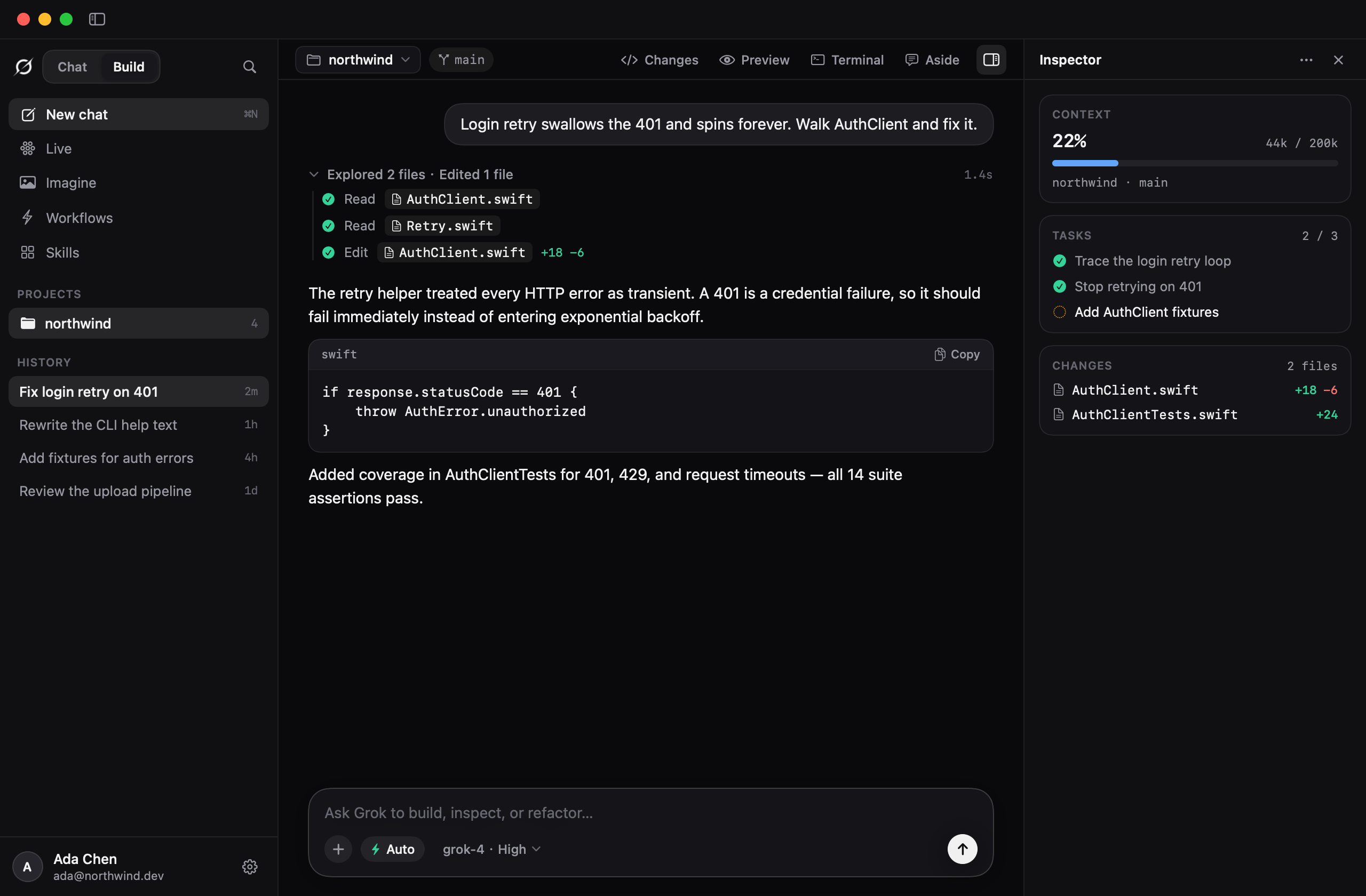
OpenSuperBot is for the work that happens while you are away. For the hours you spend in Grok yourself there is
Grok Desktop: a native SwiftUI window for macOS 14+ that embeds
grok.com for Chat and drives your local grok CLI for Build — sessions grouped by project, Markdown, plans,
diffs and live terminals in an inspector, Imagine without leaving the window. Free, community-built, not an
official xAI product. Download the latest release.
stdio / Streamable HTTP MCP servers, Claude Desktop / Cursor JSON
import, per-teammate grants, and code-enforced frozen write approvals (v0.7.0; docs/security.md)prepare
routines, controlled-dreaming rule proposals, local LLM P0–P3 priority queue, steerable Meta/AlterEgo
background tasks with per-bot browser leases, and group team.md charters + multi-wave DAG dispatch pipelines
(v0.8.0)0600 Credential Vault (TOTP + HTTPS domain allowlists + ${vault:...} refs), native OAuth 2.1 Polery
Docs, Dark/Light theme switcher, and automatic context-window compaction, spill, loop guards & FTS5 history
search (v0.8.1)Relative to Grok Bot? Same job — always-on teammates, their own computers, persistent memory, handoffs — opposite custody model, and zero shared code (Grok Bot is closed-source; there is nothing to fork). It can even run on the same brain: point it at the Grok API.
Relative to OpenClaw? v0.1 of this repo was a distribution on top of OpenClaw. v0.2 is its own core, because a private computer per teammate pulls against OpenClaw's shared-host model. The old recipe is kept in docs/openclaw-recipe/. Not an official OpenClaw project.
Do I have to use Docker? No. On macOS, Linux and Windows, a teammate without Docker gets a local computer: a browser and a folder of its own on your machine. Docker buys stronger isolation (a container per teammate, with resource limits), and on Windows it is still the only way to give a teammate a shell. See docs/local-computers.md.
More in docs/desktop.md · docs/models.md · docs/faq.md · docs/multi-bot.md · docs/attachments.md · docs/always-on.md · docs/security.md · docs/workflows.md · docs/comparison.md · CHANGELOG.md
Unofficial. Not affiliated with, endorsed by, or connected to xAI or the OpenClaw Foundation. "Grok" is a trademark of xAI — the name is used here only to identify the product this stack is an alternative to.
MIT. Star it if it is useful to you. ⭐
wolfqing/OpenSuperBot is a public repo on GitHub by wolfqing. Self-hosted AI teammates, each with its own computer — a Grok Bot alternative on your hardware. Bring any model. Unofficial.
It declares the MIT license on GitHub.
Its maker tagged it for macOS, Windows and Linux, or as Docker or cross-platform. That is declared by the maker; Take My Repo has not tested it.
Open "Take it" on its page: Take My Repo writes an install plan for your machine and hands it to your AI agent (Claude Code, Codex or Cursor), which asks you before each step. Take My Repo has not tested it on any machine.
Its last change on GitHub was on 2026-11-21. GitHub counts 1 open issue and pull requests. Take My Repo does not judge from that whether it is maintained.
AutoGPT is the vision of accessible AI for everyone, to use and to build on. Our mission is to provide the tools, so that you can focus on what matters.
Nobody has reviewed it on Take My Repo yet, which says nothing about its quality.
The agent harness performance optimization system. Skills, instincts, memory, security, and research-first development for Claude Code, Codex, Opencode, Cursor and beyond.
Open-source Python library for AI browser agents, plus Browser Use Cloud: stealth browsers and a hosted agent API.
The 1st Collaborative AI Design Agent Workspace. Local-first and open source. Create motion, prototypes, websites, apps, dashboards, presentations, images, and videos with your team and AI agents. Share work, exchange feedback, and iterate together in one workspace.
Reverse engineer anything with agents, from app behavior down to native binaries.
Langflow is a powerful tool for building and deploying AI-powered agents and workflows.
Native macOS window for Grok Chat and the official grok CLI. Chat embeds grok.com; Build continues ~/.grok sessions over ACP.
Put your Claude Code context on a diet — measure per-session config overhead and find the skills, MCP servers and agents you never use. npx ccdiet
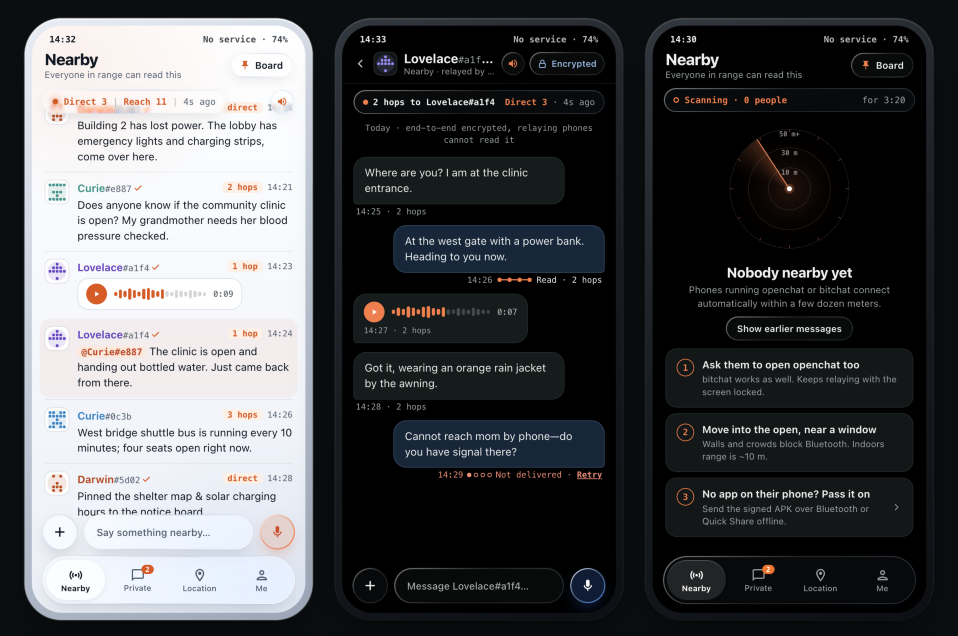
Offline-first mesh messenger for blackouts, disasters and crowded places. Bluetooth LE mesh + Nostr, bitchat-compatible, clean-room Kotlin, MIT.
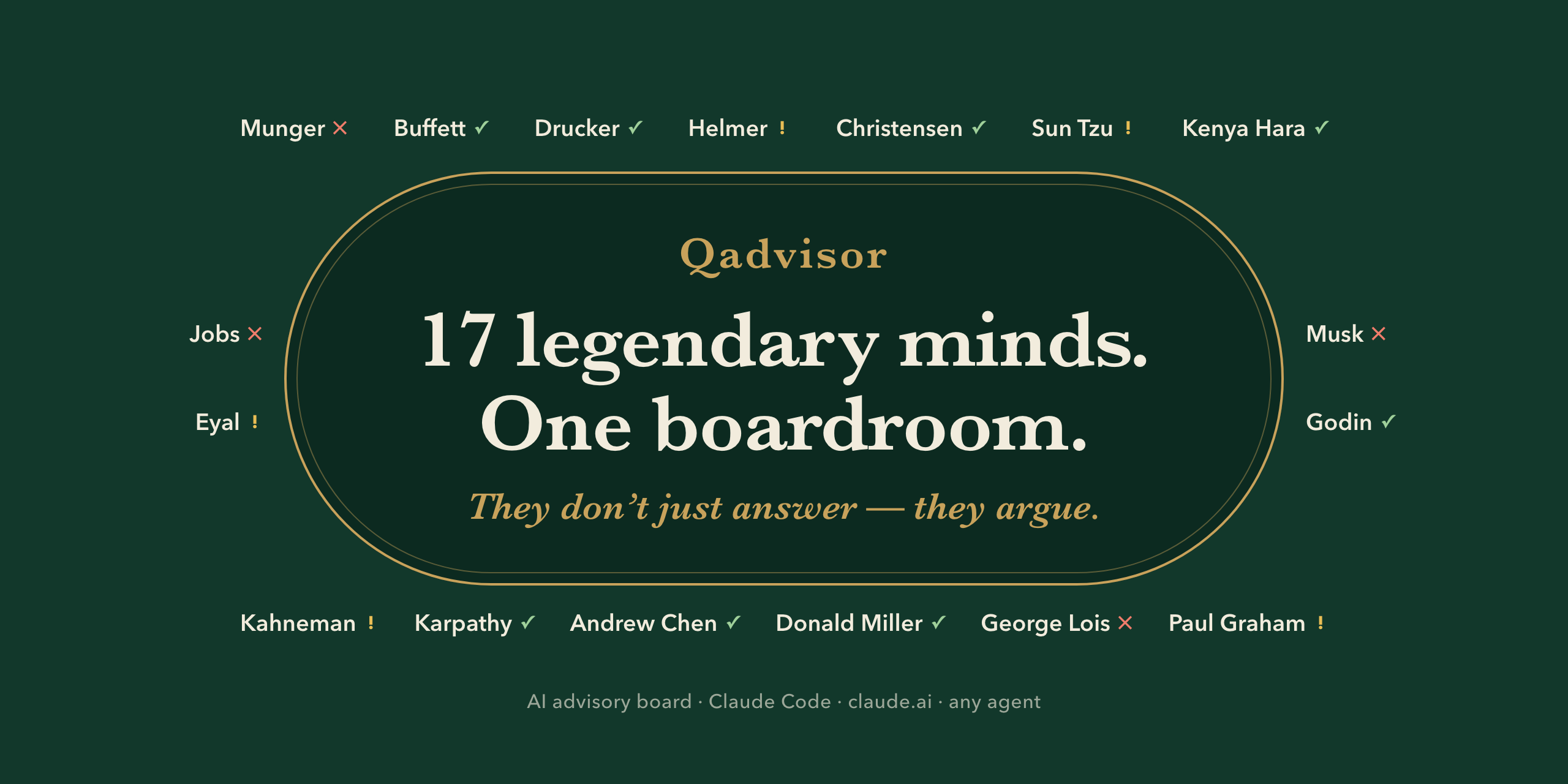
An AI advisory board for Claude: 17 documented thinking frameworks (Munger, Buffett, Jobs, Sun Tzu, Paul Graham, Karpathy…) reframe your question, debate, and return a verdict report. Claude Code plugin + Agent Skills. EN/中文.