Microsoft-Activation-Scripts
Open-source Windows and Office activator featuring HWID, Ohook, TSforge, and Online KMS activation methods, along with advanced troubleshooting.
- 201k
- Batchfile
- GPL-3.0
- 12 d ago
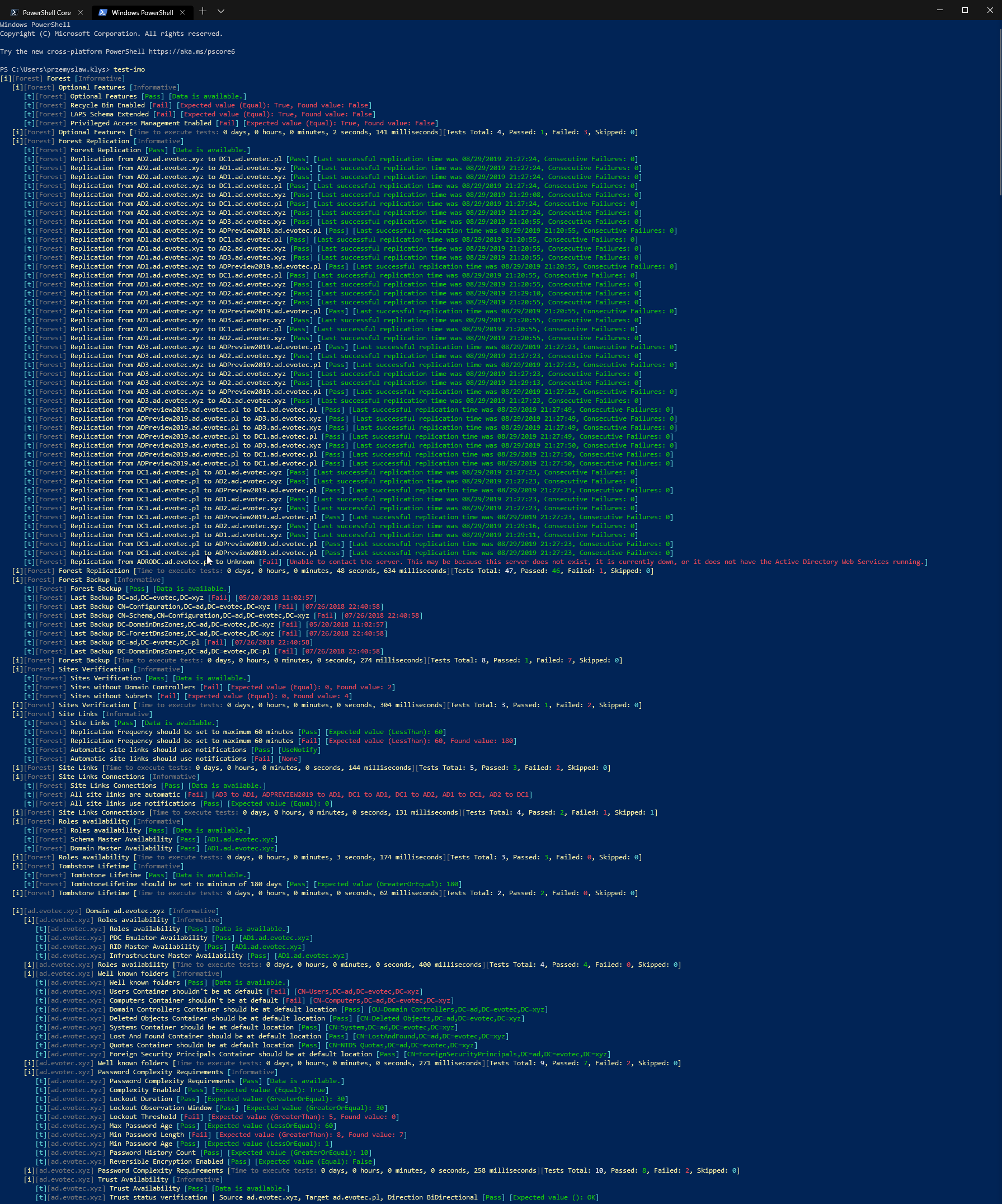
Testimo is a PowerShell module for running health checks for Active Directory against a bunch of different tests
Repo EvotecIT/Testimo, read from GitHub 10 h ago. EvotecIT has not joined Take My Repo.
EvotecIT/Testimo is a public repo on GitHub by EvotecIT. Testimo is a PowerShell module for running health checks for Active Directory against a bunch of different tests. It declares no license on GitHub. Public does not mean open source: without a license, nobody is granted the right to reuse it. It is written mainly in PowerShell, has 654 stars and last changed on 2026-10-30. Nobody has reviewed it on Take My Repo yet, which says nothing about its quality. Read from GitHub on 2026-11-23.
Open-source Windows and Office activator featuring HWID, Ohook, TSforge, and Online KMS activation methods, along with advanced troubleshooting.
Testimo is a PowerShell Module to help with basic/more advanced testing of Active Directory and maybe in future other types of servers. Testimo is an alpha product and as such things do change. It's goal is to be fully automated solution where one can run the command and get results without executing 50 little functions.
If you're new to Testimo you should read this blog post!
Note: At present this module is not supported in PowerShell Core/PowerShell 7. This is because the Testimo module depends on other Microsoft moodules that are also not supported in PowerShell 7, including GroupPolicy and ServerManager. There is an issue tracking this compatibiity which you can follow: https://github.com/EvotecIT/Testimo/issues/110.
Things to know:
Install-Module -Name Testimo -AllowClobber -Force
Force and AllowClobber aren't really nessecary but they do skip errors in case some appear.
Update-Module -Name Testimo
Alternatively, rerunnng Install-Module with force will trigger reinstallation or update
Install-Module -Name Testimo -AllowClobber -Force
That's it. Whenever there's new version you simply run the command and you can enjoy it. Remember, that you may need to close, reopen PowerShell session if you have already used module before updating it.
The important thing is if something works for you on production, keep using it till you test the new version on a test computer. I do changes that may not be big, but big enough that auto-update will break your code. For example, small rename to a parameter and your code stops working! Be responsible!
With output to screen and HTML
Invoke-Testimo
Generate all tests but display content only in PowerShell
Invoke-Testimo -HideHTML
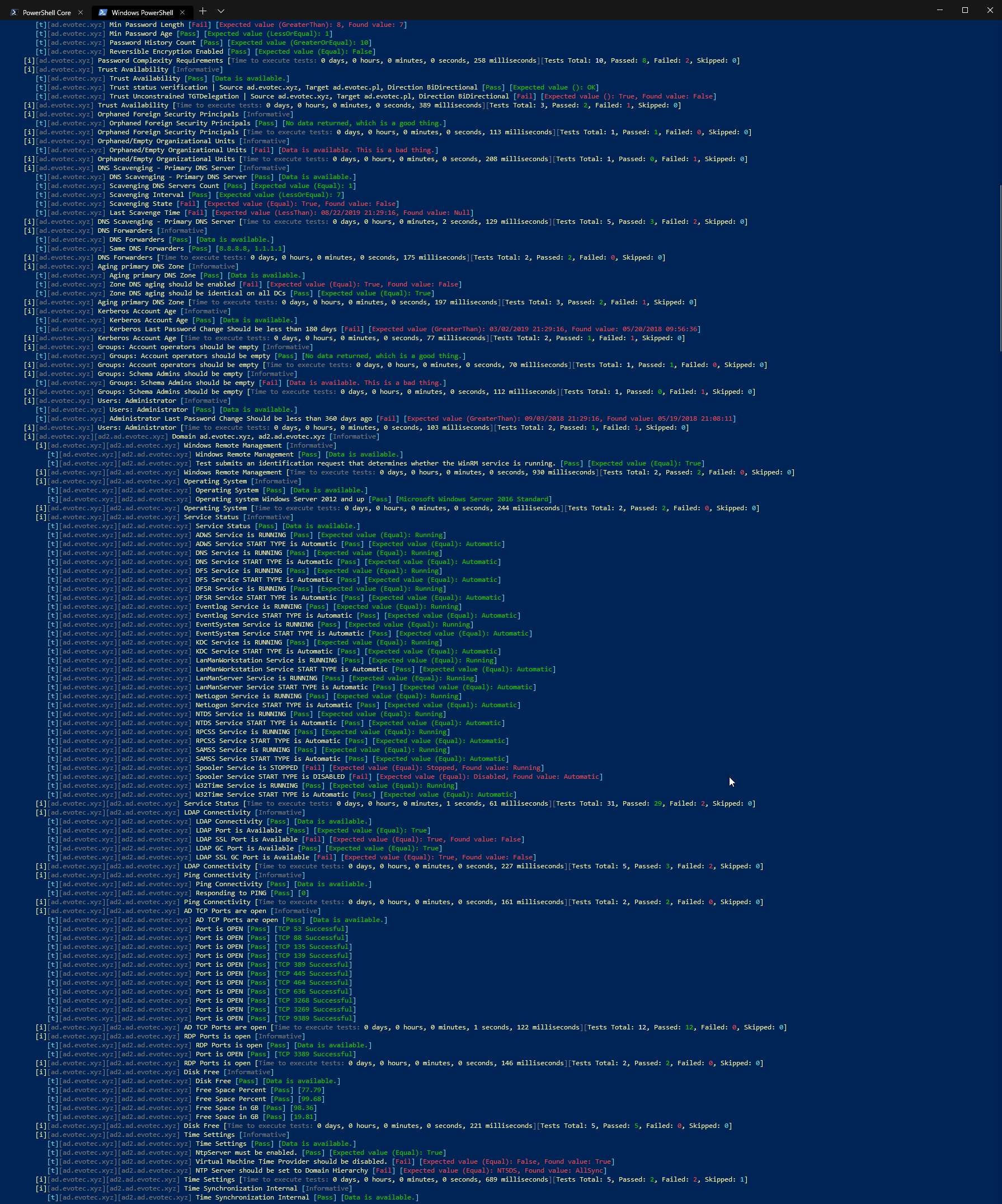
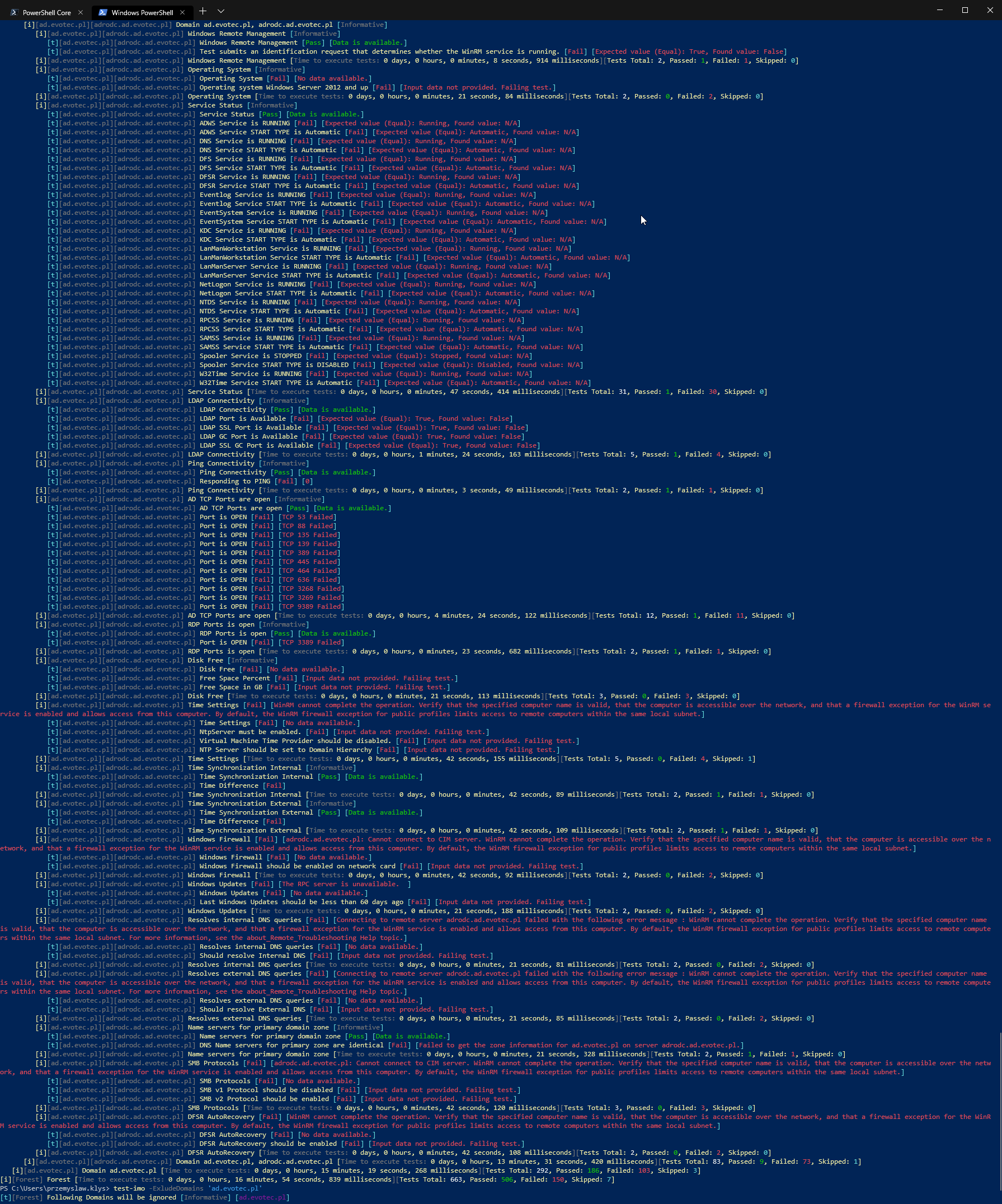
Please keep in mind that there is currently known issue that running all tests while works correctly generated HTML is very very slow when switching Tabs. It's advised to run seperate tests which will generate smaller file which will be more responsive
Invoke-Testimo -Source 'ForestOptionalFeatures','DomainWellKnownFolders','ForestSubnets' -Online -ReportPath $PSScriptRoot\Reports\TestimoSummary.html -AlwaysShowSteps
There are also other parameters available With option to be able to process output - for example to email
Invoke-Testimo -ReturnResults
Following configuration allows you to:
Import-Module Testimo

$OutputOrderedDictionary = Get-TestimoConfiguration
$OutputOrderedDictionary.ForestOptionalFeatures.Tests.RecycleBinEnabled.Enable = $false
$OutputOrderedDictionary.ForestOptionalFeatures.Tests.LapsAvailable.Enable = $true
$OutputOrderedDictionary.ForestOptionalFeatures.Tests.LapsAvailable.Parameters.ExpectedValue = $false

$Sources = @(
    'ForestFSMORoles'
    'ForestOptionalFeatures'
    'ForestBackup'
    'ForestOrphanedAdmins'
    'DomainPasswordComplexity'
    'DomainKerberosAccountAge'
    'DomainDNSScavengingForPrimaryDNSServer'
    'DCWindowsUpdates'
)

$TestResults = Invoke-Testimo -PassThru -ExcludeDomains 'ad.evotec.pl' -Sources $Sources -Configuration $OutputOrderedDictionary
$TestResults | Format-Table -AutoSize *
Be sure to checkout Examples section for more How-To.
Testimo comes with preset rules that may not apply to your environment. You may want to change some things like disabling some tests or changing some values (to an extent). There are 3 ways to do it. Depending on how you want to save/edit/pass configuration to TestIMO - I leave it up to you.
Get-TestimoConfiguration -FilePath $PSScriptRoot\Configuration\TestimoConfiguration.json
Get-TestimoConfiguration -AsJson
$OutputOrderedDictionary = Get-TestimoConfiguration
$OutputOrderedDictionary.ForestOptionalFeatures.Tests.RecycleBinEnabled.Enable = $false
$OutputOrderedDictionary.ForestOptionalFeatures.Tests.LapsAvailable.Enable = $true
$OutputOrderedDictionary.ForestOptionalFeatures.Tests.LapsAvailable.Parameters.ExpectedValue = $false
Keep in mind not all tests apply to each environment. I'm adding those to be flexible and be able to test things as needed. Each of those tests will need additional description and recommendation, most likely with links and steps to fix. Some of the tests are very basic and will need feedback, work on making it a robust test. Nothing is written in stone for now. Things can change day by day.
Tests are based on:
| Type | Name | Area | Description |
|---|---|---|---|
| Forest | Backup | Backup | Verify last backup time should be [less than X days] |
| Forest | Replication | Connectivity | Verify each DC in replication site can [reach other replication members] |
| Forest | Replication using Repadmin | Connectivity | Verify each DC in replication site can [reach other replication members] |
| Forest | Optional Features | Features | Verify Optional Feature Recycle Bin should be [Enabled] |
| Forest | Optional Features | Features | Verify Optional Feature Privileged Access Management Feature should be [Enabled] |
| Forest | Optional Features | Features | Verify Optional Feature Laps should be enabled [Configured] |
| Forest | Sites Verification | Sites | Verify each site has at least [one subnet configured] |
| Forest | Sites Verification | Sites | Verify each site has at least [one domain controller configured] |
| Forest | Site Links | Site Links | Verify each site link is automatic |
| Forest | Site Links | Site Links | Verify each site link uses notifications |
| Forest | Site Links | Site Links | Verify each site link does not use notifications |
| Forest | Roles | Connectivity | Verify each FSMO holder is [reachable] |
| Forest | Orphaned/Empty Admins | Security | Verify there are no Orphaned Admins (users/groups/computers) |
| Forest | Tombstone Lifetime | Features | Verify Tombstone lifetime is greater or equal 180 days |
| Domain | Roles | Connectivity | Verify each FSMO holder is [reachable] |
| Domain | Password Complexity Requirements | Password | Verify Password Complexity Policy should be [Enabled] |
| Domain | Password Complexity Requirements | Password | Verify Password Length should be [greater than X] |
| Domain | Password Complexity Requirements | Password | Verify Password Threshold should be [greater than X] |
| Domain | Password Complexity Requirements | Password | Verify Password Lockout Duration should be [greater than X minutes] |
| Domain | Password Complexity Requirements | Password | Verify Password Lockout Observation Window should be [greater than X minutes] |
| Domain | Password Complexity Requirements | Password | Verify Password Minimum Age should be [greater than X] |
| Domain | Password Complexity Requirements | Password | Verify Password History Count should be [greater than X] |
| Domain | Password Complexity Requirements | Password | Verify Password Reversible Encryption should be [Disabled] |
| Domain | Trust Availability | Connectivity | Verify each Trust status is OK |
| Domain | Trust Unconstrained TGTDelegation | Security | Verify each Trust TGTDelegation is set to True |
| Domain | Kerberos Account Age | Security | Verify Kerberos Last Password Change Should be less than 180 days |
| Domain | Groups: Account Operators | Security | Verify Group is empty |
| Domain | Groups: Schema Admins | Security | Verify Group is empty |
| Domain | User: Administrator | Security | Verify Last Password Change should be less than 360 days or account disabled |
| Domain | DNS Forwarders | DNS | Verify DNS Forwarders are identical on all DNS nodes |
| Domain | DNS Scavenging - Primary DNS Server | DNS | Verify DNS Scavenging is set to [X days] |
| Domain | DNS Scavenging - Primary DNS Server | DNS | Verify DNS Scavenging State is set to True |
| Domain | DNS Scavenging - Primary DNS Server | DNS | Verify DNS Scavenging Time is less than [X days] |
| Domain | DNS Zone Aging | DNS | Verify DNS Zone Aging is set |
| Domain | DNS Zones Forest 0ADEL | Configuration/DNS | Verify owner is not 0ADEL |
| Domain | DNS Zones Domain 0ADEL | Configuration/DNS | Verify owner is not 0ADEL |
| Domain | Well known folder - UsersContainer | WellKnownFolders | Verify folder is not at it's defaults. |
| Domain | Well known folder - ComputersContainer | WellKnownFolders | Verify folder is not at it's defaults. |
| Domain | Well known folder - DomainControllersContainer | WellKnownFolders | Verify folder is at it's defaults. |
| Domain | Well known folder - DeletedObjectsContainer | WellKnownFolders | Verify folder is at it's defaults. |
| Domain | Well known folder - SystemsContainer | WellKnownFolders | Verify folder is at it's defaults. |
| Domain | Well known folder - LostAndFoundContainer | WellKnownFolders | Verify folder is at it's defaults. |
| Domain | Well known folder - QuotasContainer | WellKnownFolders | Verify folder is at it's defaults. |
| Domain | Well known folder - ForeignSecurityPrincipalsContainer | WellKnownFolders | Verify folder is at it's defaults. |
| Domain | Orphaned Foreign Security Principals | Cleanup | Verify there are no orphaned FSP objects. |
| Domain | Orphaned/Empty Organizational Units | Cleanup | Verify there are no orphaned Organizational Units |
| Domain | Group Policy Missing Permissions | Configuration | Verify Authenticated Users/Domain Computers are on each and every Group Policy |
| Domain | DFSR Sysvol | Configuration | Verify SYSVOL is DFSR |
| Domain | NTDS Parameters | Configuration | Verify Domain Controller is writable (DSA Not Writable) |
| Domain Controller | Information | Configuration | Verify Is enabled |
| Domain Controller | Information | Configuration | Verify Is global catalog |
| Domain Controller | Service Status | Services | Verify all {Services} are [running] |
| Domain Controller | Service Status | Services | Verify all {Services} are set to [automatic startup] |
EvotecIT/Testimo is a public repo on GitHub by EvotecIT. Testimo is a PowerShell module for running health checks for Active Directory against a bunch of different tests.
It declares no license on GitHub. Public does not mean open source: without a license, nobody is granted the right to reuse it.
Its maker tagged it for Windows. That is declared by the maker; Take My Repo has not tested it.
game of active directory
A simple, lightweight PowerShell script that allows you to remove pre-installed apps, disable telemetry, as well as perform various other changes to declutter and customize your Windows experience. Win11Debloat works for both Windows 10 and Windows 11.
A cheat sheet that contains common enumeration and attack methods for Windows Active Directory.
Write better integration tests! Dockertest helps you boot up ephermal docker images for your Go tests with minimal work.
Open "Take it" on its page: Take My Repo writes an install plan for your machine and hands it to your AI agent (Claude Code, Codex or Cursor), which asks you before each step. Take My Repo has not tested it on any machine.
Its last change on GitHub was on 2026-10-30. GitHub counts 54 open issues and pull requests. Take My Repo does not judge from that whether it is maintained.
Nobody has reviewed it on Take My Repo yet, which says nothing about its quality.
Take My Repo cannot say: it does not audit code and has not run Testimo. What is known comes from GitHub. It declares no license on GitHub. Public does not mean open source: without a license, nobody is granted the right to reuse it. Its last change was on 2026-10-30. It has 654 stars, which measure popularity, not safety. Nobody has reviewed it on Take My Repo yet, which says nothing about its quality. Read the source before you run it. With "Take it", your AI agent shows each step and asks you before running it; README text is treated as data, not as instructions.