A2A
Agent2Agent (A2A) is an open protocol enabling communication and interoperability between opaque agentic applications.
- 27k
- Shell
- Apache-2.0
- 3 d ago
A general-purpose API load testing platform that supports LLM services、A2A/MCP services and business HTTP interfaces, enabling one-click performance testing, result comparison, and AI-powered intelligent analysis and summarization. 一站式通用 API 压测平台,支持大模型推理业/务 HTTP 接口、A2A/MCP服务,一键完成性能测试、结果对比与 AI 智能分析总结
Repo MigoXLab/LMeterX, read from GitHub 1 min ago. MigoXLab has not joined Take My Repo.
MigoXLab/LMeterX is a public repo on GitHub by MigoXLab. A general-purpose API load testing platform that supports LLM services、A2A/MCP services and business HTTP interfaces, enabling one-click performance testing, result comparison, and AI-powered intelligent analysis and summarization. 一站式通用 API 压测平台,支持大模型推理业/务 HTTP 接口、A2A/MCP服务,一键完成性能测试、结果对比与 AI 智能分析总结. It declares the Apache-2.0 license on GitHub. It is written mainly in Python, has 218 stars and last changed on 2026-09-22. Nobody has reviewed it on Take My Repo yet, which says nothing about its quality. Read from GitHub on 2026-11-23.

简体中文 | English
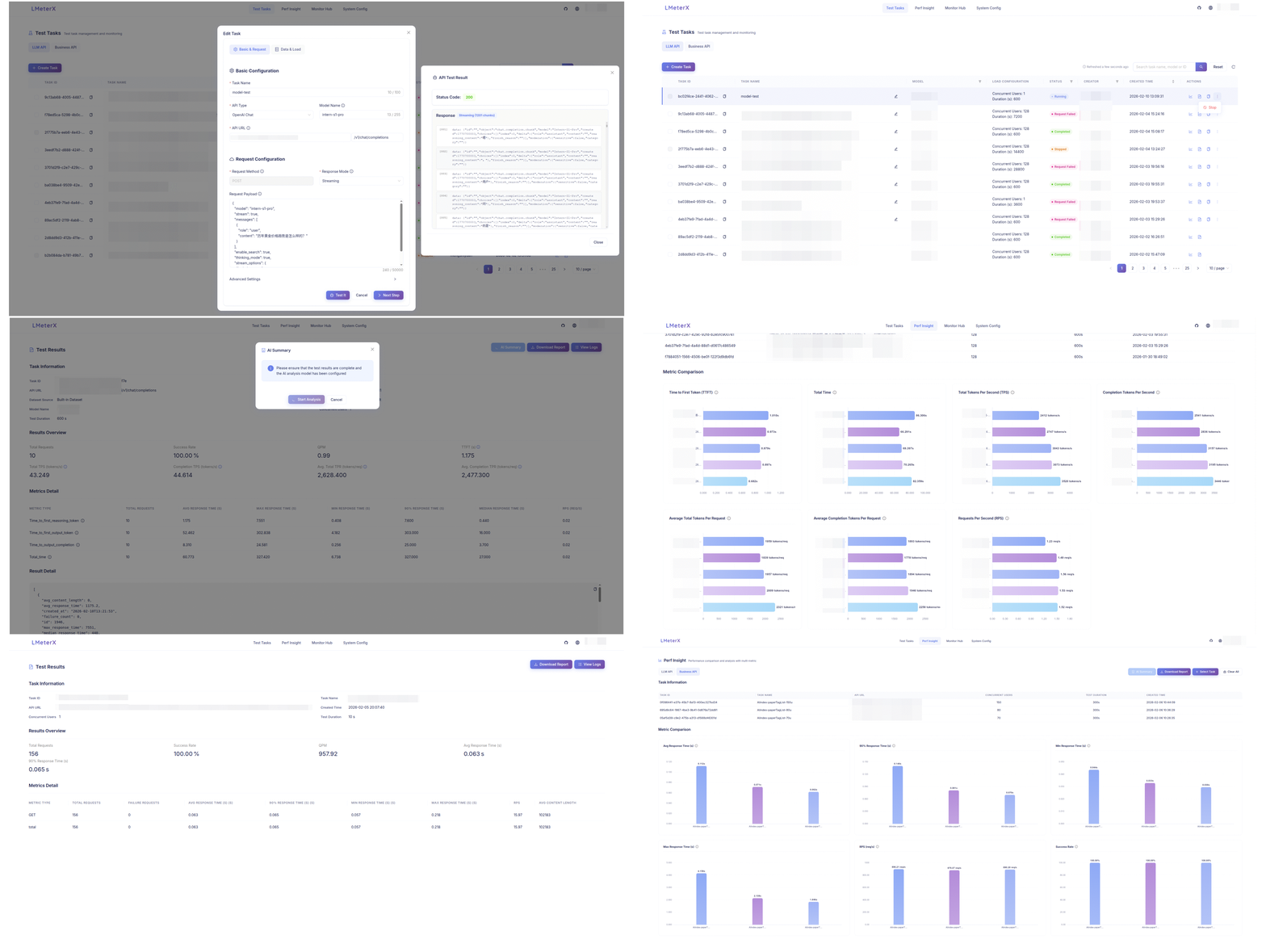
LMeterX is a professional performance testing platform for LLM inference services, general HTTP APIs, and Agent protocols. It covers inference stacks such as LiteLLM, vLLM, TensorRT-LLM, and LMDeploy, cloud services such as Azure OpenAI, AWS Bedrock, and Google Vertex AI, plus A2A Agent collaboration and MCP tool-call workloads. Through an intuitive Web interface, users can create and manage test tasks, monitor testing in real time, and get detailed performance reports for deployment and optimization.

/v1/chat/completions, /v1/responses  , Anthropic
/v1/messages, Embeddings, custom model APIs, and general HTTP services. strategies, supports simulating ultra-high concurrency, and accurately locates performance inflection points and system capacity limits.: Supports automatic model service warm-up to eliminate cold-start effects, ensuring the accuracy of test data..: Supports real-time monitoring of the load testing machine's CPU, memory, and network bandwidth, accurately identifying local resource bottlenecks. with multi-model comparison, intuitively identifying optimization directions.: Enter a web page URL to automatically crawl the page and discover core business APIs, complete connectivity pre-checks, and create load test tasks with zero configuration.: Built-in MCP Server and OpenClaw Skills with native support for AI agents such as Claude Code and Cursor — automatically generate load test configurations and launch tasks via natural language instructions.: Load-test Agent-to-Agent (A2A 1.0) services over JSON-RPC, HTTP+JSON REST, or gRPC, plus MCP Streamable HTTP tool servers. Mix weighted scenarios, choose sync / SSE / async-poll, and get latency, success-rate, and tool-call metrics.: Manage local and Kubernetes load-generation clusters from one control plane, route tasks by environment, and monitor or scale Engines centrally.| Dimension | LMeterX | EvalScope | llmperf |
|---|---|---|---|
| Usage | Web UI for full-lifecycle task creation, monitoring & stop (load-test) | CLI for ModelScope ecosystem (eval & load-test) | CLI, Ray-based (load-test) |
| Concurrency & Stress | Multi-process / multi-task, fix/stepped load, enterprise-scale load testing | Command-line concurrency (--parallel, --rate) |
Command-line concurrency |
| Test Report | Multi-model / multi-version comparison, AI analysis, visual dashboard | Basic report + visual charts (requires gradio, plotly, etc.) | Simple report |
| Model & Data Support | OpenAI Chat/Responses, Claude, A2A (JSON-RPC / HTTP+JSON / gRPC), MCP, custom data & model interfaces | OpenAI-compatible by default; extending APIs needs custom code | OpenAI-compatible |
| Performance & Resource Monitoring | Real-time performance metrics and load-generator resource status | - | - |
| Deployment & Scaling | Docker / K8s ready, easy horizontal scaling | pip install or source code |
Source code only |
LMeterX separates its control plane from its execution plane:
The diagram below shows the default single-cluster deployment. See the Multi-Cluster Engine Guide for the distributed topology.

docker compose plugin or standalone docker-compose)Need more deployment options? See the Complete Deployment Guide for Kubernetes, air-gapped installs, and advanced tuning.
Docker Compose creates a default
localenvironment. To attach multiple Engine clusters, see the Multi-Cluster Engine Guide.
# Download and run the one-click deployment script
curl -fsSL https://raw.githubusercontent.com/MigoXLab/LMeterX/main/quick-start.sh | bash
After the script finishes:
docker compose psdocker compose logs -fdocker compose up -d --scale backend=2 --scale engine=2./data → mounted to /app/data in the engine service (bundled ShareGPT source and local image files for multimodal tests; large datasets are not baked into the image)./logs → shared log output for backend and engine./upload_files → dataset-library files, task uploads, and exported reportsDataset files are UTF-8 JSONL (one JSON object per line). Choose a type that matches the task: llm, business (HTTP), a2a, or mcp. See the Dataset Usage Guide for row formats, field rules, and image mounts.
The Tasks page has four tabs: HTTP API, LLM Load Test, A2A Agent Collaboration, and MCP Tool Calls. Switch to the tab that matches what you are testing. Every task type can paste a full curl command and one-click parse it to auto-fill the request fields.
business dataset from the library or upload JSONL. Each line must be a complete request-body JSON object; rows are used round-robin. Without a dataset, the form body is sent on every request.Local for a single-node deployment./chat/completions, /responses, /messages, or /embeddings also set the API type. You can still select the API type and enter the path, model, and response mode manually, or provide a complete payload.OpenAI Responses, set the path to /v1/responses, and use input instead of messages in the payload..jsonl, paste JSONL, or skip the dataset and use the request payload as-is. Then set concurrency and duration.
prompt or messages; optional system_prompt replaces the system message / Claude system field. messages replaces the whole conversation; otherwise prompt replaces the user message.prompt, input, or messages (written to input).💡 Tip: Row formats, ShareGPT compatibility, and local image mounts are documented in the Dataset Guide.
Use this tab to stress-test Agent-to-Agent (A2A 1.0) services that accept messages and return task results. Three protocol bindings are supported:
| Binding | Target URL | Actual request |
|---|---|---|
| JSON-RPC | Single endpoint, e.g. https://agent.example.com/a2a |
POST to that URL with the method in the JSON-RPC body (SendMessage / SendStreamingMessage) |
| HTTP+JSON (REST) | Service base URL without route suffixes | Auto-appends /message:send or /message:stream; async-poll also calls GET /tasks/{taskId} |
| gRPC | host:port, e.g. agent.example.com:443 |
Calls a2a.A2AService/SendMessage or SendStreamingMessage |
curl (or grpcurl for gRPC) and click One-click parse to detect the binding and execution mode, then fill in the URL, headers, and message scenariohttps://... base URL for JSON-RPC / HTTP+JSON; for gRPC use host:port without http://a2a library dataset or upload .jsonl so the same scenario can send different messages. Each row needs id, scenario_id (must match a configured scenario), and message (role = ROLE_USER, non-empty parts). Extra fields are rejected; weights stay on the scenario, not the row. The file must cover every configured scenario.Use this tab to stress-test MCP Streamable HTTP servers by calling tools concurrently.
arguments, and set a weightmcp library dataset or upload .jsonl to vary arguments for the same tool. Each row needs id, scenario_id (must match a configured scenario), and arguments (object, {} allowed). Extra fields are rejected; the file must cover every configured scenario.# ================= Database Configuration ================= DB_HOST=mysql # Database host (container name or IP) DB_PORT=3306 # Database port DB_USER=lmeterx # Database username DB_PASSWORD=lmeterx_password # Database password (use secrets management in production) DB_NAME=lmeterx # Database name
# ================= LDAP Authentication Configuration =================
# Enable or disable LDAP authentication (on/off)
LDAP_ENABLED=on

# LDAP server connection
LDAP_SERVER=ldap://ldap.example.com    # LDAP server address
LDAP_PORT=389                          # LDAP server port (389 for LDAP, 636 for LDAPS)
LDAP_USE_SSL=false                     # Use SSL/TLS connection (true for LDAPS)
LDAP_TIMEOUT=5                         # Connection timeout in seconds

# LDAP search configuration
LDAP_SEARCH_BASE=dc=example,dc=com     # Base DN for user search
LDAP_SEARCH_FILTER=(sAMAccountName={username})  # LDAP search filter

# Authentication method 1: Direct bind with DN template (recommended for simple setups)
LDAP_USER_DN_TEMPLATE=cn={username},ou=users,dc=example,dc=com

# Authentication method 2: Bind with service account (recommended for Active Directory)
LDAP_BIND_DN=cn=service,ou=users,dc=example,dc=com    # Service account DN
LDAP_BIND_PASSWORD=service_password                   # Service account password

# JWT configuration (optional)
JWT_SECRET_KEY=your-secret-key-here    # JWT signing key (change in production)
JWT_EXPIRE_MINUTES=10080                 # Token expiration time in minutes (default: 7 days)
Configuration Notes:
LDAP_USER_DN_TEMPLATE for direct user bindingLDAP_BIND_DN + LDAP_BIND_PASSWORD for service account bindingLDAP_USE_SSL=true in production environmentsVITE_LDAP_ENABLED=on to enable login UILMETERX_AUTH_TOKEN is a static service token designed for AI Agent / Skill programmatic access (e.g., Claude Code, Cursor, OpenClaw Skills). It allows agent tools to call designated APIs without going through the interactive LDAP login flow. For detailed configuration and whitelist APIs, please see:Contributing Guide
# ================= Service Token Configuration =================
# Static token for AI Agent / Skill programmatic access.
# When set, the token is bound to the built-in "agent" user.
# Required only when LDAP_ENABLED=on and AI Agent integration is needed.
LMETERX_AUTH_TOKEN=<your-strong-random-token>
# ================= High-Concurrency Load Testing Deployment Requirements =================
# When concurrent users exceed this threshold, the system will automatically enable multi-process mode (requires multi-core CPU support)
MULTIPROCESS_THRESHOLD=1000

# Minimum number of concurrent users each child process should handle (prevents excessive processes and resource waste)
MIN_USERS_PER_PROCESS=500

# ⚠️ IMPORTANT NOTES:
#   - When concurrency ≥ 1000, enabling multi-process mode is strongly recommended for performance.
#   - Multi-process mode requires multi-core CPU resources — ensure your deployment environment meets these requirements.

# ================= Deployment Resource Limits =================
deploy:
  resources:
    limits:
      cpus: '2.0'       # Recommended minimum: 2 CPU cores (4+ cores recommended for high-concurrency scenarios)
      memory: 2G        # Memory limit — adjust based on actual load (minimum recommended: 2G)
LMeterX uses VictoriaMetrics as a lightweight, high-performance time-series database to store real-time performance metrics and engine resource monitoring data (CPU, memory, network bandwidth).
# ================= VictoriaMetrics Configuration =================
# VictoriaMetrics service endpoint (used by backend and engine)
VICTORIA_METRICS_URL=http://victoria-metrics:8428

# Engine resource collection interval in seconds (default: 2s)
RESOURCE_COLLECT_INTERVAL=2
Key parameters in docker-compose.yml:
victoria-metrics:
  image: victoriametrics/victoria-metrics:v1.106.1
  ports:
    - "8428:8428"           # HTTP API & UI port
  command:
    - "-retentionPeriod=7d"               # Data retention period (default: 7 days)
    - "-search.maxUniqueTimeseries=50000" # Max unique time series for query
    - "-memory.allowedPercent=60"         # Percentage of available RAM for cache
  deploy:
    resources:
      limits:
        cpus: '1'
        memory: 2G
Note: VictoriaMetrics supports cgroup v1 and v2. Every instance in a multi-engine deployment must have a globally unique
engine_id; container hostnames work automatically, while Kubernetes deployments should setENGINE_IDto the Pod UID.
We welcome all forms of contributions! Please read our Contributing Guide for details.
LMeterX adopts a modern technology stack to ensure system reliability and maintainability:
make allThe bundled system dataset ShareGPT V3 Partial (
ShareGPT_V3_partial.jsonl) is mounted into the dataset library as a public LLM text set. Each line is{"id","prompt"}. It is derived from open-source ShareGPT and follows the original license.
We welcome any contributions from the community! Please refer to our Contributing Guide Thanks to all developers who have contributed to the LMeterX project!
|
|
|---|
If you use EvalScope in your research, please cite our work:
@software{LMeterX2025,
  author  = {LMeterX Team},
  title   = {LMeterX: Enterprise-Grade Performance Benchmarking Platform for Large Language Models},
  year    = {2025},
  url     = {https://github.com/MigoXLab/LMeterX},
}
This project is licensed under the Apache 2.0 License.
⭐ If you like this project, please click the "Star" button in the upper right corner to support us. Your support is our motivation to move forward!
MigoXLab/LMeterX is a public repo on GitHub by MigoXLab. A general-purpose API load testing platform that supports LLM services、A2A/MCP services and business HTTP interfaces, enabling one-click performance testing, result comparison, and AI-powered intelligent analysis and summarization. 一站式通用 API 压测平台,支持大模型推理业/务 HTTP 接口、A2A/MCP服务,一键完成性能测试、结果对比与 AI 智能分析总结.
It declares the Apache-2.0 license on GitHub.
Its maker tagged it for macOS, Windows and Linux, or as Docker or cross-platform. That is declared by the maker; Take My Repo has not tested it.
Open "Take it" on its page: Take My Repo writes an install plan for your machine and hands it to your AI agent (Claude Code, Codex or Cursor), which asks you before each step. Take My Repo has not tested it on any machine.
Its last change on GitHub was on 2026-09-22. GitHub counts 0 open issues and pull requests. Take My Repo does not judge from that whether it is maintained.
Agent2Agent (A2A) is an open protocol enabling communication and interoperability between opaque agentic applications.
Nobody has reviewed it on Take My Repo yet, which says nothing about its quality.
The agent harness performance optimization system. Skills, instincts, memory, security, and research-first development for Claude Code, Codex, Opencode, Cursor and beyond.
Enterprise AI Platform with guardrails, MCP registry, gateway & orchestrator
Dingo: A Comprehensive AI Data, Model and Application Quality Evaluation Tool
A comprehensive collection of data quality resources, tools, papers, and projects across various data types including traditional data, LLM pretraining/fine-tuning data, multimodal data, and more. Essential reference for researchers and practitioners in data-centric AI.