
dingo
Dingo: A Comprehensive AI Data, Model and Application Quality Evaluation Tool
- 771
- Apache-2.0
- 6 d ago
Repo MigoXLab/dingo, read from GitHub 1 d ago. MigoXLab has not joined Take My Repo.
In short
MigoXLab/dingo is a public repo on GitHub by MigoXLab. Dingo: A Comprehensive AI Data, Model and Application Quality Evaluation Tool. It declares the Apache-2.0 license on GitHub. It is written mainly in Python, has 771 stars and last changed on 2026-11-19. Nobody has reviewed it on Take My Repo yet, which says nothing about its quality. Read from GitHub on 2026-11-24.
Similar repos


👋 join us on Discord and WeChat
If you like Dingo, please give us a ⭐ on GitHub!
Introduction
Dingo is A Comprehensive AI Data, Model and Application Quality Evaluation Tool, designed for ML practitioners, data engineers, and AI researchers. It helps you systematically assess and improve the quality of training data, fine-tuning datasets, and production AI systems.
🚀 Enterprise Dingo SaaS Version
Need a production-grade data quality platform? Try Dingo SaaS Enterprise Edition!
✨ Compared to the open-source version, SaaS provides:
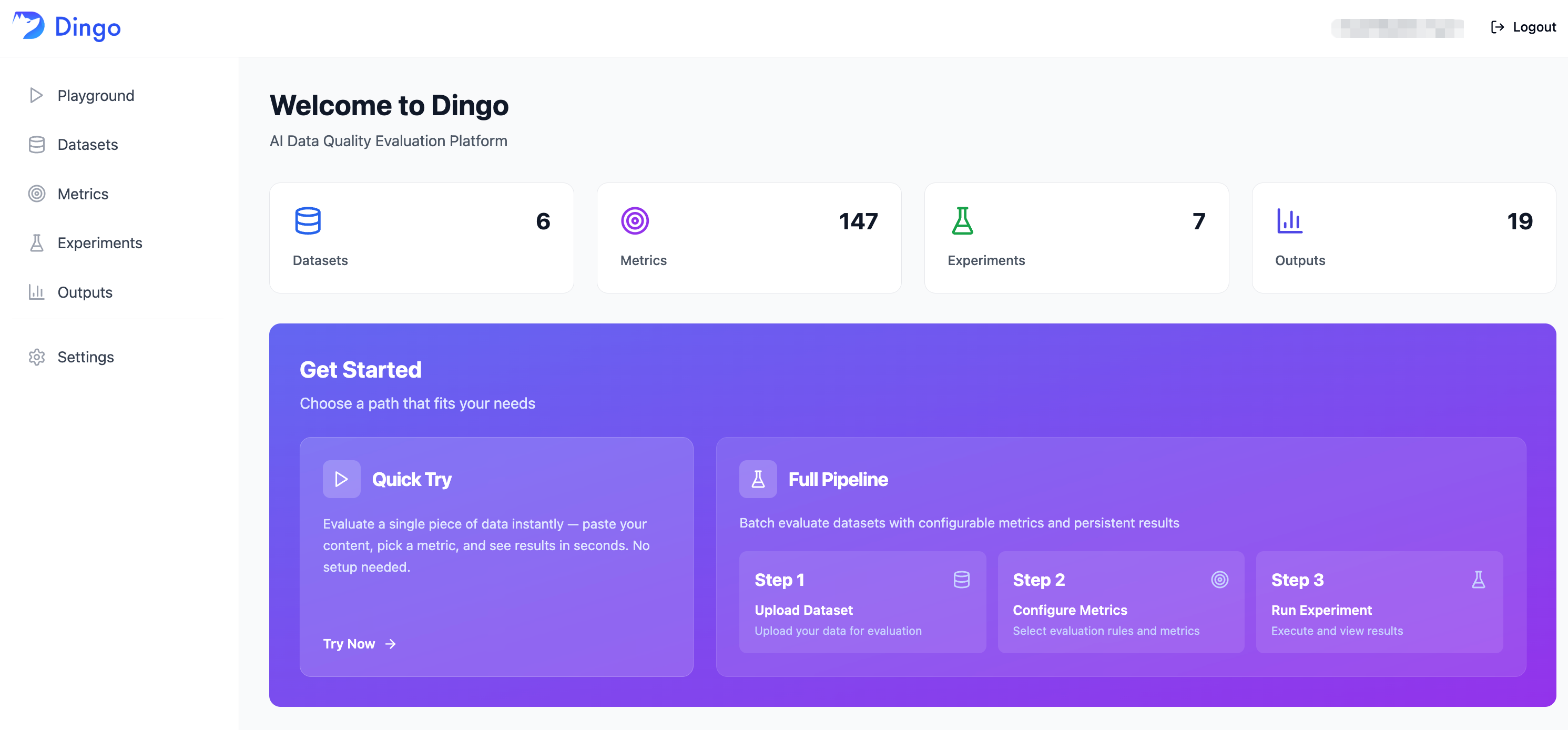
- 🌐 Web UI - Visual evaluation interface, no coding required
- 🔐 Access Control - JWT + Google OAuth 2.0
- 📊 Visual Reports - Interactive charts, trend analysis, export features
- 🔌 RESTful API - Seamless integration with existing systems
SaaS — Dashboard
SaaS — Playground
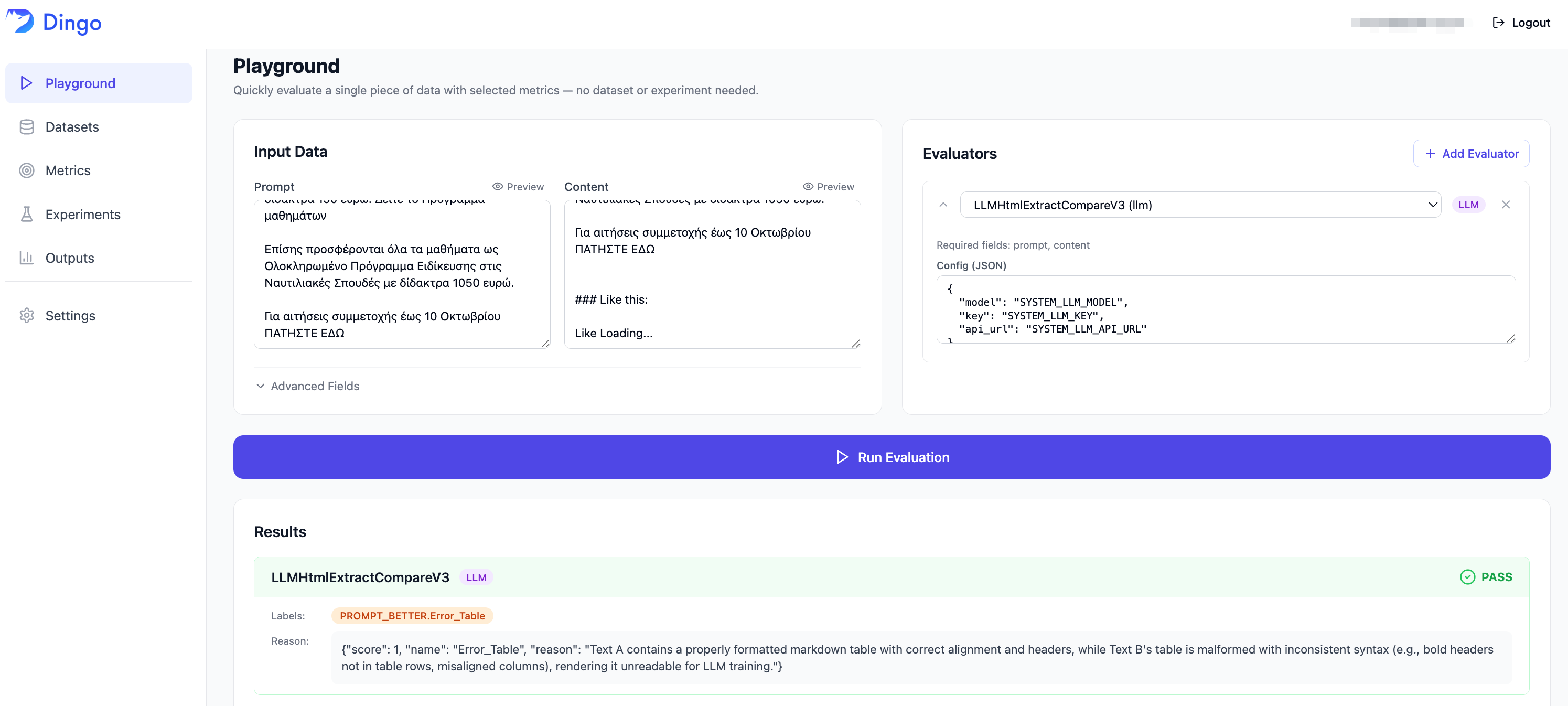
SaaS — Evaluation output
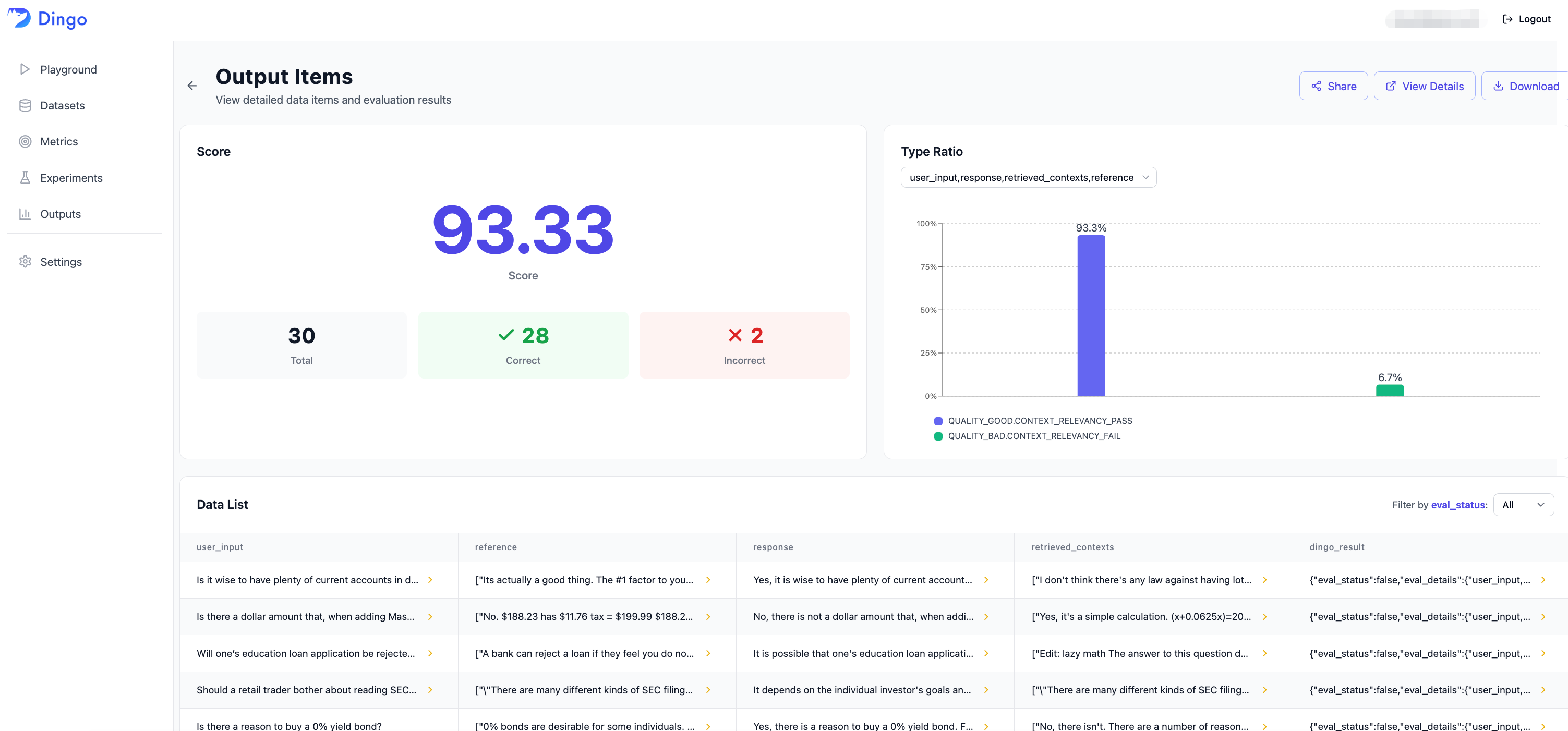
📝 How to Get Free SaaS Code
👉 Apply for Dingo SaaS Repository Access
Review time: 1-5 business days | Suitable for enterprise data governance, team collaboration
Why Dingo?
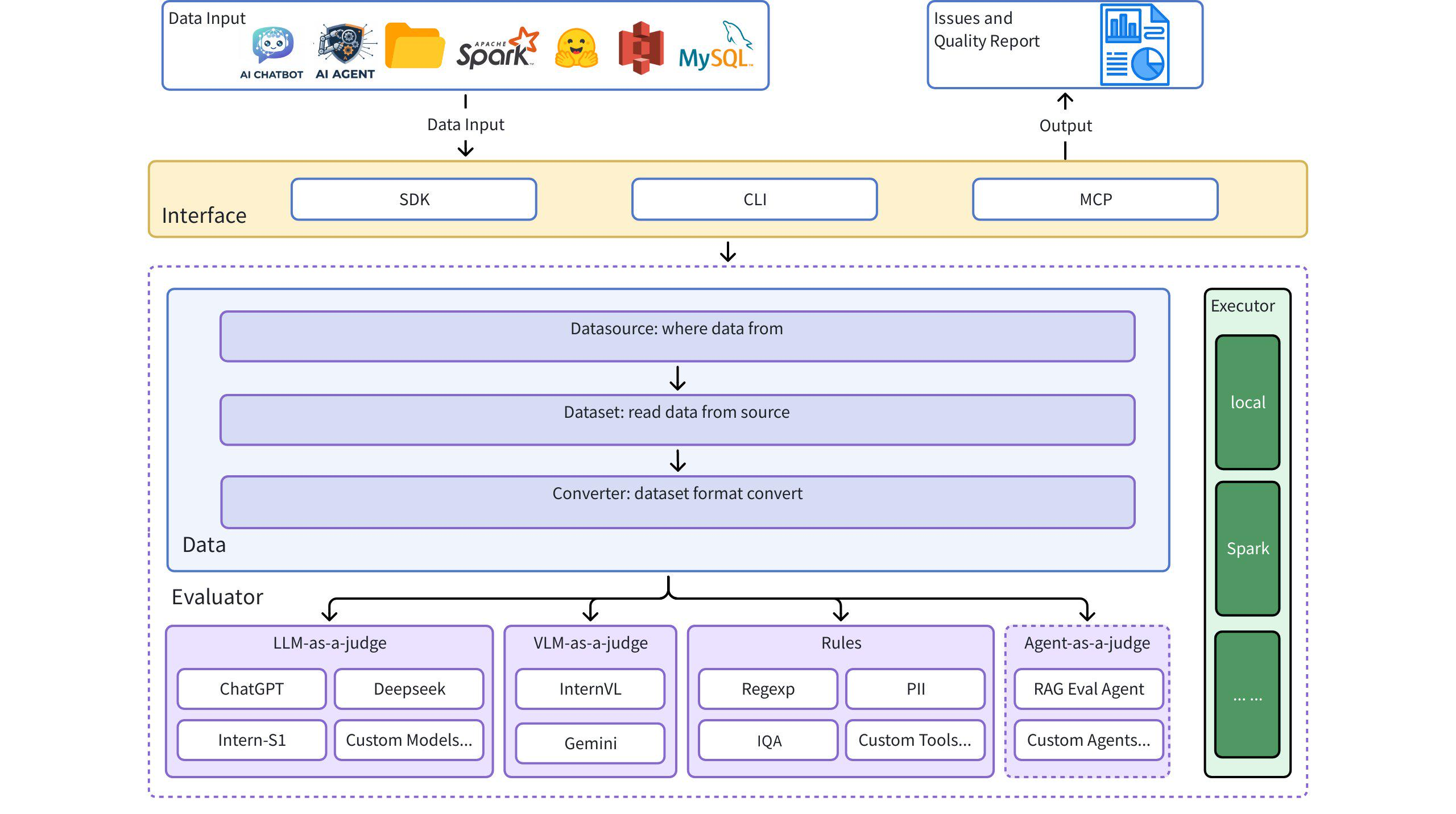
🎯 Production-Grade Quality Checks - From pre-training datasets to RAG systems, ensure your AI gets high-quality data
🗄️ Multi-Source Data Integration - Seamlessly connect to Local files, SQL databases (PostgreSQL/MySQL/SQLite), HuggingFace datasets, and S3 storage
🔍 Multi-Field Evaluation - Apply different quality rules to different fields in parallel (e.g., ISBN validation for isbn, text quality for title)
🤖 RAG System Assessment - Comprehensive evaluation of retrieval and generation quality with 5 academic-backed metrics
🧠 LLM & Rule & Agent Hybrid - Combine fast heuristic rules (30+ built-in) with LLM-based deep assessment
🚀 Flexible Execution - Run locally for rapid iteration or scale with Spark for billion-scale datasets
📊 Rich Reporting - Detailed quality reports with GUI visualization and field-level insights
Architecture Diagram
Quick Start
Installation
# Core package (includes rule evaluation, LLM evaluation, MCP server, datasource support)
pip install dingo-python

# With HHEM hallucination detection model (requires transformers + torch)
pip install "dingo-python[hhem]"

# With retrieval benchmark evaluation (MTEB + pytrec-eval-terrier)
pip install "dingo-python[retrieval]"

# With all features (HHEM + Agent + Retrieval)
pip install "dingo-python[all]"
Example Use Cases of Dingo
1. Evaluate LLM chat data
from dingo.config.input_args import EvaluatorLLMArgs
from dingo.io.input import Data
from dingo.model.llm.text_quality.llm_text_quality_v4 import LLMTextQualityV4
from dingo.model.rule.rule_common import RuleSpecialCharacter

data = Data(
    data_id='123',
    prompt="hello, introduce the world",
    content="�I am 8 years old. ^I love apple because:"
)


def llm():
    LLMTextQualityV4.dynamic_config = EvaluatorLLMArgs(
        key='YOUR_API_KEY',
        api_url='https://api.openai.com/v1/chat/completions',
        model='gpt-4o',
    )
    res = LLMTextQualityV4.eval(data)
    print(res)

def rule():
    res = RuleSpecialCharacter().eval(data)
    print(res)

rule()
2. Evaluate Dataset
from dingo.config import InputArgs
from dingo.exec import Executor

# Evaluate a dataset from Hugging Face
if __name__ == '__main__':
    input_data = {
        "input_path": "tatsu-lab/alpaca",  # Dataset from Hugging Face
        "dataset": {
            "source": "hugging_face",
            "format": "plaintext"  # Format: plaintext
        },
        "executor": {
            "result_save": {
                "bad": True  # Save evaluation results
            }
        },
        "evaluator": [
            {
                "evals": [
                    {"name": "RuleColonEnd"},
                    {"name": "RuleSpecialCharacter"}
                ]
            }
        ]
    }

    input_args = InputArgs(**input_data)
    executor = Executor.exec_map["local"](input_args)
    result = executor.execute()
    print(result)
Command Line Interface
Evaluate with Rule Sets
dingo eval --input .github/env/local_plaintext.json
Evaluate with LLM (e.g., GPT-4o)
dingo eval --input .github/env/local_json.json
MCP Server
Dingo includes a built-in Model Context Protocol (MCP) server for AI agent integration:
# Start MCP server (SSE transport, default port 8000)
dingo serve

# Custom port
dingo serve --port 9000

# stdio transport (for Claude Desktop)
dingo serve --transport stdio
For detailed setup and Cursor/Claude Desktop integration, see the dedicated documentation:
Video Demonstration
To help you get started quickly with Dingo MCP, we've created a video walkthrough:
https://github.com/user-attachments/assets/aca26f4c-3f2e-445e-9ef9-9331c4d7a37b
This video demonstrates step-by-step how to use Dingo MCP server with Cursor.
📚 Data Quality Metrics
Dingo provides 100+ evaluation metrics across multiple dimensions, combining rule-based speed with LLM-based depth.
Metric Categories
| Category | Examples | Use Case |
|---|---|---|
| Pretrain Text Quality | Completeness, Effectiveness, Similarity, Security | LLM pre-training data filtering |
| SFT Data Quality | Honest, Helpful, Harmless (3H) | Instruction fine-tuning data |
| RAG Evaluation | Faithfulness, Context Precision, Answer Relevancy | RAG system assessment |
| Hallucination Detection | HHEM-2.1-Open, Factuality Check | Production AI reliability |
| Classification | Topic categorization, Content labeling | Data organization |
| Multimodal | Image-text relevance, VLM quality, OCR visual evaluation | Vision-language data |
| Security | PII detection, Perspective API toxicity | Privacy and safety |
📊 View Complete Metrics Documentation →
📖 RAG Evaluation Guide → | 中文版
🔍 Hallucination Detection Guide → | 中文版
✅ Factuality Assessment Guide → | 中文版
👁️ VLM Render Judge Guide → | 中文版
Most metrics are backed by academic research to ensure scientific rigor.
Quick Metric Usage
llm_config = {
    "model": "gpt-4o",
    "key": "YOUR_API_KEY",
    "api_url": "https://api.openai.com/v1/chat/completions"
}

input_data = {
    "evaluator": [
        {
            "fields": {"content": "content"},
            "evals": [
                {"name": "RuleAbnormalChar"},           # Rule-based (fast)
                {"name": "LLMTextQualityV5", "config": llm_config}  # LLM-based (deep)
            ]
        }
    ]
}
Customization: All prompts are defined in dingo/model/llm/ directory (organized by category: text_quality/, rag/, hhh/, etc.). Extend or modify them for domain-specific requirements.
🎓 Key Concepts for Practitioners
What Makes Dingo Production-Ready?
1. Multi-Field Evaluation Pipeline
Apply different quality checks to different fields in a single pass:
"evaluator": [
    {"fields": {"content": "isbn"}, "evals": [{"name": "RuleIsbn"}]},
    {"fields": {"content": "title"}, "evals": [{"name": "RuleAbnormalChar"}]},
    {"fields": {"content": "description"}, "evals": [{"name": "LLMTextQualityV5"}]}
]
Why It Matters: Evaluate structured data (like database tables) without writing separate scripts for each field.
2. Stream Processing for Large Datasets
SQL datasources use SQLAlchemy's server-side cursors:
# Handles billions of rows without OOM
for data in dataset.get_data():  # Yields one row at a time
    result = evaluator.eval(data)
Why It Matters: Process production databases without exporting to intermediate files.
3. Field Isolation in Memory
RAG evaluations prevent context bleeding across different field combinations:
outputs/
├── user_input,response,retrieved_contexts/  # Faithfulness group
└── user_input,response/                     # Answer Relevancy group
Why It Matters: Accurate metric calculations when evaluating multiple field combinations.
4. Hybrid Rule-LLM Strategy
Combine fast rules (100% coverage) with sampled LLM checks (10% coverage):
"evals": [
    {"name": "RuleAbnormalChar"},        # Fast, runs on all data
    {"name": "LLMTextQualityV5"}         # Expensive, sample if needed
]
Why It Matters: Balance cost and coverage for production-scale evaluation.
5. Extensibility Through Registration
Clean plugin architecture for custom rules, prompts, and models:
@Model.rule_register('QUALITY_BAD_CUSTOM', ['default'])
class MyCustomRule(BaseRule):
    @classmethod
    def eval(cls, input_data: Data) -> EvalDetail:
        # Example: check if content is empty
        if not input_data.content:
            return EvalDetail(
                metric=cls.__name__,
                status=True,  # Found an issue
                label=[f'{cls.metric_type}.{cls.__name__}'],
                reason=["Content is empty"]
            )
        return EvalDetail(
            metric=cls.__name__,
            status=False,  # No issue found
            label=['QUALITY_GOOD']
        )
Why It Matters: Adapt to domain-specific requirements without forking the codebase.
🌟 Feature Highlights
📊 Multi-Source Data Integration
Diverse Data Sources - Connect to where your data lives
✅ Local Files: JSONL, CSV, TXT, Parquet
✅ SQL Databases: PostgreSQL, MySQL, SQLite, Oracle, SQL Server (with stream processing)
✅ Cloud Storage: S3 and S3-compatible storage
✅ ML Platforms: Direct HuggingFace datasets integration
Enterprise-Ready SQL Support
Questions
What is dingo?
MigoXLab/dingo is a public repo on GitHub by MigoXLab. Dingo: A Comprehensive AI Data, Model and Application Quality Evaluation Tool.
Is dingo open source?
It declares the Apache-2.0 license on GitHub.
Does dingo run on macOS, Windows or Linux?
Its maker has not tagged a system, so it is unknown here. Its README says what it needs.
How do I install dingo?
Open "Take it" on its page: Take My Repo writes an install plan for your machine and hands it to your AI agent (Claude Code, Codex or Cursor), which asks you before each step. Take My Repo has not tested it on any machine.






