cs249r_book
Machine Learning Systems: Foundations, Scaling, Agentic AI, and Physical AI (Vols I–IV) • Harvard CS249r | https://mlsysbook.ai
- 30k
- Python
- 6 h ago
[RSS 2026] The first framework enabling humanoid robots to learn whole-body loco-manipulation from egocentric human demos
Repo OpenDriveLab/EgoHumanoid, read from GitHub 1 d ago. OpenDriveLab has not joined Take My Repo.
OpenDriveLab/EgoHumanoid is a public repo on GitHub by OpenDriveLab. [RSS 2026] The first framework enabling humanoid robots to learn whole-body loco-manipulation from egocentric human demos. It declares the Apache-2.0 license on GitHub. It is written mainly in Python, has 264 stars and last changed on 2026-06-06. Nobody has reviewed it on Take My Repo yet, which says nothing about its quality. Read from GitHub on 2026-11-22.
🤖 The first framework enabling humanoid loco-manipulation with egocentric human demonstrations.
Human demonstrations offer rich environmental diversity and scale naturally, making them an appealing alternative to robot teleoperation. We present EGOHUMANOID, the first framework to co-train a vision-language-action policy using abundant egocentric human demonstrations together with a limited amount of robot data.
To bridge the embodiment gap, we introduce a systematic alignment pipeline with two key components: view alignment reduces visual discrepancies; action alignment maps human motions into a unified action space for humanoid control.
Extensive real-world experiments demonstrate that incorporating robot-free egocentric data significantly outperforms robot-only baselines by 51%, particularly in unseen environments.
📚 Detailed Documentation:
graph LR
    A[👤 Human Demo<br/>PICO VR + ZED] -->|Collect| B[📹 Egocentric Data]
    B -->|Process| C[⚡ View Alignment]
    C -->|Train| D[🤖 VLA Model<br/>π₀.₅-based]
    D -->|Deploy| E[🚀 Unitree G1<br/>Robot Control]
EgoHumanoid consists of four main components:
1️⃣ Data CollectionCollect synchronized multi-modal data from both humanoid robots (Unitree G1) and human demonstrators (PICO VR + ZED Mini) |
2️⃣ Data ProcessingProcess, align, and retarget human demonstrations to robot action space |
3️⃣ Model TrainingFine-tune vision-language-action models π₀.₅ on the processed datasets |
4️⃣ DeploymentDeploy trained policies on real humanoid robots with real-time inference |
🤖 Robot Data Collection HardwareRequired:
|
👤 Human Data Collection HardwareRequired:
|
Setup Requirements:
[!NOTE] We use ZED Mini instead of ZED X Mini (as in the paper) for easier accessibility and setup.
| 🖥️ OS | Ubuntu 22.04 (tested and recommended) |
| 🐍 Python | 3.11+ |
| 🎮 GPU |
• ≥ 8 GB VRAM (inference) • ≥ 22.5 GB VRAM (fine-tuning with LoRA) • ≥ 70 GB VRAM (full fine-tuning) |
git clone --recurse-submodules https://github.com/OpenDriveLab/EgoHumanoid.git
cd EgoHumanoid
# See https://docs.astral.sh/uv/getting-started/installation/
curl -LsSf https://astral.sh/uv/install.sh | sh
# Create environment and install dependencies
GIT_LFS_SKIP_SMUDGE=1 uv sync
GIT_LFS_SKIP_SMUDGE=1 uv pip install -e .
# Clone GR00T WholeBodyControl
cd data_collection/robot_data
git clone https://github.com/NVlabs/GR00T-WholeBodyControl.git
cd GR00T-WholeBodyControl/decoupled_wbc

# Copy teleoperation scripts
cp -r ../../teleop/ control/main/teleop

# Set up Docker environment
# Modify docker/run_docker.sh to mount src/openpi directory
# See data_collection/robot_data/README.md for detailed setup instructions

# Install and start Docker container
./docker/run_docker.sh --install --root
Follow the ZED SDK installation guide for your platform, then install the Python API:
python /usr/local/zed/get_python_api.py
Follow the XR Robotics guidelines to set up the PICO SDK and XRoboToolkit-PC-Service.
For detailed hardware setup and collection procedures, see:
Robot data collection uses the Unitree G1 humanoid with teleoperation control and synchronized camera recording.
1. Set up Docker environment:
cd data_collection/robot_data/GR00T-WholeBodyControl/decoupled_wbc

# Modify docker/run_docker.sh to mount src/openpi directory
# See data_collection/robot_data/README.md for details

# Install and start Docker container
./docker/run_docker.sh --install --root
./docker/run_docker.sh --root
2. Inside Docker container, run G1 control:
# For real robot (ensure network is configured)
python decoupled_wbc/control/main/teleop/run_g1_control_loop.py --interface real --control-frequency 50 --with_hands
3. In a separate terminal, run teleoperation:
python decoupled_wbc/control/main/teleop/run_teleop_policy_loop.py --body-control-device pico --hand_control_device=pico --enable_real_device
4. Start data collection:
python decoupled_wbc/control/main/teleop/zed_mini_run_g1_data_exporter.py --dataset-name <task_name> --visualize
Controller Bindings:
Menu + Left Trigger: Toggle lower-body policyMenu + Right Trigger: Toggle upper-body policyLeft Stick: X/Y translationRight Stick: Yaw rotationL/R Triggers: Control hand grippersA Button: Start collecting episodeB Button: Discard episodeOutput:
data_collection/<task_name>/episode_*.hdf5 - Robot state, actions, and navigation commandsdata_collection/<task_name>/episode_*.svo2 - ZED camera recordingsSee data_collection/robot_data/README.md for detailed instructions.
Human data collection captures synchronized full-body motion and binocular camera views.
1. Set up data collection environment:
# Create conda environment
conda create -n humandata python=3.11
conda activate humandata

# Install dependencies
pip install -r data_collection/human_data/requirements.txt
2. Start data collection:
cd data_collection/human_data

# Basic collection
python scripts/human_data_collection.py --name <dataset_name>

# With ZED camera preview
python scripts/human_data_collection.py --name <dataset_name> --visualize-zed

# Specify save directory
python scripts/human_data_collection.py --data-dir <save_dir> --name <dataset_name>
3. Collection workflow:
http://localhost:7000/static/ to view 3D skeletonOutput:
<data_dir>/<dataset_name>/episode_*.hdf5 - Body pose, hand pose, controller pose, timestamps<data_dir>/<dataset_name>/episode_*.svo2 - ZED Mini video with depthSee data_collection/human_data/README.md for detailed instructions.
For detailed pipeline documentation, see:
The human data processing pipeline transforms raw VR recordings into robot-compatible datasets.
Run the full pipeline:
cd data_alignment/human_data_process

./run_human_data_pipeline.sh \
  --input_dir /path/to/raw_data \
  --output_dir /path/to/intermediate \
  --final-output-dir /path/to/final \
  --file all
Pipeline stages:
Advanced usage:
# Skip stages
./run_human_data_pipeline.sh \
  --input_dir /path/to/raw \
  --output_dir /path/to/processed \
  --final-output-dir /path/to/final \
  --skip-reorder \
  --skip-merge

# Generate validation plots
./run_human_data_pipeline.sh \
  --input_dir /path/to/raw \
  --output_dir /path/to/processed \
  --final-output-dir /path/to/final \
  --with-png

# Dry run (preview commands)
./run_human_data_pipeline.sh \
  --input_dir /path/to/raw \
  --output_dir /path/to/processed \
  --final-output-dir /path/to/final \
  --dry-run
See data_alignment/human_data_process/README.md for detailed pipeline documentation.
Process robot demonstration data:
cd data_alignment/robot_data_process

python merge_data.py \
  --dataset-dir /path/to/robot/data \
  --output-dir /path/to/processed/output
Transform egocentric camera viewpoints to match robot's perspective using depth-based warping and inpainting.
Process single HDF5 file:
cd data_alignment/view_alignment

python viewport_transform_batch_h5.py \
  --h5_file /path/to/input.h5 \
  --image_key "observation_image_left" \
  --trajectory "down" \
  --movement_distance 0.07 \
  --output_dir ./output
Process directory (multi-GPU):
python viewport_transform_batch_h5.py \
  --h5_dir /path/to/h5_directory \
  --batch_size 32 \
  --trajectory "down" \
  --movement_distance 0.07 \
  --num_gpus 4 \
  --output_dir /path/to/output
Trajectory options: left, right, up, down, forward, backward
See data_alignment/view_alignment/README.md for more details.
Convert processed HDF5 datasets to LeRobot format for training:
cd data_alignment

# Single-threaded
python convert_to_lerobot.py \
  --src-path /path/to/processed/data \
  --output-path /path/to/lerobot/data \
  --repo-id my_dataset \
  --fps 20 \
  --task "task description"

# Multi-threaded (faster)
python convert_to_lerobot.py \
  --src-path /path/to/processed/data \
  --output-path /path/to/lerobot/data \
  --repo-id my_dataset \
  --num-workers 16 \
  --fps 20 \
  --task "task description"
Before training, compute normalization statistics for your dataset:
uv run python scripts/compute_norm_states_ultra_fast.py --config-name=norm_compute
A sample dataset is hosted on Hugging Face for quickly validating the training pipeline or running a smoke-test fine-tune:
| Subset | Description | Link |
|---|---|---|
| Robot | Teleoperation demonstrations (Unitree G1) | example/robot |
| Human | Robot-free egocentric demonstrations (PICO VR + ZED) | example/human |
# Download the sample dataset
hf download OpenDriveLab/EgoHumanoid --repo-type=dataset --local-dir ./data
Train the model using the computed normalization statistics:
# Set XLA memory fraction for better GPU utilization
XLA_PYTHON_CLIENT_MEM_FRACTION=0.9 uv run scripts/train.py <config_name> --exp_name=<experiment_name>
Examples:
# Train on your custom dataset
XLA_PYTHON_CLIENT_MEM_FRACTION=0.9 uv run scripts/train.py pi05_g1_custom --exp_name=my_experiment

# Multi-GPU training with FSDP
XLA_PYTHON_CLIENT_MEM_FRACTION=0.9 uv run scripts/train.py pi05_g1_custom --exp_name=my_experiment --fsdp-devices 4
Checkpoints are saved to checkpoints/<config_name>/<exp_name>/ during training. Training progress is logged to the console and Weights & Biases.
Start a policy server for remote inference:
# Use a trained checkpoint
uv run scripts/serve_policy.py policy:checkpoint \
  --policy.config=<config_name> \
  --policy.dir=checkpoints/<config_name>/<exp_name>/<iteration>
The server will listen on port 8000 by default.
The deployment client connects to the OpenPI policy server via websocket for action inference and controls the G1 robot via the GR00T WBC framework.
On the robot/client side:
# Inside the GR00T Docker container
cd /root/Projects/openpi

# Run the deployment client
python scripts/deploy.py --host <server_ip> --port 8000
🎛️ Keyboard Controls:
| Key | Action |
|---|---|
] |
▶️ Activate WBC policy / Exit silent mode |
p |
🎯 Enter preparation phase (move to initial pose) |
c |
🖐️ Toggle left hand open/close (right hand stays open) |
l |
⏯️ Start/pause inference loop |
[ |
🔇 Enter silent mode (slowly return to initial pose) |
o |
🛑 Deactivate policy (emergency stop) |
Ctrl+C |
❌ Exit program |
📋 Workflow:
graph LR
    A[Start Policy Server<br/>on GPU Host] --> B[Start G1 Robot<br/>Control Loop]
    B --> C[Run Deployment<br/>Client]
    C --> D[Use Keyboard<br/>Controls]
    D --> E[Robot Execution]
Example Python API:
from openpi.training import config as _config
from openpi.policies import policy_config

# Load policy
config = _config.get_config("pi05_g1_custom")
checkpoint_dir = "checkpoints/pi05_g1_custom/exp1/100000"
policy = policy_config.create_trained_policy(config, checkpoint_dir)

# Run inference
observation = {
    "observation/exterior_image_1_left": camera_left_image,
    "observation/wrist_image_left": wrist_image,
    "observation/state": joint_positions,
    "prompt": "pick up the object"
}
action_chunk = policy.infer(observation)["actions"]

# Execute on robot
robot.execute_action(action_chunk[0])
For detailed deployment instructions including camera setup, robot initialization, and troubleshooting, see the comments in scripts/deploy.py.
| 💻 Component | 🎮 GPU Memory | 🔧 Example Hardware |
|---|---|---|
| Inference | > 8 GB VRAM | RTX 4090 |
| Fine-tuning (LoRA) | > 22.5 GB VRAM | RTX 4090 |
| Fine-tuning (Full) | > 70 GB VRAM | A100 80GB / H100 |
| Robot Control | N/A | Ubuntu 22.04 PC |
| Human Data Collection | N/A | Ubuntu 22.04 + USB 3.0 |
If you find EgoHumanoid useful in your research, please consider citing:
@article{shi2026egohumanoid,
    title={EgoHumanoid: Unlocking In-the-Wild Loco-Manipulation with Robot-Free Egocentric Demonstration},
    author={Shi, Modi and Peng, Shijia and Chen, Jin and Jiang, Haoran and Li, Yinghui and Huang, Di and Luo, Ping and Li, Hongyang and Chen, Li},
    journal={arXiv preprint arXiv:2602.10106},
    year={2026}
}
⭐ If you find this project helpful, please consider giving it a star! ⭐
This project is licensed under the Apache 2.0 License.
The OpenPI models and code are provided by Physical Intelligence under the Apache 2.0 License.
We sincerely thank the following projects and teams:
|
Vision-language-action models |
Humanoid control framework |
PICO VR integration |
ZED camera SDK |
OpenDriveLab/EgoHumanoid is a public repo on GitHub by OpenDriveLab. [RSS 2026] The first framework enabling humanoid robots to learn whole-body loco-manipulation from egocentric human demos.
It declares the Apache-2.0 license on GitHub.
Its maker has not tagged a system, so it is unknown here. Its README says what it needs.
Open "Take it" on its page: Take My Repo writes an install plan for your machine and hands it to your AI agent (Claude Code, Codex or Cursor), which asks you before each step. Take My Repo has not tested it on any machine.
Its last change on GitHub was on 2026-06-06. Take My Repo does not judge from that whether it is maintained.
Nobody has reviewed it on Take My Repo yet, which says nothing about its quality.
Machine Learning Systems: Foundations, Scaling, Agentic AI, and Physical AI (Vols I–IV) • Harvard CS249r | https://mlsysbook.ai
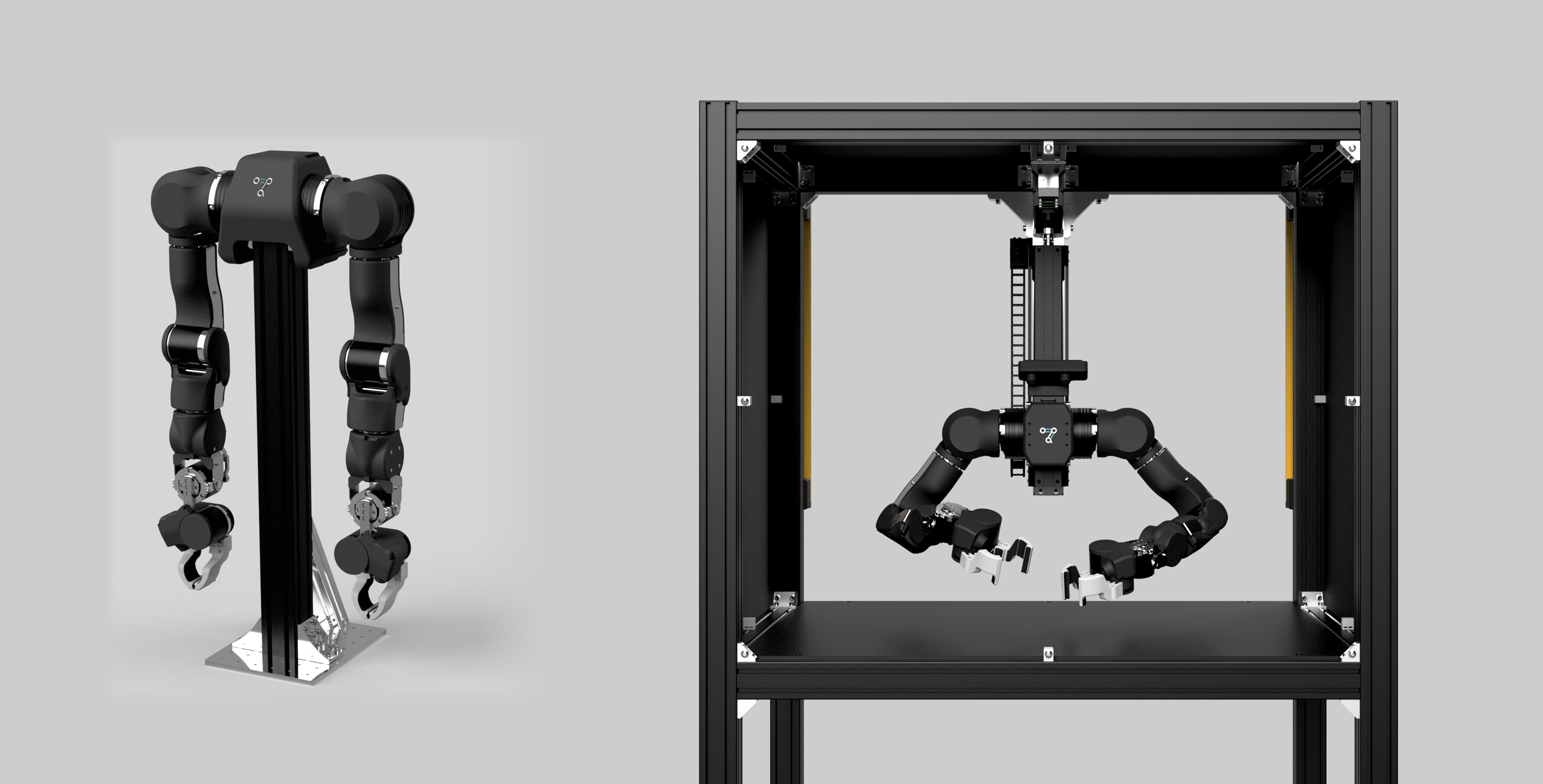
A fully open-source humanoid arm for physical AI research and deployment in contact-rich environments.
[ICLR 2026] Towards Unified Latent VLA for Whole-body Loco-manipulation Control
Humanoid-Gym: Reinforcement Learning for Humanoid Robot with Zero-Shot Sim2Real Transfer https://arxiv.org/abs/2404.05695
[L4DC 2026 (Oral)] "FALCON: Learning Force-Adaptive Humanoid Loco-Manipulation"
[IEEE T-PAMI 2024] All you need for End-to-end Autonomous Driving
[IROS 2025 Best Paper Award Finalist & IEEE TRO 2026] The Large-scale Manipulation Platform for Scalable and Intelligent Embodied Systems
[IEEE T-PAMI 2023] Awesome BEV perception research and cookbook for all level audience in autonomous diriving
[ECCV 2024 Oral] DriveLM: Driving with Graph Visual Question Answering
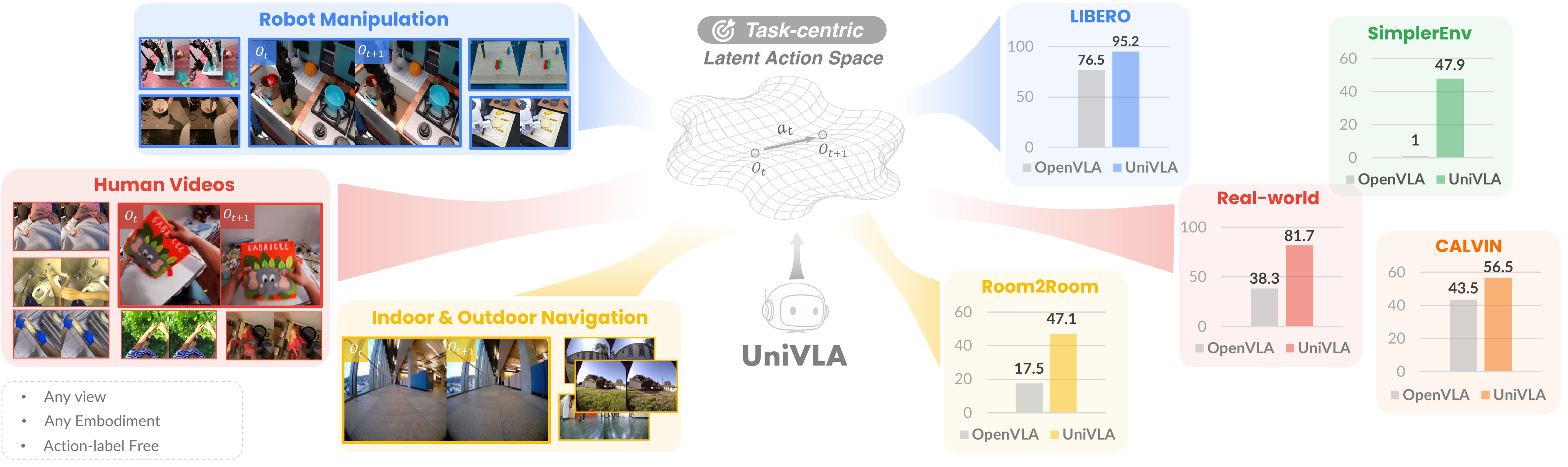
[RSS 2025] Learning to Act Anywhere with Task-centric Latent Actions