
mavsim
Rust native rewrite of MAVSim with MAVLink/PX4 SITL compatibility
- 11
- BSD-3-Clause
- 6 mo ago
Repo RustedBytes/mavsim, read from GitHub 1 min ago. RustedBytes has not joined Take My Repo.
In short
RustedBytes/mavsim is a public repo on GitHub by RustedBytes. Rust native rewrite of MAVSim with MAVLink/PX4 SITL compatibility. It declares the BSD-3-Clause license on GitHub. It is written mainly in Rust, has 11 stars and last changed on 2026-06-06. Nobody has reviewed it on Take My Repo yet, which says nothing about its quality. Read from GitHub on 2026-11-25.

MAVSim Rust

Rust native rewrite of MAVSim with MAVLink/PX4 SITL compatibility and an
eframe/egui desktop UI rendered through wgpu.
The simulator keeps the existing environment/, models/, and
mavlink/message_definitions/ assets. The active build is the Cargo workspace and the repository keeps only the runtime assets needed by the simulator.
Requirements
- Rust stable toolchain with Cargo.
- Platform graphics support for
wgpuwhen running the GUI. - Serial-port permissions if using
-serialon Linux or macOS.
Build And Run
Build all crates:
cargo build --workspace
Run the native egui app:
cargo run --release -- -udp 14560 -lockstep
Run headless for PX4 SITL:
cargo run --release -- -no-gui -udp 14560 -lockstep
Run over serial:
cargo run --release -- -serial /dev/tty.usbmodem1 230400
Run all tests:
cargo test --workspace --all-targetsCargo Workspace
mavsim-core: world update loop, physics, environment, sensors, vehicles, gimbal, and reporting state.mavsim-mavlink: MAVLink endpoints, routing, PX4 HIL bridge, and generated common-dialect bindings.mavsim-ui:eframe/eguiUI, panels, keyboard commands, HUD/log output, OBJ model loading, and embeddedwgpuviewport.mavsim-bin:mavsimCLI parsing, startup, and shutdown wiring.
Command Examples
cargo run --release -- -udp 14560 -lockstep
cargo run --release -- -no-gui -udp 14560
cargo run --release -- -serial /dev/tty.usbmodem1 230400
cargo run --release -- -udp 14560 -lockstep --hud-log-dir logs
The binary preserves compatibility single-dash flags:
-udp, -tcp, -serial, -qgc, -sdk, -ap, -r, -f, -view, -automag, -rep, -max,
-aa, -no-aa, -gimbal, -no-gimbal, -gui, -no-gui, -lockstep, -debug,
-disponly, -fw, -mc, -ts, -m, -h, --hud-log-dir
Defaults are chosen for PX4 SITL parity:
- UDP autopilot port:
14560 - QGC peer port:
14550 - SDK peer port:
14540 - Zurich home origin
- quad multicopter model
250 Hzsimulation rate
Environment overrides:
PX4_SIM_SPEED_FACTOR=2 cargo run --release -- -no-gui -udp 14560 -lockstep
PX4_HOME_LAT=47.397742 PX4_HOME_LON=8.545594 PX4_HOME_ALT=488 cargo run --release -- -udp 14560 -lockstep
-f requires -lockstep, matching PX4 lockstep timing expectations.
Using The GUI
Start the desktop GUI from the repository root:
cargo run --release -- -udp 14560 -lockstep
The GUI is enabled by default. Use -gui to make that explicit, or -no-gui
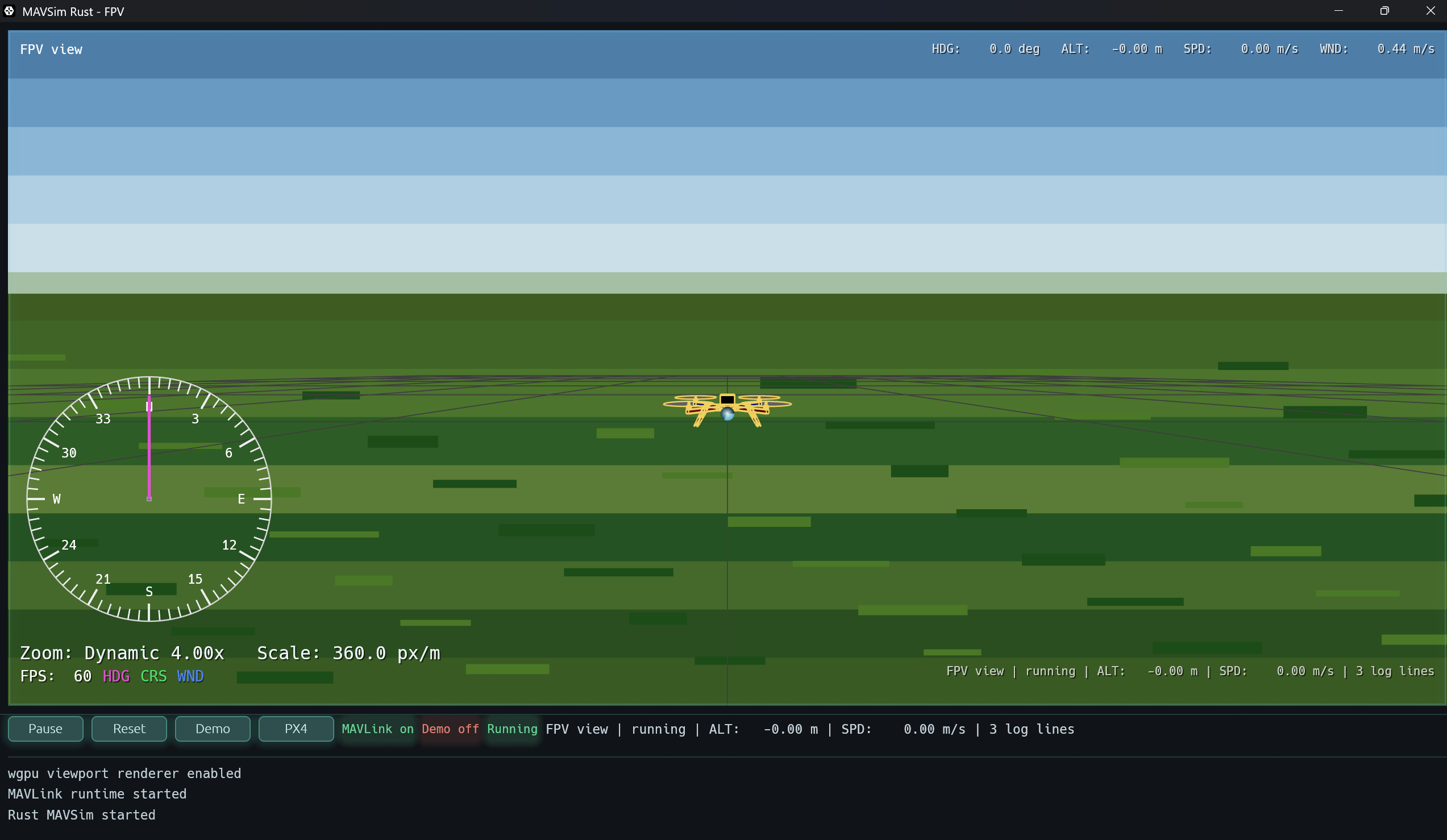
when running headless. The window opens with the 3D viewport, HUD messages, and
MAVLink runtime status.
GUI HUD messages are saved to a per-run file in logs/ by default. Use
--hud-log-dir <DIR> to write those files somewhere else.
Typical PX4 SITL workflow:
- Start PX4 SITL so it sends HIL traffic to UDP port
14560. - Start MAVSim with
cargo run --release -- -udp 14560 -lockstep. - Confirm the HUD shows the MAVLink runtime is active.
- Press
Iif the simulator needs to explicitly enable MAVLink simulation. - Use the view, report, sensor, and vehicle controls below while PX4 is connected.
- Press
Escto close the GUI.
For a quick local GUI check without PX4, run the same command and use the keyboard controls to move, rotate, pause, and reset the simulated vehicle.
MAVLink/PX4 Behavior
The Rust MAVLink bridge currently handles the PX4 HIL path:
- receives
HEARTBEAT,HIL_ACTUATOR_CONTROLS, deprecatedHIL_CONTROLS,COMMAND_LONG,STATUSTEXT, and display-onlyHIL_STATE_QUATERNION; - sends
HEARTBEAT,HIL_SENSOR,HIL_GPS,SYSTEM_TIME, and requestedHIL_STATE_QUATERNION; - forwards QGC/SDK traffic while filtering HIL messages;
- supports lockstep timing and display-only state updates.
Run the ignored real-PX4 acceptance harness after starting PX4 SITL:
cargo test -p mavsim-mavlink --test px4_sitl_acceptance -- --ignored
cargo test -p mavsim-bin --test px4_sitl_binary_acceptance -- --ignored
Optional overrides:
MAVSIM_PX4_UDP_PORT=14560 MAVSIM_PX4_ACCEPTANCE_SECS=20 cargo test -p mavsim-mavlink --test px4_sitl_acceptance -- --ignored
MAVSIM_PX4_UDP_PORT=14560 MAVSIM_PX4_ACCEPTANCE_SECS=20 cargo test -p mavsim-bin --test px4_sitl_binary_acceptance -- --ignored
The test expects PX4 to send HEARTBEAT plus HIL actuator controls, and it
asserts that Rust MAVSim sends HIL_SENSOR, HIL_GPS, and SYSTEM_TIME.
Run the ignored native GUI acceptance harness from a desktop session:
cargo test -p mavsim-ui --test native_gui_acceptance -- --ignoredOptional runtime override:
MAVSIM_GUI_ACCEPTANCE_SECS=5 cargo test -p mavsim-ui --test native_gui_acceptance -- --ignored
MAVSIM_GUI_ACCEPTANCE_UDP_PORT=14560 cargo test -p mavsim-ui --test native_gui_acceptance -- --ignored
The test opens the egui/wgpu window and closes it through the same shutdown signal path used by the binary. Inspect the window while it is open to confirm the viewport is visible and nonblank on the target machine.
GUI Controls
Views:
F: first-person-view cameraS: stationary ground cameraG: gimbal cameraZ: toggle static-view dynamic zoom+/-: zoom in/out0/Enter: reset zoom
Actions:
Q: disable sim on MAVLinkI: enable sim on MAVLinkH: toggle HUD overlayC: clear HUD messagesR: toggle report panelT: pause report updatesD: toggle sensor parameter panelF1: show key referenceP: pause simulationEsc: exitSpace: reset vehicle
Vehicle and environment controls:
- Arrow keys: rotate pitch/roll
End/PageDown: rotate yawShift+ arrows: move north/south/east/westShift+Insert/Delete: move up/down- Numpad
8/2/4/6: adjust rotation rate around pitch/roll - Numpad
1/3: adjust yaw rotation rate - Numpad
5: stop rotation Ctrl+ Numpad5: reset attitude and velocityAlt+ arrow/insert/delete/numpad controls: adjust wind and wind deviation
Assets And Models
Vehicle models are loaded from existing Wavefront .obj assets:
- multicopter:
models/3dr_arducopter_quad_x.obj - fixed wing:
models/cessna.obj - tailsitter:
models/x_vert.obj
When exporting new models from Blender, use Wavefront .obj, keep materials in
.mtl, and preserve the orientation convention used by the existing models.
Development Notes
The Rust rewrite is tested through unit, CLI, MAVLink, and UI geometry/raster coverage:
cargo test --workspace --all-targetsFinal cleanup should keep the workspace focused on Rust crates, runtime assets, and acceptance fixtures after PX4 SITL and native GUI acceptance have been verified.
Questions
What is mavsim?
RustedBytes/mavsim is a public repo on GitHub by RustedBytes. Rust native rewrite of MAVSim with MAVLink/PX4 SITL compatibility.
Is mavsim open source?
It declares the BSD-3-Clause license on GitHub.
Does mavsim run on macOS, Windows or Linux?
Its maker tagged it for macOS and Linux. That is declared by the maker; Take My Repo has not tested it.
How do I install mavsim?
Open "Take it" on its page: Take My Repo writes an install plan for your machine and hands it to your AI agent (Claude Code, Codex or Cursor), which asks you before each step. Take My Repo has not tested it on any machine.