tauri
Build smaller, faster, and more secure desktop and mobile applications with a web frontend.
- 113k
- Rust
- Apache-2.0
- 4 h ago
PAROL6 commander software: the desktop GUI to jog, program and simulate the PAROL6 robot arm.
Repo Source-Robotics/PAROL-commander-software, read from GitHub 3 h ago. Source-Robotics has not joined Take My Repo.
Source-Robotics/PAROL-commander-software is a public repo on GitHub by Source-Robotics. PAROL6 commander software: the desktop GUI to jog, program and simulate the PAROL6 robot arm. It declares the GPL-3.0 license on GitHub. It is written mainly in Python, has 74 stars and last changed on 2026-11-05. Nobody has reviewed it on Take My Repo yet, which says nothing about its quality. Read from GitHub on 2026-11-23.
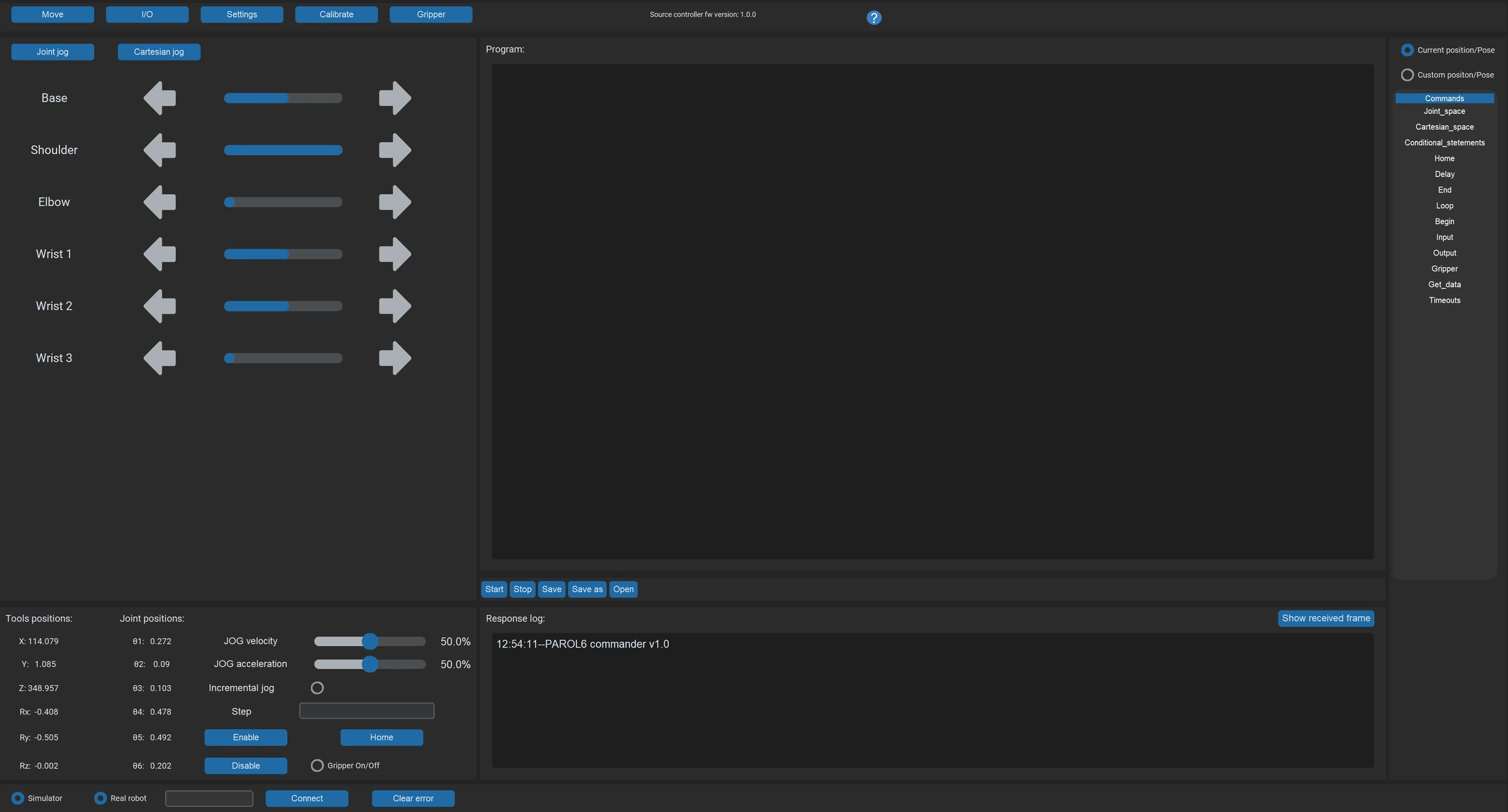
The desktop GUI to jog, program and simulate the PAROL6 robot arm. Joint and Cartesian jogging, a 3D simulator that mirrors the robot, a program editor for RBTscript, the I/O and gripper tabs, in a 100 Hz loop to the control board over USB.
Documentation · Installation · Examples · Discord
[!CAUTION] The
experimental_kinematicsbranch resolves most Cartesian jogging errors but introduces potentially dangerous conditions and may damage the robot. Use it at your own risk. Themainbranch is the safe one.
It is written in Python with customtkinter and the Robotics Toolbox for Python. It is the tool for the first day, for teaching poses, for demos and for simple sequences; it has no blending, no collision checking, no network interface and no tool selection. For programs that need those, the Python API.
| Requirement | Details |
|---|---|
| Robot | PAROL6 with the PAROL6 control board; build your own |
| Connection | a USB type B cable (USB does not power the board) |
| OS | Windows, Linux or macOS (on macOS, follow the Linux steps) |
| Python | 3.10 or 3.11 (tested on 3.10.12 and 3.11.0; newer versions break some pinned dependencies) |
| PC | one that keeps the 100 Hz loop: at least an Intel i5 six-core processor of 2017 or newer, or an AMD equivalent |
Tested and working systems, from confirmed_working_systems.md:
| System | Processor |
|---|---|
| Windows 10 x64 PC | AMD Ryzen 5 3600, 6 cores, 3600 MHz |
| Windows 10 x64 PC | AMD Ryzen 5 6600HS Creator Edition, 6 cores, 3301 MHz |
| Radxa ROCK 5B, Linux | |
| MacBook Pro, macOS Sonoma 14.3.1 | 2.6 GHz 6-core Intel Core i7 |
The commander goes into its own folder with its own virtual environment. It pins numpy 1.23.4 and the Python API needs numpy 2, so the two cannot share one Python.
Windows:
git clone https://github.com/Source-Robotics/PAROL-commander-software.git
cd PAROL-commander-software
py -3.11 -m venv .venv
.venv\Scripts\activate
python -m pip install -r requirements.txt
Linux and macOS:
git clone https://github.com/Source-Robotics/PAROL-commander-software.git
cd PAROL-commander-software
python3.11 -m venv .venv
source .venv/bin/activate
python -m pip install -r requirements.txt
On Linux, first sudo apt install python3.11 python3.11-venv python3.11-tk; installed into the system Python
without a virtual environment, as in the repository's
Linux guide, it also needs
sudo apt-get install python3-tk and sudo apt-get install python3-pil python3-pil.imagetk. On macOS, use
Python 3.11 from python.org. Activate the
environment again in every new terminal. Every operating system, step by step:
Installation in the PAROL6 manual.
Write the robot's serial port into the program once. Near the top of GUI/files/Serial_sender_good_latest.py:
if my_os == "Windows":
    STARTING_PORT = 58 # COM3
else:
    STARTING_PORT = 0
On Windows, replace 58 with the number of the robot's port (5 for COM5; Device Manager lists it under
Ports (COM & LPT)). On Linux, 0 means /dev/ttyACM0. Then start it from the activated environment:
cd GUI/files
python Serial_sender_good_latest.py
Two windows open: the commander and the simulator. Enter the port at the bottom of the commander (COM5, or
ttyACM0 on Linux) and press Connect, more than once if needed. The terminal prints
Time between 2 commands in ms: near 0.010 while you jog (the value is in seconds: the 10 ms cycle) means the PC
keeps up. Every window and button: The GUI.
PAROL6 is a high-performance 3D-printed desktop robotic arm, designed to be similar to industrial robots in its mechanical design, control software and usability. Its control software, GUI and STL files are open source; the Build guide and the PAROL6 repository have the building instructions, the STL files and the BOM.
| Product | Firmware | Commander | Repository |
|---|---|---|---|
| PAROL6 desktop robot arm, releases 1.1 and 1 (control board v2.0; v1.2 is functionally identical) | control board firmware 1 | main branch | PAROL6-Desktop-robot-arm |
| SSG-48 adaptive electric gripper, in the Gripper tab | Spectral Micro firmware 101 or newer | main branch | SSG-48-adaptive-electric-gripper |
| MSG compliant AI stepper gripper, in the Gripper tab | STEPFOC firmware 103 or newer | main branch | MSG-compliant-AI-stepper-gripper |
The commander has no releases: the main branch is what you clone. Every version that works together:
Versions and compatibility in the
PAROL6 manual. Without the GUI and the simulator, control the robot from Python with the
Python API (Python 3.11 or newer). One program owns the control
board at a time: the commander and the Python API cannot be connected to the robot together.
| Example | What it does |
|---|---|
GUI/files/Programs/example_2.txt |
an RBTscript pick and place: joint and Cartesian moves and gripper commands |
GUI/files/Programs/example_dance_2.txt |
an RBTscript dance of timed joint and Cartesian moves |
GUI/files/Programs/execute_script.txt |
the program Start ran last: Start saves the editor's text here |
Examples/Commander_minimal_version.py |
a stripped-down commander without the GUI: h homes and e enables the robot from the keyboard, and a UDP socket on 127.0.0.1:5001 takes data from other scripts on the PC or network; a base for your own functions (Windows; it also needs the keyboard package) |
The language and every command: RBTscript; more programs, explained: Examples.
COMx on
Windows, ttyACMx on Linux (which tty is my USB device?).sudo chmod 666 /dev/ttyACM0 (0 may be another number, the port the
robot was given), or join the dialout group once: sudo usermod -aG dialout $USER, then log out and in.requirements.txt fails: install the packages one by one with the
Windows or
Linux guide; the robotics
toolbox, swift, numpy and scipy are pinned to versions that work together. The
Working dependency
folder lists the Python modules of systems on which the software works.Time between 2 commands in ms often well above 0.010
shows it (Communication).Ask in Discussions, chat on Discord, report a bug in Issues. Follow Source Robotics:
Project is under GPLv3 Licence.
Source-Robotics/PAROL-commander-software is a public repo on GitHub by Source-Robotics. PAROL6 commander software: the desktop GUI to jog, program and simulate the PAROL6 robot arm.
It declares the GPL-3.0 license on GitHub.
Its maker has not tagged a system, so it is unknown here. Its README says what it needs.
Open "Take it" on its page: Take My Repo writes an install plan for your machine and hands it to your AI agent (Claude Code, Codex or Cursor), which asks you before each step. Take My Repo has not tested it on any machine.
Its last change on GitHub was on 2026-11-05. Take My Repo does not judge from that whether it is maintained.
Build smaller, faster, and more secure desktop and mobile applications with a web frontend.
Nobody has reviewed it on Take My Repo yet, which says nothing about its quality.
A fully open-source humanoid arm for physical AI research and deployment in contact-rich environments.
:house_with_garden: Open source home automation that puts local control and privacy first.
π RuView turns commodity WiFi signals into real-time spatial intelligence, vital sign monitoring, and presence detection — all without a single pixel of video.
PAROL6: open-source 3D-printed 6-axis desktop robot arm. BOM, STL and STEP files, firmware and build instructions.
Faze4: open-source 3D-printed 6-axis robot arm with cycloidal gearboxes and the wiring inside the arm, the files to build it.
Differential robot wrist: an open-source 3D-printed differential mechanism for a robot wrist, driven by two gimbal motors on Spectral Micro BLDC drivers.
SSG-48: open-source adaptive electric gripper with force feedback, driven by the Spectral Micro BLDC controller.
Spectral Micro: compact FOC controller for brushless (BLDC) motors, with CAN, UART and open-source firmware.