
virtual-format
Format buffers visually without modification
- 11
- GPL-3.0
- 16 mo ago
Repo abougouffa/virtual-format, read from GitHub 13 min ago. abougouffa has not joined Take My Repo.
In short
abougouffa/virtual-format is a public repo on GitHub by abougouffa. Format buffers visually without modification. It declares the GPL-3.0 license on GitHub. It is written mainly in Emacs Lisp, has 11 stars and last changed on 2025-08-02. Nobody has reviewed it on Take My Repo yet, which says nothing about its quality. Read from GitHub on 2026-11-23.
Virtual Format
This package provides a simple mode to visually format buffers without modifying them.
Motivation
When working on big and dirty projects, we usually face the problem of badly formatted source files (mixed tabs and spaces, messy indentation, inconsistent code formatting, etc.)
The trivial (and naive) way of dealing with this kind of problems is to format the files and commit them to the central repository. However, in real world projects, it is not that simple!
I found myself working on some complex projects and with dirty formatting! So, Emacs being Emacs, I know that I can do something to format the buffer visually without actually modifying it. I've looked-up but didn't find a package that does this.
Example
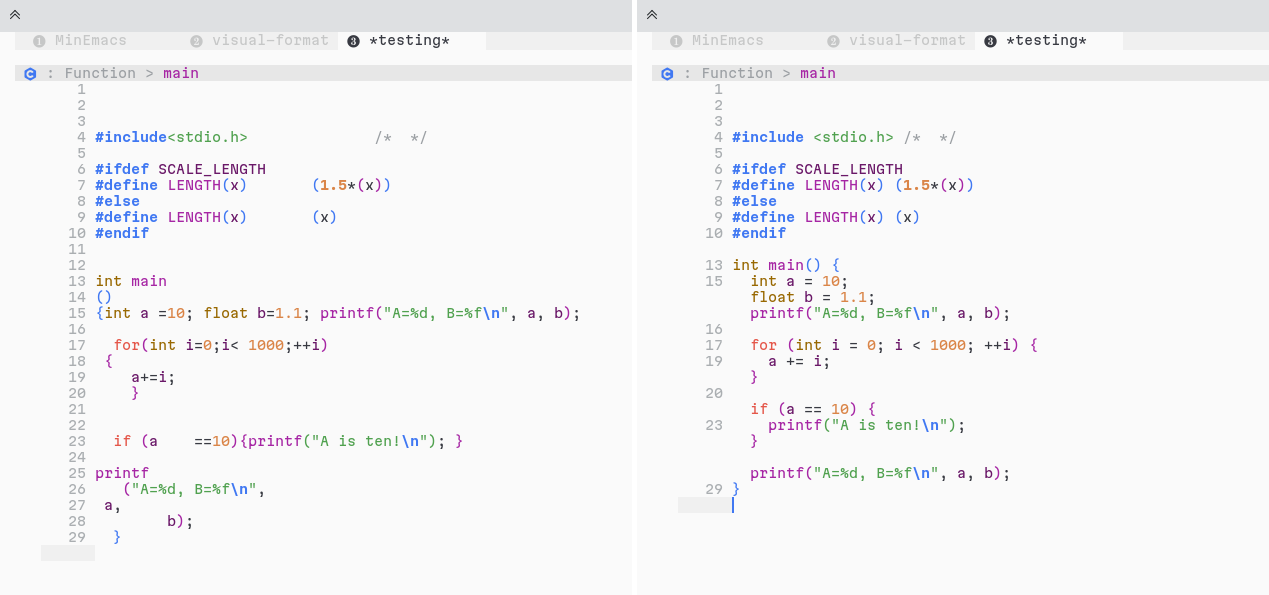
Having this dirty code at the left side, it becomes like the one on the right
side after calling virtual-format-buffer:
Basic usage
TLDR; you can use this package in one of the three scenarios:
- You can call
virtual-format-buffer,virtual-format-regionorvirtual-format-modeto virtually format the current buffer/region. If the command succeeds, the buffer becomes formatted while you can modify the buffer without affecting the original formatting. - If the former commands failed to format the buffer, you can try the
virtual-format-buffer-incrementally, this command will try to format code blocks from the top-level, and when a block fails, it tries to format each sub-block independently. Please note that this strategy is quite slow and can fail for some languages. - As a last resort, in order to view a buffer as formatted without
modifying it. You can call the
virtual-format-view-mode, this mode is very simple, it only calls the formatter and displays the formatted buffer as read-only. No fancy stuff are performed (actually, we don't even need Tree Sitter for this mode).
How it works?
The idea behind this package is quite simple, for a target buffer, it creates a
temporary buffer with the same content and formats it with the formatter of your
choice (customize it via virtual-format-buffer-formatter-function). Then,
transposes the spaces and newlines from the formatted buffer to the original
buffers via Emacs' text properties.
In order to know where to look, virtual-format uses Tree Sitter (via Emacs 29+
treesit), it walks the AST for the original buffer and the formatted buffer to
the token level, and then, it copies the spaces/newlines between the tokens from
the formatted buffer to the original one. What we mean here by copying is the
fact that Emacs will display the spaces present in the original buffer
as the spaces observed in the formatted buffer, hence, you don't change the
buffer content and we still have editing access to the code in between. This
means that, when editing and saving virtually formatted buffer, we will not
change the formatting, only the manually edited part gets written to the file.
Assumptions
For virtual-format-region and virtual-format-buffer, the following
assumption has to be verified:
[!CAUTION] The formatted buffer should have the same AST as the original buffer
In other words, if the used formatter adds some instructions the original code,
like replacing an if-else with a switch-case or something similar.
Sometimes, depending on the buffer being formatted or not, Tree Sitter might
produce a buggy AST (in such cases, you should report the issue in the
corresponding Tree Sitter grammar repository). This can make the virtual
formatting fail, in this case, you can set the
virtual-format-keep-incomplete-formatting to non-nil in order to keep the
formatted regions. If you want to see where the formatting has failed, you can
set virtual-format-jump-on-incomplete-formatting so the point (cursor) jumps
to the problematic position when the error occurs.
These issues can also happen when the used formatter modifies the code significantly.
[!IMPORTANT] In both cases, you can try to invoke
virtual-format-buffer-incrementallysovirtual-formatdoes its best to format the buffer.
Questions
What is virtual-format?
abougouffa/virtual-format is a public repo on GitHub by abougouffa. Format buffers visually without modification.
Is virtual-format open source?
It declares the GPL-3.0 license on GitHub.
Does virtual-format run on macOS, Windows or Linux?
Its maker has not tagged a system, so it is unknown here. Its README says what it needs.
How do I install virtual-format?
Open "Take it" on its page: Take My Repo writes an install plan for your machine and hands it to your AI agent (Claude Code, Codex or Cursor), which asks you before each step. Take My Repo has not tested it on any machine.
Is virtual-format still maintained?
Its last change on GitHub was on 2025-08-02. GitHub counts 0 open issues and pull requests. Take My Repo does not judge from that whether it is maintained.
What do people who ran virtual-format say?
Nobody has reviewed it on Take My Repo yet, which says nothing about its quality.
