
rea
Reverse engineer anything with agents, from app behavior down to native binaries.
- 478k
- TypeScript
- MIT
- 2 h ago
Ultra customisation of Termux
Repo devohmycode/OhMyTermux, read from GitHub 15 min ago. devohmycode has not joined Take My Repo.
devohmycode/OhMyTermux is a public repo on GitHub by devohmycode. Ultra customisation of Termux. It declares the MIT license on GitHub. It is written mainly in Shell, has 46 stars and last changed on 2026-10-24. Nobody has reviewed it on Take My Repo yet, which says nothing about its quality. Read from GitHub on 2026-11-25.
Reverse engineer anything with agents, from app behavior down to native binaries.

🚀 Latest version of Termux : v0.119.0-beta.3
curl -sL https://raw.githubusercontent.com/devohmycode/OhMyTermux/main/install.sh -o install.sh && chmod +x install.sh && ./install.sh --gum
curl -sL https://raw.githubusercontent.com/devohmycode/OhMyTermux/main/install.sh -o install.sh && chmod +x install.sh && ./install.sh
--gum | -g              # Using Gum as Command Line Interface
--lang | -l             # Language selection (en, fr)
--shell | -sh           # Shell selection
--package | -pk         # Packages installation
--xfce | -x             # XFCE installation
--proot | -pr           # Debian PRoot installation
--font | f              # Font selection
--x11 | -x              # Termux-X11 installation
--skip | -sk            # Skip initial configuration
--verbose | -v          # Detailed outputs
--help | -h             # Show help
Setup an XFCE desktop for native Termux environment.
Using Termux-X11 : the server as well as the APK are downloaded and then installed from Termux or manually.
✅ 3 configurations are available :
Only the necessary packages :
termux-x11-nightly        # Termux-X11
virglrenderer-android     # VirGL
xfce4                     # XFCE
xfce4-terminal            # Terminal
Minimal installation + following packages :
netcat-openbsd            # Network Utility
pavucontrol-qt            # Sound Control
thunar-archive-plugin     # Archives
wmctrl                    # Window Control
xfce4-notifyd             # Notifications
xfce4-screenshooter       # Screenshot
xfce4-taskmanagerb        # Task Manager
xfce4-whiskermenu-plugin  # Whisker Menu
And the following interface elements :
WhiteSur-Theme            # https://github.com/vinceliuice/WhiteSur-gtk-theme
WhiteSur-Icon             # https://github.com/vinceliuice/WhiteSur-icon-theme
Fluent-Cursors            # https://github.com/vinceliuice/Fluent-cursors
WhiteSur-Wallpapers       # https://github.com/vinceliuice/WhiteSur-wallpapers
The contents of the Minimal installation + the choice among :
jq                        # JSON Utility
gigolo                    # File Manager
mousepad                  # Text Editor
netcat-openbsd            # Network Utility
parole                    # Media Player
pavucontrol-qt            # Sound Control
ristretto                 # Image Manager
thunar-archive-plugin     # Archives
thunar-media-tags-plugin  # Media
wmctrl                    # Window Control
xfce4-artwork             # Artwork
xfce4-battery-plugin      # Battery
xfce4-clipman-plugin      # Clipboard
xfce4-cpugraph-plugin     # CPU Graph
xfce4-datetime-plugin     # Date and Time
xfce4-dict                # Dictionary
xfce4-diskperf-plugin     # Disk Performance
xfce4-fsguard-plugin      # Disk Monitoring
xfce4-genmon-plugin       # Generic Widgets
xfce4-mailwatch-plugin    # Mail Monitoring
xfce4-netload-plugin      # Network Loading
xfce4-notes-plugin        # Notes
xfce4-notifyd             # Notifications
xfce4-places-plugin       # Places
xfce4-screenshooter       # Screenshot
xfce4-taskmanager         # Task Manager
xfce4-systemload-plugin   # System Load
xfce4-timer-plugin        # Timer
xfce4-wavelan-plugin      # Wi-Fi
xfce4-weather-plugin      # Weather Information
xfce4-whiskermenu-plugin  # Whisker Menu
The choice among following interface elements :
Theme :
WhiteSur-Theme            # https://github.com/vinceliuice/WhiteSur-gtk-theme
Fluent-Theme              # https://github.com/vinceliuice/Fluent-gtk-theme
Lavanda-Theme             # https://github.com/vinceliuice/Lavanda-gtk-theme
Icons :
WhiteSur-Icon             # https://github.com/vinceliuice/WhiteSur-icon-theme
McMojave-Circle           # https://github.com/vinceliuice/McMojave-circle-icon-theme
Tela-Icon                 # https://github.com/vinceliuice/Tela-icon-theme
Fluent-Icon               # https://github.com/vinceliuice/Fluent-icon-theme
Qogir-Icon                # https://github.com/vinceliuice/Qogir-icon-theme
Cursors :
Fluent-Cursors # https://github.com/vinceliuice/Fluent-cursors
Wallpapers :
WhiteSur-Wallpapers # https://github.com/vinceliuice/WhiteSur-wallpapers
The ability to install a web browser, either Chromium or Firefox.
[!IMPORTANT] The recommended installation uses approximately 3,5 GB of disk space.
Debian PRoot installation with an application installer that are unavailable with Termux or Debian package managers.
start : start a Termux-X11 session.
debian : access Debian PRoot installation from the terminal.
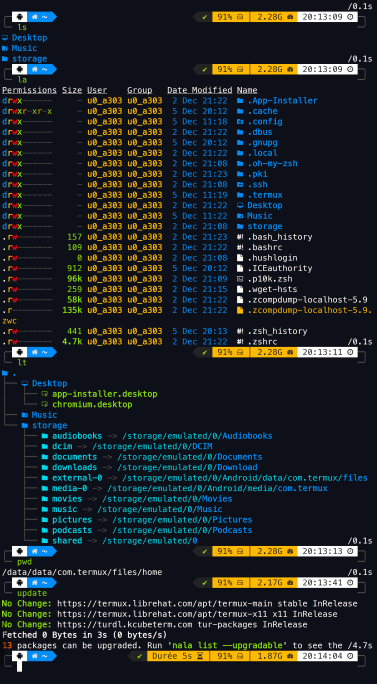
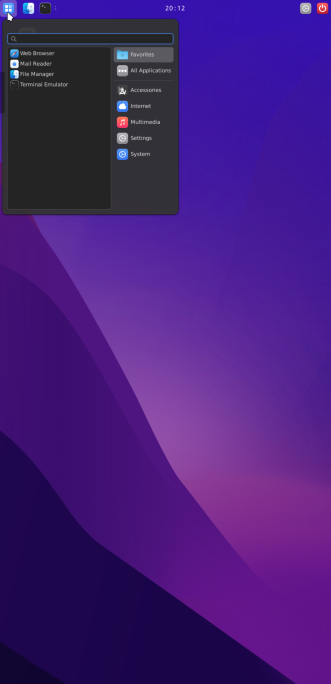
[!WARNING]
Process completed (signal 9) - press Enter
You need to run this adb command to fix the process 9 error that will force close Termux :
adb shell "/system/bin/device_config put activity_manager max_phantom_processes 2147483647"
To do this without using a PC you have several methods : First, Connect to WIFI.
Method 1 : Install adb in Termux by running this code:
pkg install android-tools -y
Then open settings and enable developer's options by selecting "About phone" then hit "Build" 7 times.
Back out of this menu and go into developer's options, enable wireless debugging then click into there to get the port number then click pair device to get the pairing code.
Put settings into split screen mode by pressing the square button on the bottom right of your phone, and hold the settings icon until the split screen icon shows up.
Then select Termux and in settings select pair with a code. In Termux type adb pair then enter your pairing info.
After you have completed this process you can type adb connect and connect to your phone with the ip and port provided in the wireless debugging menu. You can then run the fix command :
adb shell "/system/bin/device_config put activity_manager max_phantom_processes 2147483647"
Method 2 :
devohmycode/OhMyTermux is a public repo on GitHub by devohmycode. Ultra customisation of Termux.
It declares the MIT license on GitHub.
Its maker has not tagged a system, so it is unknown here. Its README says what it needs.
Open "Take it" on its page: Take My Repo writes an install plan for your machine and hands it to your AI agent (Claude Code, Codex or Cursor), which asks you before each step. Take My Repo has not tested it on any machine.
Its last change on GitHub was on 2026-10-24. Take My Repo does not judge from that whether it is maintained.
Master the command line, in one page
Termux - a terminal emulator application for Android OS extendible by variety of packages.
The agent harness performance optimization system. Skills, instincts, memory, security, and research-first development for Claude Code, Codex, Opencode, Cursor and beyond.
Flutter makes it easy and fast to build beautiful apps for mobile and beyond
Nobody has reviewed it on Take My Repo yet, which says nothing about its quality.
Take My Repo cannot say: it does not audit code and has not run OhMyTermux. What is known comes from GitHub. It declares the MIT license on GitHub. Its last change was on 2026-10-24. It has 46 stars, which measure popularity, not safety. Nobody has reviewed it on Take My Repo yet, which says nothing about its quality. Read the source before you run it. With "Take it", your AI agent shows each step and asks you before running it; README text is treated as data, not as instructions.




