Browse public Agent Skills (SKILL.md format) by theme in a collapsible terminal tree or a local web interface. Tick several and install them together through npx skills add. Installed skills start ticked: untick one to uninstall it.
🤖 Visit Website.
- Find: about 75,000 skills from skills.sh, claude-plugins.dev and Smithery, in 20 themes, plus ★ Recommended repositories, 🔥 Trending skills and 📦 Packs to install as a block.
- Check before installing: read any skill's
SKILL.md with p, with a risk check that points at what it runs, reads or sends, at content it fetches from a URL and at a name imitating a far more installed skill. A skill that would replace another of the same name is flagged before anything runs.
- Keep up to date: installed skills are detected and ticked; untick to uninstall, press
u to update the outdated ones, and see which agent has what.
- Keep it lean: see what each skill costs in context, which ones were not used lately, which ones an agent may confuse, and switch between sets of skills with profiles.
- Share:
export and import a selection, or commit a skills-atlas.json so that skills-atlas sync gives every teammate the same skills.
- From your agent: a skill, an MCP server and a Claude Code plugin let Claude and other agents search, read and install skills for you.
- Everywhere: 79 agents, a terminal tree and a web page, nine languages, shell completion, and it works offline.
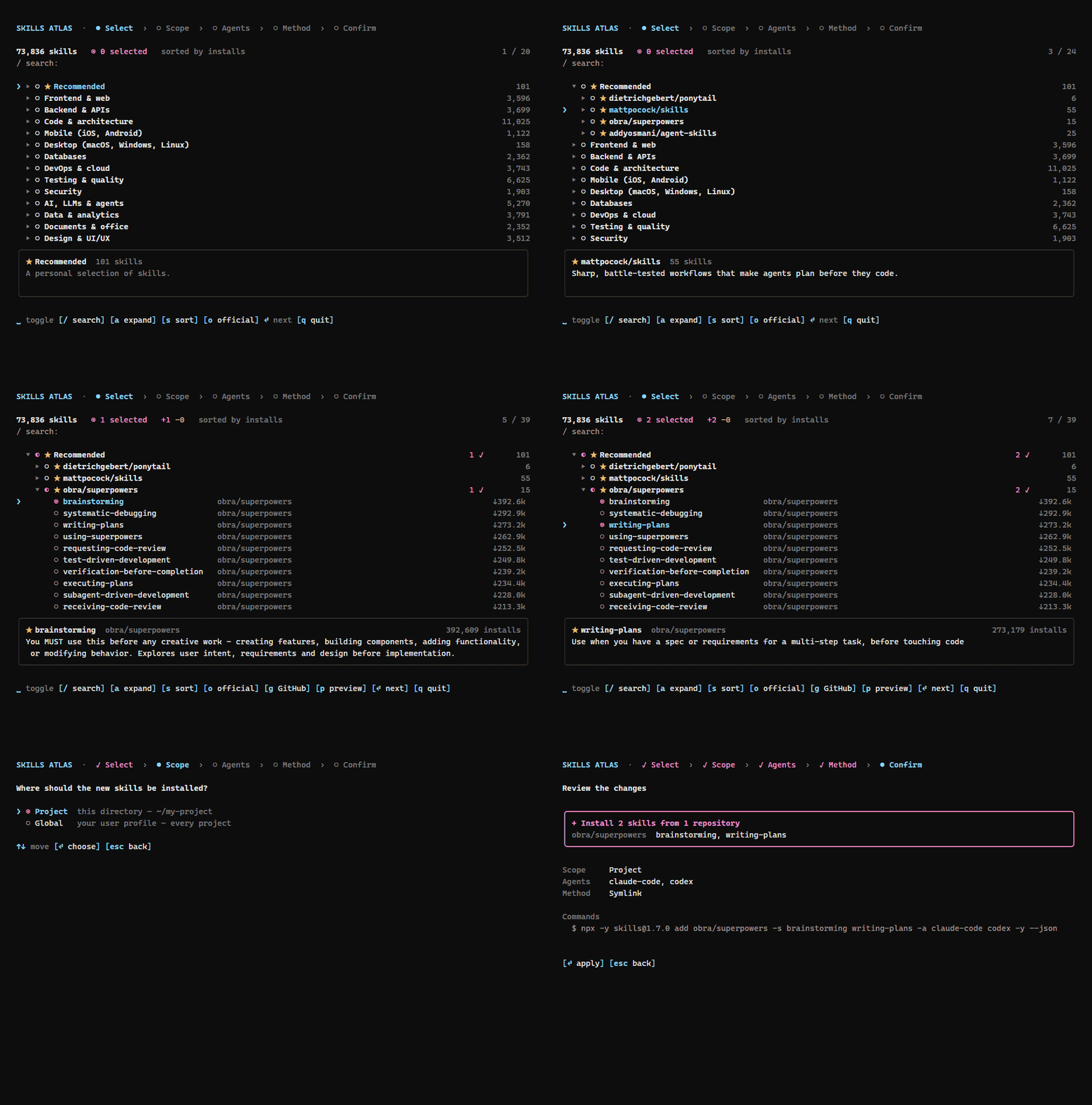
A session: tick skills in ★ Recommended, read a SKILL.md with p, then review the npx skills command. Try the web interface online, nothing installs there.
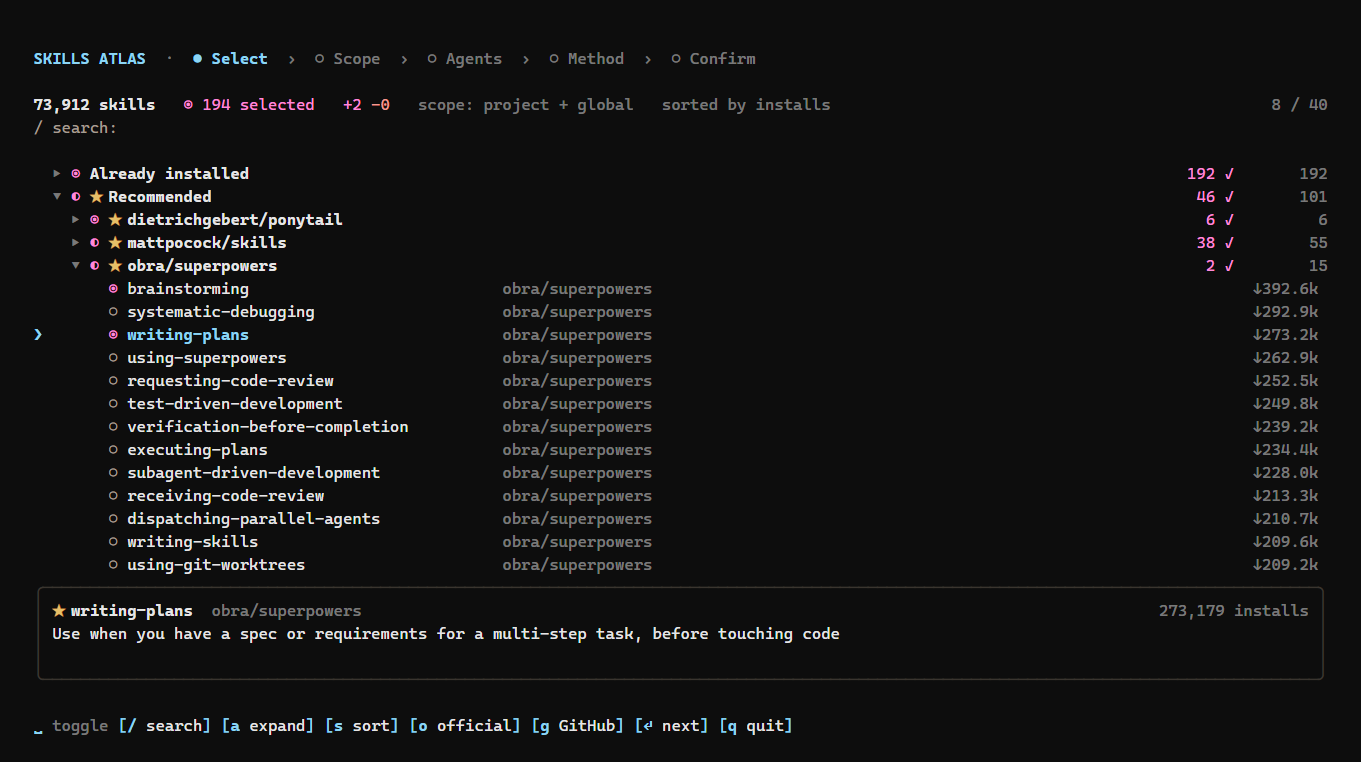
Terminal: installed skills ticked, ★ Recommended opened by repository, candy-pink selections.
Installation
npx skills-atlas # or: npm i -g skills-atlas
Node ≥ 20. A catalog snapshot ships inside the package, so it works offline; online, the CLI fetches the latest snapshot, rebuilt every other day (see The catalog).
Updating
npm i -g skills-atlas@latest   # global install
skills-atlas --version         # check the installed version
npx skills-atlas@latest        # with npx, which may otherwise run a cached older version
npx clear-npx-cache            # if npx still runs the old version
The catalog updates on its own, without a new version: the CLI checks for a newer snapshot at most every 12 hours. skills-atlas --refresh checks now.
Usage
skills-atlas                                  # interactive: tree → scope → options → confirm, then back to the tree
skills-atlas browse -t security -q audit      # tree pre-filtered by theme and text
skills-atlas browse -a claude-code cursor -g  # options given as flags are not asked; -g/-p also limits the tree to that scope
skills-atlas themes                           # themes and their skill counts
skills-atlas list -t databases -n 10          # non-interactive listing (--json available)
skills-atlas agents                           # ids accepted by --agent (★ = detected here)
skills-atlas install anthropics/skills@pdf supabase/agent-skills@supabase -a claude-code -p -y
skills-atlas ui                               # the same in your browser, with the mouse
skills-atlas export > my-skills.json          # installed skills as a selection file (-g / -p for one scope)
skills-atlas import my-skills.json -a claude-code -g  # install the same skills on another machine or project
skills-atlas show obra/superpowers@brainstorming      # a skill's SKILL.md, read from GitHub (--json available)
skills-atlas outdated                         # installed skills, project and global, with a newer version on GitHub (-p/-g, --json)
skills-atlas update                           # update them all, each in its scope (or name some; -p/-g, --dry-run)
skills-atlas suggest                          # skills for this project, from its package.json, pyproject.toml, Dockerfile… (--json)
skills-atlas rollback <id>                    # reinstall the version it had before its last update (--list, --to <sha>)
skills-atlas mcp                              # MCP server on stdio, for Claude and other agents
skills-atlas installed -a claude-code codex   # installed skills by agent: what each one sees (--json available)
skills-atlas installed --size                 # the same, with what each skill costs in context (tokens) and on disk
skills-atlas unused                           # installed skills Claude Code has not used in 30 days (--days, --remove, --json)
skills-atlas overlaps                         # installed skills an agent may confuse: close descriptions (--threshold, --json)
skills-atlas packs                            # curated packs: frontend, security, quality, writing
skills-atlas install --pack security -a claude-code -g   # install a whole pack
skills-atlas sync                             # install what this project's skills-atlas.json lists and is missing
skills-atlas profile create Design <ids...>   # a personal pack to use as a profile (--from-installed available)
skills-atlas profile use design               # keep only that pack's skills in the global scope (-p: this project), after a backup
skills-atlas profile restore                  # put the scope back exactly as before (--initial: before any profile)
skills-atlas completion bash                  # shell completion script (bash, zsh, fish, powershell)
Shell completion completes commands, options, skill ids, agents, themes and languages. Load it from your shell's startup file:
| Shell |
Line to add |
bash (~/.bashrc) |
eval "$(skills-atlas completion bash)" |
zsh (~/.zshrc) |
eval "$(skills-atlas completion zsh)" |
fish (~/.config/fish/config.fish) |
skills-atlas completion fish | source |
PowerShell ($PROFILE) |
skills-atlas completion powershell | Out-String | Invoke-Expression |
It needs skills-atlas installed (npm i -g skills-atlas), not run through npx. Skill ids come from the cached catalog, so Tab never waits for the network.
export writes the installed skills that have a GitHub source as { "skillsAtlas": 1, "skills": ["owner/repo@skill", …] }; home-made skills are listed on stderr and left out. import takes the same options as install and asks for what they leave open. A selection file is checked before anything runs: a malformed id, or a name that could pass for a flag, stops the import.
When a newer skills-atlas is published, a dim line says so above the tree and under the ui address. npm is asked at most once a day, in the background, so it never slows the start; --offline skips it.
Risk check
The SKILL.md preview (p), skills-atlas show and the MCP server's show_skill point at what a skill asks for beyond its description:
| Level |
Warning sign |
| high |
downloads and runs code (curl … | sh, base64 -d | sh), reads or sends credential files (~/.ssh, ~/.aws…), deletes broadly (rm -rf ~), asks the agent to hide things from the user or ignore its instructions |
| medium |
needs a program missing from this machine, runs commands as administrator, reads secrets from the environment, sends data to a server, reads content from a URL (curl https://…/llms.txt, “fetch the rules at https://…”), holds what looks like a secret key (sk-…, ghp_…, AKIA…, a private key block; shown cut to its first characters), has a name close to a far more installed skill |
| info |
installs or runs packages or bundled scripts, states its requirements |
The catalog already carries them for the 3,000 most installed skills, read at each crawl, with the day their folder last changed for the top 1,000: the tree's details show needs gh, ✗ jq (missing programs in red), the compatibility text and updated 2026-09-30; the web page shows the same as tags, and MCP's search_skills returns requires and updated_at. Prerequisites come from the frontmatter: the programs listed under requires.bins (OpenClaw metadata) are looked up on your PATH, and the spec's compatibility text (agent versions, tools, network) is shown as is. A missing program does not block the install, but the review screen and install -y name it before any command runs. Skills rarely declare either field, so no warning does not mean nothing is needed.
Content read from a URL is flagged because it can change after you reviewed the skill, and pinning the skill to a commit (lock) does not pin it: read what is served there, and expect it to differ later. A plain link after a word such as “read” is flagged too; a line that already downloads and runs code, or sends data, is reported under that sign only. A name close to a far more installed skill comes from the catalog, not from the skill's files: the name, or the owner's name for a skill of the same name, is one character away from one installed at least 1,000 times and 20 times more (skil-creator for skill-creator, anthroplcs/skills for anthropics/skills). It names that skill so that you can compare the two; honest forks match too.
It is a pattern check on the text, tuned on the 150 most installed skills: it points at lines worth reading, it does not prove a skill safe. show prints the warning signs on stderr, so that stdout stays the SKILL.md alone; show --json adds them as risks.
The security audit runs this check before every install and update, on the SKILL.md and on the other text files of the skill folder (scripts, references, configs: up to 30 files of 64 KB, listed with one GitHub call per repository), since a script the skill runs can hold what its SKILL.md does not show. Each finding names its file (scripts/setup.sh:12); binaries, larger files and files that could not be read are listed as not audited, never as passed. show and the MCP server's show_skill report the same. A skill fails it with at least one high warning sign; medium ones are shown and do not block.
- In the tree and with
install's questions, the review screen lists the skills that fail, unticked: they are left out. Read one (p in the list, or skills-atlas show <id>), then tick it with space to install it anyway.
- Without a person at the keyboard (
install -y, import, sync, update), a failing skill is left out with its warning signs printed; --no-audit installs it anyway.
- Through the MCP server,
install_skills refuses a failing skill and tells the agent why; it passes only with ignore_audit: true, which the agent is told to send only after the user's yes.
skills-atlas audit off turns the audit off for good, skills-atlas audit on turns it back on, and --no-audit skips it for one command. A SKILL.md that cannot be read is reported as not audited, not as failing.
Packs
A pack is a set of skills meant to be installed together: 📦 Frontend dev, 📦 Security review, 📦 Code quality & testing and 📦 Writing & docs. Each one is a theme in the tree and on the web page, after Recommended and Trending: tick the theme to take the whole pack, or open it to pick. skills-atlas packs lists them and install --pack <id> installs one.
In the web interface, Save as pack saves the checked catalog skills, including installed ones that remain checked, as a personal pack. Enter a unique lowercase id (letters, digits and hyphens), a name and description; a pack contains 1–100 skills. Saving adds to your personal file, preserves bundled packs on the first save, and opens the new pack immediately without restarting. Duplicate ids and invalid existing files are rejected without overwriting them. The offline demo explicitly disables saving.
The packs ship in data/packs.json. They always show. Personal packs are added to them from ~/.config/skills-atlas/packs.json, with the same shape: [{ "id", "name", "description", "skills": ["owner/repo@skill", …] }]; an entry under a shipped pack's id is ignored.
Profiles
A profile is a pack activated on its own, to switch between configurations such as Design or Backend. skills-atlas profile use <pack>