MVVMHabit
👕基于谷歌最新AAC架构,MVVM设计模式的一套快速开发库,整合Okhttp+RxJava+Retrofit+Glide等主流模块,满足日常开发需求。使用该框架可以快速开发一个高质量、易维护的Android应用。
- 7.7k
- Java
- Apache-2.0
- 4 y ago
⚛ Enhances the reliability of managing app lifecycles across iOS and Android platforms, ensuring consistent behavior regarding foreground and background states.
Repo douglasjunior/react-native-applifecycle, read from GitHub 12 min ago. douglasjunior has not joined Take My Repo.
douglasjunior/react-native-applifecycle is a public repo on GitHub by douglasjunior. ⚛ Enhances the reliability of managing app lifecycles across iOS and Android platforms, ensuring consistent behavior regarding foreground and background states. It declares the MIT license on GitHub. It is written mainly in TypeScript, has 131 stars and last changed on 2026-11-26. Nobody has reviewed it on Take My Repo yet, which says nothing about its quality. Read from GitHub on 2026-11-26.
👕基于谷歌最新AAC架构,MVVM设计模式的一套快速开发库,整合Okhttp+RxJava+Retrofit+Glide等主流模块,满足日常开发需求。使用该框架可以快速开发一个高质量、易维护的Android应用。
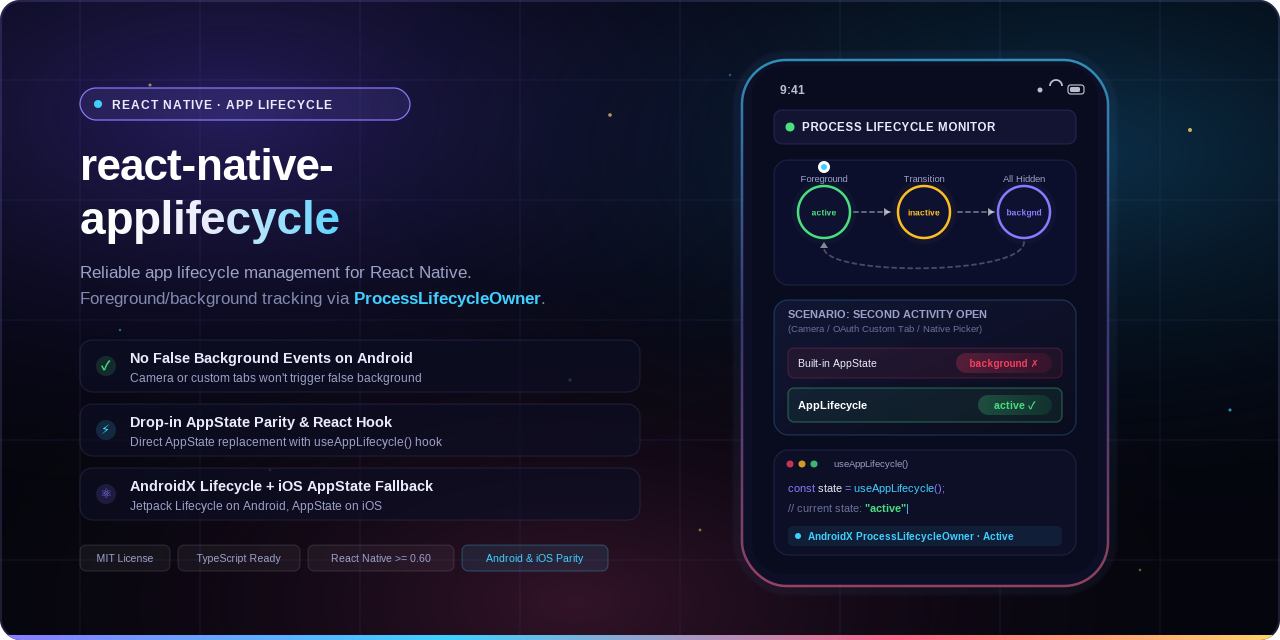
Enhances the reliability of managing app lifecycles across iOS and Android, ensuring consistent foreground and background state detection.
React-Native App Lifecycle bridges the gap in React Native's built-in AppState on Android. By utilizing AndroidX ProcessLifecycleOwner for Android and falling back gracefully to native AppState on iOS, it guarantees that the background state is only dispatched when the entire application is truly in the background—eliminating false triggers when opening secondary activities like cameras, file pickers, or OAuth custom tabs.
Quick Start · Why · How It Works · Requirements · Installation · Usage · API Reference · Jest Mock · Limitations · Contributing
# 1. Install dependency
yarn add react-native-applifecycle
# or: npm i -S react-native-applifecycle
import React, { useEffect } from 'react';
import { View, Text } from 'react-native';
import { AppLifecycle, useAppLifecycle } from 'react-native-applifecycle';

export default function App() {
  // Option A: Convenient React Hook
  const currentLifecycle = useAppLifecycle();

  // Option B: Event Subscription
  useEffect(() => {
    const subscription = AppLifecycle.addEventListener('change', (state) => {
      console.log('App lifecycle transitioned to:', state);
    });

    return () => subscription.remove();
  }, []);

  return (
    <View style={{ flex: 1, justifyContent: 'center', alignItems: 'center' }}>
      <Text>Current Lifecycle: {currentLifecycle}</Text>
    </View>
  );
}
AppState to prematurely dispatch background. This library keeps your app in active until the entire application process is obscured.ProcessLifecycleOwner. Listens directly to the whole application process lifecycle rather than an isolated Activity lifecycle, ensuring architectural fidelity on Android.AppState on iOS, which already treats application-level scenes correctly.useAppLifecycle() out of the box so functional components can react to lifecycle changes with zero listener boilerplate.addEventListener(), currentState, and isAvailable APIs of React Native's standard AppState for effortless migration.react-native-applifecycle/jest/AppLifecycleMock) ready for your automated unit and integration tests.AppStateReact Native's built-in AppState exhibits platform inconsistency when handling Android activities:
background state accurately reflects that the entire application has been suspended or sent to the home screen / app switcher.AppState binds to the single ReactActivity. When another Activity within your application launches (such as a photo selector, payment flow, or secondary screen), the React Activity calls onPause(), which causes standard AppState to fire background even though the user is actively engaged inside your application.┌────────────────────────────────────────────────────────────────────────┐
│ User Opens Camera Activity │
├────────────────────────────────┬───────────────────────────────────────┤
│ Standard RN AppState: │ ⚠️ Reports "background" (Wrong!) │
│ react-native-applifecycle: │ ✅ Remains "active" (Correct!) │
└────────────────────────────────┴───────────────────────────────────────┘
| Scenario | Standard RN AppState (Android) |
react-native-applifecycle (Android) |
iOS Behavior |
|---|---|---|---|
| User is in the React Native screen | active |
active |
active |
| Secondary native Activity opens (Camera, Picker, In-App Webview) | background ⚠️ (Premature) |
active ✅ |
active |
| User presses Home or switches apps | background |
background |
background |
| User returns to the app from Home | active |
active |
active |
| Notification Center / App Switcher open | inactive (iOS only) |
active (Android) / inactive (iOS) |
inactive |
By using react-native-applifecycle, your background sync routines, timeout locks, session managers, and analytics only trigger when the user actually leaves your application.
| Platform / Tool | Supported Version |
|---|---|
| React Native | >= 0.80.0 (New Architecture & Old Architecture supported) |
| Android | minSdkVersion >= 24 (AndroidX Lifecycle supported) |
Using Yarn:
yarn add react-native-applifecycle
Using npm:
npm i -S react-native-applifecycle
react-native link or Gradle modifications are required.AppState.useAppLifecycle()The simplest way to consume lifecycle status inside React functional components:
import React from 'react';
import { View, Text } from 'react-native';
import { useAppLifecycle } from 'react-native-applifecycle';

export const StatusScreen = () => {
  const lifecycle = useAppLifecycle();

  return (
    <View style={{ padding: 20 }}>
      <Text>Application State: {lifecycle}</Text>
      {lifecycle === 'active' ? (
        <Text>App is in the foreground!</Text>
      ) : (
        <Text>App is running in the background.</Text>
      )}
    </View>
  );
};
addEventListener()For imperative code, class components, or state stores (Zustand, Redux, MobX):
import { useEffect } from 'react';
import { AppLifecycle } from 'react-native-applifecycle';

export const useAppLifecycleLogger = () => {
  useEffect(() => {
    const subscription = AppLifecycle.addEventListener('change', (nextState) => {
      console.log('App state changed to:', nextState);

      if (nextState === 'background') {
        // Safe to pause sensitive timers or persist state
        console.log('Entire app sent to background.');
      } else if (nextState === 'active') {
        // App has returned to the foreground
        console.log('App returned to active foreground.');
      }
    });

    return () => {
      subscription.remove();
    };
  }, []);
};
currentStateYou can inspect the current app state synchronously without waiting for an event:
import { AppLifecycle } from 'react-native-applifecycle';

function checkCurrentStatus() {
  const state = AppLifecycle.currentState;
  console.log('Current state:', state); // 'active' | 'background' | 'inactive' | 'unknown'
}
isAvailableVerifies whether lifecycle observation is available on the current platform:
import { AppLifecycle } from 'react-native-applifecycle';

if (AppLifecycle.isAvailable) {
  console.log('AppLifecycle module is available and ready');
}
For an interactive example showcasing the difference between AppState and AppLifecycle when opening a second Android Activity, check out the Sample Project.
| State | Platform | Description |
|---|---|---|
active |
Android & iOS | The application is running in the foreground. At least one activity is visible to the user. |
background |
Android & iOS | The application is running in the background. The user is either on the home screen or inside another app entirely. |
inactive |
iOS | The application is transitioning between foreground and background, or is in an inactive state such as viewing the multitasking app switcher, opening Notification Center, or handling an incoming call. |
unknown |
Android & iOS | Assigned when an unrecognised native lifecycle event is received. On Android the initial value is AppState.currentState. |
For additional background on iOS states, refer to the React Native AppState documentation.
| Event Type | Handler Signature | Description |
|---|---|---|
'change' |
(state: AppStateStatus) => void |
Fired when the overall application transitions between active, background, or inactive. |
'memoryWarning' |
() => void |
(delegated to React Native AppState, all platforms; availability per RN docs) Emitted when the operating system warns that memory is low. |
'focus' |
() => void |
(delegated to React Native AppState, all platforms; availability per RN docs) Emitted when the app window gains focus. |
'blur' |
() => void |
(delegated to React Native AppState, all platforms; availability per RN docs) Emitted when the app window loses focus. |
AppLifecycle.addEventListener()static addEventListener(
type: AppStateEvent,
listener: (state: AppStateStatus) => void,
): EventSubscription;
Sets up an event listener that is invoked whenever the specified lifecycle event occurs. Returns an EventSubscription object containing a .remove() method to cleanly unsubscribe.
| Property | Type | Description |
|---|---|---|
AppLifecycle.currentState |
AppStateStatus |
Synchronous getter returning the current lifecycle state ('active', 'background', 'inactive', or 'unknown'). |
AppLifecycle.isAvailable |
boolean |
Synchronous getter indicating whether the lifecycle module is supported and available. |
useAppLifecycle()function useAppLifecycle(): AppStateStatus;
A React hook that returns the current lifecycle status and automatically triggers a component re-render whenever the lifecycle state updates.
To run unit tests without requiring native Android or iOS lifecycle bindings, add the provided mock to your jest.setup.js or directly inside your test file:
jest.mock('react-native-applifecycle/dist/AppLifecycle', () =>
  require('react-native-applifecycle/jest/AppLifecycleMock'),
);
[!NOTE] In development mode, some lifecycle events may not trigger as expected due to how React Native manages backgrounding and hot reloading during Metro development sessions.
For further details and discussion, see Issue #13 (comment).
blur / focus events with native Dialogs & Bottom Sheets: AppLifecycle uses ProcessLifecycleOwner only for 'change' (active / background). The 'blur' and 'focus' events are delegated directly to React Native's AppState (which tracks window focus on ReactActivity). As a result, opening any native Dialog, Modal, or BottomSheetDialog (such as react-native-true-sheet) creates a separate Android Window and triggers 'blur' while AppLifecycle.currentState remains 'active'. If you rely on 'blur'douglasjunior/react-native-applifecycle is a public repo on GitHub by douglasjunior. ⚛ Enhances the reliability of managing app lifecycles across iOS and Android platforms, ensuring consistent behavior regarding foreground and background states.
It declares the MIT license on GitHub.
Its maker has not tagged a system, so it is unknown here. Its README says what it needs.
A framework for building native applications using React
Reverse engineer anything with agents, from app behavior down to native binaries.
Flutter makes it easy and fast to build beautiful apps for mobile and beyond
f.k.a. Awesome ChatGPT Prompts. Share, discover, and collect prompts from the community. Free and open source — self-host for your organization with complete privacy.
Open "Take it" on its page: Take My Repo writes an install plan for your machine and hands it to your AI agent (Claude Code, Codex or Cursor), which asks you before each step. Take My Repo has not tested it on any machine.
Its last change on GitHub was on 2026-11-26. Take My Repo does not judge from that whether it is maintained.
Nobody has reviewed it on Take My Repo yet, which says nothing about its quality.
Take My Repo cannot say: it does not audit code and has not run react-native-applifecycle. What is known comes from GitHub. It declares the MIT license on GitHub. Its last change was on 2026-11-26. It has 131 stars, which measure popularity, not safety. Nobody has reviewed it on Take My Repo yet, which says nothing about its quality. Read the source before you run it. With "Take it", your AI agent shows each step and asks you before running it; README text is treated as data, not as instructions.