zeal
Offline documentation browser. Your personal reference library, searchable in an instant.
- 13k
- C++
- GPL-3.0
- 1 d ago
Transform documentation into LLM training datasets
Repo t21dev/docset-gen, read from GitHub 13 h ago. t21dev has not joined Take My Repo.
t21dev/docset-gen is a public repo on GitHub by t21dev. Transform documentation into LLM training datasets. It declares the MIT license on GitHub. It is written mainly in Python, has 1 stars and last changed on 2026-11-13. Nobody has reviewed it on Take My Repo yet, which says nothing about its quality. Read from GitHub on 2026-11-24.
Transform documentation into LLM training datasets
DocSet Gen scrapes documentation websites and generates high-quality Q&A training datasets for fine-tuning LLMs.
# Clone the repository
git clone https://github.com/t21dev/docset-gen.git
cd docset-gen

# Create virtual environment
# Windows (the py launcher avoids picking up an unrelated venv on PATH):
py -m venv venv
# macOS/Linux:
python3 -m venv venv

# Activate virtual environment
# Windows:
venv\Scripts\activate
# macOS/Linux:
source venv/bin/activate

# Install dependencies
pip install -r requirements.txt
Activate before installing. Every command below assumes the venv is active. If you skip activation,
pipandpythonmay resolve to two different interpreters and nothing will work — see Troubleshooting.
cp .env.example .env
.env with your API keys:FIRECRAWL_API_KEY=fc-your-key-here
OPENAI_API_KEY=sk-your-key-here
Note: The default model is
gpt-5.1. Make sure you have access to this model enabled in your OpenAI developer account. You can change the model in.envby settingOPENAI_MODEL=gpt-4oor another supported model.
Just run:
python app.py
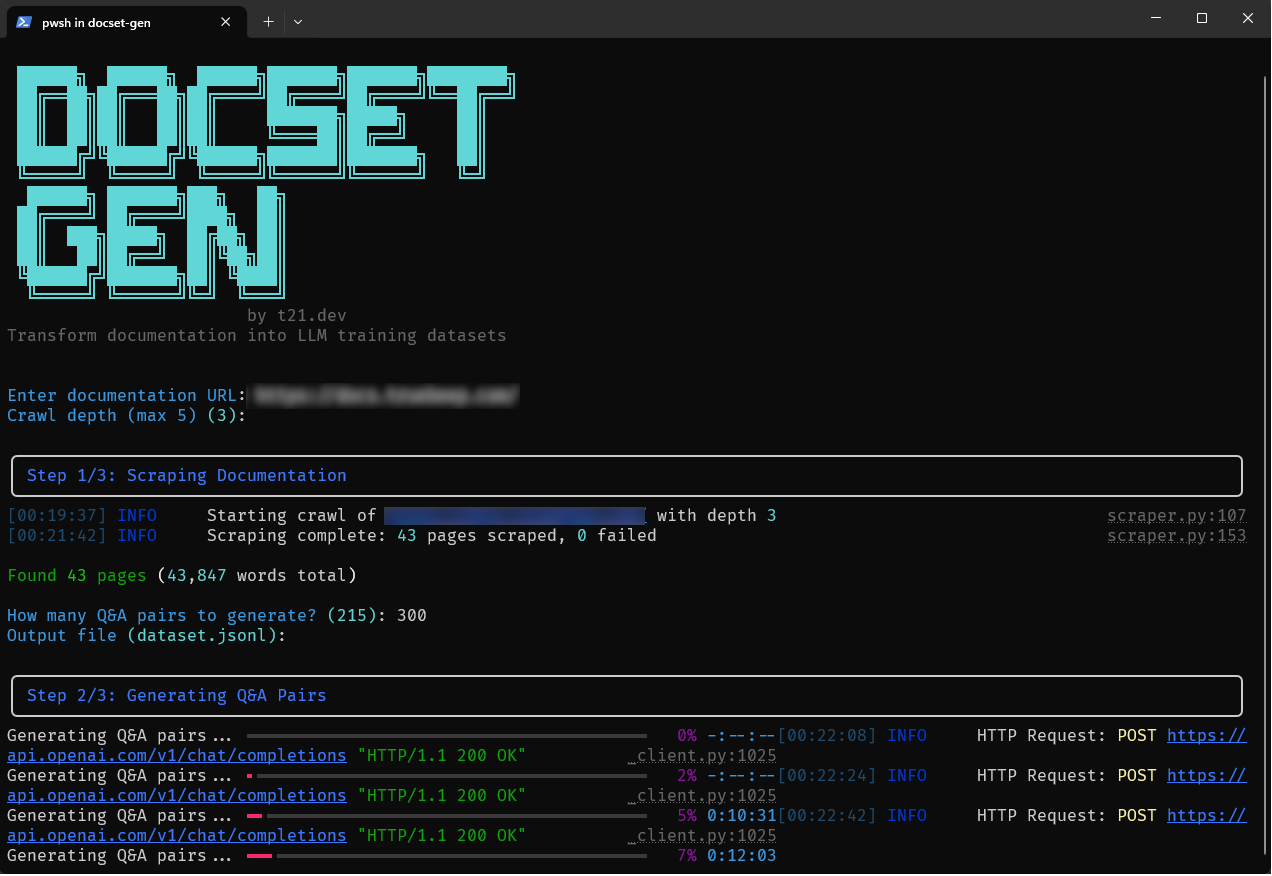
The interactive CLI will guide you:
 ██████╗  ██████╗  ██████╗███████╗███████╗████████╗
 ██╔══██╗██╔═══██╗██╔════╝██╔════╝██╔════╝╚══██╔══╝
 ██║  ██║██║   ██║██║     ███████╗█████╗     ██║
 ██║  ██║██║   ██║██║     ╚════██║██╔══╝     ██║
 ██████╔╝╚██████╔╝╚██████╗███████║███████╗   ██║
 ╚═════╝  ╚═════╝  ╚═════╝╚══════╝╚══════╝   ╚═╝
  ██████╗ ███████╗███╗   ██╗
 ██╔════╝ ██╔════╝████╗  ██║
 ██║  ███╗█████╗  ██╔██╗ ██║
 ██║   ██║██╔══╝  ██║╚██╗██║
 ╚██████╔╝███████╗██║ ╚████║
  ╚═════╝ ╚══════╝╚═╝  ╚═══╝
                        by t21.dev
Transform documentation into LLM training datasets

Enter documentation URL: docs.example.com
Crawl depth [3]: 3

──────── Step 1/3: Scraping Documentation ────────

Found 45 pages (23,450 words total)

Output format? [dataset/llms.txt/both]: dataset

How many Q&A pairs to generate? [225]: 200
Output file [dataset.jsonl]:

──────── Step 2/3: Generating Q&A Pairs ──────────

Generated 200 Q&A pairs

──────── Step 3/3: Cleaning and Saving ───────────

┌────────────── Dataset Complete ──────────────┐
│ Pages Scraped       │ 45                     │
│ Q&A Pairs Generated │ 200                    │
│ Train / Val / Test  │ 160 / 20 / 20          │
│ Output              │ dataset.jsonl          │
└──────────────────────────────────────────────┘
You can also run individual steps:
# Just scrape (save for later)
python app.py scrape https://docs.example.com --output ./scraped

# Generate from previously scraped content
python app.py generate ./scraped --pairs 500 --output dataset.jsonl

# Generate llms.txt directly
python app.py llms-txt https://docs.example.com --output llms.txt

# Create config file
python app.py init
Generate llms.txt files - a proposed standard to help LLMs understand your documentation structure.
Two modes available:
# Generate minimal llms.txt (links only)
python app.py llms-txt https://docs.example.com

# Generate full llms.txt with complete content
python app.py llms-txt https://docs.example.com --mode full

# Specify project name and output file
python app.py llms-txt https://docs.example.com --name "My Project" --output my-llms.txt
Or choose llms.txt or both when prompted for output format in interactive mode.
Minimal mode output:
# Example Project

> A comprehensive toolkit for building modern web applications.

## Docs
- [Getting Started](https://example.com/docs/getting-started): Quick start guide
- [Configuration](https://example.com/docs/config): Configuration options

## API Reference
- [Authentication](https://example.com/api/auth): Auth endpoints
- [Users](https://example.com/api/users): User management
Full mode output:
# Example Project

> A comprehensive toolkit for building modern web applications.

## Docs

### [Getting Started](https://example.com/docs/getting-started)

> Quick start guide

# Getting Started

Welcome to the project! This guide will help you get up and running...

### [Configuration](https://example.com/docs/config)

> Configuration options

# Configuration

The following configuration options are available...
{"instruction": "What is dependency injection?", "input": "", "output": "Dependency injection is..."}
{"instruction": "How do I configure logging?", "input": "", "output": "To configure logging..."}
Create docset-gen.yaml for advanced settings:
firecrawl:
  max_depth: 3
  exclude_patterns:
    - "/changelog/*"
    - "/blog/*"

openai:
  model: gpt-4o-mini
  temperature: 0.7

generation:
  mode: qa
  pairs_per_page: 5

output:
  split_ratio: [0.8, 0.1, 0.1]

llms_txt:
  include_optional_section: true
  max_links_per_section: 20
ModuleNotFoundError: No module named 'typer' (or any other dependency)Your shell is running a different Python than the one pip installed into. This is common on Windows when another tool has put its own venv on your PATH. Check both:
# Windows
where python
where pip

# macOS/Linux
which python
which pip
If the two paths don't point into the same directory, that's the problem — installing with one never affects the other. Activate the project venv and confirm the paths now agree:
# Windows
venv\Scripts\activate
# macOS/Linux
source venv/bin/activate
To bypass PATH entirely, call the venv's interpreter directly:
# Windows
venv\Scripts\python.exe app.py
# macOS/Linux
venv/bin/python app.py
ImportError: cannot import name 'Firecrawl' from 'firecrawl'You have firecrawl-py 1.x installed, which exposes FirecrawlApp instead. This project uses the v2 API. Reinstall with pip install -r requirements.txt in an active venv.
TypeError: Parameter.make_metavar() missing 1 required positional argument: 'ctx'typer 0.15.x is incompatible with click 8.2+. requirements.txt pins typer>=0.16; make sure your install picked it up.
This tool pairs perfectly with LoCLI - a CLI tool that makes fine-tuning LLMs accessible to developers. Just point it at your dataset and go.
# Generate dataset with DocSet Gen
python app.py

# Fine-tune with LoCLI
lo-cli train --dataset dataset.jsonl
This project is free and open source. If it saves you time, you can support Team 21 on Patreon. It pays for code signing, app store fees and servers. In Bangladesh? You can support in taka on SupportKori.
MIT License - see LICENSE
Created by @TriptoAfsin | t21dev
t21dev/docset-gen is a public repo on GitHub by t21dev. Transform documentation into LLM training datasets.
It declares the MIT license on GitHub.
Its maker has not tagged a system, so it is unknown here. Its README says what it needs.
Open "Take it" on its page: Take My Repo writes an install plan for your machine and hands it to your AI agent (Claude Code, Codex or Cursor), which asks you before each step. Take My Repo has not tested it on any machine.
Its last change on GitHub was on 2026-11-13. Take My Repo does not judge from that whether it is maintained.
Knowledge infrastructure to make your agents smarter. Search, scrape and access 550+ data providers through one API.
Fair-code workflow automation platform with native AI capabilities. Combine visual building with custom code, self-host or cloud, 400+ integrations.
A convenient CLI to add Dash's User Contributed docsets to Zeal
Nobody has reviewed it on Take My Repo yet, which says nothing about its quality.
Take My Repo cannot say: it does not audit code and has not run docset-gen. What is known comes from GitHub. It declares the MIT license on GitHub. Its last change was on 2026-11-13. It has 1 stars, which measure popularity, not safety. Nobody has reviewed it on Take My Repo yet, which says nothing about its quality. Read the source before you run it. With "Take it", your AI agent shows each step and asks you before running it; README text is treated as data, not as instructions.