whisperX
WhisperX: Automatic Speech Recognition with Word-level Timestamps (& Diarization)
- 26k
- Python
- BSD-2-Clause
- 2 d ago
Inference code for Haas, fast and accurate Japanese speech recognition
Repo third-intelligence/Haas-ASR, read from GitHub 5 h ago. third-intelligence has not joined Take My Repo.
third-intelligence/Haas-ASR is a public repo on GitHub by third-intelligence. Inference code for Haas, fast and accurate Japanese speech recognition. It declares the Apache-2.0 license on GitHub. It is written mainly in Python, has 48 stars and last changed on 2026-10-30. Nobody has reviewed it on Take My Repo yet, which says nothing about its quality. Read from GitHub on 2026-11-23.
🤗 Model | 📑 Blog | 📊 Benchmark | 📏 jacer
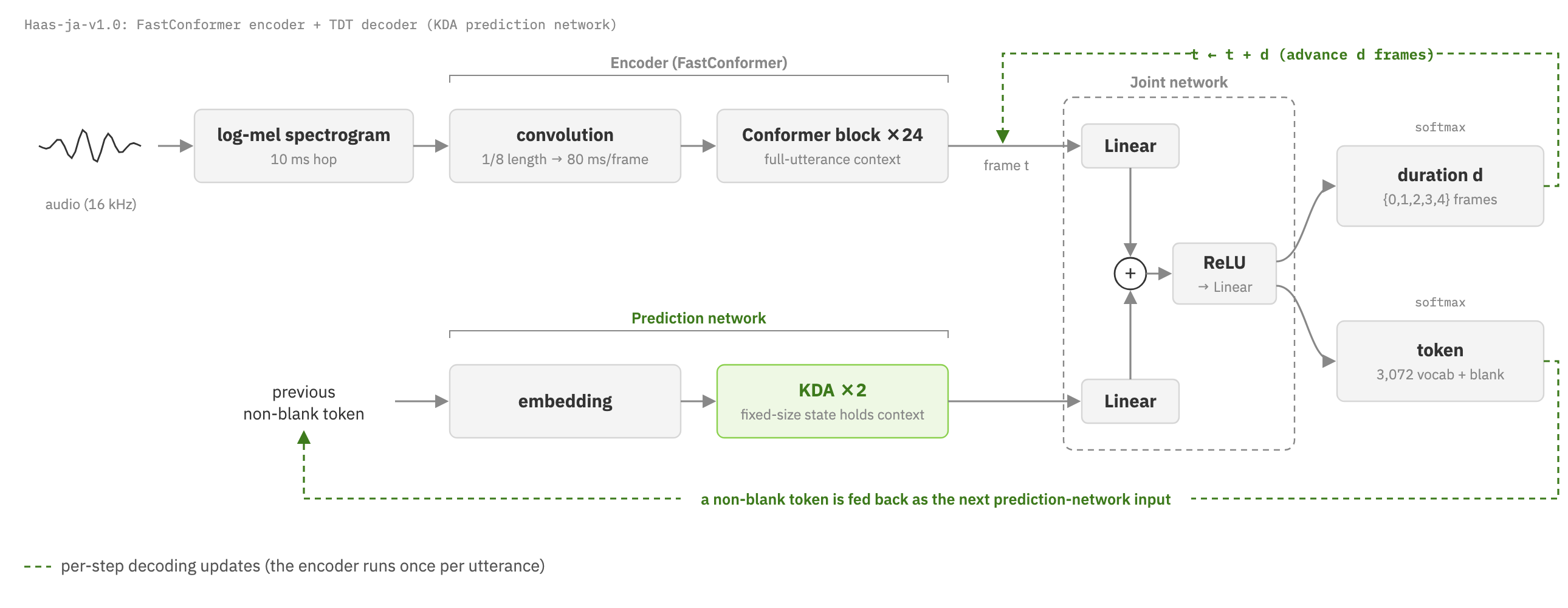
Inference code for the Haas speech recognition models. The first release, Haas-ja-v1.0, is a Japanese model: a FastConformer encoder with a TDT decoder whose prediction network uses Kimi Delta Attention.
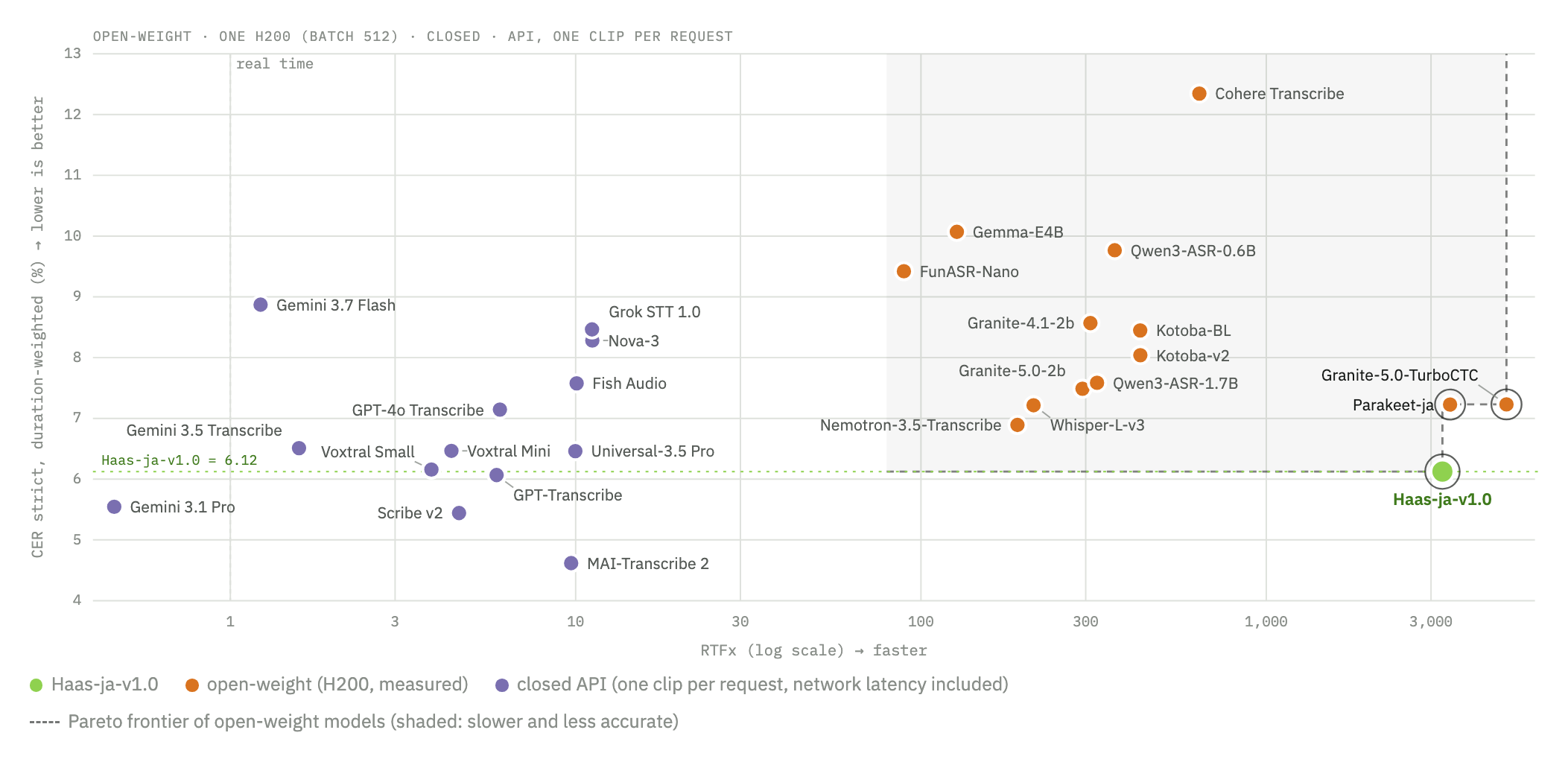
On asr-ja-bench v1.1, five public Japanese test sets, Haas-ja-v1.0 reaches a weighted CER strict of 6.12%, the best of the open models we evaluated. It is competitive with commercial APIs: on par with GPT-Transcribe (6.07%), while MAI-Transcribe 2, Scribe v2 and Gemini 3.1 Pro remain more accurate.
In each cell, the top value is CER strict and the bottom values are CER flex / kana (%, lower is better):
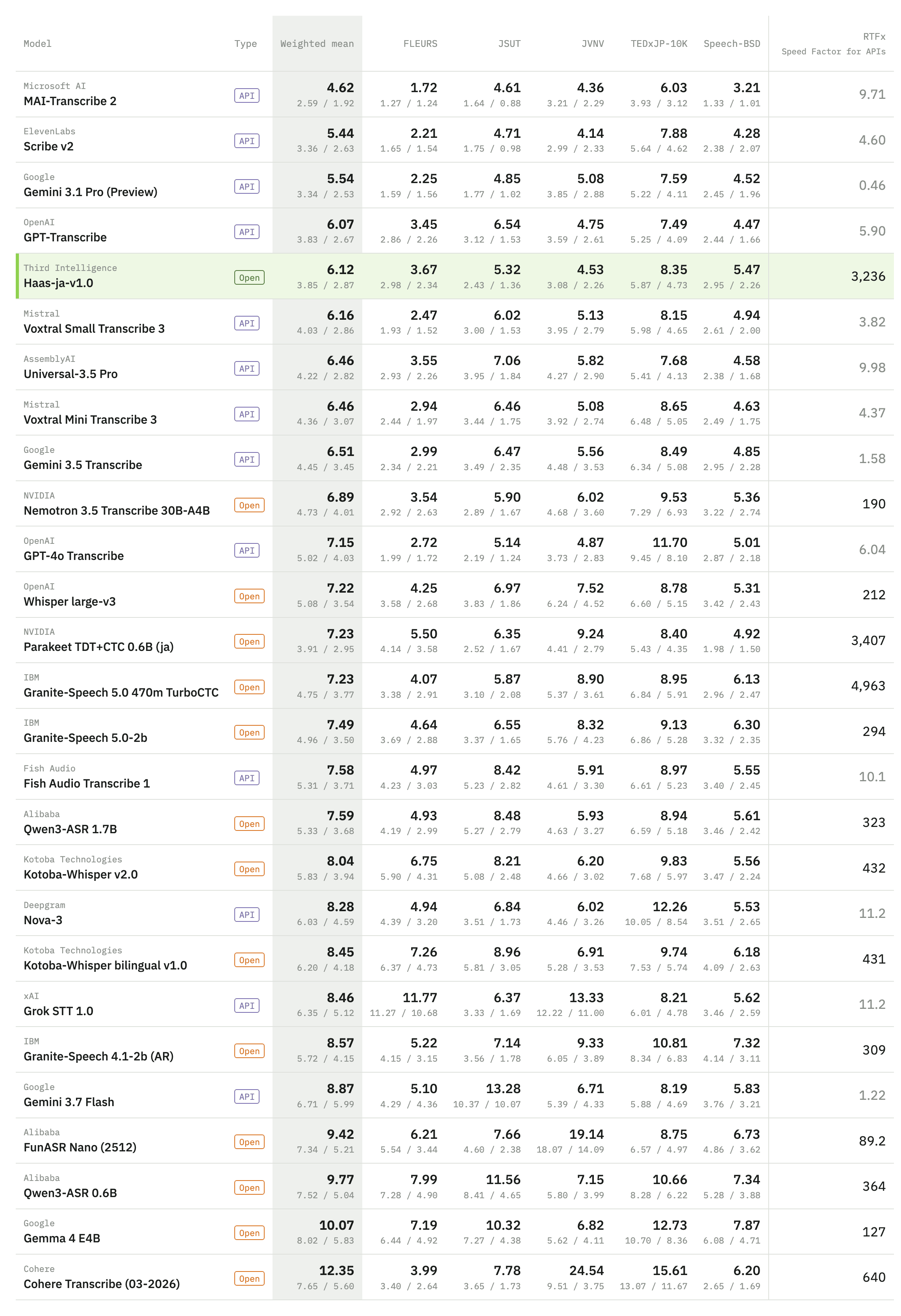
Among open models, Haas-ja-v1.0 is on the Pareto frontier of speed and accuracy. It runs at almost the same speed as Parakeet (RTFx 3,236 vs. 3,407) while cutting CER strict by about 1.1 points, and is about 15–17 times faster than Nemotron 3.5 Transcribe and Whisper large-v3, the next most accurate open models.
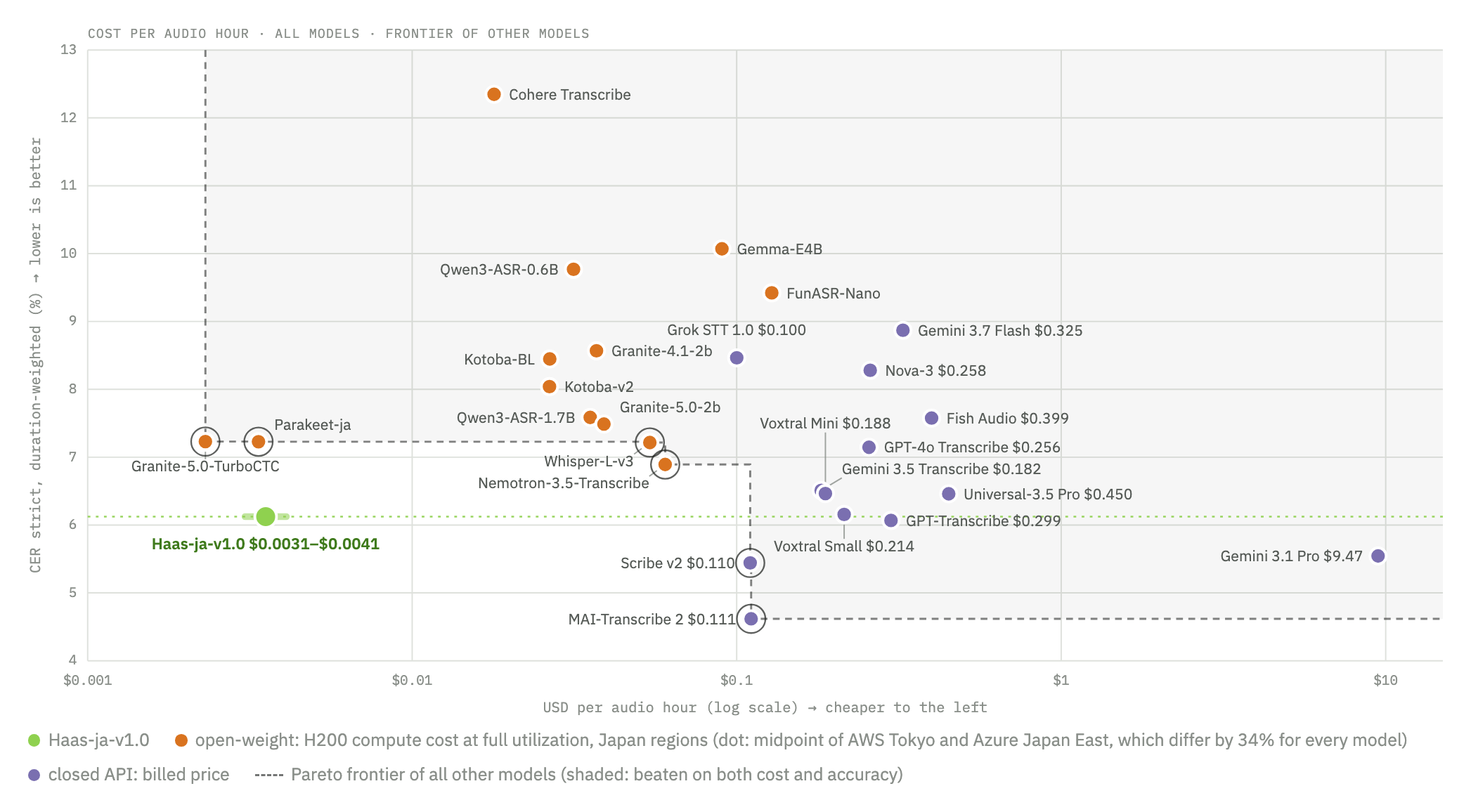
It transcribes an hour of audio for about $0.003–0.004, roughly 1/70–1/100 of GPT-Transcribe, which has similar accuracy.
For the evaluation details, including the benchmark design, the CER metrics and the full results, see the blog post. Evaluation below shows how to reproduce the Haas-ja-v1.0 results.
examples/speakers/ the first time you run the example and leaves
the default environment unchanged.Try it with this repository
Clone it and install with
uv, which uses the exact dependency versions in
uv.lock, the ones we test with:
git clone https://github.com/third-intelligence/Haas-ASR.git
cd Haas-ASR
uv sync
uv run python examples/quickstart.py --model third-intelligence/Haas-ja-v1.0 example.wav
Use it in your own project
Install the package into your environment:
pip install "haas-asr @ git+https://github.com/third-intelligence/Haas-ASR.git"
This resolves dependencies within the ranges in pyproject.toml rather than the
locked versions.
import haas_asr

model = haas_asr.load_model("third-intelligence/Haas-ja-v1.0")
audio = haas_asr.load_audio("example.wav")
output = model.transcribe([audio])
print(output[0].text)
load_audio reads a WAV, FLAC, MP3 or OGG file, averages stereo to mono and
resamples it to 16 kHz, the model's input. load_model returns a regular NeMo
ASRModel, so everything in NeMo's ASR API works on it. To use
ASRModel.from_pretrained yourself, import haas_asr first so that NeMo can build
the custom decoder.
The model was trained on utterances of up to 30 s. For longer audio, it cuts at quiet points and transcribes the chunks in batches:
audio = haas_asr.load_audio("example.flac")
text = haas_asr.transcribe_longform(model, audio, batch_size=64)
See examples/ for runnable scripts.
Names and terms the model rarely heard in training can be listed, so that it recognises them more often and writes them as you want:
vocabulary = haas_asr.Vocabulary(
    {"Haas": ["ハース"], "Third Intelligence": ["サードインテリジェンス"]}
)
texts = haas_asr.transcribe(model, [audio], vocabulary=vocabulary)  # short clips
text = haas_asr.transcribe_longform(model, audio, vocabulary=vocabulary)
Each word maps its written form to its readings, the ways Haas would write it (usually in kana; several, or none if Haas already writes it as listed). The readings are boosted while decoding with NeMo's GPU phrase boosting, and replaced by the written form wherever found, whether in hiragana or katakana, full-width or not, in any letter case or spacing.
Boosting can also change text where no listed word was said. To prevent most of this, audio without speech is not boosted, and each audio is also decoded without the words: a change is kept only where it includes a whole listed word. Both decodes share one encoder pass, so a vocabulary costs about 1.3 times the time. This check cannot tell when boosting writes a whole listed word where it was not said, and each listed word adds a small chance of that, so list only the words you need.
# --words "written form=reading,reading"
uv run python examples/transcribe_with_vocabulary.py --model third-intelligence/Haas-ja-v1.0 \
    example.flac --words "Haas=ハース,ハウス" "Third Intelligence=サードインテリジェンス"
Haas can be combined with other models. With NVIDIA's speaker diarization model Nemotron-3-Diarization, which finds who speaks when, it produces a transcript with speaker labels:
uv run --project examples/speakers python examples/speakers/transcribe_with_speakers.py example.wav
[00:00:00.8] Speaker 1: 本日はよろしくお願いします
[00:00:03.1] Speaker 2: こちらこそ、よろしくお願いします
The diarization model needs a newer NeMo than this package pins, so the example has
its own environment in examples/speakers/, created the first
time you run it. The default environment is unchanged. --words adds a custom
vocabulary. Speakers are numbered in order of appearance; overlapping speech is
transcribed in each speaker's turn.
The model card's results are measured on
asr-ja-bench v1.1.
The dataset repository ships no audio or transcripts, only the sample lists and a
rebuild.py script, so the benchmark is built locally first:
rebuild.py. It writes the benchmark data directory
(asr-ja-bench-v1.1/ in the card's example): one <subset>.jsonl per subset,
listing each sample's audio path and transcript, and the audio under audio/.--bench pointing at that benchmark data directory (not at the
downloaded dataset repository):uv sync --group eval
uv run python examples/evaluate_asr_ja_bench.py \
--model third-intelligence/Haas-ja-v1.0 --bench path/to/asr-ja-bench-v1.1
The dataset repository, the benchmark data directory and this repository can live
anywhere; --bench is the only link between them.
This prints CER strict, flex and kana for each subset and the duration-weighted
overall score, scored with jacer.
--out <dir> also writes every hypothesis.
Two browser demos run on your own GPU: long-form transcription of an uploaded recording, and real-time captions from the microphone.
uv sync --group demo
uv run python -m demos.app      # then open http://localhost:7860
See demos/README.md for options and how the real-time demo works.
These are simple versions to run locally; the
Hugging Face Space also
has the custom vocabulary and speaker labels.
Haas-ja-v1.0 stands on the work of many people, and we are grateful to all of them. It builds on NVIDIA NeMo and the Parakeet-TDT architecture: a FastConformer encoder with a Token-and-Duration Transducer decoder. Its prediction network uses Kimi Delta Attention from Kimi Linear, run on the kernels of flash-linear-attention, and it was trained with Lhotse. The speaker-label example uses NVIDIA's Nemotron-3-Diarization (OpenMDW-1.1). We thank the authors of these projects for making them openly available.
We also thank the creators of ReazonSpeech, Common Voice and YODAS, whose openly released speech made training possible, and the authors of JSUT, JVNV, TEDxJP-10K, FLEURS and SpeechBSD, whose test sets make up our benchmark.
The code in this repository is released under the Apache 2.0 License, as are the Haas-ja-v1.0 model weights. Third-party components retain their respective licenses.
third-intelligence/Haas-ASR is a public repo on GitHub by third-intelligence. Inference code for Haas, fast and accurate Japanese speech recognition.
It declares the Apache-2.0 license on GitHub.
Its maker has not tagged a system, so it is unknown here. Its README says what it needs.
Open "Take it" on its page: Take My Repo writes an install plan for your machine and hands it to your AI agent (Claude Code, Codex or Cursor), which asks you before each step. Take My Repo has not tested it on any machine.
Its last change on GitHub was on 2026-10-30. Take My Repo does not judge from that whether it is maintained.
Nobody has reviewed it on Take My Repo yet, which says nothing about its quality.
WhisperX: Automatic Speech Recognition with Word-level Timestamps (& Diarization)
[EMNLP 2025 Demo] PDF scientific paper translation with preserved formats - 基于 AI 完整保留排版的 PDF 文档全文双语翻译,支持 Google/DeepL/Ollama/OpenAI 等服务,提供 CLI/GUI/MCP/Docker/Zotero
🤗 Transformers: the model-definition framework for state-of-the-art machine learning models in text, vision, audio, and multimodal models, for both inference and training.
VoiceStudio is the open-source, fully-local ElevenLabs alternative — voice cloning, voice design, video dubbing, dictation, transcription & audiobook creation in 646 languages.
利用 AI 大模型和自动化工作流,根据主题或关键词一键生成高清短视频。Generate HD short videos from a topic or keyword with an automated AI workflow.
Open-source speech recognition toolkit for training, inference, streaming ASR, VAD, punctuation, speaker diarization pipelines, and OpenAI-compatible/MCP serving.
RubatoCodec: Budgeted Adaptive Speech Tokenization with Streaming Decoding
A character error rate (CER) library for Japanese speech recognition that accounts for spelling and notation variants
How Many Exposures Does a World Model Need? Learning Unseen Game Mechanics at Test Time