
awesome-flutter
An awesome list that curates the best Flutter libraries, tools, tutorials, articles and more.
- 62k
- Dart
Java Basics ( Java-25 )
Repo learning-zone/java-basics, read from GitHub 2 min ago. learning-zone has not joined Take My Repo.
learning-zone/java-basics is a public repo on GitHub by learning-zone. Java Basics ( Java-25 ). It declares no license on GitHub. Public does not mean open source: without a license, nobody is granted the right to reuse it. It is written mainly in Java, has 1,918 stars and last changed on 2024-09-29. Nobody has reviewed it on Take My Repo yet, which says nothing about its quality. Read from GitHub on 2026-11-18.
Click ★ if you like the project. Your contributions are heartily ♡ welcome.
Calendarand Locale;java.lang.String(byte[], *) and method performance java.lang.String.getBytes();AccessController.doPrivileged that allows you to set a subset of privileges without having to check all * other access levels;jjs for using JavaScript Nashorn;java can run JavaFX applications;jdeps for analyzing .class files.Nashorn is a JavaScript engine developed in Java by Oracle. Designed to provide the ability to embed JavaScript code in Java applications. Compared to Rhino , which is supported by the Mozilla Foundation, Nashorn provides 2 to 10 times better performance, as it compiles code and transfers bytecode to the Java virtual machine directly in memory. Nashorn can compile JavaScript code and generate Java classes that are loaded with a special loader. It is also possible to call Java code directly from JavaScript.
jjs - This is a command line utility that allows you to execute JavaScript programs directly in the console.
In Java, there are three different ways for reading input from the user in the command line environment ( console ).
1. Using Buffered Reader Class:
This method is used by wrapping the System.in ( standard input stream ) in an InputStreamReader which is wrapped in a BufferedReader, we can read input from the user in the command line.
/**
 * Buffered Reader Class
 */
import java.io.BufferedReader;
import java.io.IOException;
import java.io.InputStreamReader;

public class Test {
    public static void main(String[] args) throws IOException {
        // Enter data using BufferReader
        BufferedReader reader = new BufferedReader(new InputStreamReader(System.in));

        // Reading data using readLine
        String name = reader.readLine();

        // Printing the read line
        System.out.println(name);
    }
}
2. Using Scanner Class:
The main purpose of the Scanner class is to parse primitive types and strings using regular expressions, however it is also can be used to read input from the user in the command line.
/**
 * Scanner Class
 */
import java.util.Scanner;

class GetInputFromUser {
    public static void main(String args[]) {
        // Using Scanner for Getting Input from User
        Scanner in = new Scanner(System.in);

        String s = in.nextLine();
        System.out.println("You entered string " + s);

        int a = in.nextInt();
        System.out.println("You entered integer " + a);

        float b = in.nextFloat();
        System.out.println("You entered float " + b);
    }
}
3. Using Console Class:
It has been becoming a preferred way for reading user's input from the command line. In addition, it can be used for reading password-like input without echoing the characters entered by the user; the format string syntax can also be used ( like System.out.printf() ).
/**
 * Console Class
 */
public class Sample {
    public static void main(String[] args) {
        // Using Console to input data from user
        String name = System.console().readLine();
        System.out.println(name);
    }
}
The javap command displays information about the fields, constructors and methods present in a class file. The javap command ( also known as the Java Disassembler ) disassembles one or more class files.
/**
 * Java Disassembler
 */
class Simple {
   public static void main(String args[]) {
       System.out.println("Hello World");
   }
}
cmd> javap Simple.class Output
Compiled from ".java"
class Simple {
  Simple();
  public static void main(java.lang.String[]);
}
System.out::println?The specified expression illustrates passing a reference to a static method of a println()class System.out.
Streams can be sequential and parallel. Operations on sequential streams are performed in one processor thread, on parallel streams - using several processor threads. Parallel streams use the shared stream ForkJoinPoolthrough the static ForkJoinPool.commonPool()method. In this case, if the environment is not multi-core, then the stream will be executed as sequential. In fact, the use of parallel streams is reduced to the fact that the data in the streams will be divided into parts, each part is processed on a separate processor core, and in the end these parts are connected, and final operations are performed on them.
You can also use the parallelStream()interface method to create a parallel stream from the collection Collection.
To make a regular sequential stream parallel, you must call the Streammethod on the object parallel(). The method isParallel()allows you to find out if the stream is parallel.
Using, methods parallel()and sequential()it is possible to determine which operations can be parallel, and which only sequential. You can also make a parallel stream from any sequential stream and vice versa:
collection
  .stream ()
  .peek ( ... ) // operation is sequential
  .parallel ()
  .map ( ... ) // the operation can be performed in parallel,
  .sequential ()
  .reduce ( ... ) // operation is sequential again
As a rule, elements are transferred to the stream in the same order in which they are defined in the data source. When working with parallel streams, the system preserves the sequence of elements. An exception is a method forEach()that can output elements in random order. And in order to maintain the order, it is necessary to apply the method forEachOrdered().
ArrayListeasy to use, since the structure of this collection assumes a sequence of unrelated data. But a type collection LinkedListis not the best option, since in a sequential list all the elements are connected with previous / next. And such data is difficult to parallelize.ForkJoinPool, such long operations can stop all parallel streams in the JVM due to the lack of available threads in the pool, etc. e. parallel streams should be used only for short operations where the count goes for milliseconds, but not for those where the count can go for seconds and minutes;unordered():collection.parallelStream () .sorted () .unordered () .collect ( Collectors . toList ());
Java Virtual Machine (JVM) is a specification that provides runtime environment in which java bytecode(.class files) can be executed. The JVM is the platform. The JVM acts as a "virtual" machine or processor. Java's platform independence consists mostly of its Java Virtual Machine (JVM). JVM makes this possible because it is aware of the specific instruction lengths and other particularities of the platform (Operating System).
The JVM is not platform independent. Java Virtual Machine (JVM) provides the environment to execute the java file(. Class file). So at the end it's depends on kernel and kernel is differ from OS (Operating System) to OS. The JVM is used to both translate the bytecode into the machine language for a particular computer and actually execute the corresponding machine-language instructions as well.
The Just-In-Time (JIT) compiler is a component of the runtime environment that improves the performance of Java applications by compiling bytecodes to native machine code at run time.
Java programs consists of classes, which contain platform-neutral bytecodes that can be interpreted by a JVM on many different computer architectures. At run time, the JVM loads the class files, determines the semantics of each individual bytecode, and performs the appropriate computation. The additional processor and memory usage during interpretation means that a Java application performs more slowly than a native application. The JIT compiler helps improve the performance of Java programs by compiling bytecodes into native machine code at run time. The JIT compiler is enabled by default. When a method has been compiled, the JVM calls the compiled code of that method directly instead of interpreting it.
The Java ClassLoader is a part of the Java Runtime Environment that dynamically loads Java classes into the Java Virtual Machine. Java code is compiled into class file by javac compiler and JVM executes Java program, by executing byte codes written in class file. ClassLoader is responsible for loading class files from file system, network or any other source.
Types of ClassLoader:
1. Bootstrap Class Loader:
It loads standard JDK class files from rt.jar and other core classes. It loads class files from jre/lib/rt.jar. For example, java.lang package class.
2. Extensions Class Loader:
It loads classes from the JDK extensions directly usually JAVA_HOME/lib/ext directory or any other directory as java.ext.dirs.
3. System Class Loader:
It loads application specific classes from the CLASSPATH environment variable. It can be set while invoking program using -cp or classpath command line options.
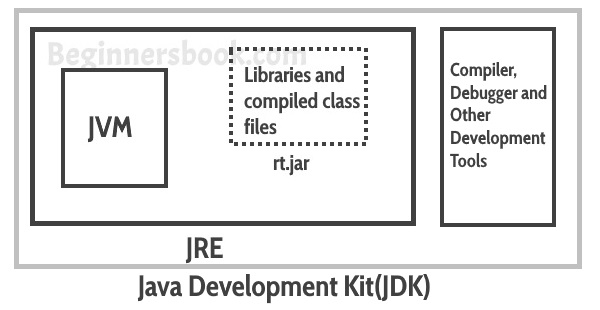
1. JDK:
Java Development Kit is the core component of Java Environment and provides all the tools, executables and binaries required to compile, debug and execute a Java Program.
2. JVM:
JVM is responsible for converting Byte code to the machine specific code. JVM is also platform dependent and provides core java functions like memory management, garbage collection, security etc. JVM is customizable and we can use java options to customize it, for example allocating minimum and maximum memory to JVM. JVM is called virtual because it provides an interface that does not depend on the underlying operating system and machine hardware.
2. JRE:
Java Runtime Environment provides a platform to execute java programs. JRE consists of JVM and java binaries and other classes to execute any program successfully.

1. Java Heap Space:
Java Heap space is used by java runtime to allocate memory to Objects and JRE classes. Whenever we create any object, it's always created in the Heap space.
Garbage Collection runs on the heap memory to free the memory used by objects that doesn't have any reference. Any object created in the heap space has global access and can be referenced from anywhere of the application.
2. Java Stack Memory:
Stack in java is a section of memory which contains methods, local variables and reference variables. Local variables are created in the stack.
Stack memory is always referenced in LIFO ( Last-In-First-Out ) order. Whenever a method is invoked, a new block is created in the stack memory for the method to hold local primitive values and reference to other objects in the method.
As soon as method ends, the block becomes unused and become available for next method. Stack memory size is very less compared to Heap memory.
Difference:
| Parameter | Stack Memory | Heap Space |
|---|---|---|
| Application | Stack is used in parts, one at a time during execution of a thread | The entire application uses Heap space during runtime |
| Size | Stack has size limits depending upon OS and is usually smaller then Heap | There is no size limit on Heap |
| Storage | Stores only primitive variables and references to objects that are created in Heap Space | All the newly created objects are stored here |
| Order | It is accessed using Last-in First-out (LIFO) memory allocation system | This memory is accessed via complex memory management techniques that include Young Generation, Old or Tenured Generation, and Permanent Generation. |
| Life | Stack memory only exists as long as the current method is running | Heap space exists as long as the application runs |
| Efficiency | Comparatively much faster to allocate when compared to heap | Slower to allocate when compared to stack |
| Allocation/Deallocation | This Memory is automatically allocated and deallocated when a method is called and returned respectively | Heap space is allocated when new objects are created and deallocated by Gargabe Collector when they are no longer referenced |
JVM is a program which takes Java bytecode and converts the byte code (line by line) into machine understandable code. JVM perform some particular types of operations:
Types of Memory areas allocated by the JVM:
1. Classloader: Classloader is a subsystem of JVM that is used to load class files.
2. Class(Method) Area: Class(Method) Area stores per-class structures such as the runtime constant pool, field and method data, the code for methods.
3. Heap: It is the runtime data area in which objects are allocated.
4. Stack: Java Stack stores frames.It holds local variables and partial results, and plays a part in method invocation and return. Each thread has a private JVM stack, created at the same time as thread.
5. Program Counter Register: PC (program counter) register. It contains the address of the Java virtual machine instruction currently being executed.
6. Native Method Stack: It contains all the native methods used in the application.
The automatic conversion of primitive data types into its equivalent Wrapper type is known as boxing and opposite operation is known as unboxing.
Example: Autoboxing
/**
 * Autoboxing
 */
class BoxingExample {
    public static void main(String args[]) {
        int a = 50;
        Integer a2 = new Integer(a); // Boxing
        Integer a3 = 5; // Boxing

        System.out.println(a2 + " " + a3);
    }
}
Example: Unboxing
/**
 * Unboxing
 */
class UnboxingExample {
    public static void main(String args[]) {
        Integer i = new Integer(50);
        int a = i;

        System.out.println(a);
    }
}
1. Transient:
The transient modifier tells the Java object serialization subsystem to exclude the field when serializing an instance of the class. When the object is then deserialized, the field will be initialized to the default value; i.e. null for a reference type, and zero or false for a primitive type.
Example:
/**
 * Transient
 */
public transient int limit = 55;   // will not persist
public int b;   // will persist
2. Volatile:
The volatile modifier tells the JVM that writes to the field should always be synchronously flushed to memory, and that reads of the field should always read from memory. This means that fields marked as volatile can be safely accessed and updated in a multi-thread application without using native or standard library-based synchronization.
Example:
/**
 * Volatile
 */
public class MyRunnable implements Runnable {
   private volatile boolean active;
   public void run() {
      active = true;
      while (active) {
      }
   }
   public void stop() {
      active = false;
   }
}
An assertion allows testing the correctness of any assumptions that have been made in the program. Assertion is achieved using the assert statement in Java.
While executing assertion, it is believed to be true. If it fails, JVM throws an error named AssertionError. It is mainly used for testing purposes during development.
The assert statement is used with a Boolean expression and can be written in two different ways.
// First way
assert expression;

// Second way
assert expression1 : expression2;
Example:
/**
 * Assertions
 */
public class Example {
    public static void main(String[] args) {
        int age = 14;
        assert age <= 18 : "Cannot Vote";
        System.out.println("The voter's age is " + age);
    }
}
1. Final Variable:
Final variables are nothing but constants. We cannot change the value of a final variable once it is initialized.
Example:
/**
 * Final Variable
 */
class Demo {

    final int MAX_VALUE = 99;

    void myMethod() {
        MAX_VALUE = 101;
    }

    public static void main(String args[]) {
        Demo obj = new Demo();
        obj.myMethod();
    }
}
Output
Exception in thread "main" java.lang.Error: Unresolved compilation problem:
	The final field Demo.MAX_VALUE cannot be assigned

	at beginnersbook.com.Demo.myMethod(Details.java:6)
	at beginnersbook.com.Demo.main(Details.java:10)
2. Blank final variable:
A final variable that is not initialized at the time of declaration is known as blank final variable. We must initialize the blank final variable in constructor of the class otherwise it will throw a compilation error ( Error: variable MAX_VALUE might not have been initialized ).
Example:
/**
 * Blank final variable
 */
class Demo {
    // Blank final variable
    final int MAX_VALUE;

    Demo() {
        // It must be initialized in constructor
        MAX_VALUE = 100;
    }

    void myMethod() {
        System.out.println(MAX_VALUE);
    }

    public static void main(String args[]) {
        Demo obj = new Demo();
        obj.myMethod();
    }
}
Output
1003. Final Method:
A final method cannot be overridden. Which means even though a sub class can call the final method of parent class without any issues but it cannot override it.
Example:
/**
 * Final Method
 */
class XYZ {
    final void demo() {
        System.out.println("XYZ Class Method");
    }
}

class ABC extends XYZ {
    void demo() {
        System.out.println("ABC Class Method");
    }

    public static void main(String args[]) {
        ABC obj = new ABC();
        obj.demo();
    }
}
If a primitive type or a string is defined as a constant and the value is known at compile time, the compiler replaces the constant name everywhere in the code with its value. This is called a compile-time constant.
Compile time constant must be:
They are replaced with actual values at compile time because compiler know their value up-front and also knows that it cannot be changed during run-time.
private final int x = 10;
default – No keyword required, when a class, constructor,variable, method, or data member declared without any access specifier then it is having default access scope i.e. accessible only within the same package.private - when declared as a private , access scope is limited within the enclosing class.protected - when declared as protocted, access scope is limited to enclosing classes, subclasses from same package as well as other packages.public - when declared as public, accessible everywhere in the program.... /* data member variables */ String firstName="Pradeep"; /* default scope */ protected isValid=true; /* protected scope */ private String otp="AB0392"; /* private scope */ public int id = 12334; /* public scope */ ... ... /* data member functions */ String getFirstName(){ return this.firstName; } /* default scope */ protected boolean getStatus(){this.isValid;} /* protected scope */ private void generateOtp(){ /* private scope */ this.otp = this.hashCode() << 16; }; public int getId(){ return this.id; } /* public scope */ ... .../* inner classes */ class A{} /* default scope */ protected class B{} /* protected scope */ private class C{} /* private scope */ public class D{} /* public scope */ ...
In Java, all non-static methods are by default virtual functions. Only methods marked with the keyword final, which cannot be overridden, along with private methods, which are not inherited, are non-virtual.
Example: Virtual function with Interface
/**
 * The function applyBrakes() is virtual because
 * functions in interfaces are designed to be overridden.
 **/
interface Bicycle {
    void applyBrakes();
}

class ACMEBicycle implements Bicycle {
    public void applyBrakes() { // Here we implement applyBrakes()
        System.out.println("Brakes applied"); // function
    }
}
A native method is a Java method (either an instance method or a class method) whose implementation is also written in another programming language such as C/C++. Moreover, a method marked as native cannot have a body and should end with a semicolon:
Main.java:
public class Main {
    public native int intMethod(int i);

    public static void main(String[] args) {
        System.loadLibrary("Main");
        System.out.println(new Main().intMethod(2));
    }
}
Main.c:
#include <jni.h>
#include "Main.h"

JNIEXPORT jint JNICALL Java_Main_intMethod(
    JNIEnv *env, jobject obj, jint i) {
  return i * i;
}
Compile and Run:
javac Main.java
javah -jni Main
gcc -shared -fpic -o libMain.so -I${JAVA_HOME}/include \
  -I${JAVA_HOME}/include/linux Main.c
java -Djava.library.path=. Main
Output
4If a method is declared as static, it is a member of a class rather than belonging to the object of the class. It can be called without creating an object of the class. A static method also has the power to access static data members of the class.
There are a few restrictions imposed on a static method
this and super cannot be used in static context.Example:
/**
 * Static Methods
 */
class Parent {
    static void display() {
        System.out.println("Super class");
    }
}

public class Example extends Parent {
    void display()  // trying to override display() {
       System.out.println("Sub class");
    }

    public static void main(String[] args) {
        Parent obj = new Example();
        obj.display();
    }
}
This generates a compile time error. The output is as follows −
Example.java:10: error: display() in Example cannot override display() in Parent
void display()  // trying to override display()
     ^
overridden method is static

1 error
What is the structure and features of using a lambda expression? A lambda is a set of instructions that can be separated into a separate variable and then repeatedly called in various places of the program.
The basis of the lambda expression is the lambda operator , which represents the arrow ->. This operator divides the lambda expression into two parts: the left side contains a list of expression parameters, and the right actually represents the body of the lambda expression, where all actions are performed.
The lambda expression is not executed by itself, but forms the implementation of the method defined in the functional interface. It is important that the functional interface should contain only one single method without implementation.
interface  Operationable {
     int  calculate ( int  x , int  y );
}

public  static  void main ( String [] args) {
    Operationable operation = (x, y) - > x + y;
    int result = operation.calculate ( 10 , 20 );
    System.out.println (result); // 30
}
In fact, lambda expressions are in some way a shorthand form of internal anonymous classes that were previously used in Java.
Deferred execution lambda expressions - it is defined once in one place of the program, it is called if necessary, any number of times and in any place of the program.
The parameters of the lambda expression must correspond in type to the parameters of the functional interface method:
operation = ( int x, int y) - > x + y;
// When writing the lambda expression itself, the parameter type is allowed not to be specified:
(x, y) - > x + y;
// If the method does not accept any parameters, then empty brackets are written, for example:
() - >  30  +  20 ;
// If the method accepts only one parameter, then the brackets can be omitted:
n - > n * n;
interface  Printable {
     void  print( String  s );
}

public  static  void main ( String [] args) {
    Printable printer = s - >  System.out.println(s);
    printer.print("Hello, world");
}

// _ Block lambda - expressions_ are surrounded by curly braces . The modular lambda - expressions can be used inside nested blocks, loops, `design the if ` ` switch statement ', create variables, and so on . d . If you block a lambda - expression must return a value, it explicitly applies `statement return statement ' :


Operationable operation = ( int x, int y) - > {
    if (y ==  0 ) {
        return  0 ;
    }
    else {
        return x / y;
    }
};
interface  Condition {
     boolean  isAppropriate ( int  n );
}

private  static  int sum ( int [] numbers, Condition condition) {
     int result =  0 ;
    for ( int i : numbers) {
         if (condition.isAppropriate(i)) {
            result + = i;
        }
    }
    return result;
}

public  static  void main ( String [] args) {
     System.out.println(sum ( new  int [] { 0 , 1 , 0 , 3 , 0 , 5 , 0 , 7 , 0 , 9 }, (n) - > n ! =  0 ));
}
Access to external scope variables from a lambda expression is very similar to access from anonymous objects.
The default methods of the implemented functional interface are not allowed to be accessed inside the lambda expression.
If the method existing in the class already does everything that is necessary, then you can use the method reference mechanism (method reference) to directly pass this method. The result will be exactly the same as in the case of defining a lambda expression that calls this method.
Example:
private interface Measurable {
   public int length(String string);
}

public  static  void main ( String [] args) {
   Measurable a =  String::length;
   System.out.println(a.length("abc"));
}
Method references are potentially more efficient than using lambda expressions. In addition, they provide the compiler with better information about the type, and if you can choose between using a reference to an existing method and using a lambda expression, you should always use a method reference.
Nested Inner class can access any private instance variable of outer class. Like any other instance variable, we can have access modifier private, protected, public and default modifier.
Example:
/**
 * Inner Class
 */
class Outer {
   class Inner {
      public void show() {
           System.out.println("In a nested class method");
      }
   }
}
class Main {
   public static void main(String[] args) {
       Outer.Inner in = new Outer().new Inner();
       in.show();
   }
}
A subclass is class which inherits a method or methods from a superclass.
Example:
/**
 * Sub Class
 */
class Car {
    //...
}

class HybridCar extends Car {
    //...
}
1. Static Class Loading:
Creating objects and instance using new keyword is known as static class loading. The retrieval of class definition and instantiation of the object is done at compile time.
Example:
/**
 * Static Class Loading
 */
class TestClass {
  public static void main(String args[]) {
      TestClass tc = new TestClass();
  }
}
2. Dynamic Class Loading:
Loading classes use Class.forName() method. Dynamic class loading is done when the name of the class is not known at compile time.
Example:
/**
 * Dynamic Class Loading
 */
Class.forName (String className);
1. Runtime Class:
The java.lang.Runtime class is a subclass of Object class, provide access to the Java runtime system. The runtime information like memory availability, invoking the garbage collector, etc.
Example:
/**
 * Runtime Class
 */
public class RuntimeTest
{
    static class Message extends Thread {
        public void run() {
            System.out.println(" Exit");
        }
    }

    public static void main(String[] args) {
        try {
            Runtime.getRuntime().addShutdownHook(new Message());
            System.out.println(" Program Started...");
            System.out.println(" Wait for 5 seconds...");
            Thread.sleep(5000);
            System.out.println(" Program Ended...");
        } catch (Exception e) {
            e.printStackTrace();
        }
    }
}
2. System Class:
The purpose of the System class is to provide access to system resources. It contains accessibility to standard input, standart output, error output streams, current time in millis, terminating the application, etc.
1. Using new keyword:
MyObject object = new MyObject();
2. Using Class.forName():
MyObject object = (MyObject) Class.forName("subin.rnd.MyObject").newInstance();
3. Using clone():
MyObject anotherObject = new MyObject();
MyObject object = (MyObject) anotherObject.clone();
4. Using object deserialization:
ObjectInputStream inStream = new ObjectInputStream(anInputStream );
MyObject object = (MyObject) inStream.readObject();
Immutable objects are objects that don't change. A Java immutable object must have all its fields be internal, private final fields. It must not implement any setters. It needs a constructor that takes a value for every single field.
Creating an Immutable Object:
/**
 * Immutable Object
 */
public class DateContainer {
    private final Date date;

    public DateContainer() {
        this.date = new Date();
    }

    public Date getDate() {
        return new Date(date.getTime());
    }
}
Immutable class means that once an object is created, we cannot change its content. In Java, all the wrapper classes (like Integer, Boolean, Byte, Short) and String class is immutable.
Rules to create immutable classes:
/**
 * Immutable Class
 */
public final class Employee {

    final String pancardNumber;

    public Employee(String pancardNumber) {
        this.pancardNumber = pancardNumber;
    }

    public String getPancardNumber() {
        return pancardNumber;
    }
}
Bootstrap ClassLoader is repsonsible for loading standard JDK classs files from rt.jar and it is parent of all class loaders in java. There are three types of built-in ClassLoader in Java:
1. Bootstrap Class Loader: It loads JDK internal classes, typically loads rt.jar and other core classes for example java.lang.* package classes
2. Extensions Class Loader: It loads classes from the JDK extensions directory, usually $JAVA_HOME/lib/ext directory.
3. System Class Loader: It loads classes from the current classpath that can be set while invoking a program using -cp or -classpath command line options.
/**
 * ClassLoader
 */
import java.util.logging.Level;
import java.util.logging.Logger;

public class ClassLoaderTest {

    public static void main(String args[]) {
        try {
            // printing ClassLoader of this class
            System.out.println("ClassLoader : " + ClassLoaderTest.class.getClassLoader());

            // trying to explicitly load this class again using Extension class loader
            Class.forName("Explicitly load class", true, ClassLoaderTest.class.getClassLoader().getParent());
        } catch (ClassNotFoundException ex) {
            Logger.getLogger(ClassLoaderTest.class.getName()).log(Level.SEVERE, null, ex);
        }
    }
}
Different ways to create an object in Java
class ObjectCreationExample{
	String Owner;
}
public class MainClass {
	public static void main(String[] args) {
		// Here we are creating Object of JBT using new keyword
		ObjectCreationExample obj = new ObjectCreationExample();
	}
}
class CreateObjectClass {
	static int j = 10;
	CreateObjectClass() {
		i = j++;
	}
	int i;
	@Override
	public String toString() {
		return "Value of i :" + i;
	}
}

class MainClass {
	public static void main(String[] args) {
		try {
			Class cls = Class.forName("CreateObjectClass");
			CreateObjectClass obj = (CreateObjectClass) cls.newInstance();
			CreateObjectClass obj1 = (CreateObjectClass) cls.newInstance();
			System.out.println(obj);
			System.out.println(obj1);
		} catch (ClassNotFoundException e) {
			e.printStackTrace();
		} catch (InstantiationException e) {
			e.printStackTrace();
		} catch (IllegalAccessException e) {
			e.printStackTrace();
		}
	}
}
 class CreateObjectWithClone implements Cloneable {
	@Override
	protected Object clone() throws CloneNotSupportedException {
		return super.clone();
	}
	int i;
	static int j = 10;
	CreateObjectWithClone() {
		i = j++;
	}
	@Override
	public String toString() {
		return "Value of i :" + i;
	}
}

class MainClass {
	public static void main(String[] args) {
		CreateObjectWithClone obj1 = new CreateObjectWithClone();
		System.out.println(obj1);
		try {
			CreateObjectWithClone obj2 = (CreateObjectWithClone) obj1.clone();
			System.out.println(obj2);
		} catch (CloneNotSupportedException e) {
			e.printStackTrace();
		}
	}
}
class CreateObjectWithClassLoader {
	static int j = 10;
	CreateObjectWithClassLoader() {
		i = j++;
	}
	int i;
	@Override
	public String toString() {
		return "Value of i :" + i;
	}
}

public class MainClass {
	public static void main(String[] args) {
		CreateObjectWithClassLoader obj = null;
		try {
			obj = (CreateObjectWithClassLoader) new MainClass().getClass()
					.getClassLoader().loadClass("CreateObjectWithClassLoader").newInstance();
        // Fully qualified classname should be used.
		} catch (InstantiationException e) {
			e.printStackTrace();
		} catch (IllegalAccessException e) {
			e.printStackTrace();
		} catch (ClassNotFoundException e) {
			e.printStackTrace();
		}
		System.out.println(obj);
	}
}
The Object class is the parent class of all the classes in java by default.
| Method | Description |
|---|---|
| public final Class getClass() | returns the Class class object of this object. The Class class can further be used to get the metadata of this class. |
| public int hashCode() | returns the hashcode number for this object. |
| public boolean equals(Object obj) | compares the given object to this object. |
| protected Object clone() throws CloneNotSupportedException | creates and returns the exact copy (clone) of this object. |
| public String toString() | returns the string representation of this object. |
| public final void notify() | wakes up single thread, waiting on this object\'s monitor. |
| public final void notifyAll() | wakes up all the threads, waiting on this object\'s monitor. |
| public final void wait(long timeout)throws InterruptedException | causes the current thread to wait for the specified milliseconds, until another thread notifies (invokes notify() or notifyAll() method). |
| public final void wait(long timeout,int nanos)throws InterruptedException | causes the current thread to wait for the specified milliseconds and nanoseconds, until another thread notifies (invokes notify() or notifyAll() method). |
| public final void wait()throws InterruptedException | causes the current thread to wait, until another thread notifies (invokes notify() or notifyAll() method). |
| protected void finalize()throws Throwable | is invoked by the garbage collector before object is being garbage collected. |
An optional value Optionalis a container for an object that may or may not contain a value null. Such a wrapper is a convenient means of prevention NullPointerException, as has some higher-order functions, eliminating the need for repeating if null/notNullchecks:
Optional < String > optional =  Optional.of( " hello " );

optional.isPresent(); // true
optional.ifPresent(s ->  System.out.println(s.length())); // 5
optional.get(); // "hello"
optional.orElse( " ops ... " ); // "hello"
In Java, a constructor is a block of codes similar to the method. It is called when an instance of the class is created. At the time of calling constructor, memory for the object is allocated in the memory.
Types of Java Constructors:
Example: Default Constructor (or) no-arg constructor
/**
 * Default Constructor
 */
public class Car {
    Car() {
        System.out.println("Default Constructor of Car class called");
    }

    public static void main(String args[]) {
        // Calling the default constructor
        Car c = new Car();
    }
}
Output
Default Constructor of Car class called
Example: Parameterized Constructor
/**
 * Parameterized Constructor
 */
public class Car {
    String carColor;

    Car(String carColor) {
        this.carColor = carColor;
    }

    public void display() {
        System.out.println("Color of the Car is : " + carColor);
    }

    public static void main(String args[]) {
        // Calling the parameterized constructor
        Car c = new Car("Blue");
        c.display();
    }
}
Java constructor chaining is a method of calling one constructor with the help of another while considering the present object. It can be done in 2 ways –
this() keyword for constructors in the same class.super() keyword to call a constructor from the base class./** * Constructor Chaining * within same class Using this() keyword */ class Temp { // default constructor 1 // default constructor will call another constructor // using this keyword from same class Temp() { // calls constructor 2 this(5); System.out.println("The Default constructor"); } // parameterized constructor 2 Temp(int x) { // calls constructor 3 this(10, 20); System.out.println(x); } // parameterized constructor 3 Temp(int x, int y) { System.out.println(10 + 20); } public static void main(String args[]) { // invokes default constructor first new Temp(); } }
Ouput:
30
10
The Default constructor
/**
 * Constructor Chaining to
 * other class using super() keyword
 */
class Base
{
    String name;

    // constructor 1
    Base() {
        this("");
        System.out.println("No-argument constructor of base class");
    }

    // constructor 2
    Base(String name) {
        this.name = name;
        System.out.println("Calling parameterized constructor of base");
    }
}

class Derived extends Base
{
    // constructor 3
    Derived() {
        System.out.println("No-argument constructor of derived");
    }

    // parameterized constructor 4
    Derived(String name) {
        // invokes base class constructor 2
        super(name);
        System.out.println("Calling parameterized constructor of derived");
    }

    public static void main(String args[]) {
        // calls parameterized constructor 4
        Derived obj = new Derived("test");

        // Calls No-argument constructor
        // Derived obj = new Derived();
    }
}
Output:
Calling parameterized constructor of base
Calling parameterized constructor of derived
public class MyClass {

    static{
        System.out.println("outer static block..");
        new MyClass();
    }

    private MyInner in;

    {
        System.out.println("outer instance block..");
        //new MyClass(); //private constructor accessbile but bad practive will cause infinite loop
    }

    private MyClass(){
        System.out.println("outer private constructor..");
    }

    public void getInner(){
        System.out.println("outer data member function..");

        new MyInner();
    }

    private static class MyInner{
        {
            System.out.println("inner instance block..");
            new MyClass();
        }

        MyInner(){
            System.out.println("inner constructor..");
        }
    }


    public static void main(String args[]) {
        System.out.println("static main method..");
        MyClass m=new MyClass();
        m.getInner();
    }
}

class Visitor{
    {
        new MyClass();//gives compilation error as MyClass() has private access in MyClass
    }
}
CopyOnWriteArrayList class implements List and RandomAccess interfaces and thus provide all functionalities available in ArrayList class.
Using CopyOnWriteArrayList is costly for update operations, because each mutation creates a cloned copy of underlying array and add/update element to it.
It is thread-safe version of ArrayList. Each thread accessing the list sees its own version of snapshot of backing array created while initializing the iterator for this list.
Because it gets snapshot of underlying array while creating iterator, it does not throw ConcurrentModificationException.
Mutation operations on iterators (remove, set, and add) are not supported. These methods throw UnsupportedOperationException.
CopyOnWriteArrayList is a concurrent replacement for a synchronized List and offers better concurrency when iterations outnumber mutations.
It allows duplicate elements and heterogeneous Objects (use generics to get compile time errors).
Because it creates a new copy of array everytime iterator is created, performance is slower than ArrayList.
We can prefer to use CopyOnWriteArrayList over normal ArrayList in following cases:
        import java.util.concurrent.CopyOnWriteArrayList;
        CopyOnWriteArrayList<String> copyOnWriteArrayList = new CopyOnWriteArrayList<String>();
        copyOnWriteArrayList.add("captain america");
        Iterator it = copyOnWriteArrayList.iterator();  //iterator creates separate snapshot
        copyOnWriteArrayList.add("iron man");           //doesn't throw ConcurrentModificationException
        while(it.hasNext())
            System.out.println(it.next());              // prints captain america only , since add operation is after returning iterator

        it = copyOnWriteArrayList.iterator();           //fresh snapshot
        while(it.hasNext())
            System.out.println(it.next());              // prints captain america and iron man,

        it = copyOnWriteArrayList.iterator();           //fresh snapshot
        while(it.hasNext()){
            System.out.println(it.next());
            it.remove();                                //mutable operation 'remove' not allowed ,throws UnsupportedOperationException
        }

        ArrayList<String> list = new ArrayList<String>();
        list.add("A");
        Iterator ait = list.iterator();
        list.add("B");                                      // immediately throws  ConcurrentModificationException
        while(ait.hasNext())
            System.out.println(ait.next());

        ait = list.iterator();
        while(ait.hasNext()){
            System.out.println(ait.next());
            ait.remove();                                //mutable operation 'remove' allowed without any exception
        }
When you create String object using new() operator, it always create a new object in heap memory. On the other hand, if you create object using String literal syntax e.g. "Java", it may return an existing object from String pool ( a cache of String object in Perm gen space, which is now moved to heap space in recent Java release ), if it's already exists. Otherwise it will create a new string object and put in string pool for future re-use.
Example:
/**
 * String literal
 */
String a = "abc";
String b = "abc";
System.out.println(a == b);  // true

/**
 * Using new()
 */
String c = new String("abc");
String d = new String("abc");
System.out.println(c == d);  // false
1. Mutability Difference:
String is immutable, if you try to alter their values, another object gets created, whereas StringBuffer and StringBuilder are mutable so they can change their values.
2. Thread-Safety Difference:
The difference between StringBuffer and StringBuilder is that StringBuffer is thread-safe. So when the application needs to be run only in a single thread then it is better to use StringBuilder. StringBuilder is more efficient than StringBuffer.
Example:
/**
 * StringBuffer
 */
public class BufferTest {
    public static void main(String[] args) {
        StringBuffer buffer = new StringBuffer("Hello");
        buffer.append(" World");
        System.out.println(buffer);
    }
}
Example:
/**
 * StringBuilder
 */
public class BuilderTest {
    public static void main(String[] args) {
        StringBuilder builder = new StringBuilder("Hello");
        builder.append(" World");
        System.out.println(builder);
    }
}
The string is Immutable in Java because String objects are cached in String pool. Since cached String literals are shared between multiple clients there is always a risk, where one client's action would affect all another client.
Since string is immutable it can safely share between many threads and avoid any synchronization issues in java.
String Pool in java is a pool of Strings stored in Java Heap Memory. String pool helps in saving a lot of space for Java Runtime although it takes more time to create the String.
When we use double quotes to create a String, it first looks for String with the same value in the String pool, if found it just returns the reference else it creates a new String in the pool and then returns the reference. However using new operator, we force String class to create a new String object in heap space.
/**
 * String Pool
 */
public class StringPool {

    public static void main(String[] args) {
        String s1 = "Java";
        String s2 = "Java";
        String s3 = new String("Java");

        System.out.println("s1 == s2 :" + (s1 == s2)); // true
        System.out.println("s1 == s3 :" + (s1 == s3)); // false
    }
}
String is immutable, if you try to alter their values, another object gets created, whereas StringBuffer and StringBuilder are mutable so they can change their values.
The difference between StringBuffer and StringBuilder is that StringBuffer is thread-safe. So when the application needs to be run only in a single thread then it is better to use StringBuilder. StringBuilder is more efficient than StringBuffer.
Situations:
String object is immutable.StringBuilder is good enough.StringBuffer because StringBuffer is synchronous so you have thread-safety.Example:
class StringExample {

    // Concatenates to String
    public static void concat1(String s1) {
        s1 = s1 + "World";
    }

    // Concatenates to StringBuilder
    public static void concat2(StringBuilder s2) {
        s2.append("World");
    }

    // Concatenates to StringBuffer
    public static void concat3(StringBuffer s3) {
        s3.append("World");
    }

    public static void main(String[] args) {
        String s1 = "Hello";
        concat1(s1);  // s1 is not changed
        System.out.println("String: " + s1);

        StringBuilder s2 = new StringBuilder("Hello");
        concat2(s2); // s2 is changed
        System.out.println("StringBuilder: " + s2);

        StringBuffer s3 = new StringBuffer("Hello");
        concat3(s3); // s3 is changed
        System.out.println("StringBuffer: " + s3);
    }
}
Output
String: Hello
StringBuilder: World
StringBuffer: World
The class is StringJoinerused to create a sequence of strings separated by a separator with the ability to append a prefix and suffix to the resulting string:
StringJoiner joiner =  new  StringJoiner ( " . " , " Prefix- " , " -suffix " );
for ( String s :  " Hello the brave world " . split ( "  " )) {
    , joiner, . add (s);
}
System.out.println(joiner); // prefix-Hello.the.brave.world-suffix
Reflection API in Java is used to manipulate class and its members which include fields, methods, constructor, etc. at runtime.
The java.lang.Class class provides many methods that can be used to get metadata, examine and change the run time behavior of a class. There are 3 ways to get the instance of Class class.
1. forName() method:
/**
 * forName()
 */
class Simple {
}

class Test {
    public static void main(String args[]) {
        Class c = Class.forName("Simple");
        System.out.println(c.getName());
    }
}
Output
Simple2. getClass() method:
It returns the instance of Class class. It should be used if you know the type. Moreover, it can be used with primitives.
/**
 * getClass
 */
class Simple {
}

class Test {
    void printName(Object obj) {
        Class c = obj.getClass();
        System.out.println(c.getName());
    }

    public static void main(String args[]) {
        Simple s = new Simple();
        Test t = new Test();
        t.printName(s);
    }
}
Output
Simple3. The .class syntax:
If a type is available but there is no instance then it is possible to obtain a Class by appending ".class" to the name of the type. It can be used for primitive data type also.
/**
 * .class Syntax
 */
class Test {
  public static void main(String args[]) {
   Class c = boolean.class;
   System.out.println(c.getName());

   Class c2 = Test.class;
   System.out.println(c2.getName());
 }
}
Output
boolean
Test
An interface java.util.Stream is a sequence of elements on which various operations can be performed.
Operations on streams can be either intermediate (intermediate) or final (terminal) . Final operations return a result of a certain type, and intermediate operations return the same stream. Thus, you can build chains of several operations on the same stream.
A stream can have any number of calls to intermediate operations and the last call to the final operation. At the same time, all intermediate operations are performed lazily and until the final operation is called, no actions actually happen (similar to creating an object Threador Runnable, without a call start()).
Streams are created based on sources of some, for example, classes from java.util.Collection.
Associative arrays (maps), for example HashMap, are not supported.
Operations on streams can be performed both sequentially and in parallel.
Streams cannot be reused. As soon as some final operation has been called, the flow is closed.
In addition to the universal object, there are special types of streams to work with primitive data types int, longand double: IntStream, LongStreamand DoubleStream. These primitive streams work just like regular object streams, but with the following differences:
IntFunctionor IntPredicateinstead of Functionand Predicate;sum(), average(), mapToObj().learning-zone/java-basics is a public repo on GitHub by learning-zone. Java Basics ( Java-25 ).
It declares no license on GitHub. Public does not mean open source: without a license, nobody is granted the right to reuse it.
Its maker has not tagged a system, so it is unknown here. Its README says what it needs.
Open "Take it" on its page: Take My Repo writes an install plan for your machine and hands it to your AI agent (Claude Code, Codex or Cursor), which asks you before each step. Take My Repo has not tested it on any machine.
Its last change on GitHub was on 2024-09-29. Take My Repo does not judge from that whether it is maintained.
Nobody has reviewed it on Take My Repo yet, which says nothing about its quality.
📚 A curated list of awesome articles, videos, and other resources to learn and practice software architecture, patterns, and principles.
Reverse engineer anything with agents, from app behavior down to native binaries.
:tea: All Gang of Four Design Patterns written in Unity C# with many examples. And some Game Programming Patterns written in Unity C#. | 各种设计模式的Unity3D C#版本实现