python basics

python-basics
Python Basics ( v3.x )
- 1.6k
- 4 mo ago
Repo learning-zone/python-basics, read from GitHub 1 min ago. learning-zone has not joined Take My Repo.
In short
learning-zone/python-basics is a public repo on GitHub by learning-zone. Python Basics ( v3.x ). It declares no license on GitHub. Public does not mean open source: without a license, nobody is granted the right to reuse it. It is written mainly in Python, has 1,634 stars and last changed on 2026-07-10. Nobody has reviewed it on Take My Repo yet, which says nothing about its quality. Read from GitHub on 2026-11-18.
In the maintainer's words. Shown from GitHub; Take My Repo does not keep a copy.
Python Basics
Click ★ if you like the project. Your contributions are heartily ♡ welcome.
Table of Contents
- Introduction: (Python compilation, bytecode, and VMs)
- Data Types: Data Types & Built-in Scalar Types
- Dictionary: Hash maps, hash collisions, and Python 3.6+ ordering
- Operators: Operators & Bitwise Operations
- Control Flow Statements: Control Flow Statements & Optimization
- Core Data Structures: Lists, Tuples, Sets, Deques
- Functions: Scope, LEGB rule, args/kwargs, closures
- Lambda Functions: Lambda Functions & Functional Programming Patterns
- Modules and Packages: Import system, sys.modules, namespace packages
- Object-Oriented Programming: MRO, C3 Linearization, Descriptors, Metaclasses
- Exception Handling: EAFP vs LBYL, custom exceptions, traceback overhead
- File Handling: Streams, text vs binary
- Memory Management: Object allocation, PyMalloc, small object caching
- Garbage Collector: Reference counting, generational collection, cyclic references
- Mutable vs Immutable: Hashability, identity vs equality, side-effects
- Iterators and Generators: Iteration protocol, lazy evaluation, memory efficiency
- Decorators: Function decorators, class decorators, functools.wraps, stateful decorators
- Context Managers: Context management protocol, contextlib, resource management
- Concurrency and Parallelism: Threading, Multiprocessing, Asyncio, Event loop, GIL
- Testing and Debugging: Unittest, Pytest fixtures, Mocking, profiling with cProfile
- Miscellaneous: Dunder methods, Typing/Type hinting, slots optimization
Python for AI & Data Science
- Numerical Computing: NumPy arrays, vectorisation
- Data Manipulation: Pandas DataFrames, Series
- Data Visualisation: Matplotlib, Seaborn
- Machine Learning Libraries: Scikit-Learn
- Deep Learning Frameworks: PyTorch, TensorFlow
- Model Evaluation Metrics: Precision, Recall, F1
# 1. Introduction
Q. What is Python?
Python is a popular programming language. It was created by Guido van Rossum, and released in 1991.
It is used for:
web development (server-side),
software development,
mathematics,
system scripting.
Q. What can Python do?
Python can be used on a server to create web applications. Python can be used alongside software to create workflows. Python can connect to database systems. It can also read and modify files. Python can be used to handle big data and perform complex mathematics. Python can be used for rapid prototyping, or for production-ready software development.
Q. When is using Python the "right choice" for a project?
Python is a high-level, interpreted, interactive and object-oriented scripting language. Python is designed to be highly readable. It uses English keywords frequently where as other languages use punctuation, and it has fewer syntactical constructions than other languages.
Python is a high-level general-purpose programming language that can be applied to many different classes of problems.
The language comes with a large standard library that covers areas such as string processing like regular expressions, Unicode, calculating differences between files, Internet protocols like HTTP, FTP, SMTP, XML-RPC, POP, IMAP, CGI programming, software engineering like unit testing, logging, profiling, parsing Python code, and operating system interfaces like system calls, file systems, TCP/IP sockets.
Although likes and dislikes are highly personal, a developer who is "worth his or her salt" will highlight features of the Python language that are generally considered advantageous (which also helps answer the question of what Python is "particularly good for". Some of the more common valid answers to this question include:
- Ease of use and ease of refactoring, thanks to the flexibility of Python's syntax, which makes it especially useful for rapid prototyping.
- More compact code, thanks again to Python's syntax, along with a wealth of functionally-rich Python libraries (distributed freely with most Python language implementations).
- A dynamically-typed and strongly-typed language, offering the rare combination of code flexibility while at the same time avoiding pesky implicit-type-conversion bugs.
- It's free and open source! Need we say more?
Q. What are some drawbacks of the Python language?
The two most common valid answers to this question are:
- The Global Interpreter Lock (GIL). CPython (the most common Python implementation) is not fully thread safe. In order to support multi-threaded Python programs, CPython provides a global lock that must be held by the current thread before it can safely access Python objects. As a result, no matter how many threads or processors are present, only one thread is ever being executed at any given time. In comparison, it is worth noting that the PyPy implementation discussed earlier in this article provides a stackless mode that supports micro-threads for massive concurrency.
- Execution speed. Python can be slower than compiled languages since it is interpreted. (Well, sort of. See our earlier discussion on this topic.)
Q. We know Python is all the rage these days. But to be truly accepting of a great technology, you must know its pitfalls as well?
Of course. To be truly yourself, you must be accepting of your flaws. Only then can you move forward to work on them. Python has its flaws too:
Python's interpreted nature imposes a speed penalty on it. While Python is great for a lot of things, it is weak in mobile computing, and in browsers.
Being dynamically-typed, Python uses duck-typing (If it looks like a duck, it must be a duck). This can raise runtime errors.
Python has underdeveloped database access layers. This renders it a less-than-perfect choice for huge database applications.
And even after these pitfalls, of course. Being easy makes it addictive. Once a Python-coder, always a Python coder.
So while it has problems, it is also a wonderful tool for a lot of things.
Q. What are the key differences between Python 2 and 3?
-
Text and Data instead of Unicode and 8-bit strings. Python 3.0 uses the concepts of text and (binary) data instead of Unicode strings and 8-bit strings. The biggest ramification of this is that any attempt to mix text and data in Python 3.0 raises a TypeError (to combine the two safely, you must decode bytes or encode Unicode, but you need to know the proper encoding, e.g. UTF-8)
-
This addresses a longstanding pitfall for naïve Python programmers. In Python 2, mixing Unicode and 8-bit data would work if the string happened to contain only 7-bit (ASCII) bytes, but you would get UnicodeDecodeError if it contained non-ASCII values. Moreover, the exception would happen at the combination point, not at the point at which the non-ASCII characters were put into the str object. This behavior was a common source of confusion and consternation for neophyte Python programmers.
-
printfunction. The print statement has been replaced with a print() function -
xrange– buh-bye. xrange() no longer exists (range() now behaves like xrange() used to behave, except it works with values of arbitrary size)
API changes:
zip(),map()andfilter()all now return iterators instead of lists.dict.keys(),dict.items()anddict.values()now return 'views' instead of lists.dict.iterkeys(),dict.iteritems()anddict.itervalues()are no longer supported.- Comparison operators. The ordering comparison operators (<, <=, >=, >) now raise a TypeError exception when the operands don't have a meaningful natural ordering. Some examples of the ramifications of this include:
- Expressions like 1 < '', 0 > None or len <= len are no longer valid
- None < None now raises a TypeError instead of returning False
- Sorting a heterogeneous list no longer makes sense.
- All the elements must be comparable to each other
Q. What are some key differences to bear in mind when coding in Python vs. Java?
Disclaimer #1. The differences between Java and Python are numerous and would likely be a topic worthy of its own (lengthy) post. Below is just a brief sampling of some key differences between the two languages.
Disclaimer #2. The intent here is not to launch into a religious battle over the merits of Python vs. Java (as much fun as that might be!). Rather, the question is really just geared at seeing how well the developer understands some practical differences between the two languages. The list below therefore deliberately avoids discussing the arguable advantages of Python over Java from a programming productivity perspective.
-
With the above two disclaimers in mind, here is a sampling of some key differences to bear in mind when coding in Python vs. Java:
-
Dynamic vs static typing: One of the biggest differences between the two languages is that Java is restricted to static typing whereas Python supports dynamic typing of variables.
-
Static vs. class methods: A static method in Java does not translate to a Python class method.
-
In Python, calling a class method involves an additional
memory allocation that calling a static method or function does not. -
In Java, dotted names (e.g., foo.bar.method) are looked up by the compiler, so at runtime it really doesn't matter how many of them you have. In Python, however, the lookups occur at runtime, so "each dot counts".
-
Method overloading: Whereas Java requires explicit specification of multiple same-named functions with different signatures, the same can be accomplished in Python with a single function that includes optional arguments with default values if not specified by the caller.
-
Single vs. double quotes. Whereas the use of single quotes vs. double quotes has significance in Java, they can be used interchangeably in Python (but no, it won't allow beginnning the same string with a double quote and trying to end it with a single quote, or vice versa!).
-
Getters and setters (not!). Getters and setters in Python are superfluous; rather, you should use the 'property' built-in (that's what it's for!). In Python, getters and setters are a waste of both CPU and programmer time.
-
Classes are optional. Whereas Java requires every function to be defined in the context of an enclosing class definition, Python has no such requirement.
-
Indentation matters… in Python. This bites many a newbie Python programmer.
The Big Picture
- An expert knowledge of Python extends well beyond the technical minutia of the language. A Python expert will have an in-depth understanding and appreciation of Python's benefits as well as its limitations. Accordingly, here are some sample questions that can help assess this dimension of a candidate's expertise:
-
Q. What are the key features of Python?
If it makes for an introductory language to programming, Python must mean something. These are its qualities:
- Interpreted.
- Dynamically-typed.
- Object-oriented
- Concise and simple
- Free
- Has a large community
Q. How is a .pyc file different from a .py file?
While both files hold bytecode, .pyc is the compiled version of a Python file. It has platform-independent bytecode. Hence, we can execute it on any platform that supports the .pyc format. Python automatically generates it to improve performance(in terms of load time, not speed).
Q. How does the Python version numbering scheme work?
Python versions are numbered A.B.C or A.B.
A is the major version number. It is only incremented for major changes in the language.
B is the minor version number, incremented for less earth-shattering changes.
C is the micro-level. It is incremented for each bug fix release. Not all releases are bug fix releases.
In the run-up to a new major release, 'A' series of development releases are made denoted as alpha, beta, or release candidate.
Alphas are early releases in which interfaces aren't finalized yet; it's not unexpected to see an interface change between two alpha releases.
Betas are more stable, preserving existing interfaces but possibly adding new modules, and release candidates are frozen, making no changes except as needed to fix critical bugs.
Alpha, beta and release candidate versions have an additional suffix.
The suffix for an alpha version is "aN" for some small number N,
The suffix for a beta version is "bN" for some small number N,
And the suffix for a release candidate version is "cN" for some small number N.
In other words, all versions labeled 2.0aN precede the versions labeled 2.0bN, which precede versions labeled 2.0cN, and those precede 2.0.
You may also find version numbers with a "+" suffix, e.g. "2.2+". These are unreleased versions, built directly from the subversion trunk. In practice, after a final minor release is made, the subversion trunk is incremented to the next minor version, which becomes the "a0" version, e.g. "2.4a0".
Q. What Are The Implementation In Python Program?
Python program can be implemented by two ways
1. Interactive Mode (Submit statement by statement explicitly)
2. Batch Mode (Writing all statements and submit all statements)
In Interactive mode python command shell is required. It is available in installation of python cell.
In Interactive mode is not suitable for developing the projects & Applications
Interactive mode is used for predefined function and programs. Example:
X=1000
Y=2000
X+Y
3000
Quit(X+Y)
X, Y is not find. Interactive mode is unfit for looping purpose.
Interactive Mode:
The concept of submitting one by one python statements explicitly in the python interpreter is known as "Interactive Mode"
In Order to submit the one by one python statements explicitly to the python interpreter we use python command line shell.
Python command line shell is present in python software
We can open the python command line shell by executing python command on command prompt or terminal
Example:
c:/users/mindmajix>python
3+4
7
'mindmajix'*3
'mindmajix mindmajix mindmajix'
x=1000
y=2000
x+y
3000
Quit
x+y
c:/users/sailu>python
Error: name 'X' not defined
Batch Mode:
In the concept of writing the group of python statements in a file, save the file with extension .py and submit that entire file to the python interpreter is known as Batch Mode.
In Order to develop the python files we use editors or IDE's
Different editors are notepad, notepad++, edit+,nano, VI, gedil and so on.
Open the notepad and write the following code:
Example:
X=1000
Y=2000
print(x+y, x-y, x*y)
Save the file in D drive mindmajix python folder with the demo.py Open command prompt and execute following commands:
Python D:/mindmajix python/Demo.py
3000
-1000
2000.000
Save another method if we correctly set the path
D:
D:/>cd "mindmajix python"
D:/mindmajix Python>python Demo.py
3000
-1000
2000.000
Q. What Are Applications of Python?
Applications of Python
- Automation App
- Data Analytics
- Scientific App
- Web App
- Web Scrapping
- Test Cases
- Network with IOT
- Admin Script
- GUI
- Gaming
- Animation
Q. Mention five benefits of using Python?
- Python comprises of a huge standard library for most Internet platforms like Email, HTML, etc.
- Python does not require explicit memory management as the interpreter itself allocates the memory to newvariables and free them automatically
- Provide easy readability due to use of square brackets
- Easy-to-learn for beginners
- Having the built-in data types saves programming time and effort from declaring variables
Q. Is Python interpreted or compiled?
As noted in Why Are There So Many Pythons?, this is, frankly, a bit of a trick question in that it is malformed. Python itself is nothing more than an interface definition (as is true with any language specification) of which there are multiple implementations. Accordingly, the question of whether "Python" is interpreted or compiled does not apply to the Python language itself; rather, it applies to each specific implementation of the Python specification.
Further complicating the answer to this question is the fact that, in the case of CPython (the most common Python implementation), the answer really is "sort of both". Specifically, with CPython, code is first compiled and then interpreted. More precisely, it is not precompiled to native machine code, but rather to bytecode. While machine code is certainly faster, bytecode is more portable and secure. The bytecode is then interpreted in the case of CPython (or both interpreted and compiled to optimized machine code at runtime in the case of PyPy).
Q. What are some alternative implementations to CPython? When and why might you use them?
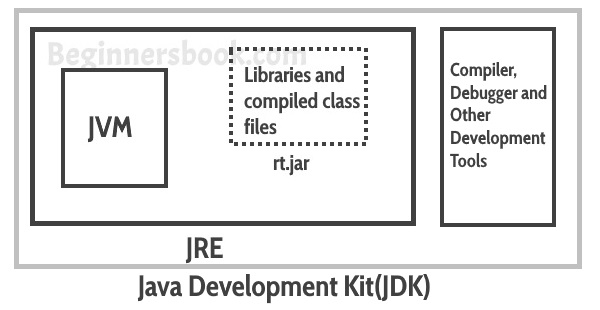
One of the more prominent alternative implementations is Jython, a Python implementation written in Java that utilizes the Java Virtual Machine (JVM). While CPython produces bytecode to run on the CPython VM, Jython produces Java bytecode to run on the JVM.
Another is IronPython, written in C# and targeting the .NET stack. IronPython runs on Microsoft's Common Language Runtime (CLR).
As also pointed out in Why Are There So Many Pythons?, it is entirely possible to survive without ever touching a non-CPython implementation of Python, but there are advantages to be had from switching, most of which are dependent on your technology stack.
Another noteworthy alternative implementation is PyPy whose key features include:
- Speed. Thanks to its Just-in-Time (JIT) compiler, Python programs often run faster on PyPy.
- Memory usage. Large, memory-hungry Python programs might end up taking less space with PyPy than they do in CPython.
- Compatibility. PyPy is highly compatible with existing python code. It supports cffi and can run popular Python libraries like Twisted and Django.
- Sandboxing. PyPy provides the ability to run untrusted code in a fully secure way.
- Stackless mode. PyPy comes by default with support for stackless mode, providing micro-threads for massive concurrency.
Q. Is Python a compiled language?
Python is both compiled and interpreted. CPython (the reference implementation) compiles source code to platform-independent bytecode (.pyc files stored in __pycache__), which is then executed by the Python Virtual Machine (PVM). It is not compiled to native machine code (unlike C/C++), which is why we call it "interpreted" in common usage.
import dis
import py_compile

# Compile a source file to bytecode manually
py_compile.compile("hello.py")  # produces __pycache__/hello.cpython-3x.pyc

# Inspect bytecode of a function
def add(a: int, b: int) -> int:
    return a + b

dis.dis(add)
# Output (example):
#   2           0 RESUME                   0
#   3           2 LOAD_FAST                0 (a)
#               4 LOAD_FAST                1 (b)
#               6 BINARY_OP               0 (+)
#              10 RETURN_VALUE
Alternatives:
- PyPy: JIT-compiles bytecode to native machine code at runtime — typically 3–5× faster than CPython for CPU-bound workloads.
- Cython: Transpiles Python-like code to C extensions for near-native performance.
Use Case: A fintech platform migrated a CPU-bound risk calculation engine from CPython to PyPy, reducing processing time from 45s to 9s with zero code changes, leveraging PyPy's JIT compilation.
Q. Why Python instead of Scala on Spark when Scala has better performance?
| Factor | Python (PySpark) | Scala (native Spark) |
|---|---|---|
| Raw CPU performance | Slower (GIL, serialization overhead) | Faster (JVM, no serialization) |
| Data science ecosystem | Excellent (pandas, NumPy, scikit-learn, PyTorch) | Limited |
| Developer productivity | High | Medium |
| DataFrame/SQL API | Near-identical via PySpark | Native |
| ML integrations | MLflow, Hugging Face, sklearn | MLlib |
| Hiring pool | Much larger | Smaller |
The performance gap has significantly narrowed because:
- PySpark DataFrames/SQL execute entirely on the JVM — Python is only used for the driver, not the executors.
- Apache Arrow (PySpark 3.0+) enables zero-copy columnar data transfer between JVM and Python, eliminating most serialization overhead.
- Pandas UDFs / Vectorized UDFs use Arrow to process batches in pandas, achieving near-JVM performance for custom transformations.
from pyspark.sql import SparkSession
from pyspark.sql.functions import pandas_udf, col
from pyspark.sql.types import DoubleType
import pandas as pd

spark = SparkSession.builder.appName("example").getOrCreate()

df = spark.range(1_000_000).toDF("value")

# Vectorized UDF — Arrow-backed, runs at near-native speed
@pandas_udf(DoubleType())
def square_udf(series: pd.Series) -> pd.Series:
    return series ** 2

result = df.withColumn("squared", square_udf(col("value")))
result.show(5)
# No Python serialization per-row — entire Arrow batch processed at once
Use Case: A data science team at an e-commerce company chose PySpark over Scala Spark to reuse their existing scikit-learn feature engineering pipelines and pandas data validation logic, cutting migration effort by ~70% while keeping 95% of Scala's throughput for DataFrame operations.
Q. What is Python?
Python is a high-level, interpreted, dynamically-typed, multi-paradigm, general-purpose programming language created by Guido van Rossum and first released in 1991. It emphasizes code readability and developer productivity through its clean syntax and extensive standard library.
Key characteristics:
| Property | Detail |
|---|---|
| Paradigm | Object-oriented, functional, procedural, imperative |
| Typing | Dynamic (types checked at runtime) + optional static typing via mypy |
| Memory | Automatic (reference counting + cyclic GC) |
| Execution | CPython: source → bytecode → PVM interpretation |
| License | PSF License (permissive open source) |
| Current version | CPython 3.13 (as of 2025) |
# Python's philosophy is captured in the "Zen of Python"
import this

# Demonstrates multi-paradigm nature:

# 1. Procedural
def celsius_to_fahrenheit(celsius: float) -> float:
    return celsius * 9 / 5 + 32

# 2. Object-oriented
class Temperature:
    def __init__(self, celsius: float) -> None:
        self._celsius = celsius

    @property
    def fahrenheit(self) -> float:
        return self._celsius * 9 / 5 + 32

    def __repr__(self) -> str:
        return f"Temperature({self._celsius}°C / {self.fahrenheit}°F)"

# 3. Functional
from functools import reduce
temps_c = [0, 20, 37, 100]
temps_f = list(map(celsius_to_fahrenheit, temps_c))
above_boiling = list(filter(lambda t: t > 212, temps_f))
print(above_boiling)  # [212.0... only 100°C qualifies at 212°F]

t = Temperature(37)
print(t)  # Temperature(37°C / 98.6°F)
Use Case: Python serves as the lingua franca of data science and ML engineering — TensorFlow, PyTorch, scikit-learn, pandas, and Apache Spark all offer Python-first APIs, making Python the single language teams use across data exploration, model training, API serving, and infrastructure automation.
Q. Describe some features of Python.
| Feature | Description |
|---|---|
| Interpreted | Executed via CPython bytecode VM — no manual compile step |
| Dynamically typed | Variable types resolved at runtime; mypy adds optional static typing |
| Garbage collected | Reference counting + cyclic GC; no manual malloc/free |
| Multi-paradigm | OOP, functional, procedural, and imperative styles all supported |
| Extensive stdlib | 200+ modules covering I/O, networking, math, concurrency, testing |
| Duck typing | Interface defined by available methods, not class hierarchy |
| First-class functions | Functions are objects; can be passed, stored, returned |
| Interactive REPL | Rapid prototyping via python shell or Jupyter notebooks |
| Cross-platform | Runs on Linux, macOS, Windows, and embedded systems |
| Readable syntax | Enforced indentation, minimal boilerplate, PEP 8 style guide |
# First-class functions + duck typing example
from typing import Callable

def apply_twice(func: Callable[[int], int], value: int) -> int:
    return func(func(value))

double = lambda x: x * 2
print(apply_twice(double, 3))   # 12

# Dynamic typing
x = 42
x = "now I'm a string"   # valid — name x rebound to a new object
x = [1, 2, 3]            # valid again
Use Case: Python's multi-paradigm nature lets a data engineering team write functional pipeline transformations (map/filter/reduce), OOP domain models, and procedural scripts all within the same codebase without language switching.
Q. How does Python execute code?
Python's execution pipeline has six stages:
Source (.py)
    ↓  tokenizer (tokenize.py)
Tokens
    ↓  parser (PEG parser, Python 3.9+)
Abstract Syntax Tree (AST)
    ↓  compiler (compile.c)
Bytecode (.pyc cached in __pycache__)
    ↓  CPython Virtual Machine (ceval.c — eval loop)
Result
import ast
import dis
import py_compile

source_code = """
def factorial(n: int) -> int:
    return 1 if n <= 1 else n * factorial(n - 1)
"""

# Stage 1: Parse to AST
tree = ast.parse(source_code)
print(ast.dump(tree, indent=2))

# Stage 2: Compile AST to code object
code_obj = compile(source_code, "<string>", "exec")

# Stage 3: Inspect bytecode
exec(code_obj)
import sys
func = sys._getframe().f_locals.get("factorial") or eval("factorial")

# Disassemble bytecode of the compiled function
def factorial(n: int) -> int:
    return 1 if n <= 1 else n * factorial(n - 1)

dis.dis(factorial)
# Shows RESUME, LOAD_FAST, COMPARE_OP, RETURN_VALUE, BINARY_OP, CALL, etc.

# Stage 4: .pyc caching
py_compile.compile("myscript.py")  # writes __pycache__/myscript.cpython-3x.pyc
Key points:
.pycbytecode is cached to skip re-parsing on subsequent runs (speed up import time, not execution speed)- The eval loop in
ceval.cdispatches on opcode using aswitchstatement (CPython 3.11 uses specializing adaptive interpreter) - PyPy replaces the eval loop with a tracing JIT compiler
Use Case: A Django application with hundreds of modules benefits from .pyc caching — on cold start, only changed modules are re-compiled, reducing startup time from ~2s to ~0.3s in production containers.
Q. What is the difference between Python 2.7+ and Python 3?
Python 3 (released 2008, Python 2 EOL January 2020) introduced breaking changes to fix long-standing design flaws. Python 2 is no longer supported.
| Feature | Python 2.7 | Python 3.x |
|---|---|---|
print |
statement: print "x" |
function: print("x") |
| Integer division | 5/2 == 2 (truncates) |
5/2 == 2.5; use 5//2 for floor |
str default |
bytes (ASCII) | Unicode (UTF-8) |
unicode type |
separate u"..." |
all strings are unicode |
range() |
returns a list | returns a lazy range object |
dict.keys() |
returns list | returns a view |
input() |
evaluates input (= py3 eval(input())) |
returns string safely |
| Exception syntax | except E, e: |
except E as e: |
super() |
super(ClassName, self) |
super() (no args) |
| Type hints | limited (PEP 484, backported) | full native support |
async/await |
not available | native (3.5+) |
| f-strings | not available | native (3.6+) |
__future__ |
needed for many py3 features | built-in |
# Division behaviour difference
# Python 2: 5 / 2 == 2
# Python 3: 5 / 2 == 2.5
print(5 / 2)    # 2.5  (Python 3)
print(5 // 2)   # 2    (floor division in both)

# String handling
s = "café"
print(type(s))          # <class 'str'> — always unicode in Python 3
print(len(s))           # 4 (characters, not bytes)
print(len(s.encode()))  # 5 (UTF-8 bytes — 'é' = 2 bytes)

# range is lazy in Python 3
r = range(1_000_000)
print(type(r))    # <class 'range'> — O(1) memory

# super() simplified
class Base:
    def hello(self) -> str: return "base"

class Child(Base):
    def hello(self) -> str:
        return super().hello() + " child"  # no args needed in Python 3
Use Case: Migrating a legacy Python 2 data pipeline to Python 3 fixes silent data corruption where b"bytes" / str string mixing caused undetected encoding bugs — Python 3's strict bytes/str separation forces explicit encoding at system boundaries.
Q. Is Python compiled? If yes, how? If not, how?
Both — Python is compiled to bytecode, then interpreted. It is not compiled to native machine code (unless using PyPy's JIT or tools like Cython/Nuitka).
Execution pipeline:
.py source → (tokenize → parse → AST → compile) → .pyc bytecode → CPython VM
import dis
import py_compile
import pathlib

# Python compiles source to .pyc automatically on import
# Inspect the bytecode of a function
def add(a: int, b: int) -> int:
    return a + b

dis.dis(add)
# RESUME           0
# LOAD_FAST        0 (a)
# LOAD_FAST        1 (b)
# BINARY_OP        0 (+)
# RETURN_VALUE

# Compile a file manually → writes __pycache__/example.cpython-3x.pyc
py_compile.compile("example.py")

# Inspect the .pyc header
pyc = next(pathlib.Path("__pycache__").glob("*.pyc"), None)
if pyc:
    data = pyc.read_bytes()
    import struct
    magic   = data[:4].hex()
    mtime   = struct.unpack("<I", data[8:12])[0]
    print(f"magic={magic}, source_mtime={mtime}")

# The bytecode is not machine code — it targets the CPython VM stack
# Proof: the same .pyc runs on any OS with a matching CPython version
import sys
print(sys.implementation.name)   # cpython
print(sys.version)
Comparison:
| Property | Python (CPython) | Java | C |
|---|---|---|---|
| Compiled to | bytecode (.pyc) | bytecode (.class) | native binary |
| Executed by | CPython VM | JVM | OS directly |
| JIT | No (PyPy: yes) | Yes (HotSpot) | N/A |
| Cross-platform | Yes | Yes | Requires recompile |
Use Case: A deployment pipeline precompiles all .py files to .pyc during the Docker image build step using python -m compileall -q src/. This speeds up container cold starts by ~30% by skipping re-parsing on every deployment.
Q. What does dynamically / duck typed mean?
Dynamic typing: Variable types are checked at runtime, not compile time. A name can be rebound to any type at any time — the name carries no type information itself; the object has a type.
Duck typing: "If it walks like a duck and quacks like a duck, it's a duck." Python does not check what class an object is — it only checks whether the object has the required method or attribute. Formal class inheritance is not required.
# Dynamic typing — same name, different types at runtime
x = 42
print(type(x))    # <class 'int'>
x = "hello"
print(type(x))    # <class 'str'>
x = [1, 2, 3]
print(type(x))    # <class 'list'>

# Duck typing — anything with .read() works
import io

def count_lines(file_like) -> int:
    """Works with any object that has a .read() method."""
    return file_like.read().count("\n")

# Works with a real file
# with open("data.txt") as f:
#     print(count_lines(f))

# Also works with StringIO — no shared base class required
fake_file = io.StringIO("line1\nline2\nline3\n")
print(count_lines(fake_file))    # 3

# Protocol / structural typing (PEP 544) — formalize duck typing
from typing import Protocol

class Drawable(Protocol):
    def draw(self) -> None: ...

class Circle:
    def draw(self) -> None: print("drawing circle")

class Square:
    def draw(self) -> None: print("drawing square")

def render(shape: Drawable) -> None:
    shape.draw()   # duck typed — no inheritance from Drawable needed

render(Circle())   # drawing circle
render(Square())   # drawing square
Dynamic vs Static typing:
| Dynamic (Python) | Static (Java, TypeScript) | |
|---|---|---|
| Type check | Runtime | Compile time |
| Flexibility | High | Lower |
| Early error detection | No (use mypy) | Yes |
| Refactoring safety | Lower | Higher |
Use Case: A data pipeline's transform(obj) function works on DataFrame rows, Pydantic models, and plain dicts equally — as long as each has the expected field access pattern. This eliminates wrapper adapters and lets the pipeline consume multiple data sources without modification.
Q. When would I not use Python?
Python is an excellent general-purpose language but has known limitations where other tools are more appropriate:
| Scenario | Reason | Better Alternative |
|---|---|---|
| CPU-bound computation | GIL limits true thread parallelism; interpreted bytecode is slow | C, C++, Rust, Julia |
| Mobile apps | No first-class Android/iOS runtime | Kotlin, Swift, Flutter (Dart) |
| Real-time / embedded systems | GC pauses, no deterministic latency | C, C++, Rust, MicroPython |
| Browser front-end | Not a native browser language | JavaScript, TypeScript, WASM |
| High-frequency trading | Microsecond latency requirements, GC pauses | C++, Java, FPGA |
| Memory-constrained IoT | Runtime overhead too large | C, Rust, MicroPython |
| Type-safe large teams | Dynamic typing makes large-scale refactoring risky | TypeScript, Go, Kotlin |
# Demonstrating the GIL limitation — threads don't speed up CPU work
import threading
import time

def cpu_task(n: int) -> int:
    return sum(i * i for i in range(n))

# Multi-threaded — NOT faster for CPU work due to GIL
start = time.perf_counter()
threads = [threading.Thread(target=cpu_task, args=(5_000_000,)) for _ in range(4)]
[t.start() for t in threads]
[t.join() for t in threads]
threaded_time = time.perf_counter() - start

# Use multiprocessing to bypass GIL
from multiprocessing import Pool
start = time.perf_counter()
with Pool(4) as pool:
    pool.map(cpu_task, [5_000_000] * 4)
mp_time = time.perf_counter() - start

print(f"Threads: {threaded_time:.2f}s  Multiprocessing: {mp_time:.2f}s")
# Multiprocessing is ~4x faster (true parallelism)
When Python is still used despite these limitations:
- Numpy/Pandas offload heavy computation to C extensions, bypassing the GIL
asynciohandles thousands of I/O-bound concurrent connections efficiently- Cython / PyPy / numba can make hot paths as fast as C
Use Case: A fintech company uses Python for data analytics and ML model training but writes the order matching engine in C++ with microsecond latency, exposing Python bindings via ctypes for integration and testing.
Q. What is DRY, and how can I apply it through OOP or FP?
DRY (Don't Repeat Yourself): Every piece of knowledge or logic should have a single authoritative representation in the codebase. Duplication means two places to update and two places to introduce bugs.
# BAD — validation logic repeated in 3 places
def create_user(name: str, email: str) -> dict:
    if not name or len(name) < 2:
        raise ValueError("Name too short")
    if "@" not in email:
        raise ValueError("Invalid email")
    return {"name": name, "email": email}

def update_user(user_id: int, name: str, email: str) -> dict:
    if not name or len(name) < 2:      # duplicated!
        raise ValueError("Name too short")
    if "@" not in email:               # duplicated!
        raise ValueError("Invalid email")
    return {"id": user_id, "name": name, "email": email}

# GOOD — DRY via OOP (extract to a class)
class UserValidator:
    @staticmethod
    def validate_name(name: str) -> str:
        if not name or len(name) < 2:
            raise ValueError(f"Name too short: {name!r}")
        return name.strip()

    @staticmethod
    def validate_email(email: str) -> str:
        if "@" not in email or "." not in email.split("@")[-1]:
            raise ValueError(f"Invalid email: {email!r}")
        return email.lower()

def create_user_dry(name: str, email: str) -> dict:
    return {
        "name":  UserValidator.validate_name(name),
        "email": UserValidator.validate_email(email),
    }

def update_user_dry(user_id: int, name: str, email: str) -> dict:
    return {
        "id":    user_id,
        "name":  UserValidator.validate_name(name),
        "email": UserValidator.validate_email(email),
    }

# GOOD — DRY via FP (higher-order function / decorator)
from functools import wraps
from typing import Callable

def validate_positive(func: Callable) -> Callable:
    """Decorator: ensures all numeric arguments are positive."""
    @wraps(func)
    def wrapper(*args, **kwargs):
        for arg in args:
            if isinstance(arg, (int, float)) and arg <= 0:
                raise ValueError(f"Expected positive number, got {arg}")
        return func(*args, **kwargs)
    return wrapper

@validate_positive
def calculate_tax(income: float, rate: float) -> float:
    return income * rate

@validate_positive
def calculate_discount(price: float, pct: float) -> float:
    return price * (1 - pct / 100)
DRY strategies:
- Functions — extract repeated logic into a single callable
- Classes / inheritance — share behaviour through base classes
- Mixins — reusable capabilities without deep hierarchy
- Decorators — apply cross-cutting concerns (logging, validation, retries) once
- Templates / generics — parameterize type differences
Use Case: A microservices platform DRYs up HTTP retry logic with a single @retry(max_attempts=3, backoff=2.0) decorator applied to all outbound API calls — changing the retry strategy requires editing one decorator, not every service client.
Q. When would I use Python?
Python excels in domains where developer productivity, readability, and ecosystem richness matter more than raw execution speed:
| Domain | Why Python | Key Libraries |
|---|---|---|
| Data science / ML | NumPy/Pandas, rich ecosystem | numpy, pandas, scikit-learn, PyTorch, TensorFlow |
| Web development | Rapid development, batteries included | Django, FastAPI, Flask |
| Scripting / automation | Readable syntax, OS integration | subprocess, pathlib, fabric |
| DevOps / infrastructure | Cloud SDKs, IaC tools | boto3, Ansible, Terraform CDK |
| Data engineering / ETL | Spark PySpark API, Airflow, connectors | pyspark, apache-airflow, dbt |
| API / microservices | Async support, fast iteration | FastAPI, aiohttp, httpx |
| Testing | Expressive assertions, fixtures | pytest, hypothesis |
| CLI tools | Simple argument parsing | click, typer, argparse |
| Scientific computing | SciPy, symbolic math | scipy, sympy, matplotlib |
# Example: Python in all these roles in a single data pipeline

# 1. Scripting — read config
import pathlib, json
config = json.loads(pathlib.Path("config.json").read_text())

# 2. Data engineering — transform
import csv
from io import StringIO
raw = "name,score\nAlice,95\nBob,87"
reader = csv.DictReader(StringIO(raw))
records = [{"name": r["name"], "score": int(r["score"])} for r in reader]

# 3. Data science — analyse
scores = [r["score"] for r in records]
mean   = sum(scores) / len(scores)
print(f"Mean score: {mean}")   # 91.0

# 4. Web API — serve results (FastAPI pattern)
# from fastapi import FastAPI
# app = FastAPI()
# @app.get("/scores")
# def get_scores() -> list[dict]: return records

# 5. Testing
assert mean == 91.0, "Unexpected mean"
print("All assertions passed")
Use Case: A startup uses Python end-to-end: Airflow for ETL orchestration, FastAPI for the REST backend, pandas for analytics, pytest for CI testing, and boto3 for AWS infrastructure — a single language team covers the full stack.
Q. Give examples of Python frameworks.
| Category | Framework | Key Strengths |
|---|---|---|
| Full-stack web | Django | ORM, admin panel, auth, batteries-included |
| Micro/async web | FastAPI | Auto OpenAPI, type hints, async-first, high performance |
| Micro web | Flask | Lightweight, flexible, easy to learn |
| Async web | aiohttp | Full async HTTP client + server |
| Data pipeline | Apache Airflow | DAG-based scheduling, rich operator ecosystem |
| ML / Deep learning | PyTorch, TensorFlow | Neural network training, GPU acceleration |
| Data manipulation | pandas | DataFrame API for tabular data |
| Scientific | SciPy / NumPy | Numerical computation, signal processing |
| Testing | pytest | Fixtures, parametrize, plugin ecosystem |
| CLI | Click / Typer | Decorator-based CLI with type hints |
| ORM | SQLAlchemy | Database-agnostic ORM + core SQL |
| Task queue | Celery | Distributed task execution |
# FastAPI — modern async REST API
from fastapi import FastAPI, HTTPException
from pydantic import BaseModel

app = FastAPI(title="User API", version="1.0.0")

class User(BaseModel):
    id: int
    name: str
    email: str

users_db: dict[int, User] = {
    1: User(id=1, name="Alice", email="alice@example.com"),
}

@app.get("/users/{user_id}", response_model=User)
async def get_user(user_id: int) -> User:
    if user_id not in users_db:
        raise HTTPException(status_code=404, detail="User not found")
    return users_db[user_id]

# Run with: uvicorn main:app --reload
# Auto-generated docs at: http://localhost:8000/docs

# pytest — expressive testing
import pytest

def add(a: int, b: int) -> int:
    return a + b

@pytest.mark.parametrize("a,b,expected", [
    (1, 2, 3),
    (-1, 1, 0),
    (0, 0, 0),
])
def test_add(a: int, b: int, expected: int) -> None:
    assert add(a, b) == expected
Use Case: A company's production stack uses Django for the customer-facing portal (ORM, admin, auth), FastAPI for internal microservices (high-throughput async endpoints), Airflow for nightly ETL jobs, and Celery for async email/notification tasks — all Python, all interoperating.
Q. How is Python interpreted?
Python's interpretation process has distinct stages. "Interpreted" means source code is never compiled to native machine code — it is instead compiled to bytecode which a software VM (the CPython interpreter loop) executes instruction by instruction.
Source code (.py)
  ↓  1. Tokenizer — splits text into tokens (keywords, operators, literals)
Token stream
  ↓  2. Parser — builds Abstract Syntax Tree (PEG grammar, Python 3.9+)
AST
  ↓  3. Compiler — converts AST to bytecode (list of stack-machine opcodes)
Code object (.pyc cached in __pycache__)
  ↓  4. Eval loop (ceval.c) — CPython VM executes opcode by opcode
Result
import ast
import dis
import tokenize
import io

source = "result = (2 + 3) * 10"

# Stage 1: Tokenize
tokens = list(tokenize.generate_tokens(io.StringIO(source).readline))
for tok in tokens:
    print(tok)
# TokenInfo(type=1 (NAME), string='result', ...)
# TokenInfo(type=54 (OP), string='=', ...)  etc.

# Stage 2: Parse to AST
tree = ast.parse(source)
print(ast.dump(tree, indent=2))

# Stage 3: Compile to bytecode
code = compile(source, "<string>", "exec")
dis.dis(code)
# LOAD_CONST    1 (2)
# LOAD_CONST    2 (3)
# BINARY_OP     0 (+)
# LOAD_CONST    3 (10)
# BINARY_OP     5 (*)
# STORE_NAME    0 (result)

# Stage 4: Execute
exec(code)
# result = 50 in the executed namespace
Key CPython details:
- The eval loop in
Python/ceval.cdispatches on each opcode (switch table) - CPython 3.11+ uses a specializing adaptive interpreter — frequently executed opcodes get specialized variants (e.g.,
LOAD_ATTR_MODULEinstead of genericLOAD_ATTR) .pycfiles cache stages 1–3; only stage 4 runs on subsequent imports- PyPy replaces the eval loop with a tracing JIT that compiles hot paths to machine code
Use Case: A platform engineering team sets PYTHONDONTWRITEBYTECODE=0 in their Docker builds and precompiles all .py files with python -m compileall during image build, shaving 400ms off cold-start time for serverless Lambda functions.
Q. What is Dynamic Typing?
Dynamic typing means type information is attached to objects at runtime, not to variables at compile time. A variable name is just a label that can be rebound to any object of any type at any point.
# The variable 'x' has no type — only the object it points to has a type
x = 42
print(type(x).__name__)   # int

x = "hello"               # rebind — no error, no type declaration
print(type(x).__name__)   # str

x = [1, 2, 3]
print(type(x).__name__)   # list

# Type is checked AT RUNTIME, not before execution
def add(a, b):
    return a + b           # works for int, float, str, list...

print(add(1, 2))           # 3
print(add("foo", "bar"))   # foobar
print(add([1], [2]))       # [1, 2]

# Runtime type error — only caught when the bad line is actually reached
def risky(value):
    if value > 0:
        return value * 2
    else:
        return value + "oops"   # TypeError only raised if value <= 0

print(risky(5))    # 10 — fine
# print(risky(-1)) # TypeError: unsupported operand type(s) for +: 'int' and 'str'

# Optional static typing via mypy — adds compile-time checking WITHOUT
# changing runtime behaviour
def typed_add(a: int, b: int) -> int:
    return a + b

# mypy would flag: typed_add("x", "y")  — but Python still runs it
Benefits: Flexibility, rapid prototyping, less boilerplate.
Drawbacks: Type errors surface at runtime; harder to refactor large codebases (use mypy / pyright to compensate).
Use Case: A data science notebook exploits dynamic typing to reuse the same variable name across exploration phases (data = load_csv() → data = clean(data) → data = aggregate(data)) without ceremony — then mypy is added to the production export path for safety.
Q. Justify this statement: Everything is an object in Python.
In Python, every value — integers, strings, functions, classes, modules, None, True — is a first-class object. This means everything has: a type (type()), an identity (id()), attributes, and can be assigned to a variable, passed to a function, or stored in a collection.
import inspect

# Integers are objects
x = 42
print(type(x))          # <class 'int'>
print(id(x))            # memory address
print(x.bit_length())   # 6  — integers have methods!

# Functions are objects
def greet(name: str) -> str:
    return f"Hello, {name}"

print(type(greet))           # <class 'function'>
print(greet.__name__)        # 'greet'
greet_alias = greet          # assign function to variable
print(greet_alias("Alice"))  # Hello, Alice

# Functions can be stored in collections
operations = [abs, str, type, len]
print([op(42) for op in operations])  # [42, '42', <class 'int'>, ...]

# Classes are objects (instances of 'type')
class Dog:
    pass

print(type(Dog))    # <class 'type'>  — Dog itself is an object
print(id(Dog))      # memory address of the class object

# None is an object
print(type(None))   # <class 'NoneType'>
print(id(None))     # always the same — singleton

# Modules are objects
import os
print(type(os))           # <class 'module'>
print(os.__file__)        # path to os.py

# Even types (classes) have methods inherited from object
print(dir(42))       # list of all methods on int
print(isinstance(42, object))       # True
print(isinstance(greet, object))    # True
print(isinstance(int, object))      # True — class itself is an object
Implication: Because everything is an object, Python enables true first-class functions, decorators, metaclasses, introspection, and dynamic behaviour that would require special syntax in other languages.
Use Case: A plugin framework stores user-provided callables (functions, class instances with __call__, lambdas) in a dict[str, Callable] registry — possible only because Python treats all of them as first-class objects with a uniform interface.
Q. What is the difference between Python and Java?
| Aspect | Python | Java |
|---|---|---|
| Typing | Dynamic (optional static via mypy) | Static (compile-time) |
| Compilation | Bytecode (.pyc) + VM | Bytecode (.class) + JVM with JIT |
| Syntax | Concise, indentation-based | Verbose, brace-based |
| OOP | Multi-paradigm (OOP, FP, procedural) | Primarily OOP |
| Memory | GC (ref counting + cyclic) | GC (generational) |
| Concurrency | GIL limits CPU threads; asyncio for I/O | True multi-threading, no GIL |
| Performance | Slower (CPython); PyPy/numba for speed | Faster (JIT compilation) |
| Primary use | Data science, scripting, web, automation | Enterprise backend, Android, big data |
| Null safety | None + Optional[T] typing |
null — NullPointerException risk |
| Entry point | Top-level script or if __name__ == "__main__" |
public static void main(String[] args) |
# Python: concise — less boilerplate
from dataclasses import dataclass

@dataclass
class Person:
    name: str
    age: int

    def greet(self) -> str:
        return f"Hello, I'm {self.name}, age {self.age}"

p = Person("Alice", 30)
print(p.greet())
// Java equivalent — much more verbose
public class Person {
    private String name;
    private int age;

    public Person(String name, int age) {
        this.name = name;
        this.age = age;
    }

    public String greet() {
        return "Hello, I'm " + name + ", age " + age;
    }

    // + getters, setters, equals, hashCode, toString...
}
When to choose Python: Prototyping, ML/DS, scripting, small-to-medium web APIs.
When to choose Java: High-throughput enterprise services, Android, large team type-safety requirements.
Use Case: A fintech firm writes its ML risk models in Python (pandas, scikit-learn) but the core transaction processing engine in Java (Spring Boot) for JIT performance and strict type safety — connecting them via a REST/gRPC boundary.
# 2. Data Types
Q. How do I convert a number to a string?
To convert, e.g., the number 144 to the string '144', use the built-in function str(). If you want a hexadecimal or octal representation, use the built-in functions hex() or oct(). For fancy formatting, use the % operator on strings, e.g. "%04d" % 144 yields '0144' and "%.3f" % (1/3.0) yields '0.333'. See the library reference manual for details.
Q. Does Python support strongly for regular expressions?
Yes, Python Supports Regular Expressions Well. re is an in-buit library for the same. There is a lot of other languages that have good support to RegEx- Perl, Awk, Sed, Java etc.
Regular expressions (called REs, or regexes, or regex patterns) are essentially a tiny, highly specialized programming language embedded inside Python and made available through the re module. Using this little language, you specify the rules for the set of possible strings that you want to match; this set might contain English sentences, or e-mail addresses, or TeX commands, or anything you like. You can then ask questions such as "Does this string match the pattern?", or "Is there a match for the pattern anywhere in this string?". You can also use REs to modify a string or to split it apart in various ways.
Regular expression patterns are compiled into a series of bytecodes which are then executed by a matching engine written in C. For advanced use, it may be necessary to pay careful attention to how the engine will execute a given RE, and write the RE in a certain way in order to produce bytecode that runs faster. Optimization isn't covered in this document, because it requires that you have a good understanding of the matching engine's internals.
Q. How do you perform pattern matching in Python? Explain.
Regular Expressions/REs/ regexes enable us to specify expressions that can match specific "parts" of a given string. For instance, we can define a regular expression to match a single character or a digit, a telephone number, or an email address, etc. The Python's "re" module provides regular expression patterns and was introduce from later versions of Python 2.5. "re" module is providing methods for search text strings, or replacing text strings along with methods for splitting text strings based on the pattern defined.
Q. Write a regular expression that will accept an email id. Use the re module.
Ans.
import re
e = re.search(r'[0-9a-zA-Z.]+@[a-zA-Z]+\.(com|co\.in)$' 'JaiRameshwar@gmail.com')
e.group()
To brush up on regular expressions, check Regular Expressions in Python.
Garbage Collector & Memory Manager
Q. Explain split(), sub(), subn() methods of re module in Python.
- To modify the strings, Python's "re" module is providing 3 methods. They are:
- split() – uses a regex pattern to "split" a given string into a list.
- sub() – finds all substrings where the regex pattern matches and then replace them with a different string.
- subn() – it is similar to sub() and also returns the new string along with the no. of replacements.
Q. Which of the following is an invalid statement?
a) abc = 1,000,000
b) a b c = 1000 2000 3000
c) a,b,c = 1000, 2000, 3000
d) a_b_c = 1,000,000
Answer: b
Q. What is the output of the following?
try:
    if '1' != 1:
        raise
a) some Error has occured b) some Error has not occured c) invalid code d) none of the above
Answer: C
Q. What is the output of the following?
x = ['ab', 'cd']
print(len(map(list, x)))
A TypeError occurs as map has no len().
Q. What is the output of the following?
x = ['ab', 'cd']
print(len(list(map(list, x))))
The length of each string is 2.
Q. Write a Python function that checks whether a passed string is palindrome Or not?
Note: A palindrome is a word, phrase, or sequence that reads the same backward as forward, e.g., madam , saas, nun.
def isPalindrome(string):
    left_pos = 0
    right_pos = len(string) – 1

    while right_pos >= left_pos:
        if not string[left_pos] == string[right_pos]:
            return False

    left_pos += 1
    right_pos -= 1
    return True
print(isPalindrome('aza'))
Q. Explain join() and split() in Python?
.join([]) It takes any iterables into this method. Join method is used to concatenate the elements of any list. join() lets us join characters from a string together by a character we specify.
','.join('12345')
'1,2,3,4,5'
split() lets us split a string around the character we specify.
'1,2,3,4,5'.split(',')
['1', '2', '3', '4', '5']
Q. Is Python case-sensitive?
A language is case-sensitive if it distinguishes between identifiers like myname and Myname. In other words, it cares about case- lowercase or uppercase. Let's try this with Python.
myname='Ramayan'
Myname
Traceback (most recent call last): File "<pyshell#3>", line 1, in Myname NameError: name 'Myname' is not defined
As you can see, this raised a NameError. This means that Python is indeed case-sensitive.
- How long can an identifier be in Python?
In Python, an identifier can be of any length. Apart from that, there are certain rules we must follow to name one:
- It can only begin with an underscore or a character from A-Z or a-z.
- The rest of it can contain anything from the following: A-Z/a-z/_/0-9.
- Python is case-sensitive, as we discussed in the previous question.
- Keywords cannot be used as identifiers.
Python has the following keywords:
and def False import not True
as del finally in or try
assert elif for is pass while
break else from lambda print with
class except global None raise yield
continue exec if nonlocal return
Q. How do you remove the leading whitespace in a string?
Leading whitespace in a string is the whitespace in a string before the first non-whitespace character. To remove it from a string, we use the method lstrip().
' Ram '.lstrip()
'Ram '
As you can see, this string had both leading and trailing whitespaces. lstrip() stripped the string of the leading whitespace. If we want to strip the trailing whitespace instead, we use rstrip().
' Ram '.rstrip()
' Ram'
- How would you convert a string into lowercase?
We use the lower() method for this.
'Ramayan'.lower()
'ramayan'
To convert it into uppercase, then, we use upper().
'Ramayan'.upper()
'RAMAYAN'
Also, to check if a string is in all uppercase or all lowercase, we use the methods isupper() and islower().
'Ramayan'.isupper()
False
'Ramayan'.isupper()
True
'Ramayan'.islower()
True
'$hrir@m'.islower()
True
'$HRIR@M'.isupper()
True
So, characters like @ and $ will suffice for both cases.
Also, istitle() will tell us if a string is in title case.
'Arrested Development'.istitle()
True
Q. What data types does Python support?
Python provides us with five kinds of data types:
     a=7.0
     title="Ramayan\'s Book"
     colors=['red','green','blue']
     type(colors)
        <class 'list'>
     name=('Ramayan','Sharma')
     name[0]='Avery'
        Traceback (most recent call last):
        File "<pyshell#129>, line 1, in <module> name[0]='Avery'
        TypeError: 'tuple' object does not support item assignment
     squares={1:1,2:4,3:9,4:16,5:25}
     type(squares)
        <class 'dict'>
     type({})
        <class 'dict'>
     squares={x:x**2 for x in range(1,6)}
     squares
        {1: 1, 2: 4, 3: 9, 4: 16, 5: 25}
Q. What is a docstring?
A docstring is a documentation string that we use to explain what a construct does. We place it as the first thing under a function, class, or a method, to describe what it does. We declare a docstring using three sets of single or double quotes.
def sayhi():
    """
    The function prints Hi
    """
    print("Hi")

sayhi()
Hi
To get a function's docstring, we use its __doc__ attribute.
sayhi.__doc__
'\n\tThis function prints Hi\n\t'
A docstring, unlike a comment, is retained at runtime.
Q. What is slicing?
These are the types of basic Python interview questions for freshers.
Slicing is a technique that allows us to retrieve only a part of a list, tuple, or string. For this, we use the slicing operator [].
     (1,2,3,4,5)[2:4]
        (3, 4)
     [7,6,8,5,9][2:]
        [8, 5, 9]
     'Hello'[:-1]
        'Hell'
Q. What is a namedtuple?
A namedtuple will let us access a tuple's elements using a name/label. We use the function namedtuple() for this, and import it from collections.
 from collections import namedtuple
 result=namedtuple('result','Physics Chemistry Maths') #format
 Ramayan=result(Physics=86,Chemistry=95,Maths=86) #declaring the tuple
 Ramayan.Chemistry
95
As you can see, it let us access the marks in Chemistry using the Chemistry attribute of object Ramayan.
Q. How would you declare a comment in Python?
Unlike languages like C++, Python does not have multiline comments. All it has is octothorpe (#). Anything following a hash is considered a comment, and the interpreter ignores it.
 #line 1 of comment
 #line 2 of comment
In fact, you can place a comment anywhere in your code. You can use it to explain your code.
Q. How would you convert a string into an int in Python?
If a string contains only numerical characters, you can convert it into an integer using the int() function.
int('227')
227
Let's check the types:
type('227')
<class 'str'>
type(int('227'))
<class 'int'>
Q. How do you take input in Python?
For taking input from user, we have the function input(). In Python 2, we had another function raw_input().
The input() function takes, as an argument, the text to be displayed for the task:
a=input('Enter a number')
Enter a number7
But if you have paid attention, you know that it takes input in the form of a string.
type(a)
<class 'str'>
Multiplying this by 2 gives us this:
 a*=2
 a
'77'
So, what if we need to work on an integer instead?
We use the int() function for this.
a=int(input('Enter a number'))
Enter a number7
Now when we multiply it by 2, we get this:
 a*=2
 a
14
Q. What is a frozen set in Python?
Answer these type of Python Interview Questions with Examples.
First, let's discuss what a set is. A set is a collection of items, where there cannot be any duplicates. A set is also unordered.
 myset={1,3,2,2}
 myset
{1, 2, 3}
This means that we cannot index it.
myset[0]
Traceback (most recent call last):
File "<pyshell#197>", line 1, in myset[0]
TypeError: 'set' object does not support indexing
However, a set is mutable. A frozen set is immutable. This means we cannot change its values. This also makes it eligible to be used as a key for a dictionary.
 myset=frozenset([1,3,2,2])
 myset
frozenset({1, 2, 3})
type(myset)
<class 'frozenset'>
Q. How will you capitalize the first letter of a string?
Simply using the method capitalize().
'Ramayan'.capitalize()
'Ramayan'
type(str.capitalize)
<class 'method_descriptor'>
However, it will let other characters be.
'$hrir@m'.capitalize()
'$HRIR@M'
Q. How will you check if all characters in a string are alphanumeric?
For this, we use the method isalnum().
'Ramayan123'.isalnum()
True
'Ramayan123!'.isalnum()
False
Other methods that we have include:
'123.3'.isdigit()
False
'123'.isnumeric()
True
'Ramayan'.islower()
True
'Ramayan'.isupper()
False
'Ramayan'.istitle()
True
' '.isspace()
True
'123F'.isdecimal()
False
Q. What is the concatenation?
This is very basic Python Interview Question, try not to make any mistake in this.
Concatenation is joining two sequences. We use the + operator for this.
'32'+'32'
'3232'
[1,2,3]+[4,5,6]
[1, 2, 3, 4, 5, 6]
(2,3)+(4)
Traceback (most recent call last):
File "<pyshell#256>", line 1, in <module> (2,3)+(4)
TypeError: can only concatenate tuple (not "int") to tuple
Here, 4 is considered an int. Let's do this again.
 (2,3)+(4,)  # (obj,) is way to declare single empty
(2, 3, 4)
Q. How will you find, in a string, the first word that rhymes with 'cake'?
For our purpose, we will use the function search(), and then use group() to get the output.
 import re
 rhyme=re.search('.ake','I would make a cake, but I hate to bake')
 rhyme.group()
'make'
And as we know, the function search() stops at the first match. Hence, we have our first rhyme to 'cake'.
Q. How do you calculate the length of a string?
This is simple. We call the function len() on the string we want to calculate the length of.
len('Adi Shakara')
Q. What does the following code output?
 def extendList(val, list=[]):
      list.append(val)
      return list
 list1 = extendList(10)
 list2 = extendList(123,[])
 list3 = extendList('a')
 list1,list2,list3
Ans. ([10, 'a'], [123], [10, 'a'])
You'd expect the output to be something like this:
([10],[123],['a'])
Well, this is because the list argument does not initialize to its default value ([]) every time we make a call to the function. Once we define the function, it creates a new list. Then, whenever we call it again without a list argument, it uses the same list. This is because it calculates the expressions in the default arguments when we define the function, not when we call it.
Let's revise the Basis of Python Programming
Q. What are The Data Types Supports in Python Language?
Questions
What is python-basics?
learning-zone/python-basics is a public repo on GitHub by learning-zone. Python Basics ( v3.x ).
Is python-basics open source?
It declares no license on GitHub. Public does not mean open source: without a license, nobody is granted the right to reuse it.
Does python-basics run on macOS, Windows or Linux?
Its maker has not tagged a system, so it is unknown here. Its README says what it needs.
How do I install python-basics?
Open "Take it" on its page: Take My Repo writes an install plan for your machine and hands it to your AI agent (Claude Code, Codex or Cursor), which asks you before each step. Take My Repo has not tested it on any machine.
Is python-basics still maintained?
Its last change on GitHub was on 2026-07-10. Take My Repo does not judge from that whether it is maintained.
What do people who ran python-basics say?
Nobody has reviewed it on Take My Repo yet, which says nothing about its quality.
Similar repos
All alternatives to python-basics- awesome pythonGitHubRepo