ui-ux-pro-max-skill
An AI skill that provides design intelligence for building professional UI/UX across multiple platforms.
- 152k
- Python
- MIT
- 8 h ago
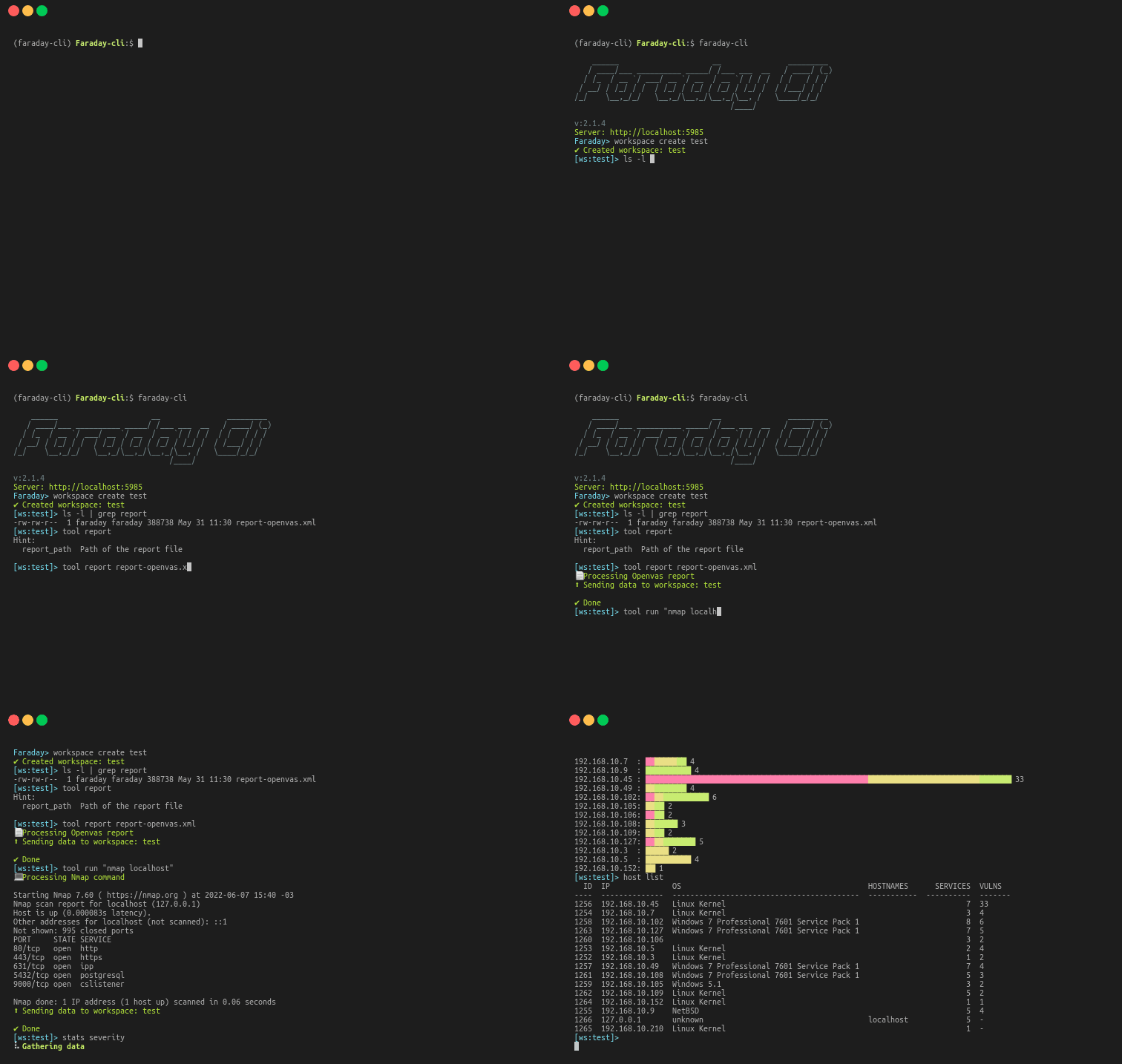
Faraday's Command Line Interface
Repo infobyte/faraday-cli, read from GitHub 1 min ago. infobyte has not joined Take My Repo.
infobyte/faraday-cli is a public repo on GitHub by infobyte. Faraday's Command Line Interface. It declares the GPL-3.0 license on GitHub. It is written mainly in Python, has 57 stars and last changed on 2026-11-12. Nobody has reviewed it on Take My Repo yet, which says nothing about its quality. Read from GitHub on 2026-11-21.
Use faraday directly from your favorite terminal

faraday-cli is the official client that make automating your security workflows, easier.
Before installing, we recommend creating and activating a Python virtual environment to avoid affecting your system Python packages. For example:
python3 -m venv .venv
source .venv/bin/activate
You can also use virtualenv if you prefer. Once the virtual environment is active, run the installation commands below.
pip install faraday-cli
git clone https://github.com/infobyte/faraday-cli.git
cd faraday-cli
pip install .
For more info you can check our documentation
Configure auth for farday-cli
$ faraday-cli auth

When you create a workspace by default is selected as active, unless you use the "-d" flag
$ faraday-cli workspace create some_name
✔ Created workspace: some_name
$ faraday-cli workspace select some_name
✔ Selected workspace: some_name
$ faraday-cli list_ws
NAME         HOSTS    SERVICES    VULNS  ACTIVE    PUBLIC    READONLY
---------  -------  ----------  -------  --------  --------  ----------
some_name       14          13       39  True      False     False
$ faraday-cli host list
  ID  IP           OS       HOSTNAMES          SERVICES  VULNS
----  -----------  -------  ---------------  ----------  -------
 574  127.0.0.1    unknown                            1  3
 566  127.0.0.10   unknown                            1  3
 569  127.0.0.11   unknown                            1  3
 568  127.0.0.12   unknown                            1  3
 570  127.0.0.13   unknown                            1  3
 576  127.0.0.2    unknown                            1  3
 565  127.0.0.3    unknown                            1  3
 572  127.0.0.4    unknown                            1  3
 573  127.0.0.5    unknown                            1  3
 567  127.0.0.6    unknown                            1  3
 571  127.0.0.7    unknown                            1  3
 564  127.0.0.8    unknown                            1  3
 575  127.0.0.9    unknown                            1  3
 590  58.76.184.4  unknown  www.googlec.com           0  -
$ faraday-cli host get 574

$ faraday-cli host get 574
Host:
  ID  IP         OS       HOSTNAMES    OWNER    OWNED      VULNS
----  ---------  -------  -----------  -------  -------  -------
 574  127.0.0.1  unknown               faraday  False          3

Services:
  ID  NAME    DESCRIPTION    PROTOCOL      PORT  VERSION    STATUS      VULNS
----  ------  -------------  ----------  ------  ---------  --------  -------
2638  ssh                    tcp             22  unknown    open            2

Vulnerabilities:
   ID  NAME                                      SEVERITY    STATUS    CONFIRMED    TOOL
-----  ----------------------------------------  ----------  --------  -----------  -------
13509  SSH Weak Encryption Algorithms Supported  MED         opened    False        Openvas
13510  SSH Weak MAC Algorithms Supported         LOW         opened    False        Openvas
13511  TCP timestamps                            LOW         opened    False        Openvas
$ faraday-cli host create -d \''[{"ip": "stan.local", "description": "some server"}]'\'
Or pipe it
$ echo '[{"ip": "1.1.1.5", "description": "some text"}]' | faraday-cli host create --stdin
The escaping of the single quotes (\') is only needed when using it as a command. In the shell or using pipes it not necessary
$ faraday-cli tool report "/path/to/report.xml"
$ faraday-cli ping -c 1 www.google.com

Local Faraday Agents (dispatcher runners). Reachable as agent, agents,
runner or runners (all equivalent).
$ faraday-cli agent list
  id  name      active    status    executors
----  --------  --------  --------  -----------
   8  internal  True      online    nmap
$ faraday-cli agent run -a 1 -e nmap -p \''{"target": "www.google.com"}'\'
Run executor: internal/nmap [{'successful': True}]
Cloud agents are server-side security scanners (the v3/cloud_agents API),
distinct from the local runners above. FaradAI is one such scanner, with its own
command and top-level shortcuts.
# Quick FaradAI pentest (standard tier — 20 rounds)
$ faraday-cli pentest --target https://example.com

# Deeper audit (80 rounds), and watch it until it finishes
$ faraday-cli pentest --target https://example.com --advanced --watch

# Triage the existing findings of a workspace
$ faraday-cli triage -w my_workspace --severities critical,high --reproduce
List and run any cloud agent generically:
$ faraday-cli scanners list
  ID  NAME            SLUG            CATEGORY   LAST_RUN
----  --------------  --------------  ---------  ----------
   2  FaradAI         faradai         pentest    -
   4  FaradAI Triage  faradai-triage  triage     -

$ faraday-cli scanners run --agent faradai -w my_workspace \
    --param TARGET=https://example.com --param ROUNDS=20
No Faraday server connected?
pentest/triagefall back to the FaradAI-scan SaaS and walk you through creating an account on first use. See the FaradAI docs for registration and--standalonedetails.
Faraday-cli can be used as a shell and have all the same commands you have as a cli

For example run nmap for all the hosts in faraday that listen on the 443 port and import the results back to faraday
$ faraday-cli host list --port 443 -ip | nmap -iL - -oX /tmp/nmap.xml && faraday-cli process_report /tmp/nmap.xml
Use a tool like assetfinder to do a domains lookup, scan them with nmap and send de results to faraday
$ assetfinder -subs-only example.com| sort | uniq |awk 'BEGIN { ORS = ""; print " {\"target\":\""}
{ printf "%s%s", separator, $1, $2
separator = ","}END { print "\"}" }' | faraday-cli  agent run  -a 1 -e nmap --stdin
infobyte/faraday-cli is a public repo on GitHub by infobyte. Faraday's Command Line Interface.
It declares the GPL-3.0 license on GitHub.
Its maker has not tagged a system, so it is unknown here. Its README says what it needs.
Open "Take it" on its page: Take My Repo writes an install plan for your machine and hands it to your AI agent (Claude Code, Codex or Cursor), which asks you before each step. Take My Repo has not tested it on any machine.
Its last change on GitHub was on 2026-11-12. Take My Repo does not judge from that whether it is maintained.
Nobody has reviewed it on Take My Repo yet, which says nothing about its quality.
An AI skill that provides design intelligence for building professional UI/UX across multiple platforms.

A collection of inspiring lists, manuals, cheatsheets, blogs, hacks, one-liners, cli/web tools and more.
Shannon is an AI pentester for web applications and APIs. It analyzes your source code, identifies attack vectors, and executes real exploits to prove vulnerabilities before they reach production.
Reverse engineer anything with agents, from app behavior down to native binaries.
A list of Free Software network services and web applications which can be hosted on your own servers
The new Windows Terminal and the original Windows console host, all in the same place!
Open-source and AI-powered cybersecurity tools for offensive security, vulnerability management, and autonomous pentesting. Built by hackers in Latin America, used worldwide.
Evilgrade is a modular framework that allows the user to take advantage of poor upgrade implementations by injecting fake updates.
An OSINT tool that helps detect members of a company with leaked credentials
Spoilerwall introduces a brand new concept in the field of network hardening. Avoid being scanned by spoiling movies on all your ports!
Welcome to the Doggie and EvilDoggie repository by Faraday Security! Doggie is a modular DIY CAN Bus to serial adapter (USB, BLE, UART) using the slcan protocol, compatible with SocketCAN and python-can. EvilDoggie adds offensive features like dominant-override, spoofing and custom attacks for automotive security testing and research.